
An AI resume builder helps you write a resume, match it to a job post, and fix wording and format. Some tools go further and track your applications, help you search for jobs, or let you practice interviews. This guide covers eight real tools, grouped by the step of the job search they help with, so you can pick the one or two you need.
Features below are as described on each vendor's own pages when we checked them in October 2026. Plans, limits and features change, so check each vendor's site before you sign up. If you would rather use a general chatbot, our ChatGPT prompts for resumes and cover letters give you copy-paste templates.
AI resume builders
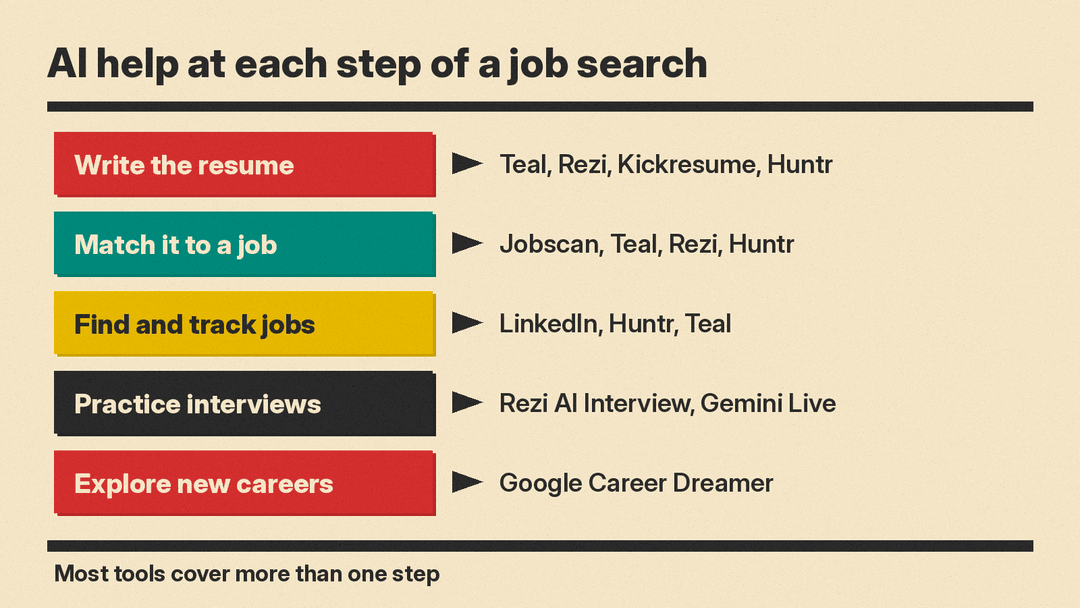
These tools help you write the resume itself and tailor it to each job.
Teal
Teal's AI resume builder lets you start from scratch, upload a resume, or import your LinkedIn profile. It can write summaries and bullet points, and Teal says its analysis checks your resume "15+ ways against any job description." When you attach a job description, you get a Match Score and suggestions for the keywords and skills you are missing.
Teal is also a job search tracker. Its site lists a Job Tracker and cover letter tools, and user reviews quoted on the resume builder page mention a Chrome extension.
Good for: people who apply to many jobs and want one place for resume versions and applications.
Rezi
Rezi builds the resume with ATS-compatible formatting "applied as you type." The Rezi Score breaks your resume down section by section. Its AI Keyword Targeting scans a job description and suggests the keywords you are missing.
Rezi also lists an AI resume agent that can "write, tailor, score and optimize your resume through a single conversation," a job search tool, and Rezi AI Interview for mock interviews with "job-tailored questions, focused on your resume."
Good for: people who want a resume builder and interview practice in the same app.
Kickresume
Kickresume's AI Resume Writer can write a full first draft from your name and job title. You can then edit any section or ask the AI to generate it again. Kickresume says it can translate a resume into 8 major languages inside the app, and it has an AI cover letter writer, an ATS resume checker and many design templates.
Kickresume's own FAQ is clear on one point: "since the text is written by AI and not you, you still need to tweak some details in the end."
Good for: people who need a polished first draft fast, or who apply in more than one language.
Huntr
Huntr is a job application tracker with an AI resume builder built in. It extracts keywords, responsibilities and qualifications from a job description and gives you a match score for how well your resume covers them. Its AI can suggest summaries, achievement bullets and cover letters.
The tracker is the core: you save jobs from many sites with the Chrome Job Clipper, move them through stages, store interview details and private notes, and keep recruiter contacts. Huntr says its extension can also autofill application forms.
Good for: people who want to organize a long job search, with resume tailoring built in.
Tools that check your resume against a job
Jobscan
Jobscan focuses on the applicant tracking systems (ATS) that many employers use to filter resumes. You upload your resume and paste a job listing, and Jobscan gives you a match rate and a list of missing hard skills, soft skills and keywords.
Jobscan explains what drives the score, in this order: hard skills, education level (only when the job asks for an advanced degree), job title, soft skills and other keywords. It also warns against chasing a perfect score: "There is such a thing as an over-optimized resume." Its other tools include a resume builder, LinkedIn optimization and an auto-apply feature where "you review every one before it's sent."
Good for: checking a finished resume before you apply to a specific job.
Tools for finding jobs and planning a career
LinkedIn AI-powered job search
LinkedIn's AI-powered job search lets you describe the job you want in your own words instead of guessing titles and filters. LinkedIn's examples include "Entry-level sales jobs in healthcare posted in the last week." It says the search "understands the meaning behind your search, not just exact keywords," so "entry-level marketing jobs" can surface a Marketing Coordinator role even if the post never says "entry-level." Filters such as date posted, experience level and remote are still there.
Good for: finding roles with job titles you did not know to search for.
Google Career Dreamer
Career Dreamer is an early-stage Google experiment for people who are not sure what job to aim for next. It helps you draft a Career Identity Statement for your resume or profile, explore careers that may fit your background, and then work with Gemini on a cover letter or resume. Google says it uses U.S. labor market data from Lightcast and wage data from the U.S. Bureau of Labor Statistics, and that it is "currently only available in the US."
Good for: career changers, recent graduates and people returning to work.
Tools for interview practice
Gemini Live
Google's interview tips guide suggests using Gemini Live in the Gemini mobile app "to simulate a real-time, conversational interview," with feedback on your answers. The same guide explains the STAR method for behavioral questions: Situation, Task, Action, Results. For questions tailored to your resume, Rezi lists Rezi AI Interview (above).
Good for: practicing out loud before a real interview. For more options, see our list of the best AI interview prep tools.
How to pick
Start with the step where you are stuck:
- You need a resume from scratch: Kickresume or Rezi.
- You apply to many jobs and need to stay organized: Teal or Huntr.
- You have a resume and want to check it against one job: Jobscan, or the match score in Teal, Rezi or Huntr.
- You do not know which jobs to search for: LinkedIn AI-powered job search or Career Dreamer.
- You have an interview soon: Rezi AI Interview or Gemini Live.
You can also combine two tools: one to write and tailor the resume, and one to track applications. Students can find more study and career tools in our best AI tools for students guide.
Tips for using AI on a resume
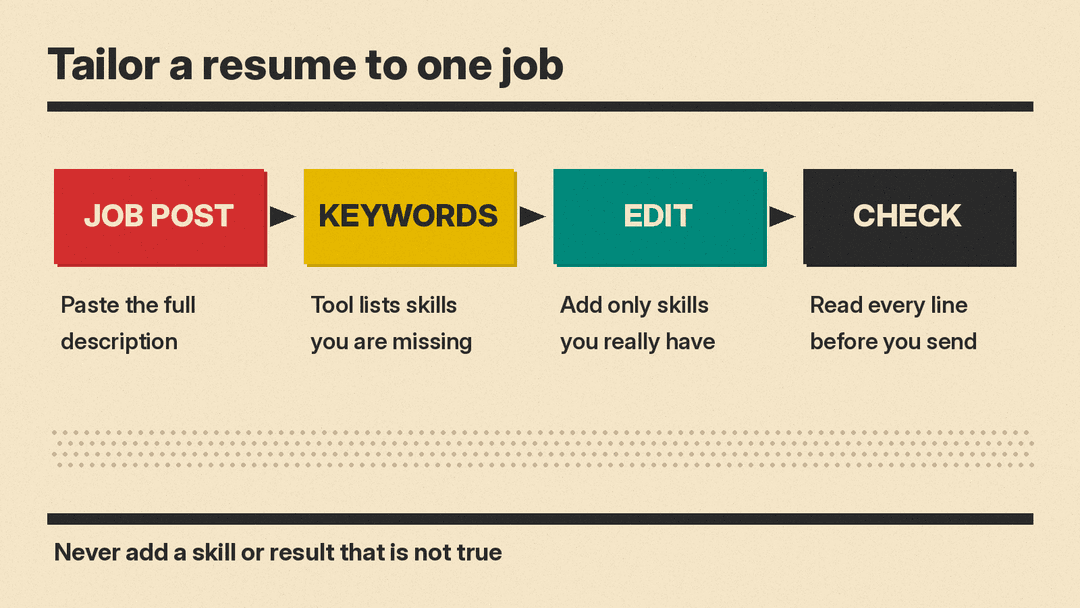
- Paste the whole job description. Teal, Rezi, Huntr and Jobscan all compare your resume to the job post, so a full post gives better suggestions than a job title.
- Add only skills you really have. A keyword list shows what the employer wants, not what you can claim. If a skill is missing and you do have it, add it with a real example.
- Do not chase 100%. Jobscan says it "might not be possible to score above 75% without overstuffing your resume with keywords."
- Read every line. AI can write confident bullets with numbers that are not yours. Fix or delete anything that is not true.
- Keep your own voice. Use AI for structure and a first draft, then edit so it sounds like you. Our best AI tools for writers guide covers editing tools.
- Think before you upload. A resume holds your contact details and work history. Read each tool's privacy policy before you upload one.
