
A logo is one of the first things a customer sees, and many small businesses do not have a designer on staff. AI logo generators fill that gap. You type a business name and a few style choices, and the tool shows you many logo options in minutes. The harder part is knowing which tool fits your budget, what files you actually receive, and what you are allowed to do with the result.
This guide compares eight tools: Looka, Brandmark, Canva, Wix (Wixel), Namecheap Logo Maker, Adobe Express, LOGO.com and Recraft. It is written for owners who are not designers. Every feature below comes from the tool's own pages, read in November 2026. Plans and prices change, so check the linked page before you pay. If you want help with the design steps themselves, see our step-by-step guide to designing a logo with AI. This post is the tool comparison.
What to look for first
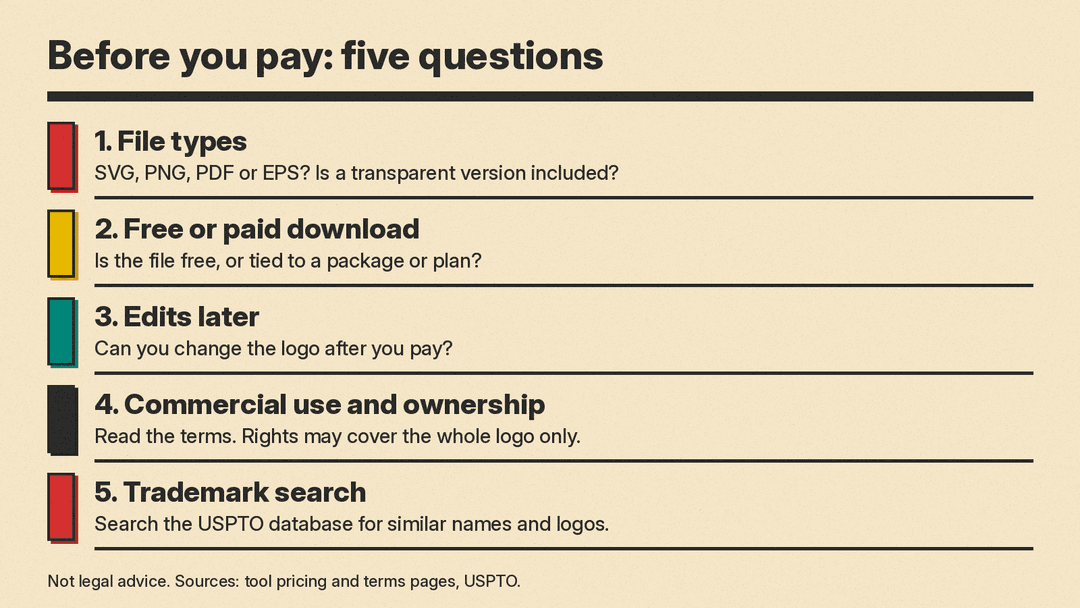
Three questions decide most of the choice.
- What do you get when you download? Some tools give you a small PNG. Others give a full set of files. The difference matters when you need a sign, a T-shirt or a business card.
- Is the download free or paid? Many tools let you design for free and charge for the files. Others let you download at no cost. Read the pricing page before you fall in love with a design.
- What happens after the download? Can you change the logo later? Is a brand kit included, such as colors, fonts and templates?
The tools
Looka
Looka asks for your company name and industry, then asks you to pick logo styles, colors and symbols. It uses those choices to generate designs, and you refine colors, fonts and layouts in an editor. Looka says there is no sign-up needed to start, and you can continue as a guest.
The files come with a purchase. According to Looka's pricing page, the Basic Logo Package costs $35 and is a single 1000 by 1000 pixel PNG with a colored background. The Premium Logo Package costs $72 and adds PNG, EPS, SVG and PDF files, multiple color versions including transparent backgrounds, and unlimited changes after purchase. There is also an annual Brand Kit subscription at $96 a year, with business cards, social media designs, email signatures and brand guidelines. Looka's page says that you own the logo as a whole but not the individual elements, such as symbols, and that you should contact your country's trademark office if you need a legally binding trademark.
Best for: owners who want a full set of files and a brand kit in one place, and are happy to pay.
Brandmark
Brandmark describes itself as an AI logo tool. It mixes its own fonts and templates with icons made by generative AI, and you edit the result in your browser. Its home page says you can export to SVG, PNG and PDF.
Brandmark sells one-time packages rather than subscriptions. As of November 2026, its pricing page lists Basic at $35, Designer at $95 and Enterprise at $195. Basic gives logo files in PNG and vector format. Designer adds source files, unlimited revisions, brand guidelines and business card and social media designs. Enterprise adds up to 10 hand-crafted concepts and a font download. The page also states "full copyright included" for commercial and personal projects.
Best for: owners who want to pay once and avoid a monthly fee.
Canva
Canva offers two routes. The first is its logo maker, where you start from templates and drag and drop icons, colors and text. The second is its AI logo generator, which works from a text prompt and offers styles such as 3D Render, Illustration and Sketch (Color). Canva's pricing page lists limited AI access on the free plan and high AI access on Pro, and says AI usage is pooled across tools and resets monthly.
Note the difference. The AI logo generator makes an image from a prompt. Canva's page does not say it produces a vector file. Canva's vector page says the SVG download option is for Canva Pro. Canva's logo page recommends PNG for most web uses, because it supports a transparent background. If you already use Canva for social posts and flyers, you can keep your logo and your other designs in one place, and the pricing page lists one Brand Kit with up to 3 colors on the free plan and five Brand Kits on Pro.
Best for: owners who already use Canva and want a logo that sits next to their other designs.
Wix (Wixel)
Wix's logo maker page now runs on Wixel, which Wix describes as an AI design agent. You describe your business or pick a template, review the designs the AI proposes, and edit the icons, fonts and colors. Wix says a free account includes a number of AI credits, that each AI generation or AI edit uses credits, and that manual edits to layout, colors and fonts are free. It also says you can download in formats including SVG and PNG, with a transparent background option.
Wix is open about the uniqueness limit. Its FAQ says the icons and fonts in the library are licensed for commercial use but are not exclusive to you, and that your design's uniqueness comes from your combination of elements. It suggests distinct color, font and layout choices to make a logo more distinct. The page also notes that the older Wix logo maker is still available with limited AI support. For the website side, see our comparison of AI website builders.
Best for: owners who want free SVG and PNG downloads and do not mind using credits.
Namecheap Logo Maker
Namecheap's Logo Maker is a free AI logo generator. Its page says there are no watermarks, that you can create as many designs as you like, and that every download includes PNG and SVG files. You need to sign in to a Namecheap account to download or share a logo, and a free account is enough. The page says your custom logo design is always free, however many times you download it.
Namecheap is direct about the legal side. Its FAQ says it cannot help with copyright or trademark filings, and it points to a guide on how to trademark a logo. It also offers previews on a website, T-shirt and business card, and imports into its own site and card makers.
Best for: owners on the tightest budget who still want an SVG.
Adobe Express
Adobe Express has a logo maker where you enter your name and slogan, choose a style and an icon, and receive generated designs. You can customize further in the Adobe Express editor, which includes Adobe Fonts. Adobe says the logo maker is free, and that the free plan covers thousands of templates.
Check the file list carefully. Adobe's page lists PNG, JPG and PDF downloads. It does not list SVG. The quick download is a square 500 by 500 pixel file, and Adobe says you can open the logo in the editor to resize it. You can also animate a logo and download it as an MP4 video, and upload it to the Brand Kit in Adobe Express. On AI, Adobe says Express includes AI features powered by Adobe Firefly in some regions.
Best for: owners who want an animated logo for video or social media and are fine without SVG.
LOGO.com
LOGO.com generates concepts from your business name, then opens them in an editor where you change text, colors, fonts and icons. It also says it can draw a custom icon from a short text description. The site says you can design, customize and download a logo at no cost, with no credit card. Its FAQ lists PNG, JPG and SVG vector downloads, and says some logos are premium, built with exclusive typefaces and icon sets.
LOGO.com also sells a Brand Plan subscription for items such as social media assets, and it offers a website builder. On ownership, its FAQ says you own the logo as a whole but not the individual elements such as icons and fonts, and it tells you to contact your country's trademark office if you need a legally binding trademark. A free account can hold one logo, according to the same FAQ.
Best for: owners who want free files and may also want a website and merchandise from the same account.
Recraft
Recraft is a general AI image tool rather than a logo maker. It is notable here for vector output. Its vector generator page says a text prompt can produce an editable SVG for logos, icons and illustrations. It also says you can convert a PNG, JPG or WebP file to SVG. The same page says a free account includes up to 30 generations a day with full SVG export, and that commercial rights and higher limits are covered on its pricing page.
Its pages describe generating and editing images, vectors and mockups, not complete brand kits. Expect a logo file you can open in a vector editor, and plan to do your own layout. If you want to use a text-first image model instead, our comparison of Flux, Midjourney and Ideogram for text in images shows how well each handles lettering, which matters for any wordmark.
Best for: owners comfortable with a prompt box who want vector output.
How to choose
Start with budget. If you want to spend nothing, the pages above point to Namecheap, Wix, LOGO.com and Recraft for free downloads, with limits on credits, accounts or daily generations. If you are happy to pay once, Brandmark and Looka sell one-time logo packages. If you want an ongoing set of templates, Looka's Brand Kit, LOGO.com's Brand Plan and Canva Pro are built for that.
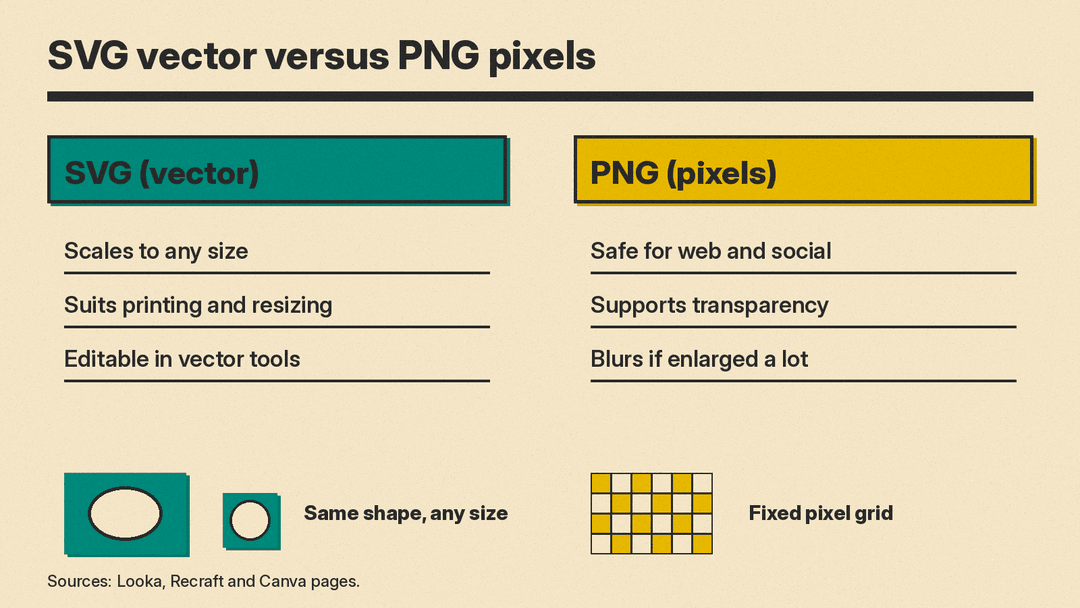
Then check file formats. SVG is a vector format, which means it can scale from a business card to a billboard without going blurry. PNG is a pixel format, and it is the safe choice for websites and social posts, especially with a transparent background. Looka's page says vector files suit printing and scaling to any size, so an SVG is worth having even if you start with a PNG.
Commercial use and trademark caution
Using a logo in your business is not the same as owning exclusive rights to it. The tools say as much themselves. Looka and LOGO.com say your rights cover the logo as a whole, not the individual symbols, icons or fonts. Wix says its icons and fonts are available to all Wixel users. Canva says you may not have exclusive rights to designs made with its AI logo generator. Namecheap says it cannot help with a trademark.
The U.S. Patent and Trademark Office says that you can build rights in a trademark by using it, but those rights are limited to the area where you do business, and registering gives broader, nationwide rights. It also says creative and unique trademarks are easier to protect than ones that merely describe your goods. The U.S. Copyright Office has published a report on the copyrightability of outputs created with generative AI, so it is worth reading if your logo is mostly AI generated.
This is not legal advice. In practice, three steps help:
- Read the tool's terms for commercial use and ownership before you pay.
- Search the USPTO trademark database for similar names and logos in your field.
- If the logo matters to your brand, talk to a trademark attorney before you rely on it.
Checklist before you pay
- Which file types do I get: SVG, PNG, PDF, EPS?
- Is there a transparent background version, and a one-color version?
- Is the download free, or is it tied to a package or subscription?
- Can I edit the logo later, and is that included in the price?
- Do the terms allow commercial use, and who owns what?
- Do I get the font and color details, so I can match my website and print work?
- Have I run a trademark search for the name and the look?
FAQ
Can I use an AI logo on my website and products? Looka, Brandmark, LOGO.com and Wix each describe commercial use in their pages, with different terms. Read the terms for your tool, and keep the files you download.
Is a free logo good enough? It can be. A free logo with PNG and SVG files covers most web use. Paid packages add brand kits, more file versions and edits after purchase.
Will another business get the same logo? It is possible. Wix says its icons and fonts are available to all users. LOGO.com says it does not remove icons from its pool after you use them, though it calls an exact match unlikely. Changing colors, fonts and layout makes your logo more distinct, but it does not make it exclusive.
Do I need SVG? Mainly if you plan to print large items or scale the logo to many sizes. For a website and social posts, a PNG with a transparent background is often enough.
Can I trademark an AI-made logo? You can ask a trademark office, but the answer depends on your country and on how unique the logo is. Do a search first, and ask an attorney.
Sources
- Looka logo maker
- Looka pricing
- Brandmark
- Brandmark pricing
- Canva logo maker
- Canva AI logo generator
- Canva AI vector creator
- Canva pricing
- Wix logo maker (Wixel)
- Namecheap Logo Maker
- Adobe Express logo maker
- LOGO.com
- Recraft
- Recraft AI vector generator
- USPTO: What is a trademark?
- USPTO trademark search
- U.S. Copyright Office: Copyright and Artificial Intelligence
