
Practicing an interview out loud is the part most people skip, because it feels awkward and there is nobody to do it with. AI interview tools fill that gap: an AI interviewer asks questions, listens to your spoken answers, and tells you what to fix. This guide covers the tools worth knowing as of November 2026, what each one does, and the plan wording straight from each vendor's own page.
Plans and free tiers change often, so check the vendor page before you pay. Where a vendor did not state something on its page, this guide says so instead of guessing.
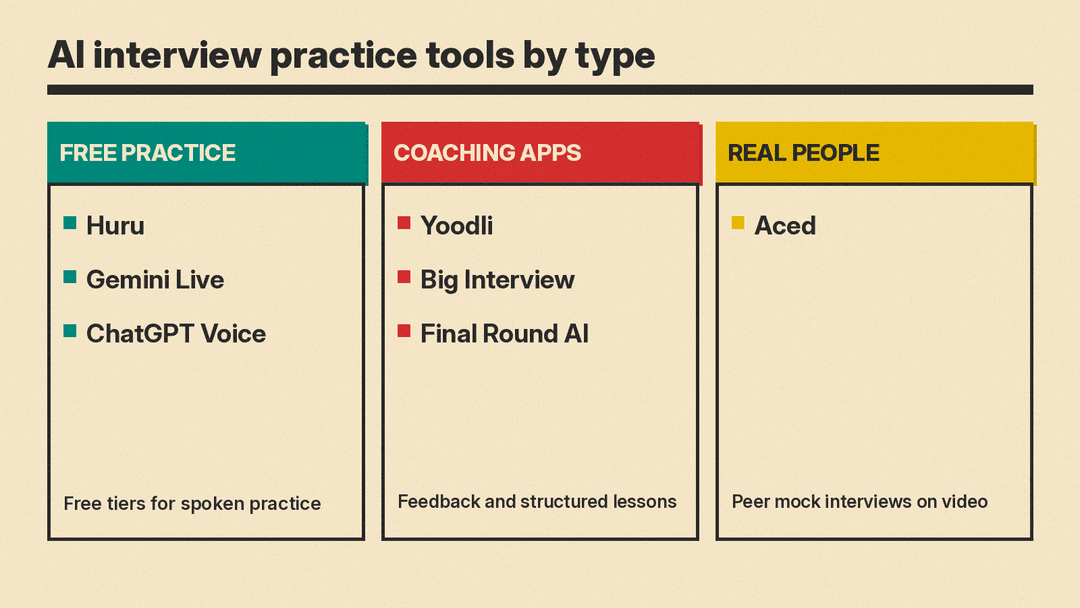
Free ways to practice
Huru
Huru is an AI interview practice site. Its page says you answer questions out loud, either with a live AI interviewer or one question at a time, for 242+ career roles, and its own scoring model rates each answer on relevance, structure, specificity, impact and articulation. You can pick a role from its library, paste a job description, or write your own questions. The live interviewer asks follow-up questions, and you choose its style, the pressure level, and a length of 5, 10, 15 or 20 minutes. You can run it with the camera on or audio only.
On pricing, Huru's page says: "Every feature is free for job seekers" and "The only paid plan is Enterprise, for organizations." Huru also says its scores are "coaching signals, not hiring decisions or guarantees," which is the right way to read any score from any tool in this list.
Best for: anyone who wants unlimited practice without paying, especially for behavioral questions tied to a specific job post.
Gemini Live
Google's own guidance has changed. The old Interview Warmup address on grow.google now redirects to a general Grow with Google interview tips article. That article says the Gemini mobile app offers Gemini Live, which you can use "to simulate a real-time, conversational interview, providing instant, structured feedback on your responses." It suggests trying general practice for your elevator pitch and follow-up questions, or practice for fields like digital marketing or data analytics.
Gemini Live is a general voice assistant, not a dedicated interview product, so you have to set up the scenario yourself: tell it the role, the company, and how strict to be. Learn more on the Gemini Live page. Google said in May 2025 that Gemini Live is free on Android and iOS for everyone. The Gemini Live page cited here does not state a price, so check what your account includes.
Best for: a quick, free spoken warm-up on your phone.
ChatGPT Voice
ChatGPT Voice lets you speak with ChatGPT and hear a spoken reply. OpenAI says the Live option can listen and speak at the same time, so you can interrupt or continue while it is answering. According to the same help page, free accounts get "limited access," while Plus includes 3 hours in a rolling 24-hour period.
Like Gemini Live, it does not come with an interview rubric. Ask it to act as a hiring manager for a named role, to ask one question at a time, and to grade each answer on structure and specifics. OpenAI also says audio clips from Live conversations are stored with the transcript and kept for 30 days, and that it does not use the clips for training unless you choose to share them.
Best for: people already paying for ChatGPT who want custom scenarios, such as a panel interview or a salary conversation.
Dedicated coaching tools
Yoodli
Yoodli offers interview prep alongside public speaking and pitch practice. Its pricing page says any practice session over 30 seconds counts as a roleplay, and that the Starter plan includes 5 lifetime sessions. It lists Pro at "$8/month billed annually" with up to 10 roleplays per week, and Advanced at "$20/month billed annually" with unlimited roleplays.
Privacy matters here because you are recording your own voice. Yoodli's page says that on the Advanced, Business and Enterprise plans your roleplay data is excluded from AI training by default, while on individual Starter and Pro plans session data may be used to improve the platform.
Best for: polishing delivery, such as pacing and clarity, once your answers are already written.
Big Interview
Big Interview sells interview training in three plans. Its pricing page lists Interview BootCamp at "$39/mo" as a 30-day subscription, Interview Accelerator at "$99" for a 3-month subscription, and Interview Pro at "$299" as "one fee, lifetime access." The page also says that if you do not see results within 30 days, you get a 100% refund, and its FAQ says to email support for a full refund within 30 days of purchase. The 3-month plan lists practice interviews, resume feedback and LinkedIn profile updates, and the page did not list a free plan.
Best for: people who want structured training on common interview questions, not only a place to rehearse.
Final Round AI
Final Round AI is a desktop app for macOS and Windows built around its Interview CoPilot. Its page lists a Practice Interview mode with eight scenarios: general, coding, system design, behavioral, product case, data and ML, salary negotiation and recruiter screen. After each session it writes a debrief on what worked and what to fix.
On cost, the page lists a Free plan for setting up goals and materials, and Pro at "$25+/mo". It says plainly that there is "no free trial" and that practice interviews are part of Pro. The same app also offers live suggestions during a real interview, with a Stealth Mode that hides its window from screen sharing. Whether that kind of help is allowed is up to each employer and each assessment, so read their rules before you use anything like it in a real interview.
Best for: technical and product candidates who want coding, system design or case rounds in one paid app.
Practice with real people
Aced (formerly Exponent)
Aced runs scheduled peer mock interviews for tech roles. Its page says sessions are live one-on-one video calls where you and a partner take turns as interviewer and interviewee, with a shared code editor for coding questions. Roles listed include product management, data structures and algorithms, system design, behavioral, finance, SQL, data science and ML, and frontend, and the page marks SQL, data science and ML, and frontend as beta. Its FAQ says the practice tool is free to use, with a monthly allotment of credits for free users and unlimited access for members. You can also answer real questions with instant AI feedback on your own.
The page says AI grading and transcripts of peer sessions are in early access and are available only to paid members. It did not state a membership price on that page, so check the site before you commit.
Best for: tech candidates who want a real person's reaction as well as an AI score.
How to choose
- Start free. Use Huru, Gemini Live or ChatGPT Voice for two or three sessions and see which questions you stumble on.
- Pay only for a gap. Delivery problems point to Yoodli. Gaps on common interview questions point to Big Interview. Technical rounds point to Final Round AI or Aced.
- Add a person. A friend or a peer session catches things a scoring model misses, such as a joke that falls flat.
- Match the tool to the job. A lot of the value comes from practicing against the actual job description, so paste it in wherever the tool lets you.
Make the practice count
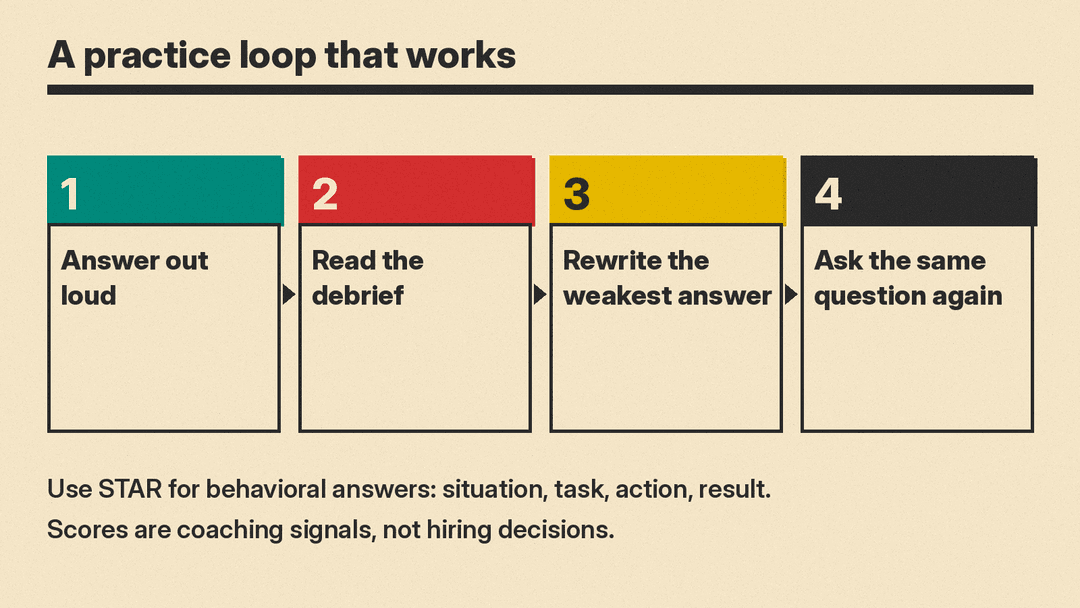
Practice works best when you change something between rounds. Record a session, read the debrief, rewrite your weakest answer, then run the same question again. Use the STAR method (situation, task, action, result) for behavioral questions, and put real numbers in your results. Grow with Google's guide gives the same advice and an example of a cost saving stated with figures rather than a vague claim.
Keep your expectations realistic. An AI score does not predict a hiring decision. It tells you whether your answer was clear, specific and well structured, which is exactly what you can fix before the call.
If you are also updating your application materials, see our guide to AI resume builders and job search tools. For tech roles, our list of AI and ML interview questions shows what employers ask and how to prepare.
