
Kling AI made Kling 4.0 Flash available to everyone on November 4, 2026. The faster tier of its 4.0 video model is now open on the Kling website and through the Kling API. Kling had said in September that Flash would first go to Ultra Yearly subscribers. The API changelog and pricing page also list Flash request paths and per-second prices. This post covers what changed, what it costs, and where the limits sit, as of November 2026.
What Kling announced
In a post on X, the Kling AI account said Kling 4.0 Flash is available "to everyone on the Kling AI website and via API." The post adds that Flash can be reached through MCP, CLI and AI plugins. It also mentions Kling plugins for Adobe Photoshop, Premiere Pro and After Effects. Trade coverage of the post (The Reel Stack) says the plugins let you generate shots inside those apps.
Flash is not a new model. Kling said in its Kling 4.0 launch post that Flash would be open to Ultra Yearly subscribers from September 28. It described Flash as "built for frequent creation," combining fast generation with "excellent value." The November 4 change is wider access plus documented API details.
API details from the changelog
The Kling API changelog lists the Flash release under November 4, 2026. It says Flash supports:
- Video from 3 to 20 seconds at 720P.
- Text-to-video, image-to-video, and Omni reference-to-video.
- Request paths /text-to-video/kling-4.0-flash, /image-to-video/kling-4.0-flash and /omni-video/kling-4.0-flash.
- A single first-frame image for image-to-video.
- Duration and aspect ratio set by parameters or in the prompt, including 21:9 and adaptive ratios.
- Prompts up to 26,000 English characters, up to 10 reference images and up to 5 reference videos.
- Up to 15 inputs in one Omni task, mixing images, videos and elements.
The same changelog shows that the full Kling 4.0 API became fully available on October 28. That model makes clips up to 30 seconds at 720P and 1080P and accepts up to 10 keyframe inputs. The Flash entry lists no keyframe inputs and no 1080P option. The changelog entry for Flash also does not say whether it outputs audio. The model host fal said on November 4 that its Flash listing generates "up to 20 seconds at 720p with native audio."
What it costs
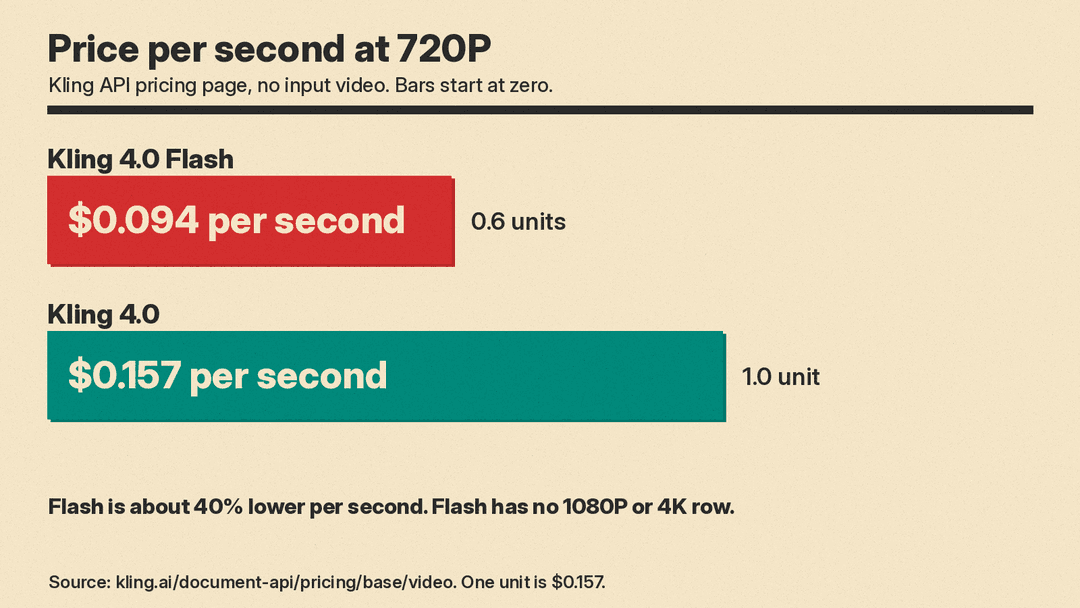
Kling's video pricing page bills 4.0 models by total duration in seconds. One unit is $0.157 on that page. These are the 720P rows for Flash and for the full model:
- Kling 4.0 Flash, no input video: 0.6 units, or $0.094 per second.
- Kling 4.0 Flash, with input video: 0.4 units, or $0.063 per second.
- Kling 4.0, no input video: 1.0 unit, or $0.157 per second.
- Kling 4.0, with input video: 0.6 units, or $0.094 per second.
Flash has no 1080P or 4K row. The full model lists 1.5 units, or $0.235 per second, at 1080P.
For a plain text-to-video clip, Flash costs about 40% less per second than the full model at 720P. A 10-second clip works out to about $0.94 on Flash and about $1.57 on Kling 4.0. Those totals are simple arithmetic on the published rates, not figures from Kling.
How input video changes the bill
The cheaper "with input video" rate does not make video input cheaper. The pricing page sets two rules:
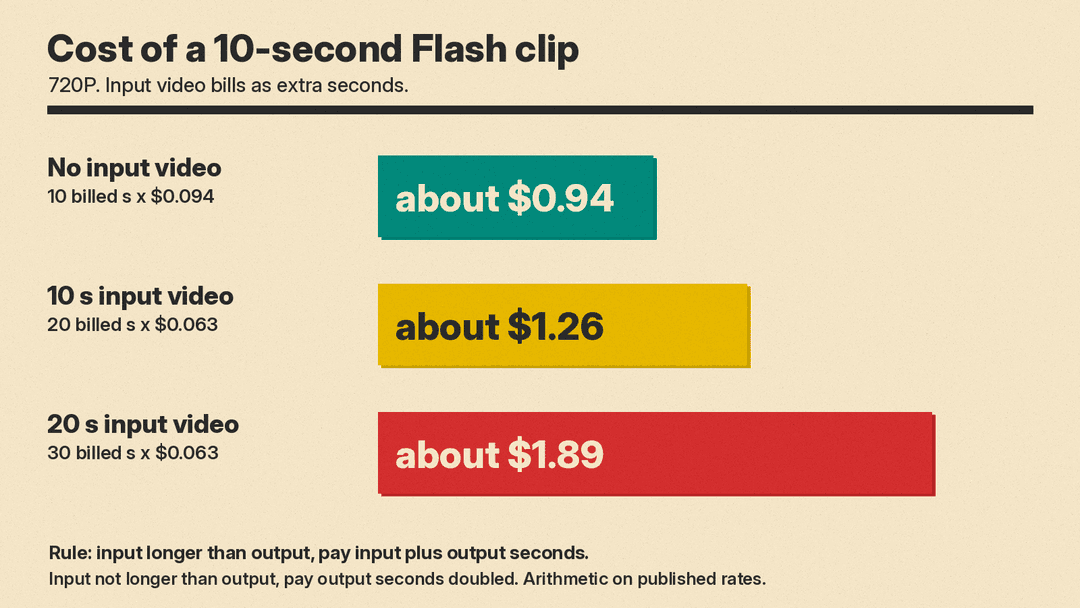
- If the input video is longer than the output, you pay the unit price times input plus output seconds.
- If the input is the same length or shorter than the output, you pay the unit price times the output seconds, doubled.
Input video includes reference videos and video character elements. The changelog adds that videos to be edited count too. Here is the arithmetic for a 10-second Flash output at $0.063 per second:
- 10-second input: 20 billed seconds, about $1.26.
- 20-second input: 30 billed seconds, about $1.89.
Both totals are higher than the roughly $0.94 for the same clip with no input video.
The full model follows the same rule. At 720P a 10-second output with a 10-second input is 20 billed seconds at $0.094, or about $1.88. Anyone who edits or restyles footage with Flash should budget from the billed-seconds rule, not from the headline rate.
Where Flash fits
The limits suggest a clear role. Flash tops out at 20 seconds and 720P, so it suits drafts, social clips and test runs. The full model is the choice for 30-second takes, 1080P and keyframe control. Our Gemini Omni Flash vs Kling 4.0 comparison covers how the full model stacks up against Google's video model. For turning stills into clips, see our guide to the best image-to-video AI tools.
The MCP and CLI access matters for a different reason. It lets coding agents and scripts call Flash as one step in a larger pipeline. For more on how Kling 4.0 is used in production, see our post on the Minibots animated feature.
What is still unknown
- Quality. Kling's materials describe Flash as fast and good value, but they give no benchmark scores. I found no independent leaderboard result for it.
- Limits. The changelog lists no rate limit or concurrency cap for the Flash API.
- Plugins. The sources I read do not say which plans, regions or Adobe versions support the plugins.
Flash gives Kling a cheaper per-second option at the cost of length and resolution. For comparison with another current video model, see our Wan 3.0 explainer.
