
Ask a normal search engine a question and you get a page of links. Ask an AI search engine and you get a written answer first, with links to the pages it used. That difference changes how you check facts, how you follow up, and how much of your question leaves your device. This guide compares seven tools as of November 2026: Perplexity, Google AI Mode, ChatGPT search, Microsoft Copilot, Ask Brave, Kagi and You.com. For each one it explains what the tool does, who it suits, and one limit taken from the vendor's own pages.
Plans and limits change often. Where a vendor page printed a price, this guide copies the wording. Where it did not, this guide says "see the vendor's pricing page" instead of guessing. This guide does not rank the tools. It uses "Best for:" labels so you can match a tool to a job.
What an AI search engine does
An AI search engine takes your question, searches the web, reads some of what it finds, and writes an answer. Most of them show the sources next to the answer so you can open the page and check it.
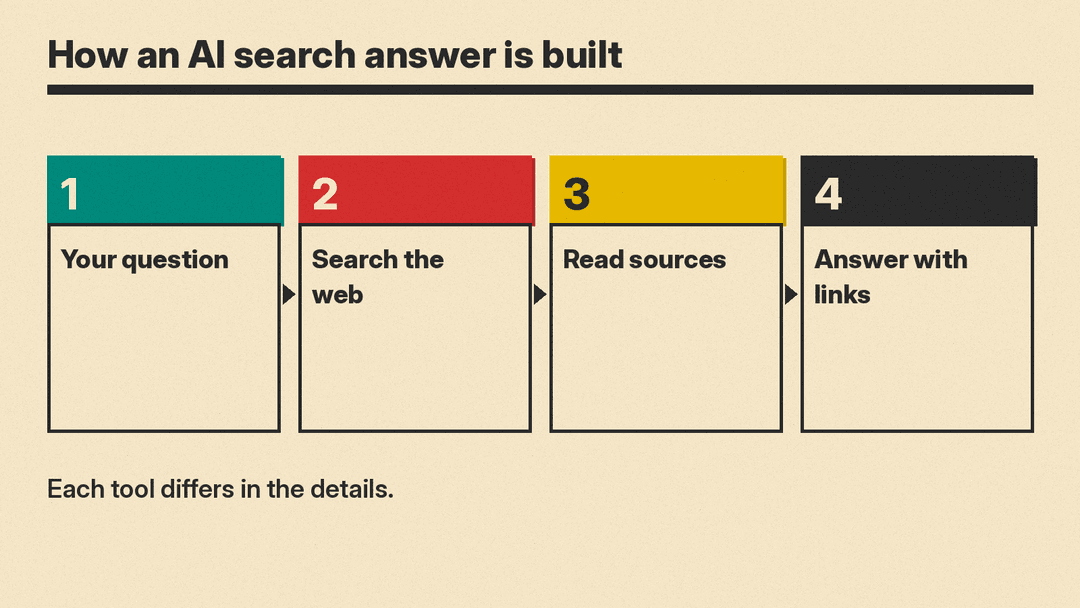
The steps are the same in most tools, but the details differ. Perplexity describes searching the internet in real time and then distilling what it finds into a summary. Google describes a "query fan-out" technique that splits a question into subtopics and searches for each one at the same time. OpenAI says ChatGPT may rewrite your question into one or more targeted queries before it sends them to search partners. Those details matter because they decide what the tool can find, what it shares, and how it can fail.
Google says AI responses may include mistakes. OpenAI says search results and citations can be incomplete, outdated, or incorrect. Treat any answer as a lead, then open the source.
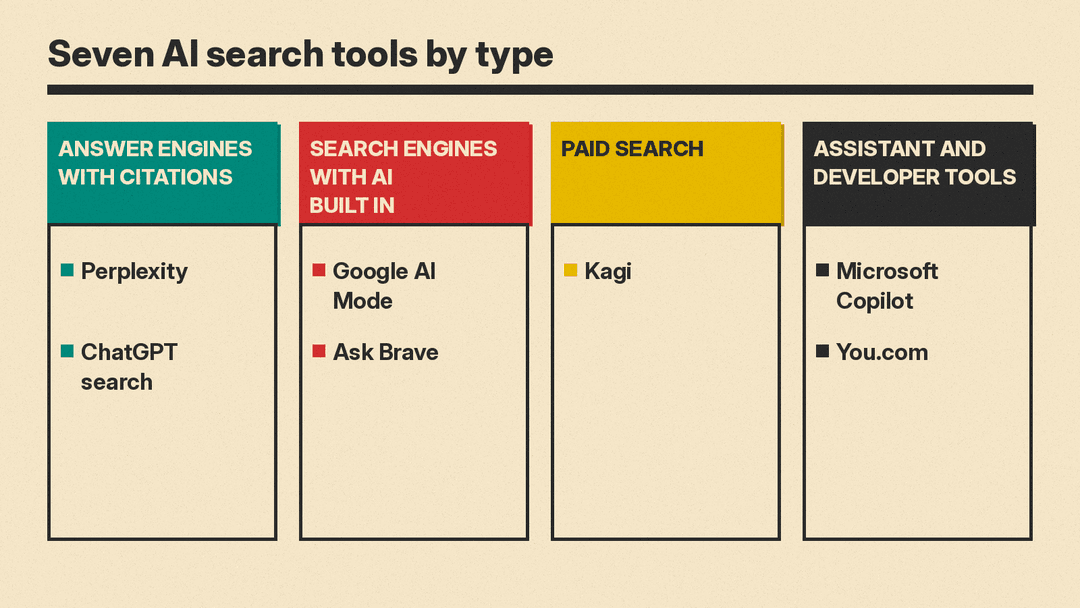
The tools fall into four groups, shown in the diagram above.
- Answer engines with citations: Perplexity and ChatGPT search.
- Search engines with AI built in: Google AI Mode and Ask Brave.
- Paid search: Kagi.
- Assistant and developer tools: Microsoft Copilot and You.com.
The seven tools
Perplexity
Perplexity's help center says that when you ask a question, it searches the internet in real time and distills the result into a summary. Its how it works page says each answer includes numbered citations that link to the original sources. The Pro Search page says Pro Search is no longer a separate toggle. You select Search and ask, and Perplexity uses Pro Search automatically when your plan includes it, up to your plan's limit. For a longer, report-style answer, you open the Search menu and choose Deep Research.
Perplexity's pricing page describes the Free plan as "Search only with accurate answers and citations." It prints "$17/month" for Pro "when billed annually" and "$167/month" for Max "when billed annually." The help center's plan comparison says the Free plan has "Practically unlimited basic searches" and a "Very limited amount of Pro Searches."
Best for: people who want a cited answer first and a short follow-up conversation, without opening a classic results page.
Limit: on the Free plan you cannot choose an advanced model manually. The model page says the Free plan gets Best and a limited number of Pro Searches. Paid plans can pick models, subject to usage limits.
Google AI Mode
Google's AI Mode help page calls AI Mode "Google's most powerful AI search experience." You ask a question, get an AI-powered response, and can go deeper with follow-up questions and links to the web. The page says AI Mode expands what AI Overviews can do with more advanced reasoning and ways of interacting. You can ask with text, voice, images or files, including PDFs and Drive files, and you can paste a webpage address and ask about it. To open it, go to google.com/ai, tap AI Mode under the Search bar, or tap AI Mode in the Google app.
For how Google is changing the links inside AI Mode answers, read our explainer on Google AI Mode link changes.
The page also says that in some cases AI Mode will show a set of web links when Google does not have high enough confidence in the quality or helpfulness of an AI response. So the tool can fall back to plain links when it is unsure.
Best for: people who already search on Google and want to ask longer, multi-part questions without leaving it.
Limit: availability and features depend on country, language and account. The page says Gemini 4 Argon in AI Mode is available to Google AI Pro and Ultra subscribers 18 and above, with daily usage limits. It also says AI Mode "doesn't always get it right." On data, the page says Google uses people's interactions with Search and these AI experiences, such as what people search for and the feedback they give, to develop and improve generative AI in Search.
ChatGPT search
OpenAI's help page on searching the web with ChatGPT says ChatGPT can search the web to answer questions with current information and links to relevant sources. It says web search is available on ChatGPT Free, Go, Plus, Pro, Business, Enterprise and Edu, and that people who are not signed in can also use it. ChatGPT may search automatically when a question would benefit from current information. You can also start a search by selecting Search from the tools menu or entering "/" in the message box.
Responses that use web search may include citations. You select a citation to open its source, and you can select Sources to see cited sources and other relevant links. The page also says you can set ChatGPT as the default search engine in Google Chrome by installing the ChatGPT search extension.
Our explainer on the Cloudflare and OpenAI search pilot covers how pages get into ChatGPT Search, for anyone who runs a website.
Best for: people who already use ChatGPT for other tasks and want it to check the web when a question needs current facts.
Limit: searches are subject to your plan's usage limits. The page says search results and citations "can be incomplete, outdated, or incorrect," and it tells you to open a cited source to check that it supports the answer. On privacy, the page says ChatGPT uses an approximate location based on your IP address, that device location sharing is optional and off by default, and that it does not share your IP address or account information with third-party search providers to run a search. It does say that rewritten queries go to those providers, and it names Microsoft and Shopify privacy policies for more information.
Microsoft Copilot
Microsoft Copilot sits in a different group. Microsoft's Copilot plans page for individuals presents Copilot as "the AI for work," helping you create, research, analyze and get things done in the Microsoft 365 apps. The FAQ on the same page says Copilot can help you create content, find information, summarize documents, emails and meetings, analyze data and get answers faster. The page does not describe Copilot as a web search engine, so treat it as an assistant that can look things up rather than a search page.
The page lists plans. With the monthly view selected, it prints "$9.99" a month for Microsoft 365 Personal, "$12.99" for Family, "$19.99" for Premium and "$99.99" for Pro, which it lists as monthly billing only. The Premium and Pro plans list a research feature called Researcher, which Microsoft describes as a way to "Find, synthesize, and understand information faster."
If your real task is analysis rather than search, see our guide to the best AI tools for data analysis.
Best for: people who spend their day in Word, Excel, PowerPoint and Outlook and want research help in the same place.
Limit: the page says usage limits apply and that, for Microsoft 365 Family, Copilot AI features are available only to the subscription owner and are not included for other family members.
Ask Brave
Brave's AI page describes Ask Brave as the AI chat built into Brave Search. Brave's help page on AI in Brave Search lists two features. AI Answers give a concise summary with references to sources. Ask Brave gives longer, more detailed answers, lets you follow up in chat, and includes a Deep Research mode for cases where thoroughness matters more than speed. The launch post says Ask Brave is free, works on any browser or platform, and sits on the Brave Search homepage and at the top of the results page. It also says that if Brave Search is your default search engine, ending a query with a double question mark sends it straight to Ask Brave.
Best for: people who want search and AI chat in one place, with a stated focus on privacy.
Limit: Brave's privacy notice says it must process your request on its servers, so it may process information about you if you include it in a conversation. It says the conversation is stored for its duration and erased after 24 hours of inactivity, and that a conversation you make public is stored for up to 7 days. The same notice says Brave does not retain your IP address, and that Ask Brave uses Nebius Token Factory with Zero Data Retention enabled. The launch post adds that all AI features in Brave Search are optional and can be turned off in settings.
Kagi
Kagi is a paid search engine. Its welcome page says it strips out ads, trackers and sponsored content, lets you rank sites up or down or block them, and offers Search Lenses to focus on the kinds of sites you want. In its comparison with Google, Kagi lists "Instant AI answers" as a feature of both, and "Searches never stored" as a Kagi feature. Kagi also offers Kagi Assistant. Its Assistant docs say it combines large language models from several developers with optional results from Kagi Search. You can control whether the Assistant has web access, apply Search Lenses to its searches, upload files and save threads.
Best for: people who want ad-free search, control over which sites they see, and the option to use several AI models in one place.
Limit: Kagi is not free to use in the ordinary sense. The welcome page says you can search 50 times without a subscription and another 100 times free with a trial plan. It also says plans start at $4.50/month; see Kagi's pricing page for current plans. The Assistant docs say premium models are available only on the Ultimate plan, and that usage follows a value-based system tied to your plan. On privacy, the docs say Assistant data is never used to train AI models, and threads are deleted after 24 hours of inactivity by default, which you can change in settings.
You.com
You.com's homepage describes the company as "Search and inference for AI." The pages are aimed at developers who want to add web search to an app or an agent, so this is the odd one out in the list. The pricing page lists a free Web Search API tier through MCP with up to 100 queries a day and no API key. It prints "$5" per "/1k calls" for Web Search API Standard. It also lists an Answer API under Agentic Research, which it describes as one call that turns a question into a cited answer with the sources it used.
Best for: developers who want to feed live web results to a model, or get a cited answer from one API call.
Limit: the pricing page covers APIs, not a consumer plan, so it does not tell you what a personal subscription would cost. For security details, the homepage says ZDR is available, that its infrastructure is SOC 2 certified and that it is DPA-ready.
How to choose
Start with the job.
- You want quick cited answers: try Perplexity or ChatGPT search. Both show sources next to the answer.
- You already live in Google Search: try Google AI Mode. It is built into the search box you already use.
- You want privacy controls and a plain explanation of retention: read the privacy notes for Ask Brave and Kagi first.
- You want to avoid ads and keep control of results: Kagi is built around that, and it is paid.
- You work in Microsoft 365: Copilot keeps research next to your documents.
- You build software: You.com targets that use.
Then check four things before you settle on one.
- Does the tool cite sources you can open? Test it on a question where you already know the answer.
- What is the free limit? Perplexity and ChatGPT tie usage to your plan, and Google applies daily limits to Gemini 4 Argon in AI Mode. Read the limit before you rely on a tool for daily work.
- What happens to your questions? Each vendor above has its own retention and sharing rules, and they differ. Read the vendor's own page, not a summary.
- Does the tool fit where you work? A browser, a phone app, an office suite and an API each suit different people.
One more habit helps with all seven: ask the same question in two tools and compare the sources they cite. When the sources differ, open both. When accuracy matters, use an authoritative source directly, as OpenAI's own help page advises.
Summary
AI search has settled into a few shapes. Perplexity and ChatGPT put a cited answer first. Google and Brave add AI to a search engine. Kagi charges for search without ads and offers an assistant on top. Copilot is an assistant for office work, and You.com serves developers. Pick by job, check the limits, and read each vendor's privacy page. For more on how links and sources work in Google and ChatGPT, see our explainers on Google AI Mode link changes and the Cloudflare and OpenAI search pilot.
Sources
- Perplexity: How does Perplexity work?
- Perplexity: What is Pro Search?
- Perplexity: pricing
- Perplexity: Which subscription plan is right for you?
- Perplexity: What advanced AI models are included in my subscription?
- Google Search Help: Get AI-powered responses with AI Mode in Google Search
- OpenAI Help Center: Searching the web with ChatGPT
- Microsoft: Copilot plans for individuals
- Brave: Brave AI
- Brave: Introducing Ask Brave
- Brave Search help: AI in Brave Search
- Brave Search privacy notice
- Kagi: Kagi Search
- Kagi docs: Kagi Assistant
- You.com: homepage
- You.com: pricing
