
Google used Android Dev Summit on October 28 to open its Android tools to coding agents it does not make. Android Studio Rabbit 2 is now stable, and its headline feature, Bring Your Own Agent (BYOA), lets developers pick from over 40 coding agents inside the IDE, including Claude Agent, Codex from OpenAI, Junie and Google Antigravity. In the same set of posts, Google shipped official Android CLI plugins for Claude Code and Codex, so those agents can build and test Android apps from a terminal.
What Bring Your Own Agent does
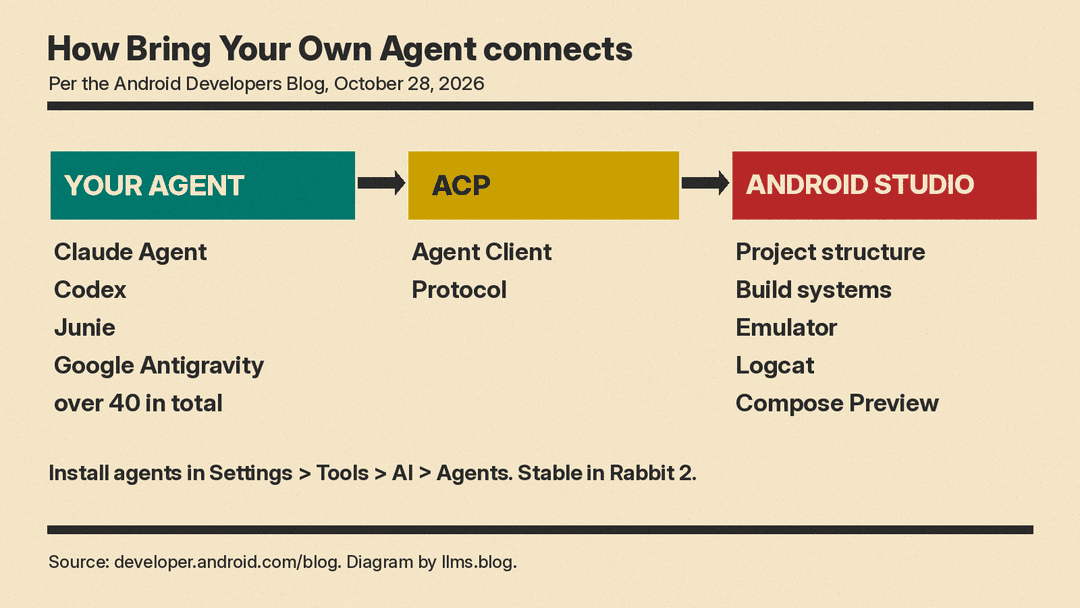
BYOA is built on the open Agent Client Protocol (ACP). Google's developer tools roundup says Android Studio "now supports over 40 ACP-compatible coding agents" and that BYOA "is now stable in today's release of Android Studio Rabbit 2."
How it works, per that post:
- Open Settings > Tools > AI > Agents to browse and install agents from the marketplace.
- Install more than one agent and switch between them as you work.
- The agent gets Android Studio's understanding of your project structure and build, symbol resolution, Compose Preview rendering, the Emulator and Logcat.
The Rabbit 2 release post adds that these agents "can use Android skills to complete complex tasks." To start, you open the agent window, select an agent, authenticate and submit a prompt.
Google did not publish a price for BYOA. When it first put BYOA into the Canary channel, the September announcement said "Both enterprise and consumer AI plans are supported - subject to the agent provider."
Android CLI plugins for Claude Code and Codex
The second half of the news is outside the IDE. Android CLI is Google's command-line tool for agents, and Google says it "works in any terminal, with any agent harness, and in your CI pipelines." It is now an official plugin for Claude Code and Codex. Per the Agent plugins docs, each plugin adds the android-cli skill so the agent can create projects, manage virtual devices, inspect live UI layouts, run Journeys and search the official Android Knowledge Base.
Install commands, from the same docs page:
- Claude Code, from the terminal:
claude plugin marketplace add android/android-cli-plugin, thenclaude plugin install android-cli@android-cli-plugin. - Codex, from the terminal:
codex plugin marketplace add android/android-cli-plugin, thencodex plugin add android-cli@android-cli-plugin.
The android-cli-plugin repository says it "holds the plugin only. It does not contain Android CLI itself," so you install the CLI separately. If you are new to the skill format these plugins use, our guide on how to write an Agent Skill covers the basics.
New CLI commands, and Google's speed numbers
The developer tools roundup lists several new Android CLI commands:
android device remoteprovisions a real physical device from a secure Google device lab.android previewrenders Compose Previews without an emulator or the IDE. Google says: "In our internal testing, agents that usedandroid previewcompleted UI tasks 77% faster while using up to 3x fewer tokens."android profiler leakcanaryanalyzes heap dumps on your computer instead of on the device. Google says that with it, "the most capable models ran this process almost 2x faster while using up to 25% lesser tokens." The same post later says "the memory leak subcommand is coming soon to Android CLI," so check your CLI version before you plan around it.android signalsbrings Android vitals and Firebase Crashlytics data to the terminal.
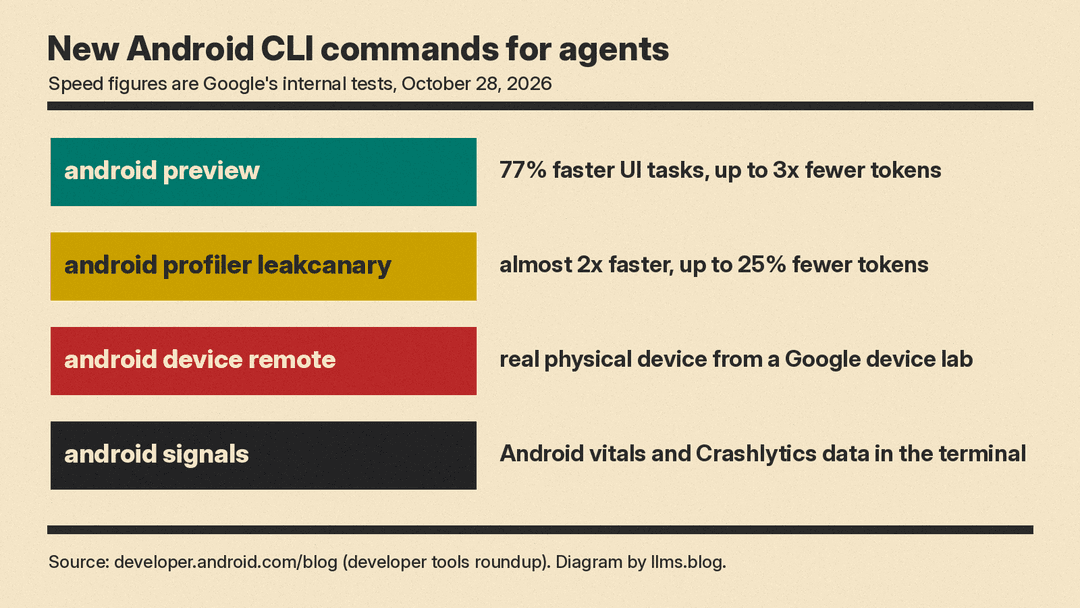
These are Google's own tests. The New Stack noted that Google "shared little about how it measured those results." Treat them as a direction, not a benchmark.
Google also says it now has over 30 official Android skills across more than 20 areas, and that "Every skill is backed by evaluations."
Change Review and Android Bench 2.0
Rabbit 2 also adds Change Review, an agentic code review step. Per Google, you can start a review from pending agent changes, pending commits or the Git log, and Android Studio generates a report of potential issues. You can then ask for a guided walkthrough that groups related diff chunks into themes, or call /review from the agent window.
Google also pointed developers to Android Bench 2.0, which it describes as an LLM leaderboard for "long-running, real-world Android development tasks." Its tasks "are designed to be ones that take an Android engineer days to complete," and solutions are graded on whether they work, with cost and time measured. We covered its October 26 update when Gemini 4 Argon placed sixth on Android Bench.
Why it matters
Google's own Antigravity is now one agent among more than 40 in its IDE. For teams that already pay for Claude Code or Codex, those agents now get Android tools (emulators, previews, profilers, security skills) through ACP and a plugin. Google's stated aim is to let agents work "without burning through tokens guessing how Android works."
The Android keynote post pairs these tools with Android MCP and the AppFunctions API, which let apps expose features to agents. AppFunctions is now in beta. That ties into the Connected Apps Platform Google announced the same day.
Before you switch, check which agents your company allows, what each provider charges for agent usage, and whether Google's speed claims hold on your own app.
Sources
- Your favorite agents are now integrated in Android Studio (Android Developers Blog)
- What's new in Android developer tools and performance at Android Dev Summit (Android Developers Blog)
- Agentic and Flexible: A next era of Android development (Android Developers Blog)
- Agent plugins (Android Developers docs)
- android/android-cli-plugin (GitHub)
- Build your way: Use any AI agent of your choice in Android Studio (Android Developers Blog, September 2026)
- Google just handed its rivals the keys to Android (The New Stack)
