
Most small teams know they should post on social media more often, and most run out of time or ideas. AI writing tools can help with the slow parts: finding angles, drafting captions, and turning one idea into posts for several platforms. They cannot know your customers, your brand or what is true about your business unless you tell them. This guide shows a five-step workflow, the prompts to use, and the platform rules for labeling AI content.
What AI is good at, and what it is not
AI tools are good at volume and variation. Buffer describes its AI Assistant as a way to brainstorm ideas, rewrite content and craft platform-specific posts, and to "turn a single post into multiple formats and styles" for each network. Canva's Magic Write can generate copy from a prompt or from text already in a design, and can rewrite, shorten, or make text more fun or more formal.
AI tools are weak at facts and judgment. A chatbot does not know your prices, your opening hours, or what happened at your event last week. It can also make a post sound like everyone else's. The fix is the same in every step below: give the AI your own material, and have a person check every post before it goes out.
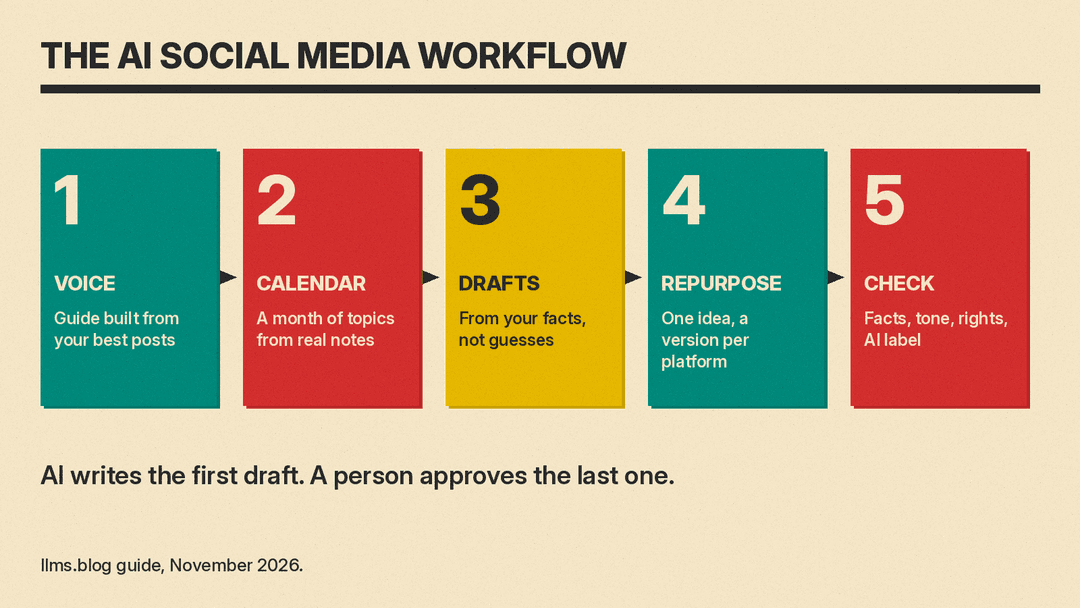
The five-step workflow
- Write a voice guide. One page that describes how your brand sounds, with real examples.
- Plan a month of topics. Ask the AI to build a content calendar from your own notes.
- Draft from real material. Give the AI facts, photos and customer questions, then ask for drafts.
- Repurpose for each platform. Turn one strong post into versions for each network.
- Check, label and publish. A person checks facts and tone, and adds AI labels where a platform requires them.
Step 1: Write a voice guide
Before you ask for a single post, give the AI something to copy. Paste five to ten of your best past posts into a chat and ask it to describe the tone, sentence length, words you use and words you avoid. Edit that description into a short voice guide and save it. Paste it at the start of every new chat, or save it as a custom writing style if your tool has one. Canva, for example, lets you choose a saved tone of voice when you change the voice of text with Magic Write.
A voice guide is the main difference between posts that sound like you and posts that sound like a template.
Step 2: Plan a month of topics
Give the AI a list of what is real for the month: product launches, events, seasonal dates, common customer questions and any offers. Ask for a calendar in a table, with a date, a topic, a format (photo, short video, carousel, text) and a goal for each post. Ask it to mix types, such as how-to tips, behind-the-scenes posts, customer questions and product posts, so the feed is not all sales.
Keep the calendar in a spreadsheet or your scheduling tool, not only in the chat, so the whole team can see it and change it.
Step 3: Draft from real material
This is where AI saves the most time, as long as you feed it facts. For each calendar slot, give the AI the specific details: the product name and what it does, the event date and place, a customer quote you have permission to use, or a note about the photo. Then ask for three short drafts in your voice guide's style.
Pick the best draft and edit it. Do not ask a chatbot to "write a post about our sale" with no details. It will fill the gaps with guesses, and guesses about prices, dates or results are how a small business ends up correcting a public post.
Step 4: Repurpose for each platform
One good idea can become several posts. Ask the AI to rewrite a post for each network you use: a longer, more professional version for LinkedIn, a short caption and hashtag set for Instagram, a hook and on-screen text for a short video, and a brief version for Threads or X. Buffer says its assistant can tailor posts for LinkedIn, Threads, X, Instagram, Bluesky and more, and change tone, length or structure in one step.
Check each version against the platform. A caption that works on Instagram may be too casual for LinkedIn, and a hook written for video makes no sense as a text post.
Step 5: Check, label and publish
Every post needs a person to check three things before it goes out: the facts (names, prices, dates, links), the tone (does it sound like you), and the rights (do you have permission to use that photo, quote or music). Our 5-minute fact-check routine for AI answers works for social posts too.
Then check if the platform needs an AI label. The rules are mostly about realistic images, video and audio, not about captions you drafted with AI:
- YouTube says it requires creators to disclose AI-generated or altered content that seems realistic, such as making a real person appear to say or do something they did not do, altering footage of a real event or place, or generating a realistic scene that did not happen. You disclose it with the "AI use" setting in YouTube Studio. YouTube may also add a label itself, for example to content with C2PA metadata, and creators who keep failing to disclose may face penalties.
- Meta (Facebook, Instagram and Threads) says it adds "AI info" labels to video, audio and image content when it detects industry-standard AI indicators or when people disclose that they are uploading AI-generated content. In September 2024 Meta said it would move the label to the post menu for content that was only edited, not generated, with AI tools. Our explainer on why Instagram labels some real photos as AI covers what that label means today.
- TikTok says it has required creators to label realistic AI-generated content, labels content made with its own AI effects, and reads Content Credentials (C2PA) metadata to label AI content uploaded from some other platforms.
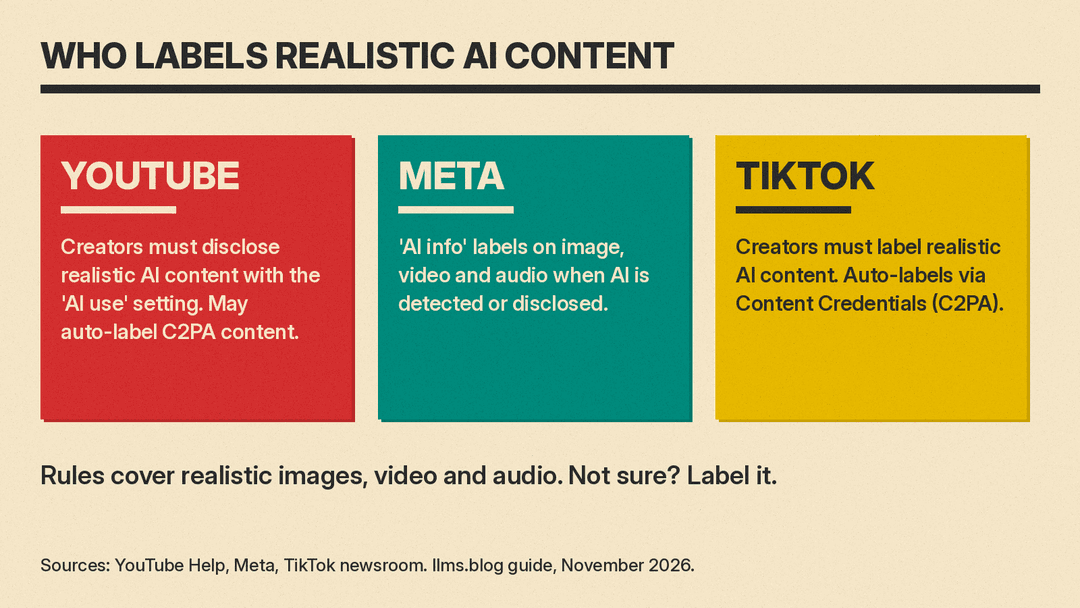
If you are not sure, label it. A label costs little. A realistic fake photo of your shop, product or customers that people later find out about costs trust.
Copy-paste prompts for social media
Change the details in brackets. Each prompt keeps the AI on your own material. For more templates by platform, see our ChatGPT prompts for social media.
- Voice guide. "Here are 8 of our past posts. Describe our tone, typical sentence length, words we use often and words we never use. Write it as a one-page voice guide with three do and three don't examples."
- Monthly calendar. "Using only these notes on our launches, events and customer questions for [month], build a table of 12 posts with date, topic, format, goal and one-line idea. Mix tips, behind-the-scenes, customer questions and product posts. Do not invent events or offers."
- Drafts. "Using the voice guide above and only these facts: [facts], write three short Instagram captions for this post. Do not add prices, dates or claims that are not in the facts."
- Repurpose. "Rewrite this post as: a LinkedIn post of 80 to 120 words, an Instagram caption with up to 5 hashtags, a 15-second video hook with on-screen text, and a short Threads post. Keep the facts the same."
- Hooks. "Give me 10 different opening lines for this post. Make each one a question, a surprising fact from the text, or a short story start. Use only the facts in the text."
- Reply drafts. "Here are 5 comments on our latest post. Draft a short, friendly reply to each in our voice. Flag any comment that needs a person to answer, such as a complaint or a question about an order."
- Fact check. "List every fact, number, date, name and claim in this post so I can check each one before I publish."
Common mistakes
- No input, generic output. Without your facts and your voice guide, AI posts sound like everyone else's.
- Posting without a read-through. AI can state wrong details with confidence. Check names, prices, dates and links every time.
- Copying the same post everywhere. Each platform has its own length, tone and format.
- Realistic AI images with no label. YouTube, Meta and TikTok all have rules or labels for realistic AI content.
- Auto-replying to complaints. Use AI to draft replies, but let a person answer anything about an order, a refund or a problem.
The bottom line
AI makes social media less of a blank-page problem: a voice guide, a calendar, drafts and platform versions in a fraction of the time. Your posts still need what only your team has, such as real facts, real photos, and a person who checks them. Use AI for the first draft, keep a human on the last one, and label realistic AI images and video.
Related guides
- Best AI tools for social media managers
- ChatGPT prompts for social media
- How to use AI for email marketing
- How to use AI for market research
Sources
- https://buffer.com/ai-assistant
- https://www.canva.com/help/use-magic-write/
- https://support.google.com/youtube/answer/14328491
- https://about.fb.com/news/2024/04/metas-approach-to-labeling-ai-generated-content-and-manipulated-media/
- https://newsroom.tiktok.com/partnering-with-our-industry-to-advance-ai-transparency-and-literacy?lang=en
