
Most procurement work in a small organization is reading and writing. You collect requirements from colleagues, send a request to vendors, read proposals that are longer than they need to be, compare quotes that arrive in different formats, and explain the final decision to whoever signs the check. AI assistants can handle a large share of that reading and writing work. They do not pick the vendor, and they should not.
This guide covers what AI can do for a small procurement team, a five step workflow you can reuse for any purchase, prompts you can copy, tools you may already have, and the decisions that stay with people.
What can AI do in procurement for a small team?
AI is useful at six specific points in a buying process:
- Turn messy notes into a requirements list. Paste in emails, meeting notes, and a colleague's bullet points, and ask for a structured list split into must have and nice to have.
- Draft a request for proposal (RFP) or request for quote. From your requirements list, AI can produce a first draft that includes scope, timeline, and what vendors must include in their response.
- Summarize long proposals. A long proposal can be reduced to the parts that answer your criteria, with pointers to where each answer appears.
- Compare quotes side by side against your own criteria. AI can build a comparison where every value is tied to a specific section of a specific proposal.
- Draft follow up questions to vendors. Where a proposal is silent or vague, AI can turn each gap into a short question you can send.
- Write up the decision. AI can draft the record of what you chose, why, and what you traded off.
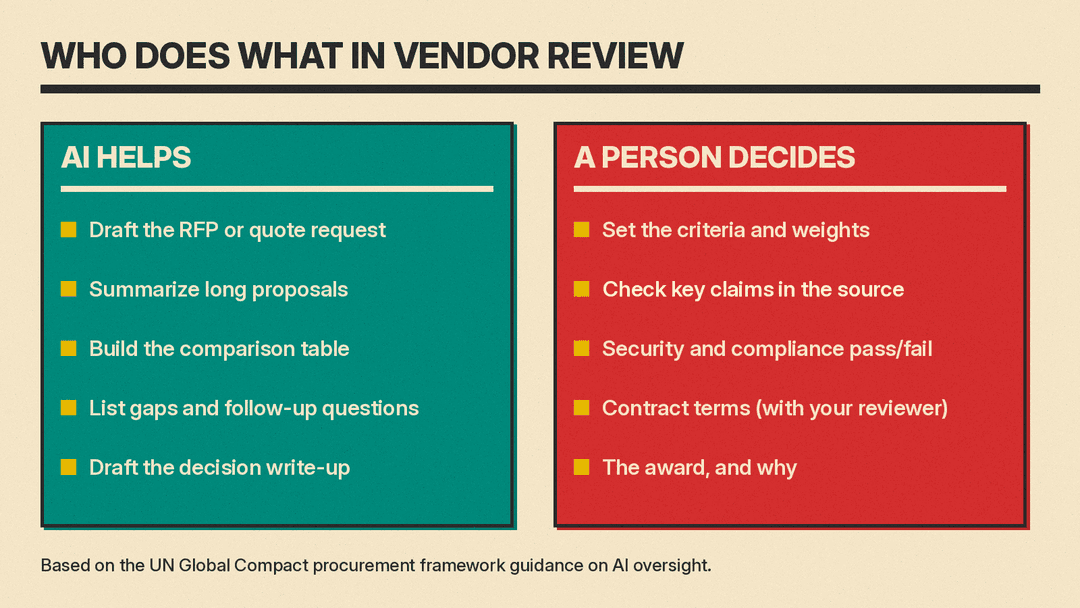
The boundary is simple: AI prepares, organizes, and drafts. People verify, judge, and decide.
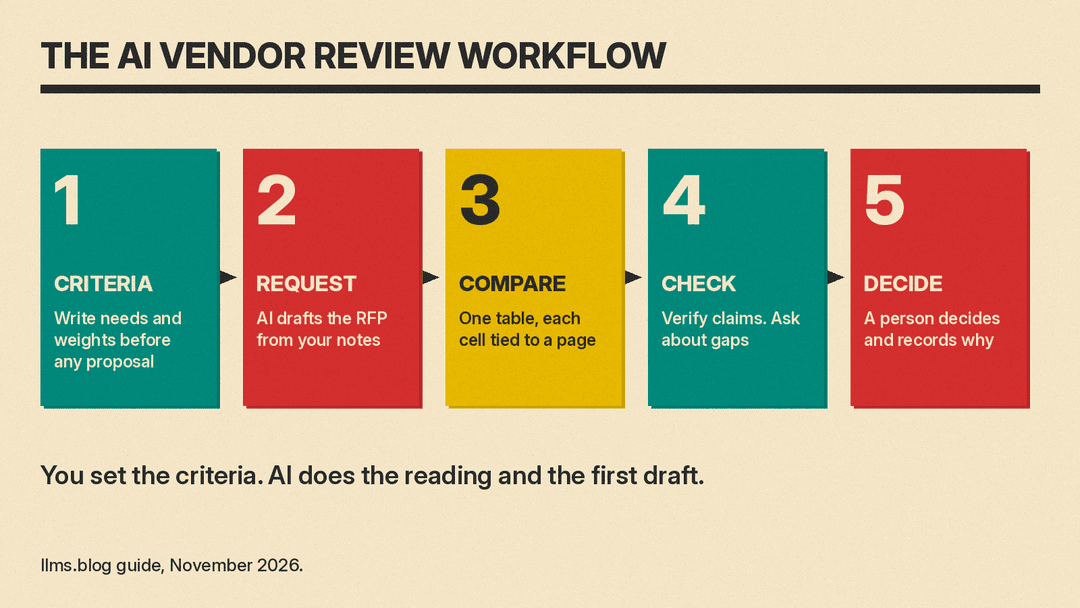
How do you run a five step AI vendor review?
Step 1: Write requirements and weighted criteria first
Do this before you see any proposal. Criteria written after reading proposals tend to match whatever one vendor already offered, which quietly rigs the comparison. List your requirements, then assign weights (for example, distribute 100 points across cost, functionality, implementation time, support, and security). AI can help you organize criteria from your notes, but the criteria and weights must exist, and be written down, before the first proposal arrives.
Step 2: Draft the RFP or quote request with AI
Give the assistant your notes and your requirements list and ask for a draft request. Ask it to flag anything unclear or missing in your input, because gaps in the request become gaps in every response. You review the draft, correct it, and send it. Vendors should all receive the same document.
Step 3: Compare proposals against those criteria in one table
Build a single comparison: one row per criterion, one column per vendor. The critical rule is that every cell must cite the page or section of the proposal it came from, and any criterion a proposal does not address must be written as "not stated." Forbid the assistant from filling gaps with assumptions or general knowledge about the vendor. A cell without a citation is a cell you cannot trust: AI assistants can state wrong details fluently, and our explainer on AI hallucinations shows how to catch them.
Step 4: Check the work
Verification is not optional. Go back to the source documents and confirm a sample of the AI's claims, especially any value that would change the ranking. Then list everything the vendor did not say: every "not stated" and every vague answer. Turn that list into follow up questions and send them to each vendor, with a deadline. Add the answers to the comparison table, again with citations.
Step 5: Decide and record
Make the decision against your weighted criteria, then write it down: which vendor you chose, the score or reasoning behind it, who approved it, and which trade offs you accepted (for example, higher cost for a shorter timeline, or fewer features for easier implementation). This record protects you in an audit, helps whoever signs off, and makes the next similar purchase faster. AI can draft this write up from your comparison table and your notes.
Which AI tools can you use for procurement?
You may not need anything new.
If your organization uses Microsoft 365, Microsoft's adoption scenario library includes an "Evaluate and purchase a new IT solution" scenario. As of November 9, 2026, it describes using Copilot to gather business requirements from your conversations, research solutions, run a build versus buy analysis with Agent Mode in Excel that compares vendor quotes with internal cost proposals, draft an RFP in Word from emails, meeting notes, and presentations, and create a comparison chart across vendor proposals with rows for cost, services provided, and timeline. That maps closely to steps 1 to 3 above. Microsoft notes that the scenario is for demonstration purposes only. It also says everyone can start with Copilot Chat, and that a Microsoft 365 Copilot license connects Copilot to your work data and apps.
Microsoft's support page says Copilot in SharePoint can compare up to 5 selected files at once. Microsoft lists comparing quotes from different vendors to understand trade offs like cost and time to complete, and comparing contract versions, among the scenarios. For contract versions, treat the AI comparison as a reading aid only, and hand the actual review to whoever reviews contracts at your organization.
Outside the Microsoft ecosystem, general assistants such as ChatGPT, Gemini, or Claude can do the same work when you upload the documents, provided your company allows you to upload vendor material to those tools (see the privacy section below).
What prompts work for RFPs, comparisons, and follow up questions?
Keep prompts short and specific. Three cover most of the process.
Drafting an RFP from your notes:
Using the attached notes and requirements list, draft a request for proposal for [what you are buying]. Include: background, scope, must-have requirements, nice-to-have requirements, timeline, what vendors must include in their response, and how responses will be evaluated. List any points where my notes are unclear or incomplete before you draft.A criteria based comparison that cites sources:
Compare the attached proposals against the attached criteria list. Produce one row per criterion and one column per vendor. In every cell, state what the proposal says and cite the page or section it comes from. If a proposal does not address a criterion, write "not stated". Do not fill gaps with assumptions or outside knowledge. After the comparison, list every criterion where any vendor is marked "not stated".Turning gaps into follow up questions:
From the comparison below, draft follow-up questions for each vendor. Write one question for every "not stated" or vague answer, and reference the section of the proposal it relates to. Keep each question to two sentences. Group the questions by vendor.What should AI not decide?
Three things stay with people:
- The award. AI can score proposals against criteria, but it cannot weigh the factors you have not written down, such as trust in a vendor, your team's capacity to implement, or a strategic relationship.
- Pass or fail on security or compliance. These require verified evidence and a named person accountable for the answer.
- Contract terms. Anything with legal effect goes to whoever normally reviews contracts at your organization, a lawyer or the person responsible for that review. AI output on contracts is a first read only.
This is consistent with published guidance. The UN Global Compact's Sustainable Procurement Implementation Framework recommends that procurement staff take ownership of every AI assisted decision and validate AI recommendations before those recommendations influence a decision. It says staff should act on AI recommendations only if they can explain the factors and data behind them, that AI may support but never replace human judgment, and that every AI recommendation in supplier selection should be reviewed by a procurement professional, with the rationale explainable to the supplier on request. It also notes that tools handling supplier or personal data must comply with privacy law and procurement policies, and that AI generated tender responses deserve extra due diligence on accuracy (worth remembering, since some proposals you receive may be written with AI too; our guide to using AI for RFP responses covers that side). The framework also says suppliers should be told when AI was used in, or influenced, a procurement decision that affects them.
SAP's AI in procurement guide adds practical advice for rolling this out: define clear goals, start with a small pilot project rather than transforming all processes at once, ensure data quality, bring in stakeholders from finance and IT, provide training, and run regular audits with human oversight.
How do you protect confidential vendor information?
Vendor proposals and pricing are often confidential, sometimes under a nondisclosure agreement. Before you upload anything:
- Check your company's AI policy. If there is not one, ask whoever handles IT or legal before the first upload, not after.
- Check the tool's data settings. For example, ChatGPT has data controls, including a setting called Improve the model for everyone. As of November 9, 2026, OpenAI's help page says this setting is on by default for personal ChatGPT Free, Plus, and Pro accounts, and that by default OpenAI does not use content from ChatGPT Business, Enterprise, or Edu workspaces to train its models. Know where yours are set; our guide to ChatGPT data controls shows how to turn model training off.
- Prefer work accounts that are covered by your organization's agreements with the vendor of the AI tool, rather than personal accounts.
- Strip what you do not need. Remove personal data about vendor staff, remove other vendors' pricing from any document you upload, and upload only the sections relevant to the task.
What mistakes should you avoid?
- Letting AI set the criteria after reading proposals. The criteria must come first, or the comparison bends toward whichever proposal the assistant saw.
- Trusting a summary without checking the source. Spot check citations against the original document, especially any value that changes the ranking.
- Comparing vendors on different units or scopes. One quote may be per user per month, another per site per year; one may include implementation, another may not. Normalize before you compare, and note the normalization in each cell.
- Treating "not mentioned" as "no." A silent proposal is an open question, not a failed one. Send the question and record the answer.
- Asking AI to "pick the best" without criteria. With no criteria, the assistant is guessing, and it will guess fluently.
- No written record of the decision. If you cannot show why you chose a vendor, who approved it, and what you traded off, you will struggle in an audit and repeat the same arguments next year.
Use this checklist before your next vendor review
- Requirements and weighted criteria written and dated before any proposal arrived
- Same RFP or quote request sent to all vendors
- Comparison built with one row per criterion, one column per vendor
- Every cell cites a page or section, or says "not stated"
- A sample of AI claims verified against the source documents
- Gaps and vague answers sent to vendors as written questions, answers added to the comparison
- Security and compliance pass or fail decided by a named person
- Contract review sent to whoever normally reviews contracts
- Company AI policy and tool data settings checked before uploading
- Decision recorded: vendor chosen, reasoning, approver, trade offs accepted
Sources
- https://adoption.microsoft.com/en-us/scenario-library/information-technology/procure-new-it-solution/
- https://support.microsoft.com/en-us/sharepoint/copilot-in-sharepoint/compare-your-files-with-ai
- https://procurementframework.unglobalcompact.org/framework/ai-integrity-and-transparency
- https://www.sap.com/resources/ai-in-procurement
- https://help.openai.com/en/articles/7730893-data-controls-in-chatgpt
