
Databricks has made its Genie app for Slack generally available, the company said on November 12, 2026. Genie is the Databricks assistant that answers questions about company data. With the Slack app, people can ask it questions in a direct message or by typing @Genie in a channel, and get answers, tables and charts back in the same thread.
The release also goes past answers. Genie in Slack can make changes in other tools through MCP connectors, run an analysis on a schedule, and work with files you upload. Databricks says it asks for your approval before it changes anything.
Why this matters for teams
Databricks frames the problem with a familiar example. A manager asks in Slack why revenue growth slowed last month. Someone has to find the right dashboard, check it against the number finance reported, and dig through meeting notes. By the time they paste an answer back, the thread has moved on.
The pitch is simple: put the data assistant where the question was asked. For teams that already store their numbers in Databricks and talk in Slack, that removes a trip to another tool. It also puts Databricks in the same race as other vendors that want their agents inside chat apps. Slack itself has been adding agent features to Slackbot, as we covered in Slackbot event-triggered tasks, and Microsoft has given Copilot connector write actions with a similar approve-first step.
What Genie in Slack can do
Databricks lists these capabilities in its announcement and FAQ:
- Answer data questions: get answers, tables and charts from your Databricks data in a DM or a channel thread.
- Search company knowledge: pull context from connected sources such as Google Drive, Confluence or Jira.
- Take action in other tools: create or update a document, comment on a ticket, or update a record through MCP connectors, using your own credentials. Genie prepares each change and waits for your approval.
- Schedule recurring analyses: click "Run this analysis on a schedule" under an answer, or ask in plain words, for example "Send me this analysis every Monday at 9 AM." Results arrive in your DM.
- Work with files: upload a file for Genie to analyze, and get documents such as PDFs back in the thread.
- Cite sources: every answer lists the sources it used, with links to explore further in Genie One.
- Notifications and feedback: receive Databricks platform notifications in Slack, and rate answers with a thumbs up or down.
Channels vs direct messages
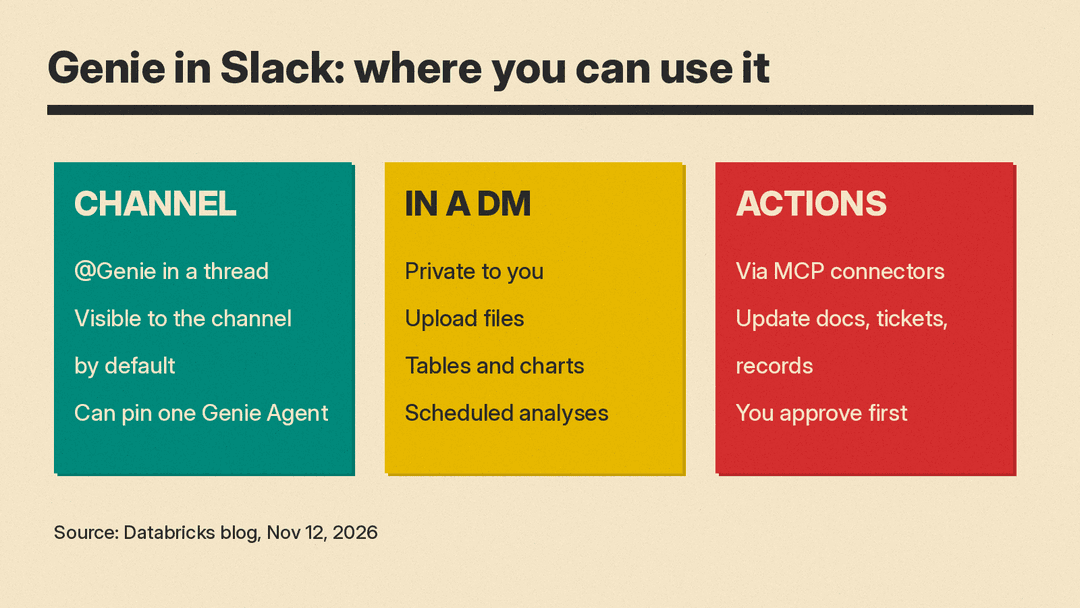
In a channel, anyone who has connected their Databricks account can @mention Genie. It replies in the thread, so follow-up questions keep their context. Databricks says Genie only reads channels it has been invited to, and answers each question in the context of that channel.
Channel answers are visible to everyone in the channel by default. Admins can change the default for the whole workspace so answers go privately to the person who asked, and each channel can choose shared or private replies.
Each channel also has its own setup. You pick which Databricks workspace it connects to, and whether questions go to Genie One or to one specific Genie Agent. Genie One is the default and routes questions across Genie Search, Genie Agents and more. For a focused channel, such as "Product FAQs" or "Employee Benefits" in Databricks' examples, you can pin a curated Genie Agent so answers stay within that agent's data and instructions.
In a DM, answers use your permissions and stay private to you. This is where you upload files, view charts and set up scheduled analyses.
How permissions work
The main promise for admins is that Genie does not get its own view of the data. Every question runs with the identity of the person who asked it, across Unity Catalog and each connected source. So Genie only uses data that person is already allowed to see. That holds in channels too: an answer in a shared thread uses the permissions of whoever asked.
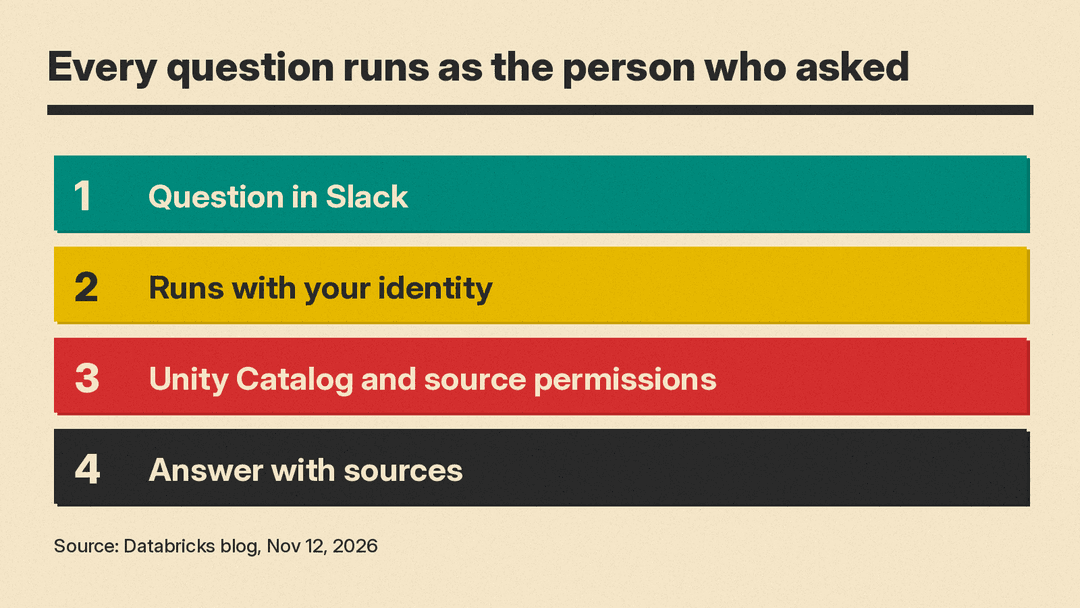
Databricks says questions are processed inside your Databricks workspace, and the service that routes messages between Slack and Databricks does not store questions or answers.
Admins manage AI use centrally in Unity Gateway. Databricks says that includes MCP policies, cost controls and monitoring. MCP policies decide which MCP servers and tools Genie can use, which users can use them, and which actions need human approval. Traces record what Genie did and who asked. Workspaces that use Private Link are supported, but an account admin has to create a context-based ingress policy first.
How to get started
Databricks gives two steps:
- Admins: install the Databricks Genie app from the Slack Marketplace, then configure channels and response visibility.
- Users: DM Genie or @mention it in a channel. The first time, you sign in to Databricks and pick a workspace.
For scheduled results, you need to sign in to the Genie app from a DM once before results can be delivered. You can also create a scheduled task in Genie One and choose Slack as the destination.
What to check before you roll it out
The announcement does not mention pricing for the Slack app, so check your Databricks plan and costs with your account team. Before you add Genie to busy channels, a few practical checks help:
- Decide the reply default. Shared answers give the team context, but Databricks' setup docs say a public answer is visible to everyone in the channel, including members who do not have access to the underlying data. The docs also say charts are not shown when replies are private. Consider private replies for sensitive channels.
- Pin agents where scope matters. A channel tied to a curated Genie Agent keeps answers inside known data and instructions.
- Set MCP policies first. Choose which tools Genie can touch and which actions need approval before people start asking it to update tickets and records.
- Use the traces. Review what Genie did and who asked, especially in the first weeks.
For teams already on Databricks, this is a low-effort way to test whether data answers in chat save time. For everyone else, it is one more sign that work assistants are moving into the chat apps where decisions happen.
