
Independent personal trainers, online fitness coaches, and small studio owners use software to build programs, send workouts, collect client updates, log nutrition, and keep messages in one place. Several coaching platforms now include AI features for those tasks. The product pages for these tools were checked in November 2026.
These tools are not standalone apps for personal workout logging. They sit inside coaching platforms that a trainer uses to run client programs. That means the tools work with your existing client workflow, not just a single generated plan. If you want an app for your own training, not a coaching platform, see our guide to the best AI fitness and workout planning apps. If you run a studio or a small coaching business, you may also need tools for admin, marketing, and finance, so see our list of AI tools for small business owners.
Do you need an AI coaching platform or one AI feature?
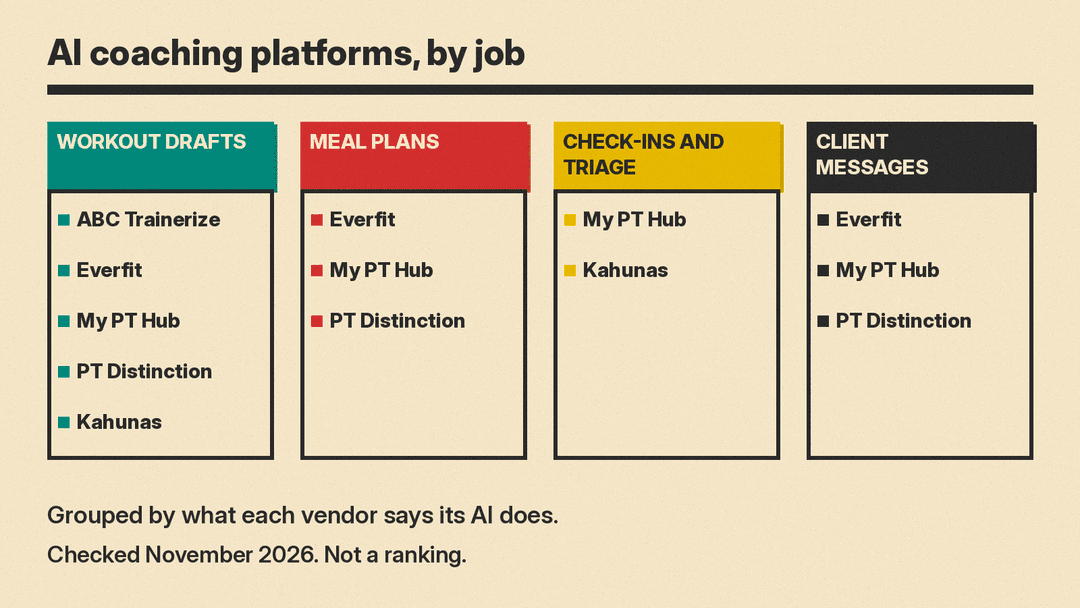
Most trainers choose one platform, then use its AI features across program design, client messages, client updates, and reports. The tools below mostly overlap. ABC Trainerize has a workout builder. Everfit has a suite covering assistant, voice, workouts, nutrition, macro logging, messaging, challenges, and dashboards. My PT Hub covers workouts, nutrition, and client update summaries. PT Distinction covers programs, meal plans, assistant content, and client questions. Kahunas focuses on triage and briefings from client data. A trainer can pick based on which parts of the job feel repetitive and which review controls feel easiest to manage.
Draft workout plans inside a coaching platform
ABC Trainerize AI Workout Builder
The feature is inside ABC Trainerize, a coaching platform for personal trainers. The page labels it as early access. Trainerize describes three steps. First, you describe the workout. You can use your own prompt, choose from a prompt library, or let the client's background and training history inform the plan. Second, you review the plan and fine-tune exercises, sets, or progressions. Third, you save it to your library or assign it to the client.
The company says the builder uses client goals, history, and preferences. It also says the trainer can edit everything before the client sees the work. Trainerize says the feature is included at no extra cost on paid plans (Grow and above). It is not available on the 30-day trial or on free accounts. Its FAQ adds that the builder drafts one workout at a time and cannot build full training programs or phases, and that client names are not shared with the AI and client data is not used to train the model.
This fits trainers who already use ABC Trainerize and want AI support for drafting workout plans. The AI feature on this page covers workout drafting only, so compare it with the wider AI suites below if you also want help with nutrition or client messages.
Add AI across client answers, workouts, nutrition, and messages
Everfit AI Suite
The Everfit AI Suite is a set of AI features inside Everfit, a coaching platform. Everfit says the suite has several tools. Olly AI Assistant lets you ask about any client and get answers about their training, nutrition, or wellness. Olly Voice lets you dictate client messages and assign tasks, such as a habit, by voice. AI Workout Builder turns text program notes or PDFs into Everfit workouts. Personalized Nutrition generates meal plans from client goals and dietary needs. MacroSnap lets clients scan a meal, barcode, or label to log macros. Smart Response drafts replies inside client messages. Everfit says these drafts are written in your voice, and you can review, edit, then send. AI Push-up Challenge tracks reps with a live leaderboard. BI Dashboard is beta and shows revenue, retention, and client trends.
This fits online fitness coaches who want AI spread across many parts of the coaching platform. If you already use Everfit, the suite can touch client questions, program creation, nutrition, macro logging through scans, and client messaging. The business dashboard is relevant only if you want platform data in one view, but it is in beta.
Use AI for workouts, meal plans, and client summaries
My PT Hub AI
My PT Hub AI is a feature set inside My PT Hub, a coaching platform. Workouts AI builds a workout from a prompt, a photo of a gym whiteboard, or a PDF. My PT Hub says it can also progress the load or adjust the volume of an assigned workout. This is relevant when you want to start from a real gym board or a file rather than writing every exercise by hand.
Nutrition AI turns text, images, and files into macro-aware meal plans. The company says it reads a client's allergies and dietary restrictions when you attach the client to the plan. Every plan runs past the coach for approval. My PT Hub says the nutrition figures come from a verified nutrition database. Check-Ins AI condenses client check-ins into key insights. It auto-generates progress reports and drafts responses.
This fits trainers who want AI support across workouts, nutrition, and client update summaries. The client update feature may help if you review many weekly notes. The nutrition approval step keeps the coach in the review loop before a plan goes to a client.
Use AI inside personal trainer software with branded apps
PT Distinction AI Coaching
PT Distinction AI Coaching tools are part of PT Distinction, personal trainer software with branded apps. PT Distinction says the AI Program Builder makes personalised plans and lets you update many client programs at once. The AI Meal Planner creates meal plans from client preferences and goals. The AI Assistant generates workout plans, meal ideas, blog posts, and social media content. It also answers common client questions. The company says the AI tools come with every package at no additional cost.
This fits personal trainers who want AI inside software that also gives clients a branded app. The content side, blog posts and social media, may matter more to independent trainers who also market their own services. The ability to update many client programs at once may fit a coach with many clients. The common client question feature may let you draft answers to frequent questions.
Use AI to prioritize clients and review results
Kahunas
Kahunas is an all-in-one coaching platform. Kahunas says Intelligent Insights turns client check-ins, habits, and metrics into a list of who needs you and why. It adds an AI summary of what changed. This places the focus on triage, which means deciding which clients need attention first.
The Crew feature uses AI assistants with one job each. Kahunas says Crew can triage clients, draft programs, and brief you at a time you choose. A Crew briefing summarizes new results on days you pick, with an optional short voice recap. Kahunas says its client app is a web app that clients install in a few taps, without an app store.
This fits trainers who want a clear review routine instead of many small prompts. It may suit coaches who prefer scheduled summaries, voice recaps, and a short list of clients who need attention. It may also suit coaches who do not want their client app to depend on an app store.
How to choose the right AI tool for your coaching setup
Start with the work you do every week. Do you write most workouts from scratch? Then a builder with prompt, library, or history inputs may matter. Do you send many client messages and review many client updates? Then drafting, triage, and summary features may matter more. Do you create meal plans? Then look for whether the platform attaches client allergies and dietary restrictions, and whether it sends the plan to you for approval. Do you already have one coaching platform? Then use the AI features inside that platform before buying another tool.
Also look at who reviews the output. The product pages for these tools describe review, edit, approval, or assignment steps. That is the part that protects your coaching standards. Choose a platform where the review step fits your normal process, not one that buries it.
What to watch for when you use AI with clients
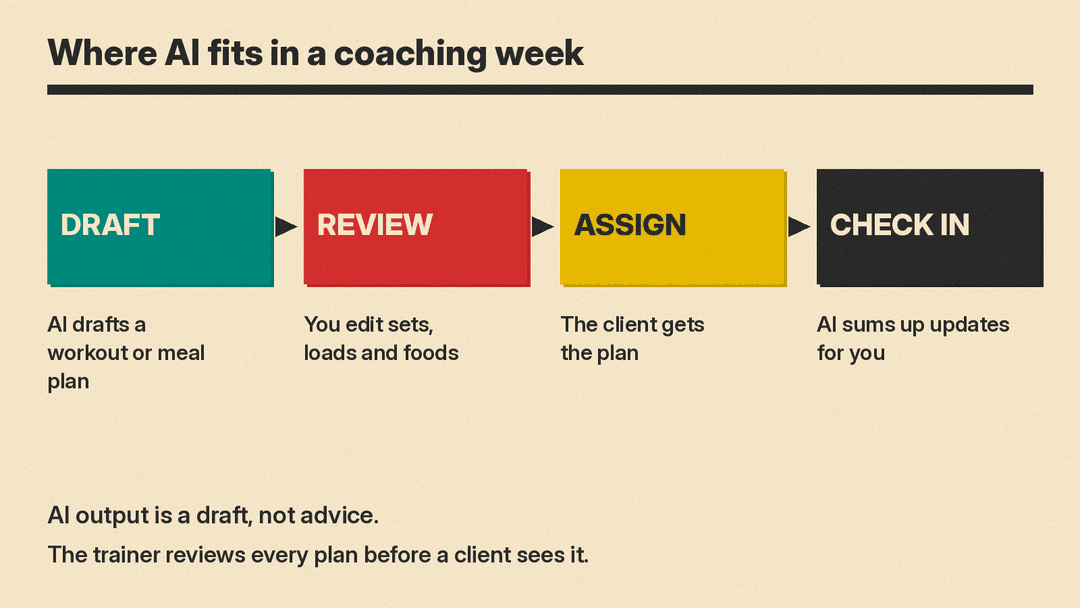
The trainer stays responsible for every program and meal plan. AI output is a draft until you have reviewed it. Check that each client gets a plan that matches their goals, history, limitations, and current training level. Review AI output before a client sees it.
AI is not medical advice or dietetic advice. Refer clients with health conditions to a qualified professional. This applies to injuries, chronic disease, pregnancy, medication interactions, eating disorders, and any condition outside your scope. A client's allergies and restrictions may inform a tool, but they do not replace qualified review when needed.
Check how each vendor handles client data in its own privacy policy. These tools may use goals, history, preferences, files, messages, client updates, meals, metrics, and reports. Before upload, ask what data is stored, who can access it, how long it is kept, and whether client files are used beyond the service. Keep client notes minimal and accurate. Do not enter information you would not want stored or exposed.
Also watch for beta features, early access labels, and platform overlap. A beta dashboard may change. Early access may have limited scope. Multiple AI tools can produce similar plans, so choose one workflow that you will actually review each week.
