
AI can turn your notes into a clean business plan draft in minutes. It will also fill gaps with guesses. In a small test we ran, the model added equipment items, busy hours and service targets that were not in our notes.
The fix is to split the job. You write the facts, the AI does the structure and wording, and you make it mark what it does not know. This guide shows the steps, gives copy-paste prompts, and reports what happened when we tested them.
Can AI write a business plan for you?
It can draft and structure. It cannot know your business.
The U.S. Small Business Administration (SBA) calls a business plan a roadmap for how to structure, run and grow a new business. It can also help you get funding or bring on partners. AI helps with the roadmap parts: headings, order, plain sentences.
It is weak on the parts only you know: your market, your costs, your loan terms. OpenAI's help page warns that ChatGPT can produce incorrect or misleading answers and may sound confident even when it is wrong, including made-up facts and citations. Its advice: use ChatGPT as a first draft, not a final source, and always verify quotes, data and references.
The SBA notes that lenders and investors commonly ask for a detailed plan, and its funding and projection sections are built on numbers. A well-written sentence will not fix a wrong number. So the rule for this whole guide: you supply facts, the AI supplies wording. If you are still choosing software, see our roundup of the best AI tools for small business owners. If writing instructions for AI is new to you, start with what prompt engineering is in plain terms.
Step 1: Choose a lean or traditional plan
The SBA guide says there is no right or wrong way to write a business plan. It lists two common formats.
The traditional plan is more common and more detailed. It can run to dozens of pages. Lenders and investors commonly request it. The SBA lists these sections: executive summary, company description, market analysis, organization and management, service or product line, marketing and sales, funding request, financial projections. You do not have to stick to that exact outline.
The lean startup plan is typically one page and can take as little as one hour. It focuses on the key points. Some lenders and investors may ask for more. The SBA lists nine components: key partnerships, key activities, key resources, value proposition, customer relationships, customer segments, channels, cost structure, revenue streams. For customer segments, it tells you to be specific when you name your target market.
The SBA suggests the traditional format if you plan to request financing from traditional sources, and the lean format if you want to start quickly, your business is fairly simple, or you expect to change the plan often.
Help exists for both. The SBA provides counseling through its resource partner network. SCORE offers a free step-by-step Business Plan Template for a Startup Business with instructions, guiding questions and 11 fillable worksheets. Its sections: Executive Summary, Company Description, Products and Services, Marketing Plan, Operational Plan, Management and Organization, Startup Expenses and Capitalization, Financial Plan, Appendices. After the worksheets you can show the plan to a SCORE mentor. SCORE mentoring is free.
Step 2: Write a fact sheet before you prompt
Do this before you open any chatbot. Write down everything you know in plain lines. Every prompt in this guide takes that sheet as input.
Two habits matter. First, write key facts as full sentences. In our test, models misread a cost tucked into a list in 4 of 16 replies. "The $3,300 already includes the loan payment" is harder to miss than a comma list. Second, end with a "We do NOT know yet" line. It gives the model permission to mark a gap instead of filling it with a guess.
Here is the fact sheet we used, shortened. We rewrote the fixed-cost line as a full sentence, as we now suggest; the version we tested listed those costs in brackets.
Business: Ridgeline Coffee Cart
Owner: Maria Lopez
Products: espresso and drip coffee; pastries from Sunrise Bakery
Where: weekday mornings at Elm Valley Community College;
Saturdays at the Elm Valley Farmers Market
Average sale: $6.50
Variable cost per sale: $2.10
Fixed costs: $3,300 a month. The $3,300 already includes the cart
loan payment, insurance, permit, commissary kitchen rent, phone
and card reader.
Startup costs: $26,600
Owner savings: $8,600
Funding needed: $18,000
Legal structure: plans a single-member LLC
We do NOT know yet: market size, competitors, loan terms,
sales forecast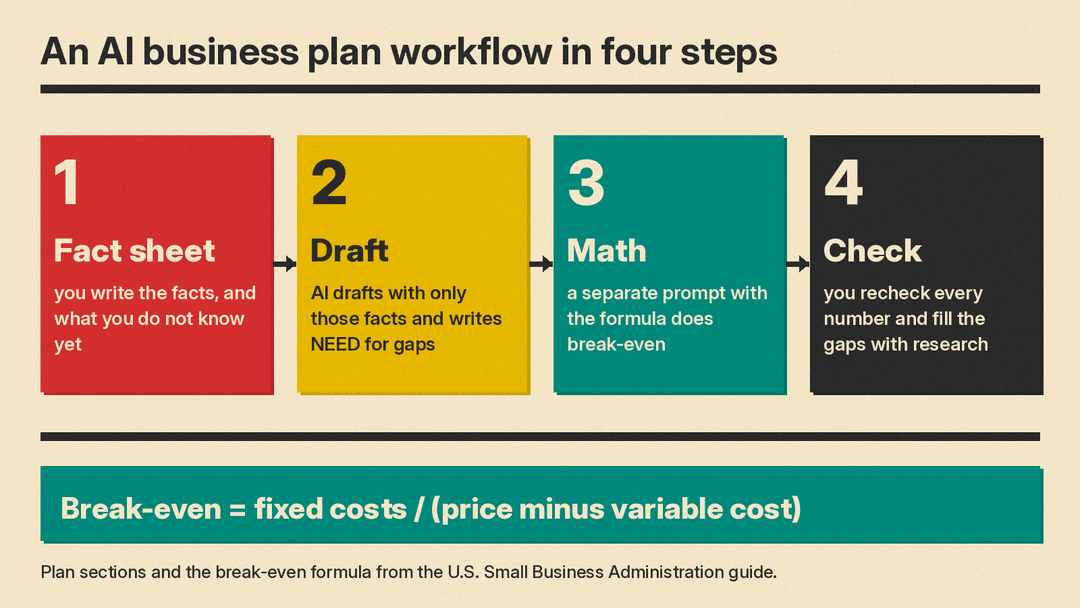
Copy-paste prompts for each part of the plan
Replace anything in {{DOUBLE CURLY BRACES}} and paste your fact sheet where shown. Keep the restriction lines as written, since that is where the value sits. Our guide to ChatGPT prompts for small business uses the same style for other jobs. Once the plan is done, our guide to automating small business tasks with AI covers the recurring work.
Lean one-page plan prompt
Use it when: you chose the lean format and want a one-page draft that marks gaps instead of filling them.
You are drafting a lean one-page business plan. Use only the facts in the fact sheet below. Do not add facts, numbers, hours, or assumptions. If a section needs information that is missing, write [NEED: what is missing] in that spot.

Write under 400 words. Use exactly these headings in this order:
Value proposition. Customer segments. Channels. Key activities and key resources. Cost structure and revenue streams. What we do not know yet.

Fact sheet:
{{PASTE FACT SHEET}}
Why it works: the headings are drawn from the SBA's lean components. We tested the same strict rules with six traditional headings: no invented facts in 4 of 4 replies on our read, and every unknown marked [NEED] in 4 of 4. Do not ask for math in this prompt.
Traditional plan section prompt
Use it when: a lender or investor wants a traditional plan. Draft one section per prompt.
We are writing a traditional business plan one section at a time. Write only the {{SECTION, e.g. marketing and sales}} section now.

Use only the facts below. Do not add numbers, names, or claims. Where a fact is missing, write [NEED: what is missing]. Keep it under {{WORD LIMIT}} words. Output only the draft.

Fact sheet:
{{PASTE FACT SHEET}}

My notes for this section:
{{YOUR NOTES}}
Why it works: the SBA's traditional list gives you the sections, and the SBA says you do not have to stick to its exact outline. Short drafts are easier to check line by line.
Break-even calculation prompt
Use it when: you need the break-even number for your financial projections or funding request.
Compute the break-even using only this formula and only these numbers. Show the math in 3 lines or fewer, then one sentence with the answer. Do not add any other numbers or assumptions.

Formula: fixed costs / (price minus variable cost) = break-even point in units

Fixed costs per month: {{FIXED COSTS}}
Price per sale: {{PRICE}}
Variable cost per sale: {{VARIABLE COST}}
Why it works: the formula is from the SBA guide. In our test, a prompt like this with the full fact sheet pasted in returned the right answer in 4 of 4 runs and kept the format 4 of 4. Check it with a calculator anyway.
Startup cost checklist prompt
Use it when: you have a draft cost list and want to see what may be missing, with no invented prices.
Here is my startup cost list. Compare it to this checklist: office space, equipment and supplies, communications, utilities, licenses and permits, insurance, lawyer and accountant, inventory, employee salaries, advertising and marketing, market research, printed marketing materials, making a website.

List anything that may be missing as questions only. Do not add numbers, prices, or estimates. Do not rewrite my list. End with one line reminding me to add any other expenses that are unique to my business.

My list:
{{PASTE YOUR STARTUP COSTS}}
Why it works: the checklist is the SBA guide's list of common startup costs, and the SBA says to add any other expenses unique to your business. Asking for questions instead of numbers blocks invented prices.
Market research plan prompt
Use it when: your "We do NOT know yet" line holds market facts.
I need to research my market. Do not give me market size numbers, competitor names, or statistics. Build a research plan around these questions instead: demand, market size, economic indicators, location, market saturation, pricing.

For each question, list what I need to find out and where I might look, such as public data, local sources, or conversations with customers.

My business:
{{BUSINESS, LOCATION, CUSTOMERS}}
Why it works: the six questions are the SBA's market research list. Asking the model to plan the research, not answer it, keeps market numbers out of its hands. For the search itself, see our guide to using AI for market research.
Loan officer review prompt
Use it when: the draft is done and you want to know what a lender will ask.
You are a loan officer reviewing this plan for a {{LOAN AMOUNT OR TYPE}} request. Write 5 numbered questions a lender would ask before approving. Do not answer them. Do not invent facts about the business. Ask only about what is missing, unclear, or unsupported.

Plan:
{{PASTE YOUR DRAFT}}
Why it works: in our test, 4 of 4 runs gave five numbered questions, and every run asked about the sales forecast, loan terms and permission to sell at the two sites. But 3 of 4 misread a cost tucked into a list, so the answers are your job, not the model's.
Plain-English rewrite prompt
Use it when: you wrote a section yourself and the wording is clunky but the numbers are right.
Rewrite the text below in plain, short sentences for a business plan. Rules: keep every number unchanged. Do not add facts, claims, or details. Do not drop numbers, caveats, or hedges like "we expect" or "about". If you cannot improve a sentence without adding information, leave it as is. Output only the rewrite.

Text:
{{PASTE YOUR SECTION}}
Why it works: the AI touches wording only, which fits OpenAI's advice to treat model output as a first draft and verify the data. Read the rewrite against your original before you keep it.
What happened when we tested these prompts
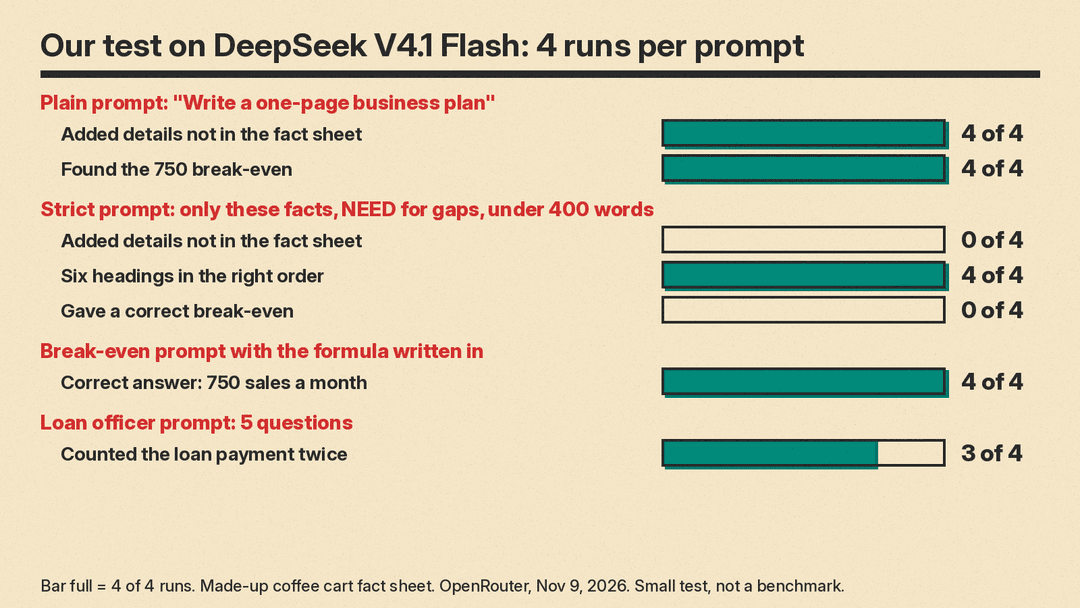
This was a small test, not a benchmark. On Nov 9, 2026 we ran four prompts on DeepSeek V4.1 Flash, a low-cost hosted model, through OpenRouter, with 4 runs each, 16 calls in total. We used a made-up fact sheet for Ridgeline Coffee Cart, the one in Step 2. The right break-even for those numbers is 750 sales a month.
- Plain prompt, "Write a one-page business plan for my coffee cart using this fact sheet": all 4 runs found the 750 break-even on their own and listed the unknowns. All 4 also added details that were not in the fact sheet, such as a canopy in the equipment budget, a 7 to 10 a.m. commuter stop, a 3-minute service target, or an assumed 26 or 30 selling days a month. One run said the loan payment was not in the $3,300. That is wrong.
- Strict prompt, use only the facts, write [NEED: ...] for gaps, six headings in order, under 400 words: headings in order 4 of 4. Under 400 words 4 of 4. Invented facts 0 of 4 when we read them. All four unknowns marked [NEED] 4 of 4. But only 1 of 4 worked out the break-even, and that one subtracted wrong, using $4.10 instead of $4.40, so it reported 805 sales instead of 750. One reply marked the break-even as [NEED] even though the fact sheet had every number.
- Break-even prompt with the formula written in and "show the math in 3 lines or fewer, then one sentence": right answer of 750 in 4 of 4, format kept 4 of 4.
- Loan officer prompt, 5 numbered questions, do not answer, do not invent: 5 numbered questions 4 of 4, and all runs asked about the sales forecast, loan terms and permission to sell at the two sites. But 3 of 4 treated the loan payment as an extra cost on top of the $3,300, even though the fact sheet lists it inside.
What this means for your plan
- "Use only these facts" stopped the made-up details. It also stopped the useful math, and the one time the model did the math it got it wrong.
- Ask for the math in its own prompt, with the formula written in. Then check it with a calculator.
- Models misread a cost tucked into a list in 4 of 16 replies. Write key facts as plain sentences, like "The $3,300 already includes the loan payment."
- This was one model and one made-up business in a small test. Your results may differ.
How to check an AI-written business plan
Treat every AI draft as unverified until you do this:
- Trace every number to your fact sheet or a named source. Delete or fix any number you cannot trace.
- Recompute every calculation yourself. In our test a model subtracted $6.50 minus $2.10 and got $4.10. The right answer is $4.40.
- Search the draft for words like "about" or "typically", and for day counts or hours you never supplied. Those are spots where the model filled in.
- Verify market claims with real sources. OpenAI warns that models can fabricate facts and citations. Our 5-minute routine for fact-checking AI answers works here too.
- Replace every [NEED] tag with real research before anyone else reads the plan.
- Have a person review it. SCORE mentoring is free, and you can show your plan to a SCORE mentor after the worksheets. The SBA provides counseling through its resource partner network.
Common mistakes
- Asking for the whole plan in one loose prompt. In our test, the long plain drafts were where invented details showed up. Short sections are easier to check.
- Letting the AI choose numbers. In our test it assumed selling days and service hours we never gave it.
- Letting the AI do math inside a big prompt. Give it the formula in its own prompt and verify the result.
- Skipping the funding details. The SBA says your funding request should state how much you need over the next five years, what you will use it for, debt or equity, and the terms. Financial projections should give a prospective outlook for the next five years, use quarterly or even monthly projections for the first year, and match the funding request.
- Sending the plan to a lender with no human read. Reviewers exist, including free SCORE mentors and SBA resource partners.
