
DeepSeek's reasoning models think before they answer. A reasoning model writes out a chain of thought first, then gives a final answer. DeepSeek's R1 models work this way, and so does thinking mode on DeepSeek's API, which is on by default. (New to the company? Start with what DeepSeek is.) That changes how you should prompt them.
DeepSeek's own research paper, model card and API docs give specific advice for these models. This guide turns that advice into copy-paste templates you can use today. It also shares a small test we ran in November 2026 on DeepSeek V4.1 Flash, the model behind the API's deepseek-flash name, so you can see what a written format rule actually does. One caution up front: the paper and model card advice was written for DeepSeek-R1. The API now serves newer models, so treat that advice as a strong starting point, not a rule for every DeepSeek model.
How DeepSeek reasoning prompts differ
The DeepSeek-R1 paper lists prompting under its limitations, and the advice is blunt:
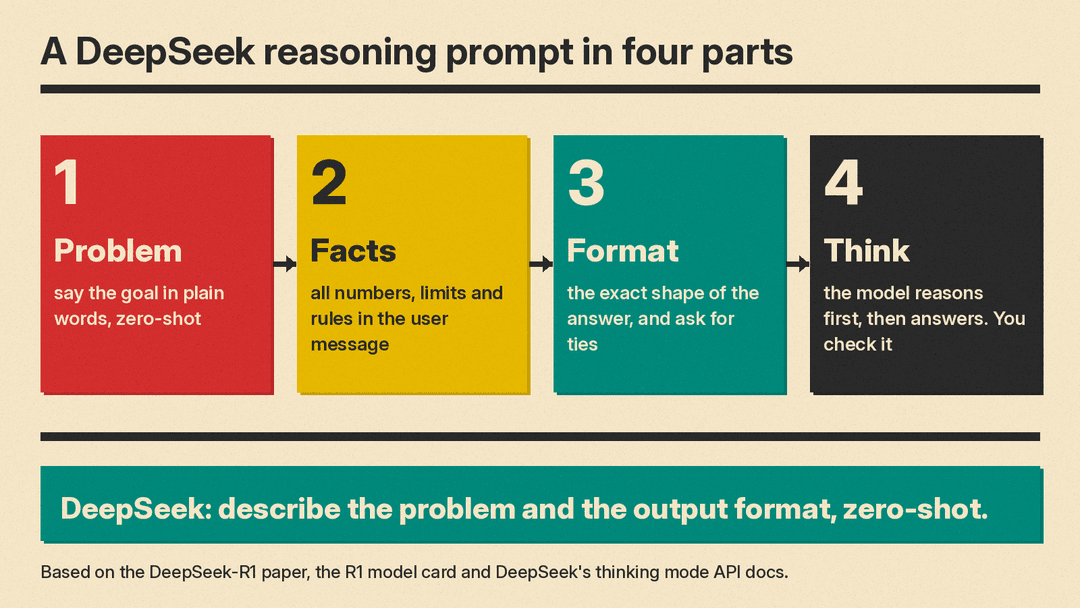
"When evaluating DeepSeek-R1, we observe that it is sensitive to prompts. Few-shot prompting consistently degrades its performance. Therefore, we recommend users directly describe the problem and specify the output format using a zero-shot setting for optimal results."
In plain terms:
- Write zero-shot prompts. Describe the problem directly instead of stacking up examples. The paper found that few-shot prompting consistently degraded R1's performance in its evaluation.
- State the goal, the facts and the limits in the prompt itself, so nothing is left for the model to guess.
- Say what the output should look like. "Reply in exactly two lines" is a direct instruction the model can follow.
- Put your instructions in the user message. DeepSeek's model card for R1 says to avoid a system prompt and keep all instructions in the user prompt.
- You do not need to ask it to think. In thinking mode on the API, the model outputs its chain of thought before the final answer on its own. That is a built-in version of chain-of-thought prompting.
Copy-paste DeepSeek prompt templates
Replace anything in double curly braces with your own details.
1. Describe the whole problem in one zero-shot prompt
Use it when: you have a word problem, a planning task or any question with facts and limits.
{{STATE THE GOAL IN ONE SENTENCE.}}

Facts:
- {{FACT 1}}
- {{FACT 2}}

Limits:
- {{CONSTRAINT 1}}

Give your answer as {{OUTPUT FORMAT}}.
Why it works: the R1 paper recommends that you "directly describe the problem and specify the output format using a zero-shot setting." This template does exactly that.
2. Math problems: use the model card's exact line
Use it when: the task is math and you want a clean final answer you can check.
{{MATH PROBLEM}}

Please reason step by step, and put your final answer within \boxed{}.
Why it works: that middle line is the exact wording DeepSeek's R1 model card recommends for math problems. The boxed answer is easy to find and compare.
3. A fixed answer format, with room for ties
Use it when: you need a strict shape, like two lines you can paste into a sheet.
{{PROBLEM WITH ALL FACTS AND LIMITS}}

Reply in exactly two lines:
Buy: {{WHAT TO LIST}}
Total: ${{AMOUNT}}

If several options cost the same, list each one on the Buy line.
Why it works: a written format rule is a direct instruction, which the paper recommends over examples. The last line matters because a strict format can hide tied answers, as our test below shows.
4. Ask for options and tradeoffs, not one answer
Use it when: the "right" answer depends on what you care about.
{{DECISION TO MAKE}}

Constraints:
- {{BUDGET, TIME, OR OTHER LIMITS}}

List 2 to 3 workable options. For each one, give the main benefit, the main drawback, and when you would pick it. Then say which option you would choose first and why, in 2 sentences.
Why it works: the model gets a clear output format and clear criteria, so its reasoning has something to aim at. You still make the final call.
5. Answers in a language other than English or Chinese
Use it when: you want the reply in another language.
Answer in {{LANGUAGE}}. Write every part of the final answer in {{LANGUAGE}}.

{{PROBLEM}}
Why it works: the R1 paper says the model is optimized for Chinese and English and "might use English for reasoning and responses, even if the query is in a language other than English or Chinese." Stating the language for the answer gives the model an explicit target, but be aware of this limit.
6. Quick factual or simple tasks: keep it short
Use it when: the task is easy and you do not want to wait or pay for long reasoning.
{{SHORT, DIRECT QUESTION}}. Answer in one sentence.Why it works: short prompts suit short tasks. The paper notes the model uses fewer tokens on simple tasks and more on complex ones, though it still overthinks simpler questions at times. On the API you can turn thinking off (thinking type "disabled") or set effort to "low" for this kind of task. One caution from our test: effort "low" did not cut reasoning tokens on a small puzzle, so it may not always save you anything.
7. Follow-up turns: restate what matters
Use it when: you are continuing a conversation in the API without tools.
Earlier we established: {{RESTATE THE KEY FACTS AND THE ANSWER YOU AGREED ON}}.

Now: {{NEXT QUESTION OR CHANGE}}.
Why it works: DeepSeek's API docs say that in a multi-turn chat without tools, the reasoning from earlier turns is not added to the context of the next turn. Only the final answers are. If the reasoning mattered, summarize it yourself in the next prompt. (With tools, the docs say the reasoning must be passed back or the API returns a 400 error.)
8. Code and debugging: give the error, the code and the target output
Use it when: something is broken and you want a fix, not an essay.
This code should {{WHAT IT SHOULD DO}}:

{{PASTE CODE}}

It fails with this error:

{{PASTE FULL ERROR MESSAGE}}

Reply with the corrected function only, then 3 bullets explaining what was wrong.
Why it works: the problem, the facts and the output format are all stated directly, which is the pattern the R1 paper recommends. Naming the exact output shape keeps the reply usable.
9. Run it twice and compare
Use it when: you are checking a prompt or judging the model's performance on your task.
Run your prompt twice, unchanged. Then paste both answers into a new chat:
Here are two answers to the same question.

Question: {{QUESTION}}

Answer 1: {{ANSWER 1}}

Answer 2: {{ANSWER 2}}

List every point where they disagree. For each one, say which answer is right and why, or say that it cannot be decided from the question.
Why it works: the R1 model card says that when you evaluate performance, you should run multiple tests and average the results. One run can get lucky. Two runs that disagree tell you the prompt needs work.
Settings: system prompt, temperature and DeepThink
The advice splits into two cases. They do not fully agree, so be clear about which one applies to you.
If you run R1 or an R1 distill yourself, follow the R1 model card. It recommends avoiding a system prompt and putting all instructions in the user prompt. It also recommends a temperature of 0.5 to 0.7, with 0.6 as the suggested value, to prevent endless repetitions or incoherent outputs. The card also says R1 models sometimes skip their thinking step, and recommends making every reply start with "<think>\n" so the model reasons first.
If you use DeepSeek's API, the picture is different. The API docs' own sample code for a first call includes a system message, "You are a helpful assistant." As of November 9, 2026, the API model names in the docs are deepseek-flash (served by DeepSeek-V4.1-Flash-1017) and deepseek-v4-pro. Also, the thinking mode docs say that in thinking mode the temperature, presence_penalty and frequency_penalty settings are not supported. Setting them gives no error but has no effect, so the 0.6 advice does not apply there. Our reading: on the API, a short system message is fine because DeepSeek's own example uses one, but keep the task details in the user message either way. If you want deeper background on system messages, see how to write a system prompt.
A few more API facts worth knowing. Thinking mode is on by default, with default effort "high." You can set effort to low, high or max, and other values map to these (for example, medium maps to high). You can turn thinking off with thinking type "disabled." In thinking mode the reasoning comes back in a separate field, reasoning_content, next to content.
On chat.deepseek.com, the model card says you switch on the "DeepThink" button to chat with R1. Before you send work or personal data to any AI service, it is worth reading is DeepSeek safe to use.
What happened when we tested these prompts
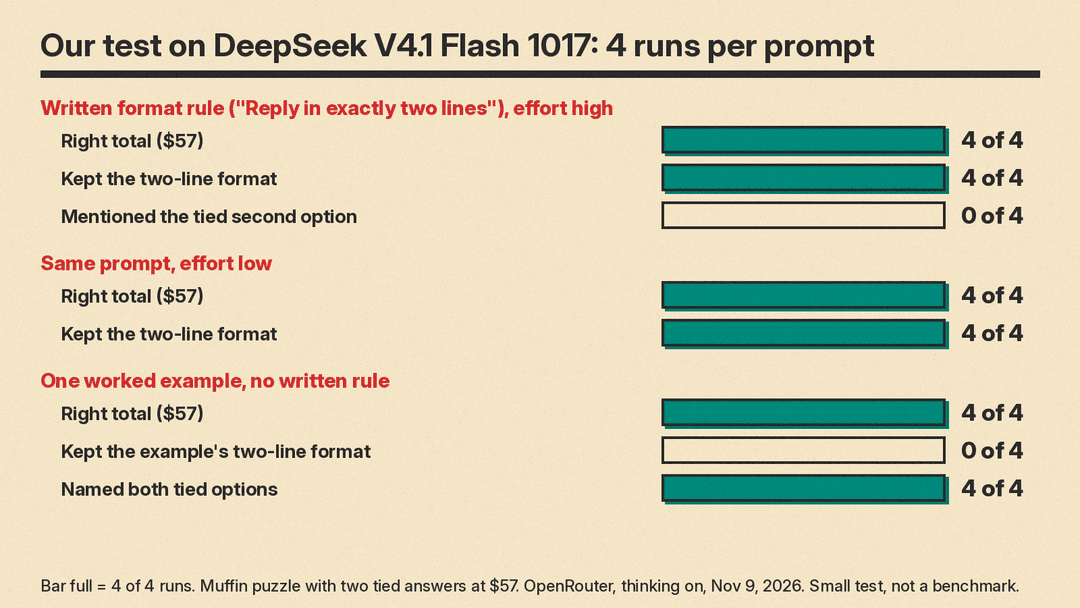
We ran prompts on DeepSeek V4.1 Flash 1017, the model behind deepseek-flash, through OpenRouter on November 9, 2026. Thinking was on, with 4 runs per prompt, and we set effort with OpenRouter's reasoning effort option. This was a small test, not a benchmark.
The puzzle: muffins cost $3 each, a box of 4 costs $10, and a box of 6 costs $14. A customer may buy at most 2 boxes of 6. You need at least 23 muffins at the lowest cost. The correct answer is $57, and there are two tied ways to get it: 2 boxes of 6 plus 2 boxes of 4 plus 3 singles, or 1 box of 6 plus 4 boxes of 4 plus 1 single. We checked this by brute force.
Results:
- Prompt A, zero-shot with the goal and a fixed format ("Reply in exactly two lines: Buy: ... / Total: $..."), effort high: right total 4 of 4, exactly two lines 4 of 4, mentioned the tie 0 of 4. Reasoning tokens ranged from 318 to 819, average about 466.
- The same prompt at effort low: right total 4 of 4, two lines 4 of 4, tie 0 of 4. Reasoning tokens ranged from 335 to 698, average about 528. Low effort did not cut reasoning on this small task.
- Prompt B, one worked example (a pens problem in the two-line format) and no written format rule: right total 4 of 4, but it kept the two-line format 0 of 4. All replies added math lines, bold text and extra sections. It did name both tied options 4 of 4. Reasoning tokens ranged from 577 to 1,307, average about 861.
- An easier plain question (11 muffins, no limit, "What should I buy?"): right answer $27 in 4 of 4 runs, and every reply also added that 12 muffins cost $28.
What this means for your prompts
- A written format rule held 4 of 4. An example alone did not hold the format at all. If you need a shape, say the shape in words.
- The strict two-line format hid the tie. If ties or alternatives matter to you, ask for them in words: "If several options cost the same, list each one."
- We did not see accuracy drop with the example on this easy puzzle. DeepSeek's few-shot warning comes from its own evaluation of R1, a different model on harder tasks, so treat our small test as one data point, not a contradiction.
- Effort "low" did not save tokens here. Do not assume a setting will cut cost on your task. Measure it.
- Check answers yourself. We brute-forced the puzzle before trusting any run.
Common mistakes
- Using examples to control format. In our test the written rule held and the example did not. Write the rule, and skip examples unless the task truly needs them.
- Forgetting to ask for ties and alternatives. A tight format can push the model to give one answer when two are equally good.
- Setting temperature in API thinking mode and expecting a change. It has no effect there, with no error to warn you.
- Assuming the model remembers its earlier reasoning across turns. Without tools, only final answers carry over, so restate the facts.
- Running a prompt once and calling it evaluated. The model card says to run multiple tests and average when you evaluate performance.
