
Digital audio workstations, or DAWs, are the apps musicians and podcasters use to record, edit and mix audio. Think of one as a recording studio on your computer. Within a few days in early November 2026, three of them added AI. These are not prompt-to-song apps. The new features help with the chores of making music: finding sounds, splitting recordings apart and setting up tracks.
As the Zinstrel newsletter put it, Splice launched its first DAW, Avid added AI to every version of Pro Tools, and Apple released an assistant that can operate Logic Pro for subscribers. Here is what each one does, who pays what, and what they have in common.
What is Splice Create?
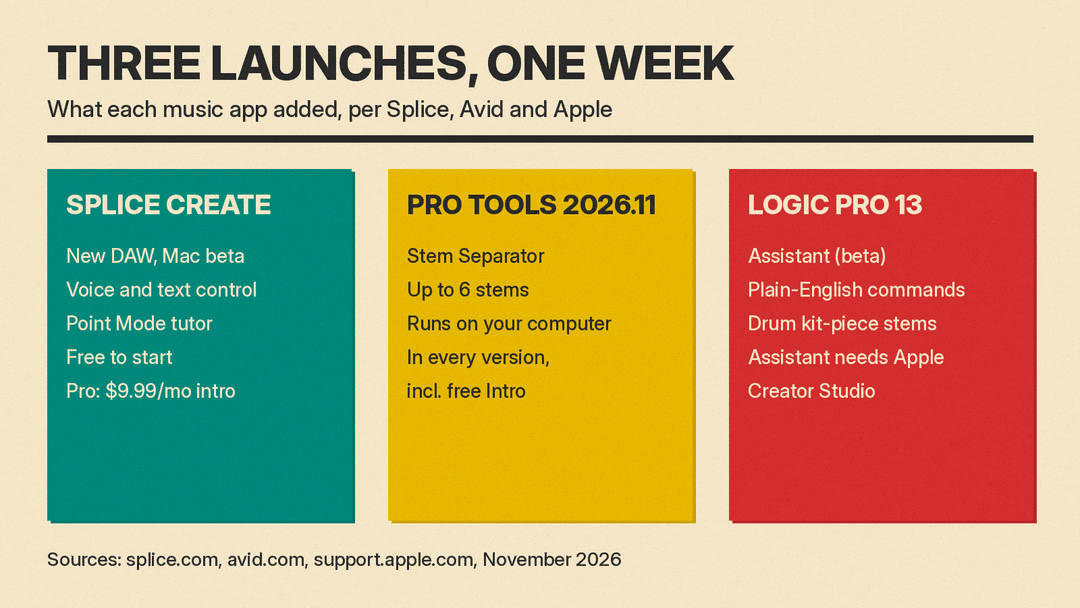
Splice Create is a new DAW from Splice, the company known for its sample library. Splice announced it on November 5, 2026 and calls it "an all-in-one DAW with the Splice catalog, instruments, and effects built in." The Splice press release says that catalog holds more than three million human-made, fully licensed sounds and samples, and that artists keep ownership of their original creations.
Create is in beta as a standalone Mac app for macOS 12 and later. Windows and web versions are "coming soon," according to the Create page. The app is free to use with no time limit. To export projects and license Splice samples, you need a subscription: Creator, Creator+ or Create Pro. Splice lists introductory pricing of $9.99 per month for Create Pro.
Parts of Create can be controlled by voice or text. Splice says you can use natural language to find sounds, group drums, apply effects and handle repetitive tasks. A feature called Point Mode moves an on-screen pointer through the interface to teach production techniques step by step.
The FADER reports that the assistant is called Assist and can label tracks, group drums, insert effects, or sidechain a kick and bass. Per The FADER, Splice says Assist does not generate new sounds. It searches the catalog, writes MIDI patterns, or works with Splice's Variations tool. The FADER also reports that Splice says it trains only on fully licensed data from its own catalog, compensates the original creators, and does not train on music users make or upload in Create.
Create also works with tools you already own. You can load your own VST plug-ins, export full-resolution stems, or open the session in Ableton Live.
What changed in Pro Tools 2026.11?
Avid announced Pro Tools 2026.11 on November 5, 2026. Its release notes give a release date of November 3.
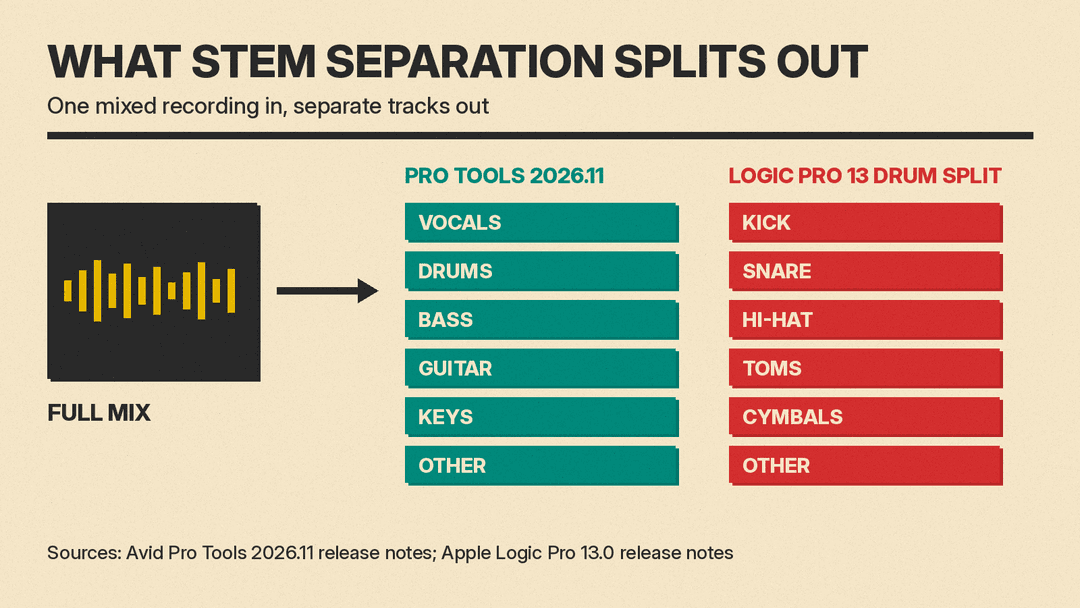
The AI piece is the Pro Tools Stem Separator. Stem separation means taking one finished, mixed recording and pulling it apart into its parts. Avid's tool uses AI to split audio into up to six stems: vocals, drums, bass, guitar, keys and other. You drag audio into it, preview the separated parts, and bring them back into your session as tracks.
Two details matter for home users. The release notes say all AI analysis and processing happens locally on your computer, with no cloud upload required. And Avid says the Stem Separator is included at no additional cost with all versions of Pro Tools, including the free Pro Tools Intro.
The Stem Separator ships as one of the first Pro Tools Extensions, a new plug-in format for tools that work across many tracks or a whole session. Extensions are also available from Pro Sound Effects, Soundly, Forte and Pibox, and Avid says its existing Splice and SoundFlow integrations will also be available as Extensions. The update adds MIDI Polyphonic Expression (MPE), which lets each note in a chord respond on its own to pressure and pitch movement.
What does the Logic Pro 13 assistant do?
Apple's Logic Pro 13.0 release notes, published November 6, 2026, introduce an intelligent assistant (beta) that "understands requests in everyday language." Apple's example prompts include "Create a track for recording acoustic guitar," "Add a compressor to the vocal track," "Make the drummer play with more intensity," and "Isolate the drums from the selected region." You can also ask it questions such as "How do I use a compressor?"
The assistant is not part of the one-time Logic Pro purchase. It requires an Apple Creator Studio subscription, a Mac with Apple silicon, macOS 27 or later, and an Apple Account with iCloud set up. Usage limits may apply. Apple's Creator Studio intelligence page says the assistant is available in U.S. English only and is powered by Google Gemini models. Subscribers in some countries can buy intelligence usage packs after they reach the monthly limit. Apple says projects and prompts sent to the assistant are never used to train models.
Logic Pro 13 adds two other AI-adjacent features. Stem Splitter can now split a drum part into individual kit pieces: kick, snare, hi-hat, toms, cymbals and other. And a new unified Browser lets you describe a sound in your own words or use Find Similar to locate sounds like a sample you pick. It can also search Splice sounds you have downloaded. We covered the wider Creator Studio subscription in our Apple Creator Studio post.
What the three launches have in common
All three put AI next to the work rather than in place of it. Splice's Assist finds sounds and writes MIDI patterns, Pro Tools splits stems, and Logic's assistant sets up tracks and plug-ins on request. None of the three is pitched as a way to type a prompt and get a finished song, which is how tools like Suno and Udio work. If you want the background on those, read how AI music generators work.
Data handling differs. Pro Tools does its stem separation on your computer. Logic's assistant sends requests to Google Gemini models, and Apple says providers are not allowed to use that information to train their models. Splice, per The FADER, says it does not train on music users make or upload in Create.
Pricing differs too. Splice Create is free to start but needs a subscription to export. Pro Tools includes its stem tool in every version, including the free Intro. Logic's assistant is only for Apple Creator Studio subscribers.
This fits a wider trend in music software. Vienna Symphonic Library's Vienna Performer also uses AI to perform notes a composer writes, without generating the music itself.
Which one should you try?
- If you are new to music production and want sounds and guidance in one app, Splice Create is free to try on a Mac. You will need a subscription to export.
- If you want to pull vocals or drums out of a mixed recording, the Pro Tools Stem Separator is included in the free Pro Tools Intro. For other options, see our list of AI stem splitters and vocal removers.
- If you already use Logic Pro on an Apple silicon Mac, the drum kit-piece splitting comes with Logic Pro 13. The assistant needs an Apple Creator Studio subscription and macOS 27, and it is still in beta.
Sources
- Splice: Introducing Splice Create
- Splice Create product page and FAQ
- Splice press release via PRWeb
- The FADER: Splice launches its own DAW
- Avid press release: Pro Tools 2026.11
- Avid: Pro Tools 2026.11 release notes
- Apple: Logic Pro for Mac release notes
- Apple: About the intelligence features in Apple Creator Studio
- Zinstrel: Splice, Apple, and Avid push AI deeper into recording studios
