
Claude can read documents you paste into the chat or upload, and it can help you analyze them. It can summarize a survey memo, compare two reports, or pull figures out of a long file. It can also be wrong. It may state a number the document never contained, or answer a question the document cannot answer. Anthropic, the company that builds Claude, publishes prompting guidance for exactly these situations. Its docs describe specific patterns for research tasks and long documents, such as putting documents before the question, asking Claude to quote before it answers, and giving Claude permission to say it does not know (Claude prompting best practices, Reduce hallucinations).
This guide turns that guidance into ten copy-paste templates. Each one uses {{PLACEHOLDERS}} in double curly braces that you replace with your own text. At the end, we show what happened when we ran simpler versions of these patterns on a small local model. We did not test Claude. The small-model results are a reminder to check any model's output against the source. For other Claude guides, see our Claude prompts for writing and Claude prompts for coding. If you need a tool that searches papers for you, see our list of AI research assistants for literature reviews.
Ten copy-paste templates for research and analysis
Replace anything inside double curly braces. Keep the XML tags exactly as written. For more on tags, see our guide to XML tags in prompts.
How to get Claude to answer your actual research question
Use it when: a vague request keeps producing vague answers.
Research question: {{RESEARCH_QUESTION}}

A good answer does all of the following:
- {{SUCCESS_CRITERION_1}}
- {{SUCCESS_CRITERION_2}}
- {{SUCCESS_CRITERION_3}}

Context: I need this because {{REASON_YOU_ARE_ASKING}}.

Before you finish, verify your answer against the criteria above and note any criterion the answer misses.
Why it works: Anthropic's research guidance says to provide clear success criteria, meaning you define what a successful answer looks like, and its general guidance says adding the reason behind an instruction helps Claude give more targeted answers (best practices). The last line is Anthropic's self-check pattern, "Before you finish, verify your answer against [test criteria]," though Anthropic notes that Claude Opus 5 verifies its own work well without it and extra verification instructions can cause over-verification there, so on Claude Opus 5 Anthropic says to remove that line.
How to check a claim across multiple sources
Use it when: one number or claim will drive a decision and a single source is not enough.
Claim to check: {{CLAIM}}

Source 1: {{SOURCE_1_NAME_AND_LINK}}
Source 2: {{SOURCE_2_NAME_AND_LINK}}
Source 3: {{SOURCE_3_NAME_AND_LINK}}

Check the claim against each source in turn. For each source, state whether it supports the claim, contradicts the claim, or says nothing about it. Quote the exact sentence you relied on. If sources conflict, say so and give the wording from each side.
Why it works: Anthropic's research section says to ask Claude to verify information across multiple sources (best practices). Asking for a verdict and a quote per source gives you something to check, and it keeps "says nothing" separate from "supports."
How to prompt Claude for structured research
Use it when: the question is complex and open-ended, with no single obvious answer.
Research task: {{RESEARCH_TASK}}

Material you may use: {{NOTES_LINKS_OR_DOCUMENTS}}

Search for this information in a structured way. As you gather data, develop several competing hypotheses. Track your confidence levels in your progress notes to improve calibration. Regularly self-critique your approach and plan. Update a hypothesis tree or research notes file to persist information and provide transparency. Break down this complex research task systematically.

Finish with:
1. Each hypothesis and its current confidence level
2. The strongest evidence for and against each one
3. What new information would change the ranking
Why it works: the middle paragraph is Anthropic's own sample text for complex research, quoted word for word (best practices). Competing hypotheses and confidence levels push Claude to weigh evidence instead of committing to the first plausible story.
How to make Claude stick to your documents
Use it when: you paste a long report, memo, or transcript and want answers from it, not from general knowledge.
<document>
<source>{{SOURCE_NAME_AUTHOR_DATE}}</source>
<document_content>
{{PASTE_THE_FULL_DOCUMENT_HERE}}
</document_content>
</document>

Use only the document above. Build the answer from what it states.

Task: {{YOUR_TASK}}

Question: {{YOUR_QUESTION}}
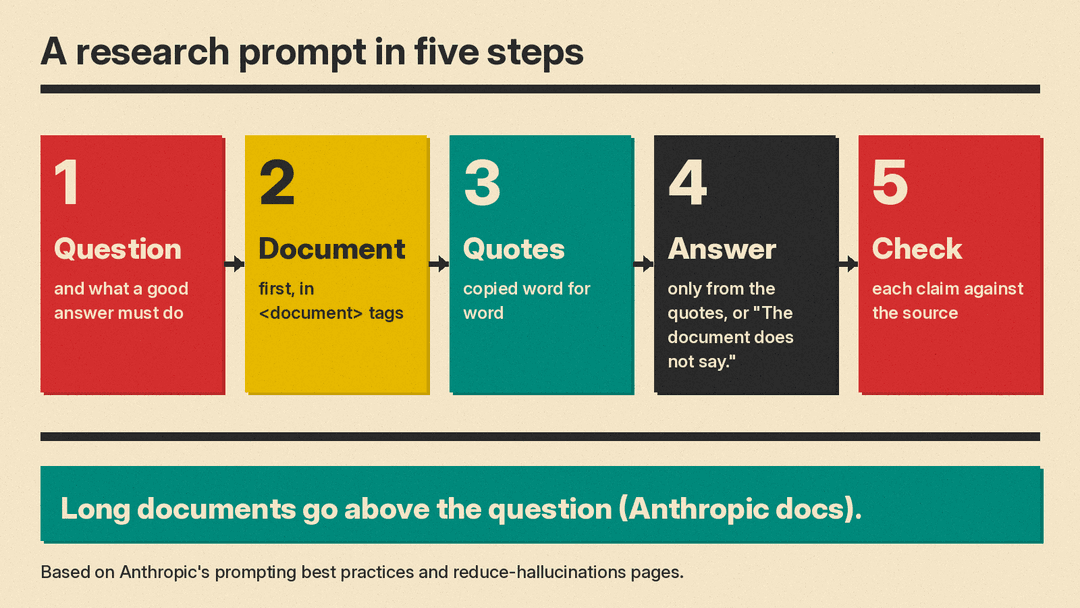
Why it works: Anthropic says XML tags help Claude parse prompts that mix instructions, context, examples and inputs, and it shows each document wrapped in <document> tags with <source> and <document_content> subtags (best practices). For long context of 20k tokens or more, Anthropic advises putting long documents near the top, above the query, and reports that queries at the end "can improve response quality by up to 30 percent in tests, especially with complex, multidocument inputs." The "use only the document above" line is Anthropic's external knowledge restriction, which tells Claude to use the provided documents instead of general knowledge (reduce hallucinations).
How to prompt Claude with several documents at once
Use it when: you have two or more files and need an answer that keeps track of which source said what.
<documents>
<document index="1">
<source>{{SOURCE_1_NAME}}</source>
<document_content>
{{DOCUMENT_1_TEXT}}
</document_content>
</document>
<document index="2">
<source>{{SOURCE_2_NAME}}</source>
<document_content>
{{DOCUMENT_2_TEXT}}
</document_content>
</document>
</documents>

Using only these documents, answer the question below. After each part of your answer, name the document index it came from.

Question: {{YOUR_QUESTION}}
Why it works: this is Anthropic's recommended nesting, with documents inside <documents> and each one inside its own <document> with <source> and <document_content> subtags (best practices). Asking for the document index after each part lets you check which file each fact came from.
How to get Claude to quote before it answers
Use it when: the document is long and you worry Claude will answer from memory or guess.
<document>
<source>{{SOURCE_NAME}}</source>
<document_content>
{{DOCUMENT_TEXT}}
</document_content>
</document>

Question: {{YOUR_QUESTION}}

Step 1. Copy every sentence from the document that helps answer the question. Put the copied sentences inside <quotes> tags. Copy them word for word.
Step 2. Using only those quotes, write your answer inside <answer> tags.
Why it works: Anthropic advises asking Claude to quote relevant parts of the document before it does the task, because this helps it focus on relevant content (best practices). Its hallucination guidance makes the same point for documents over 20k tokens: ask Claude to extract word-for-word quotes first, for grounding (reduce hallucinations).
How to let Claude say "I don't know"
Use it when: the document might not contain the answer and a confident guess would cost you.
<document>
<source>{{SOURCE_NAME}}</source>
<document_content>
{{DOCUMENT_TEXT}}
</document_content>
</document>

Answer this question using only the document above: {{YOUR_QUESTION}}

If the document does not contain the answer, reply exactly: The document does not say.
If the document contains hints but not enough to answer, write: I don't have enough information to confidently assess this.
Why it works: Anthropic says explicitly giving Claude permission to admit uncertainty "can drastically reduce false information," and it offers the line "I don't have enough information to confidently assess this" as an example (reduce hallucinations). Both fallbacks are phrased as what to do, which matches Anthropic's advice to tell Claude what to do instead of what not to do (best practices).
How to make Claude cite a quote for every claim
Use it when: you plan to reuse an answer in a report, brief, or post and need to trust each sentence.
<document>
<source>{{SOURCE_NAME}}</source>
<document_content>
{{DOCUMENT_TEXT}}
</document_content>
</document>

Question: {{YOUR_QUESTION}}

Step 1. Write a draft answer.
Step 2. For each claim in the draft, find a word-for-word quote from the document that supports it, and place the quote in brackets after the claim.
Step 3. If a claim has no supporting quote, remove the claim and mark the spot with empty [] brackets.
Step 4. Output the final answer with all brackets kept in place.
Why it works: this follows Anthropic's verify-with-citations pattern, where Claude cites quotes and sources for each claim, finds a supporting quote for each claim after drafting, and retracts any claim it cannot support. Anthropic's own example removes the claim and marks it with empty [] brackets (reduce hallucinations). The empty brackets also show you where the answer got thinner.
How to compare two sources and find where they disagree
Use it when: two documents cover the same event or topic and the differences matter.
<documents>
<document index="1">
<source>{{SOURCE_1_NAME}}</source>
<document_content>
{{SOURCE_1_TEXT}}
</document_content>
</document>
<document index="2">
<source>{{SOURCE_2_NAME}}</source>
<document_content>
{{SOURCE_2_TEXT}}
</document_content>
</document>
</documents>

Compare these two sources on {{TOPIC}}.

List every point where they disagree. For each one, quote the exact sentence from both sources and give both figures, dates, or names as written.
List a point of agreement only when both sources state it, and quote both statements.
Why it works: a plain "summarize both" prompt tends to place sources side by side and skip the conflicts, which is what we saw in our small-model test below. Even the structured version often failed on that small model, so check each pair. Asking for quoted wording and both figures gives you pairs you can check yourself, and quoting matches Anthropic's grounding advice (reduce hallucinations).
How to run a prompt twice and catch inconsistencies
Use it when: the answer matters and you want a second opinion before you act on it.
<document>
<source>{{SOURCE_NAME}}</source>
<document_content>
{{DOCUMENT_TEXT}}
</document_content>
</document>

Step 1. Answer this question using only the document: {{YOUR_QUESTION}}

Step 2. Here is an earlier answer to the same question:

<earlier_answer>
{{PASTE_THE_FIRST_ANSWER_HERE}}
</earlier_answer>

Step 3. Compare the two answers. List every statement in the earlier answer that your answer does not support, and every statement your answer adds. For each difference, quote the document text that settles it.
Why it works: run your document prompt two or more times, then paste one answer into this prompt. The first half is Anthropic's best-of-N verification, where you run the same prompt multiple times and compare outputs, because inconsistencies can indicate hallucinations. The second half is its iterative refinement pattern, where outputs become inputs for follow-up prompts that ask Claude to verify or expand on earlier statements (reduce hallucinations).
What happened when we tested these patterns
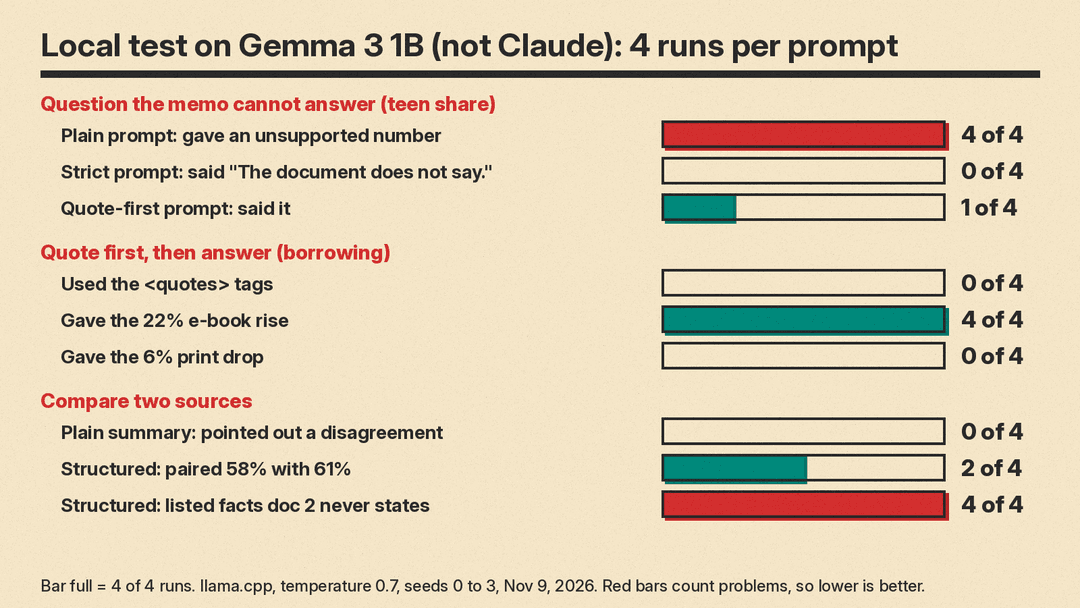
One thing first, and it matters: we did not test Claude. We have no Claude test results to report. What we did was run the same prompt shapes on Gemma 3 1B, a small open model, on a local llama.cpp server, at temperature 0.7, with 4 runs per prompt. That is a small sample on a small model. The prompts we ran were shorter versions of templates 4, 6, 7 and 9, not the exact text above. The point was to see how much structure a small model actually follows.
We made up two documents for the test. A library survey memo said the survey was emailed to 1,200 card holders, 640 replied, 58 percent of repliers visit monthly, the top request was longer weekend hours at 41 percent, e-book borrowing rose 22 percent, print loans fell 6 percent, and the survey did not ask about age. A made-up news brief said the survey reached 1,020 card holders, that 61 percent visit monthly, and that weekend hours were the top request. The two documents disagree on purpose.
The unanswerable question
We asked: "What share of teenagers visit monthly?" The memo never asked about age, so the only correct answer is that the document does not say.
- Plain prompt with no tags: 4 out of 4 runs answered with a number the memo does not support: 53.33 percent, 53.33 percent, 704 people, and 34.17 percent. Three of 4 called it the teen figure outright. Zero of 4 noticed that the survey did not ask about age.
- Document inside
<document>tags plus the line "If the document does not contain the answer, reply exactly: The document does not say.": 0 out of 4 correct. All 4 replied only "640 replied." - Quote-first version, with the question first and instructions to copy the answering sentence or write none: 1 of 4 said "The document does not say." The other 3 gave the overall 58 percent figure as the answer. Zero of 4 used the quote tags.
Quote first, then answer
We asked: "What happened to borrowing?" The memo holds two changes, e-books up 22 percent and print down 6 percent.
- Zero of 4 runs used
<quotes>tags. Two of 4 wrapped the answer in<answer>tags. - All 4 gave the 22 percent e-book rise. Zero of 4 mentioned the 6 percent print drop.
- Two of 4 wrote "Borrowing at the library rose 22%", dropping the word e-book. With a plain prompt, 4 out of 4 named only one of the two changes.
Comparing two sources
- Plain "summarize" prompt: 4 out of 4 listed both sources side by side, but 0 out of 4 pointed out a disagreement. Two of 4 turned "reached 1,020" into "1,020 people responded."
- Structured disagreement prompt: it matched 58 percent against 61 percent correctly in 2 of 4 runs. It matched 1,200 against 1,020 correctly in 0 of 4 runs, and 2 runs paired 640 with 1,020. All 4 runs listed "agreements" containing facts the news brief never mentions, such as the claim that it reported the 22 percent e-book rise.
What this means for your prompts
The lesson is plain. A tiny model often ignores these patterns. Tags, quote-first steps, and explicit permission to say "I don't know" all failed at least some of the time on a 1B model. The structure is not a guarantee. What it does give you is something to check: quotes you can look up, brackets you can inspect, and disagreements stated as pairs of figures.
Claude is a much larger model, and Anthropic recommends these patterns for it. Anthropic is also clear about the limits: "although these techniques significantly reduce hallucinations, they don't eliminate them entirely. Always validate critical information, especially for high-stakes decisions" (reduce hallucinations). So use the templates, and read every reply against the source.
A simple research routine
This builds on our 5-minute routine for fact-checking AI answers.
- Write your question and your success criteria before you paste anything. Say what a good answer must do and why you are asking (template 1).
- Put your documents first, each inside
<document>tags with a<source>line, and put the question last. Use the<documents>wrapper when you have several files (templates 4 and 5). - Ask for quotes before the answer, and give Claude the exact line to use when the document runs out: "The document does not say." (templates 6 and 7).
- Require a supporting quote for every claim and remove claims that have none. With two sources, ask for every disagreement with both figures quoted (templates 8 and 9).
- Run the prompt again, compare the two answers, and check every difference against the documents yourself (template 10).
