
Zendesk is changing how it charges for customer service software. At its AI Summit on November 10, 2026, the company announced the Outcome AI Platform and a new plan called Zendesk Unlimited. The plan offers unlimited seats. Instead of paying mainly per agent login, customers set an "Outcome Budget" and pay for eligible issues resolved and business work completed.
The launch also adds a way to plug outside AI agents into Zendesk, general availability of custom agents, and a public directory that helps personal AI assistants find a company's official support channel. Here is what changed and what support teams should check before they switch.
What Zendesk announced
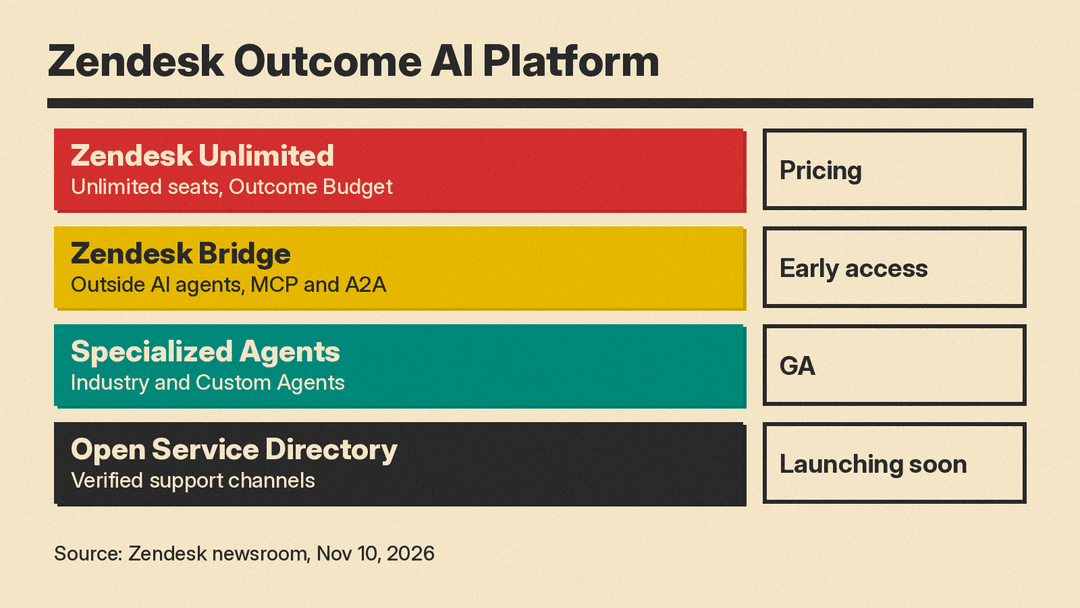
The launch has four main parts:
- Zendesk Unlimited pricing. Unlimited seats, with AI spend tied to resolved issues and completed work.
- Zendesk Bridge. A governed connection between Zendesk and the AI tools and agents a business already uses. The press release lists it as an Early Access Program feature.
- Specialized Agents, including Industry and Custom Agents, which bring business rules into service workflows. Listed as generally available.
- Open Service Directory (OSD). An open specification and public directory for verified support channels. Listed as launching soon.
The release also lists Self-Improving Zendesk (generally available), which connects insights and actions across AI agents, human workflows, knowledge and quality, plus Agentic Analytics, Quality Score, Admin Copilot and AI Agent Launchpad. Zendesk says these help teams find automation opportunities and see whether changes reduce repeat contacts or improve service quality.
How outcome-based pricing works
Most help desk software is sold per seat: each human agent who logs in costs a monthly fee. As AI agents take on more tickets, that model gets awkward. A company may need fewer human seats while its software vendor does more of the work.
Zendesk's answer, per the announcement:
- Outcome AI Platform plans give users access to Zendesk AI, with features varying by tier.
- The customer sets an Outcome Budget.
- The customer pays for eligible issues resolved and business work completed.
- Zendesk evaluates each outcome for quality and completeness, so customers can see what counts toward the budget.
- Customers can start with a low upfront investment and expand as AI handles more work.
Zendesk calls this the next evolution of the resolution-based pricing model it says it pioneered. The release does not publish per-resolution prices or tier details, so budget planning will depend on a quote.
Zendesk also claims customers on the platform "can automate up to 84% of service requests." That is a vendor figure and an upper bound, not a typical result. An IDC research director, Tapan Patel, is quoted in the release saying the model ties AI spend "directly to verified resolutions and business outcomes rather than traditional seat counts."
Zendesk Bridge: bring your own AI agent
Bridge is for companies that want to run service work from an AI interface other than Zendesk's own. According to the Zendesk help center announcement, connected agents can use more than 400 Zendesk tools to find customer context, manage work and take approved actions. It supports MCP connections and agent-to-agent (A2A) workflows.
The controls are the important part for admins:
- Admins decide which AI agents can connect.
- Admins choose which Zendesk groups can use each connection.
- Each request runs with the connected user's existing permissions.
- Zendesk records the actions taken through the connection.
This follows the same pattern as Microsoft's recent move to let Copilot write to Jira, Notion and CRM tools: AI assistants are moving from reading data to changing it, with permissions and logs as the guardrails.
Custom agents are now generally available
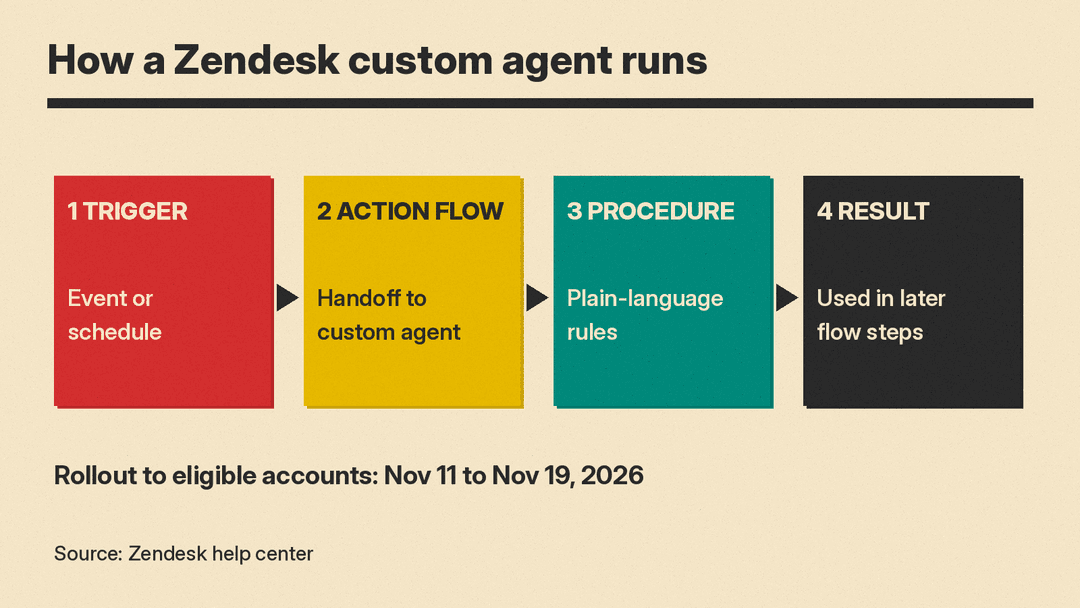
Zendesk's custom agents announcement says rollout runs from November 11 to November 19, 2026, to all eligible accounts automatically. Admins write a procedure in plain language, as if training a human agent, and configure the inputs, knowledge articles, actions and outputs the agent can use. Custom agents run inside action flows, triggered by an event or on a recurring schedule.
Zendesk's own example jobs:
- Checking refund or warranty exceptions against business policy
- Reading attachments to pull text details into a ticket
- Reviewing solved tickets for missed requests or product feedback
- Monitoring work on a schedule and flagging issues
If you are new to this kind of setup, our guide to using AI to triage support tickets covers how to define ticket categories and check the AI's choices on a sample first.
Open Service Directory
OSD helps personal AI assistants find a brand's verified support channel, whether or not the brand uses Zendesk. Businesses register their channels and control what they share and when human review is required. Zendesk says OSD does not access private customer data or take service actions. Early participants named in the release include Betterment, ElevenLabs, Flex, TeamSystem, TBA Auctions, Telekom Payment S.A. and Wireless Logic.
Zendesk ties this to its own survey: 52% of consumers said they are comfortable relying on personal AI assistants for everyday tasks, and 84% said human help should always be available.
Why it matters for support teams
Seat pricing has been the default for help desks for years. Zendesk moving its AI plans to unlimited seats plus a resolution budget changes what a support lead has to forecast: not headcount, but how many issues the AI will close and how Zendesk will judge them.
Before you move, check three things:
- What counts as an outcome. Ask how "eligible" resolutions and "business work completed" are defined and audited, and whether you can dispute one.
- Budget limits. Find out what happens when the Outcome Budget runs out mid-month.
- Bridge status. Bridge is listed as early access in the press release, so confirm availability on your plan before building around it.
For background on Zendesk's earlier move into internal requests, see our explainer on Zendesk Employee Service AI agents.
