
Ticket triage is the sorting step that happens before anyone answers a customer. A new ticket arrives, someone decides what it is about, how urgent it is, and who should handle it. On a small team, that decision is often made by whoever happens to look at the inbox first. AI can take over most of that sorting. It reads each new ticket and fills in fields such as topic, priority, sentiment, language, and team, so the ticket lands with the right person faster. The AI does not answer the customer. People still do that. For the reply side, see our guide to using AI for customer support.
This guide explains what AI triage actually does, a five-step workflow for turning it on safely, how the major help desks implement it, and what to do if your help desk has no built-in AI.
What does AI ticket triage mean?
AI ticket triage means a model reads an incoming ticket and sets structured fields on it. Typical fields include:
- Topic or category (what the ticket is about)
- Priority or urgency (how fast it needs a response)
- Sentiment (how the customer sounds)
- Language (which language the ticket is written in)
- Team, group, or assignee (who should handle it)
The point is routing and organization, not replies. A classified ticket can be sent to the right queue, filtered into the right view, and reported on by theme. The important boundary: AI does the sorting, people still answer. Classification gives your team a starting point and a workload signal. It does not replace judgment about what the customer actually needs.
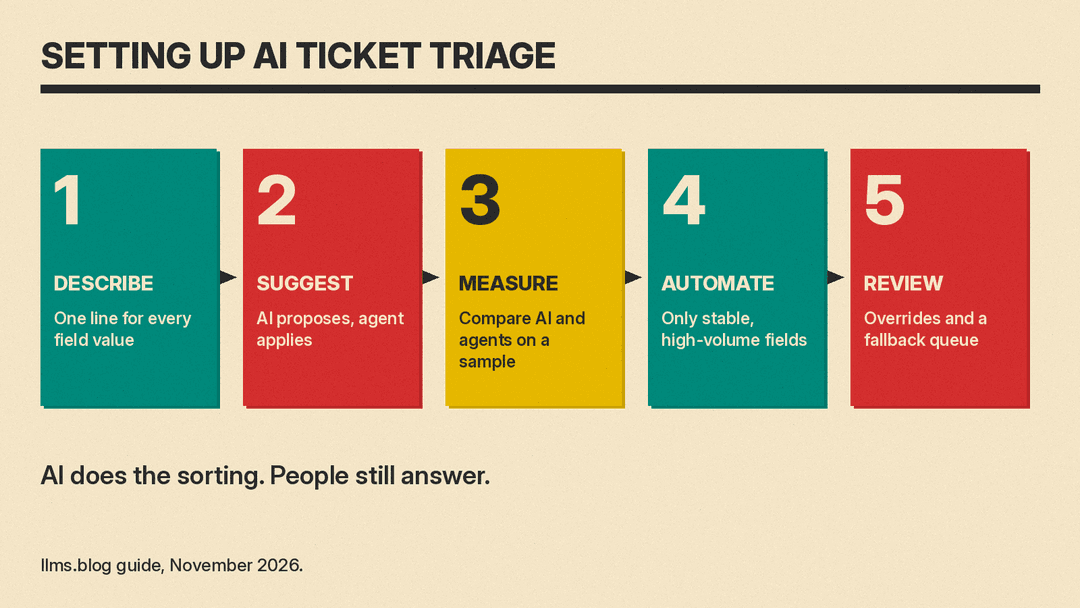
How do you set up AI triage in five steps?
Step 1: Decide the fields and describe every value. Pick the fields you want AI to fill, then write a one-line description for every possible value. If your priority field has four values, write one sentence defining each. Vague definitions produce inconsistent classification, and no model can guess what "High" means inside your company. Intercom builds this step into its product: with Fin Attributes, you choose attributes such as issue type, sentiment, urgency or spam, write a clear description for each value, and test them with a preview tool before enabling them.
Step 2: Start in suggest mode. In suggest mode, the AI proposes a value and a human clicks to apply it. Freshdesk makes this the default for Freddy AI Auto Triage: each field can be set to Manual, where Freddy suggests a value and the agent applies it. Suggest mode lets you collect data on accuracy without risking bad routing.
Step 3: Measure agreement on a sample. For a couple of weeks, pull a sample of tickets and compare what the AI suggested with what agents actually chose. Agreement rate tells you which fields are ready for automation and which need better definitions. Freshdesk also shows each field's readiness on an Auto Triage dashboard. Zendesk exposes a confidence value per field, which you can use to spot classifications the model itself is unsure about.
Step 4: Automate the stable, high-volume fields. Once a field shows consistent agreement on tickets that matter, switch it to automatic. Start with routing fields that are high-volume and low-risk, such as group or priority. Leave sensitive or ambiguous fields in suggest mode.
Step 5: Keep a human review loop and a fallback queue. Agents should always be able to change AI-set values (Zendesk explicitly allows this). Also decide in advance where low-confidence tickets and sensitive tickets go. A fallback queue, reviewed by a person, catches what the model is unsure about and keeps errors from reaching customers silently.
How do Zendesk, Freshdesk, Intercom, and Help Scout do triage?
Zendesk uses intelligent triage to classify new tickets by topic, sentiment, language, and entities such as product names. Classifications are based on the ticket subject and the first public comment, and each field carries a confidence value. Sentiment uses five values (Very Positive, Positive, Neutral, Negative, Very Negative) and is calibrated for support, so a ticket is not marked negative just because the customer has a problem. Language detection covers roughly 150 languages. If dynamic classification is on, topic and sentiment can update on each customer reply. Practical limits to know: classifications are available on Suite and Support Professional plans and above, using them in routing or triggers requires the Copilot add-on, and intelligent triage does not analyze tickets created before it was turned on (why predictions can be missing).
Freshdesk offers Freddy AI Auto Triage, which pre-fills fields on tickets from email and portals. It predicts Priority, Group, and Type, plus custom dropdowns and dependent nested fields such as Category > Sub-category. It uses the subject and description, customer intent and sentiment, historical ticket patterns, and contextual signals. It requires a Pro or Enterprise plan (Freshdesk or Freshdesk Omni), and Freshdesk recommends at least 2,000 historical tickets. Enablement typically completes within 2 days. Freshdesk also offers a Ticket Field Suggester, which needs a Freddy AI Copilot license, with two models: an Instructed model that follows admin-written instructions and field descriptions (useful for new accounts with little history, or fields with clear rules), and a Self-learning model that learns from historical tickets.
Intercom classifies through Fin Attributes, which sort conversations into values you define. Values can drive escalation rules, workflows, and reporting. By default, Fin applies attributes when its part of the conversation is done (handoff, resolution, or customer inactive). Attributes are detected automatically for conversations only, not tickets.
Help Scout has AI Topics in beta on current Plus and Pro plans. It is set per inbox, generates about 8 to 15 topics from your history for you to review and edit, backfills roughly the last month of conversations, and runs a daily job that can add a new topic when a new trend appears. During the beta, manual overrides do not feed back into the model.
Should AI suggest field values or apply them automatically?
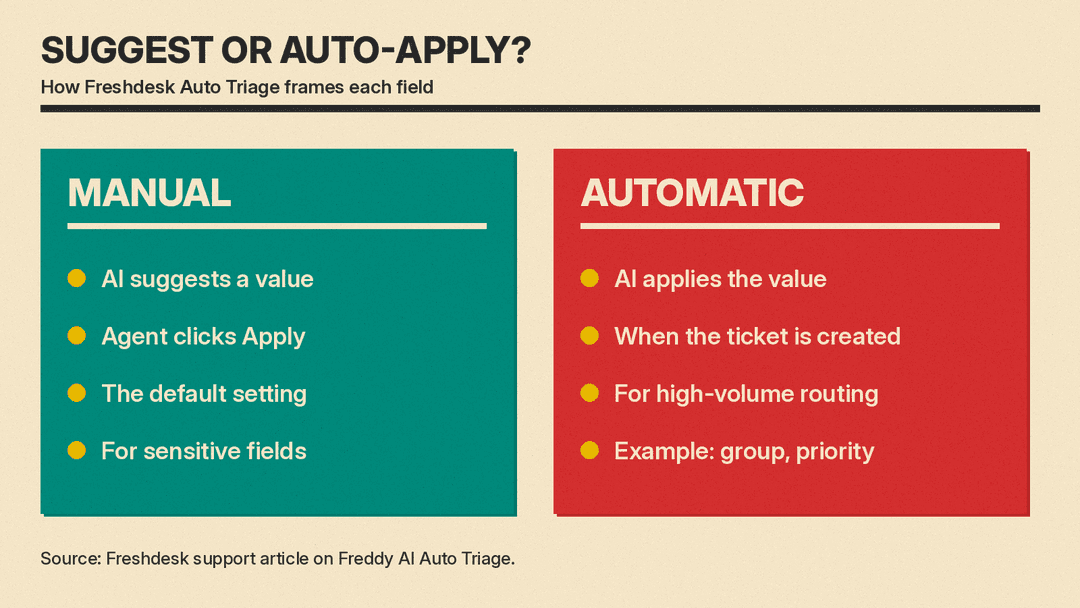
Treat this as a per-field decision, not an all-or-nothing switch. Freshdesk frames it exactly this way in Auto Triage: Manual mode (Freddy suggests, agent clicks Apply) is recommended for sensitive fields, and Automatic mode (applied on ticket creation) is recommended for high-volume routing fields such as group or priority. Manual is the default.
A workable split:
- Automate: group or team routing, priority on high-volume queues, language detection, spam detection.
- Keep manual: anything sensitive (billing disputes, security reports, complaints about your company), anything with low measured agreement, and any field where a wrong value has consequences beyond a mis-sorted ticket.
What if your help desk has no built-in AI?
You can approximate triage with a general AI assistant such as ChatGPT, Gemini, or Claude and a fixed prompt. Define your own category list and priority definitions, paste one ticket or a batch of tickets, and ask for a category, a priority, and a one-line reason drawn only from your list. The reason line matters: it lets you check the model's logic instead of trusting the label.
Before you do this, handle privacy. Check your assistant's data settings; ChatGPT, for example, has data controls, including whether your chats are used to improve models. Strip personal data (names, email addresses, phone numbers, account numbers, order details) before pasting anything.
Example prompt:
You are triaging customer support tickets. For each ticket, return exactly three lines:
Category: one of [Billing, Bug report, How-to question, Feature request, Account access, Other]
Priority: one of [Urgent, High, Normal, Low]
Reason: one sentence explaining the choice.

Rules:
- Urgent is only for outages, security problems, or data loss.
- Negative sentiment alone does not raise priority.
- If no category fits, use Other and say so in the reason.

Ticket:
[paste subject and message here, personal data removed]
This is a manual process, so it suits low-volume queues or a trial run before you buy anything. If it works, you will already have tested category definitions you can reuse in a help desk tool. Once a ticket is sorted, our ChatGPT prompts for customer service replies cover the next step. To have a bot answer routine questions before they become tickets, compare the best AI customer service chatbots for small business.
What mistakes should you avoid?
- Vague categories. If two people on your team would sort the same ticket differently, the AI will too. Write one-line definitions for every value.
- Too many categories. Long, overlapping lists reduce accuracy and make reporting useless. Start small and split a category only when volume justifies it.
- Automating before measuring. Run suggest mode first and check agreement on a sample for a couple of weeks. Automate only the fields that hold up.
- Ignoring confidence. Zendesk attaches a confidence value to each classification. Route low-confidence tickets to a human queue instead of acting on them blindly.
- Letting sentiment alone decide priority. An angry customer with a minor question is not an outage. Zendesk calibrates sentiment for support, so a ticket is not marked negative just because the customer has a problem. Keep your priority rules based on impact and urgency, with sentiment as context.
- Forgetting to update rules when fields change. Zendesk is migrating triage values to standard ticket fields between October 26 and December 4, 2026, for accounts that bought or trialed Copilot before June 11, 2026. After the move, "intent" is renamed "topic" and tickets no longer receive triage tags, so any trigger, automation, macro, or view built on those tags needs updating. If a vendor changes how triage values are stored, audit everything that depends on them.
What should you check before going live?
- Fields chosen, with a one-line description written for every value
- Suggest mode running first, with agents applying or correcting values
- Agreement measured on a sample of real tickets over a couple of weeks
- Only stable, high-volume routing fields switched to automatic
- Sensitive fields left manual
- Confidence thresholds set, with a fallback queue for low-confidence and sensitive tickets
- Agents able to override any AI-set value
- Privacy reviewed and personal data stripped if you paste tickets into a general AI assistant
- Triggers, views, macros, and reports audited against the new fields
Sources
- Zendesk help: Automatically classifying tickets with intelligent triage
- Zendesk help: About intelligent triage
- Zendesk help: Why didn't intelligent triage add predictions to a ticket?
- Zendesk help: Understanding the intelligent triage ticket field migration
- Freshdesk support: Automate ticket handling with Auto Triage
- Freshdesk partner support: Auto-suggest and autofill ticket fields with Freddy AI Copilot
- Intercom help: How to create Fin Attributes
- Help Scout support: Categorize Conversations Automatically With AI Topics
- OpenAI Help Center: Data controls in ChatGPT
