
If your team pays for ChatGPT Business, the same plan can now pay for AI requests inside some other work apps. OpenAI extended Sign in with ChatGPT to Business workspaces this week, so apps such as Notion, v0 and Warp can draw on the plan's included usage instead of billing the team a second time for the same kind of AI work.
That can save money. It can also use up the same allowance members need in ChatGPT and Codex. This guide covers what changed, which apps take part, how admins turn it on, and the limits to set first.
What changed
On November 10, OpenAI's developer account on X said ChatGPT Business subscribers can now use their plan in third-party tools through Sign in with ChatGPT, according to AI Aulis. The post named Notion, v0, Amp, Kilo Code, Warp, Hermes from Nous Research, OpenClaw and OpenCode, "and more."
Before this, using your plan in other apps was a personal-plan feature. OpenAI's help page now lists Go, Plus, Pro and Business as the plans that can share usage with participating commercial apps.
There is no new price and no new allowance. The help page says eligible requests "use the included ChatGPT Work and Codex allowance or applicable credits available under your plan." Connecting an app does not add usage. The app may also still charge for its own subscription or premium features.
How Sign in with ChatGPT works
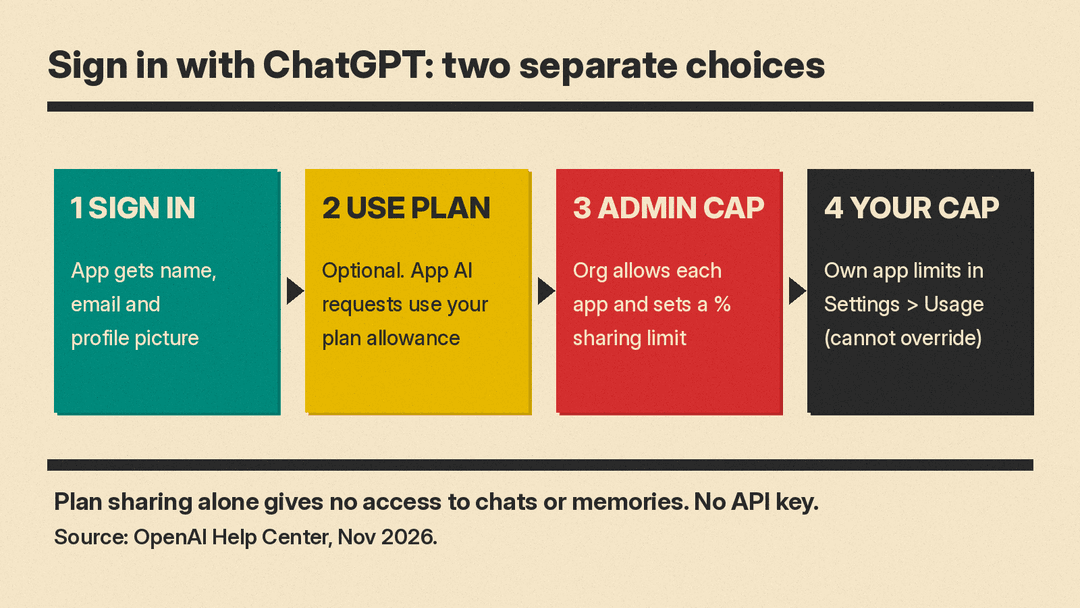
Sign in with ChatGPT is two separate permissions:
- Sign in. You log in to the app with your ChatGPT account. The app gets your name, email address and profile picture.
- Use your plan. You can also let the app send its AI requests through your ChatGPT plan. This is a separate choice, and you can sign in without it.
OpenAI says sharing your plan does not by itself give the app access to your ChatGPT conversations or memories, and it does not share an OpenAI API key. Review any other permissions the app asks for on their own.
Which apps take part
OpenAI keeps a partner directory with three groups. As listed in OpenAI's Sign in with ChatGPT page, checked November 12:
- Can use your ChatGPT plan: Amp Code, Conductor, Dactyl, Devin, Hermes Agent, Hyperagent, Kilo Code, Lovable (coming soon), Notion, Vercel, Vorflux and Warp. OpenAI notes that Devin does not support plan usage on ChatGPT Business.
- Sign-in only, no plan usage: Airtable, Canva, GitLab, HubSpot and Supabase.
- Open-source integrations: OpenClaw, OpenCode, Pi and T3.
The help page says supported open-source tools stay available to all ChatGPT users. Apps may also offer plan usage only on some of their own plans, so check the app's pricing page too.
How admins turn it on
In a Business workspace, signing in is not enough. Your organization must allow plan usage for each app. The steps from OpenAI's help page:
Allow an app to use the plan
- Open Admin Console and go to Tenant settings > External access.
- Select the app and set Use ChatGPT plan to Allowed.
- Repeat for each app your organization permits.
Set the workspace sharing limit
- Select the Business workspace in Admin Console.
- Go to Usage limits > ChatGPT plan.
- Under Usage in other services, select Edit and choose a percentage.
- Select Apply, then Save changes.
That percentage applies to each Standard or Premium member's included allowance, across all approved apps together. It is a cap, not a separate pool for each app. Members with permission can switch to workspace credits after they hit the cap. Usage-based members use workspace credits only.
What members do
Members start in the app. They pick Sign in with ChatGPT or Continue with ChatGPT, choose the right Business workspace, and then choose whether the app can use the plan. If you already use the app, look in its account or billing settings for a ChatGPT option.
In ChatGPT, Settings > Usage lets members set their own app limits or turn off plan usage for apps they have connected. Those settings cannot override the organization's permissions or the workspace sharing limit.
To cut an app off, go to Settings > Security and login > Login connections > Sign in with ChatGPT, select the app, and choose Disconnect. OpenAI notes that signing out of the app does not stop its authorized use of your plan, and disconnecting does not reverse usage already recorded.
Example: v0
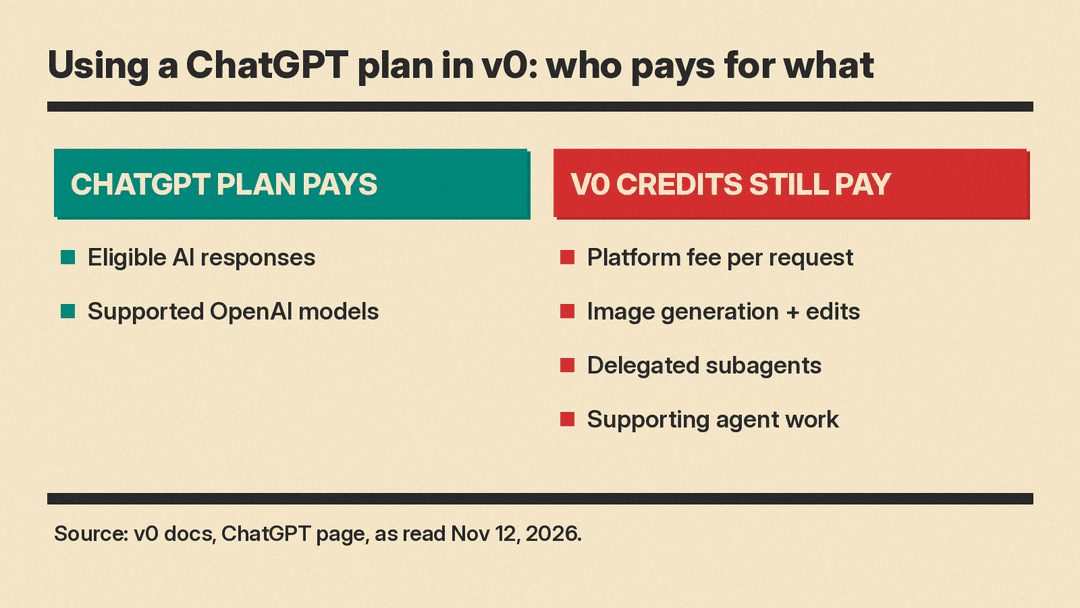
Vercel's v0 docs show how one partner handles the split. With the ChatGPT plan turned on, eligible AI responses count toward ChatGPT instead of v0 credits. But you still need a v0 credit balance. v0 credits still pay a small platform fee on each request, image generation and editing, delegated subagents and other supporting agent work.
If a Business workspace limit is reached, v0 shows "ChatGPT workspace usage limit reached." Users can copy a request for their admin, who can raise the limit at admin.openai.com under Workspace > Usage limits. v0 does not switch to its own credits on its own; the user has to change the billing option.
Why it matters for teams
One bill, one allowance. A team that already pays for ChatGPT Business may stop paying twice for AI in a coding or notes tool. But app requests come from the same ChatGPT Work and Codex allowance. A heavy week in an agent tool can leave a member less for their own work in ChatGPT and Codex.
Usage rates can differ. OpenAI says usage rates may differ between an app and ChatGPT, and how fast an app uses your allowance depends on the tasks it runs.
Errors do not fall back to paid options. If an app cannot use your plan, OpenAI says it will not move the request to another paid option automatically. The app may offer its own billing instead; read its terms first.
A simple rollout plan
- List the apps your team already pays for that appear in the plan-usage group above.
- Allow plan usage for one or two of them first, not all.
- Set a conservative Usage in other services percentage, so ChatGPT and Codex keep most of the allowance.
- Tell members to check Settings > Usage weekly and set their own app limits.
- Review workspace credit permissions before anyone runs past the cap.
For more on how OpenAI is building business features into ChatGPT, see our post on Businesses in ChatGPT, Business Hub and agents.
Sources
- OpenAI Help Center: Using your ChatGPT plan in other apps and sites
- ChatGPT Learn: Sign in with ChatGPT (partner directory and admin controls)
- OpenAI Developers: Sign in with ChatGPT
- v0 docs: ChatGPT
- AI Aulis: ChatGPT Business plans now work in Notion, Warp and Hermes Agent
- Artificially Nerdy: ChatGPT Business plans now cover AI requests inside Notion, v0, Warp and other apps
