
Performance review season has a familiar problem. You are asked to describe a year of work, and you mostly remember the last few months. The rest is scattered across emails, chat threads, tickets and calendar entries.
An AI assistant is good at the part that hurts most: turning a pile of rough notes into a clear, organized draft. It is bad at the part that matters most, which is knowing what actually happened. This guide shows how to use ChatGPT, Gemini or Copilot to prepare for a review without inventing anything, without leaking private details, and without sounding like a template.
Why the self-assessment is worth the effort
Harvard Business Review's Marlo Lyons writes that a self-assessment sets the tone for your manager's evaluation, which can affect compensation such as a merit increase or bonus. Atlassian's guide to performance reviews adds a practical reason: your manager probably does not remember every win, especially when remote or hybrid work gives them less view of your day-to-day.
So the document is not a formality. It is your chance to put your own evidence in front of the reviewer. AI can save time, but only if you give it real material to work from.
The rule that keeps the draft honest
Use AI to organize and phrase facts you provide. Never use it to decide what you did.
If you ask a chatbot to "write my self-review for a marketing coordinator," it can produce fluent text about campaigns you never ran and results you never saw. Microsoft's own support page for Copilot in Word says the suggestions come from AI, which can sometimes make mistakes, misinterpret facts or produce inaccurate results, and recommends reviewing every suggestion before accepting it. The same page says Copilot cannot understand meaning or evaluate accuracy, so you need to read what it writes and use your judgment.
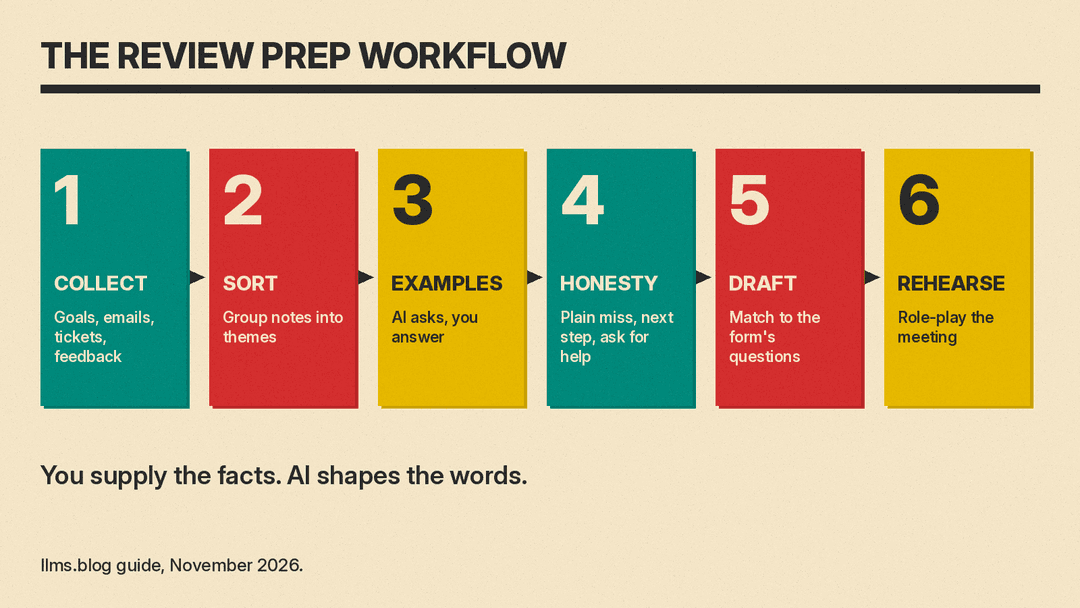
That is the whole safety model in two lines. You supply the facts. The assistant supplies the wording. You check every sentence against your records.
Step 1: Collect evidence before you open a chatbot
Atlassian recommends starting early and digging up evidence of what you have done since your last review. Its list is concrete: look back at your goals and OKRs, go through old emails and to-do lists, check completed tasks in your project management software, reread your previous reviews, and consider asking people you work closely with for feedback.
You can use AI for the sorting, but not for the remembering. Make one plain document, a notes file, and paste in raw material as you find it:
- Goals from your last review, word for word.
- Project names with rough dates.
- Numbers you can back up, such as tickets closed, customers served, deadlines met or costs reduced.
- Thanks, praise or feedback from colleagues, with names and dates.
- Things that went wrong or slipped, with a short note on why.
Do not worry about wording. A messy list with real details beats a polished summary with none.
Step 2: Sort the notes into themes
Once you have a pile, ask the assistant to organize it. This is a lower-risk job because you supply the text and the model only groups it. A prompt that works in most tools:
Below are my raw notes from the past review period. Group them into
4 to 6 themes (for example delivery, collaboration, learning, and
leadership). Under each theme, list the notes that belong there.
Use only what is in my notes. If a note does not fit, put it under
"Unsorted". Do not add any facts, numbers or dates.
The last two lines matter. Telling the model not to add facts is a request, not a guarantee. Microsoft's page says AI output can be inaccurate, so you still check the output against your notes.
Read the groups. Often you will see that one theme is thin, which tells you where to look for more evidence, or that a big accomplishment was hiding under "misc."
Step 3: Turn each accomplishment into a specific example
Atlassian advises including a tangible example wherever you can, and connecting each answer to what you did, how you did it and why it mattered. Indeed's guide on self-performance reviews says much the same: include facts and figures, be specific, and explain how you reached a result, including who else contributed and what problem-solving it took.
AI is useful here as an interviewer. Instead of asking it to write, ask it to ask you questions:
Here is one accomplishment from my notes: [paste one item].
Ask me up to five questions that would help me describe it with a
specific example: what the situation was, what I did, who else was
involved, and what changed because of it. Ask one question at a time.
Answer in your own words, in rough sentences. When you finish, ask it to turn your answers into a short paragraph that starts with what you did and ends with the result. Keep every number and name exactly as you gave it. If a number is a guess, say so in the paragraph or leave it out.
Because the content comes from your answers, the final text uses your own details and wording.
Step 4: Handle the hard questions honestly
Atlassian says self-reviews inevitably include questions about weaknesses or roadblocks, such as goals you did not accomplish or a skill you want to develop. It says it is tempting to gloss over missteps, but it says the review is also about getting the support you need, and that you cannot get it if you are not honest about what you are struggling with. Its suggested structure is to answer plainly, ideally with an example, and then explain what you are already doing about it and how your manager or company can help.
Indeed offers a similar frame: describe a miss as an opportunity for improvement, explain why the goal was not met, what you learned and how you plan to improve.
Ask the assistant for help with the structure, not the substance:
I missed this goal: [goal]. The honest reason was: [your reason].
Here is what I have done since: [your actions]. Here is the support I
would find useful: [your request]. Draft a three-sentence answer that
states the miss plainly, then what I am doing, then the support I am
asking for. Keep my wording where you can. Do not soften the miss
or blame others.
Compare the result with what you would say to your manager out loud. If it sounds more defensive or more dramatic than you are, edit it back.
Step 5: Draft the full self-assessment
Now you have themes, examples and honest answers. Give the assistant the review form's questions and your finished paragraphs, and ask it to assemble a draft:
Here are the questions from my review form, then my prepared
paragraphs. Match each paragraph to the best question. Keep my
wording, fix grammar, and trim to about 150 words per answer.
Flag any question I have no material for. Do not add new claims.
The instruction to flag gaps is more useful than it looks. It shows you which questions you have not prepared for, so you can fill them in with your own material instead of letting the model improvise.
Atlassian says to set aside at least a couple of hours to answer the questions thoughtfully and review them before submitting, and that it is better to be comprehensive than quick. AI shortens the typing, but that advice still applies to the reading and checking.
Step 6: Prepare for the conversation, not only the document
A review is a meeting, and the written form is only the start. AI is a good practice partner for the meeting itself. Try a role-play:
Act as my manager in a performance review. Ask me one question at a
time, based on my self-assessment below. After each answer, tell me
whether it was specific, and ask one follow-up. Stop after eight
questions and list the three weakest answers.
You can also use it to prepare a short list of asks: a stretch project, training, a change in scope, or a conversation about pay. Write each ask as one sentence and one reason. The assistant can tighten the wording, but the decision about what to ask for is yours.
What to keep out of the chat window
Review notes often include details about colleagues, customers and your own pay. Think before pasting them into a consumer chatbot.
OpenAI's help center says that for personal ChatGPT accounts (Free, Plus and Pro), it may use your content to train its models by default, and that you can turn off "Improve the model for everyone" under Settings, then Data controls. A second OpenAI help page says that by default OpenAI does not use inputs or outputs from ChatGPT Business, ChatGPT Enterprise, ChatGPT Edu or its API to improve its models. That page also says that on individual plans, if you rate a response with a thumbs up or thumbs down, the whole conversation may be used to train models even if you opted out. The data controls page adds that temporary chats are not used to improve models while they stay temporary, and that they may be kept for up to 30 days for safety purposes. If you save a temporary chat, it becomes a regular chat and follows your normal settings.
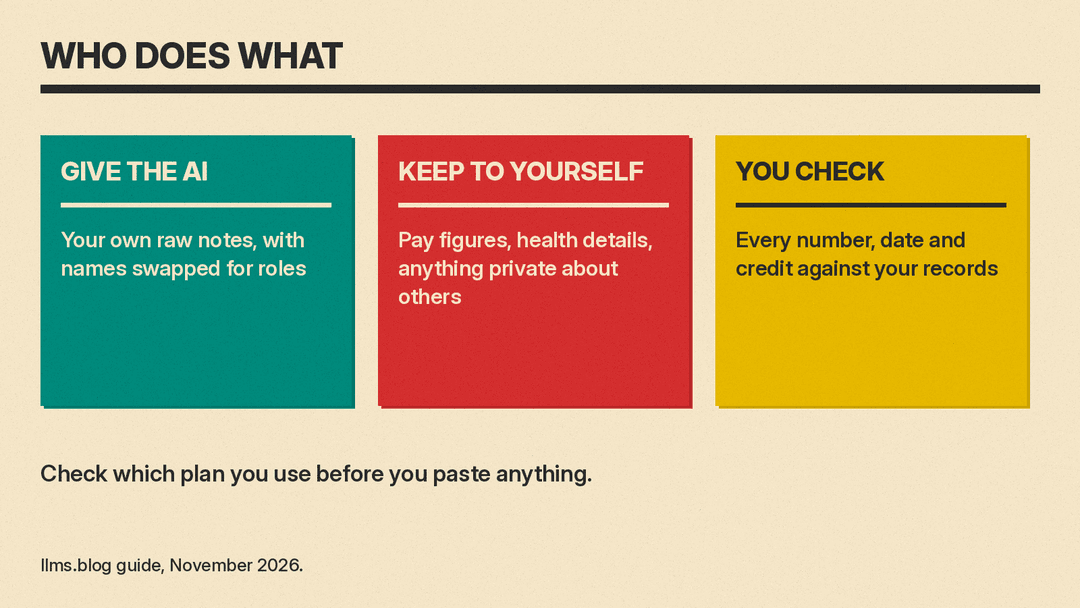
These details differ by product and change over time, so check the current page for the tool you use. Three habits are safe in any tool:
- Check whether your employer has an approved AI tool, and use that one for anything that mentions other people.
- Replace names with roles ("my manager," "the client") before you paste text.
- Leave out salary figures, health details and anything you would not want a colleague to read.
A short checklist before you submit
- Every number and date matches your notes or records.
- Every accomplishment names what you did, not only what the team did.
- Credit for other people is accurate and generous where it should be.
- Misses are stated plainly, with a next step and a request for support.
- No sentence sounds like it was written by someone who has never met you.
- You have read the whole thing aloud once.
Reading aloud helps you hear stiff or generic phrasing that a spell check misses, and that phrasing is easy to cut.
Where AI helps, and where it does not
AI is good at sorting notes, asking useful questions, tightening paragraphs, structuring hard answers and rehearsing the conversation. It is poor at remembering your year, judging your impact, or deciding what to admit. Those parts stay with you.
HBR's Lyons says that if you did not keep notes during the year, you can review your calendar of meetings to remind yourself of your projects. A running notes file, even five minutes a week, leaves you less to reconstruct. For related workflows, see our guides to writing weekly status reports with AI, AI-assisted work documents people trust and using AI for proposals and RFP responses.
Sources
- How to Write an Effective Self-Assessment, Harvard Business Review
- Performance Review Best Practices, Atlassian Work Life
- Self-Performance Review (With Template and Examples), Indeed
- Frequently asked questions about Copilot in Word, Microsoft Support
- Data controls in ChatGPT, OpenAI Help Center
- How your data is used to improve model performance, OpenAI Help Center
