
You ask a chatbot for JSON and get a friendly sentence, a code fence, and a short essay after the data. That is fine for reading. It breaks a spreadsheet import, a Zapier step, or the app you built last weekend.
There are two ways to get clean JSON. In a chat app, you write a tighter prompt. In the API, you turn on structured outputs, a setting that makes the model follow a schema. This guide covers both for ChatGPT, Claude and Gemini, with copy-paste templates and a small local test.
What JSON is, in one minute
JSON is a plain-text format for data. It uses keys and values inside curly braces:
{"name": "Dana Ruiz", "email": "dana@ruizbakery.com", "topic": "demo"}A program can read it only if it is exact: double quotes, no trailing commas, no extra words around it. A schema is a description of the shape you want. It lists the keys, the type of each value (text, number, true/false, list), and the allowed values.
Why the plain "give me JSON" prompt fails
A vague request leaves the model to invent the shape. It picks its own key names, nests some fields, and adds notes. Anthropic lists the usual problems without structured outputs: invalid JSON syntax, missing required fields, inconsistent data types, and schema violations (Claude docs).
We saw all of this in our own test below. The fix in a chat window is to spell out the shape. The fix in code is to give the API the schema.
How to get JSON in a chat app: 6 steps
These steps work in ChatGPT, Claude and Gemini chats. In a normal chat, the prompt does all the work.
- Name every key. Write the exact key names you want, in the order you want. Do not let the model choose.
- Say the type of each value. Text, number, true/false, or a list. Google's advice for schemas is the same idea: use specific types such as integer, string and enum (Gemini docs).
- List allowed values. If a field can only be "demo", "pricing", "support" or "other", say so. This stops new labels.
- Say what to do when data is missing. Ask for
nulland add "Do not guess." OpenAI warns that a model that always tries to fit a schema can make up values when the input does not fit. Its fix is to say in the prompt what to return in that case, such as empty values or a set sentence (OpenAI docs). - Ask for JSON only. Write "Reply with one JSON object and nothing else." Expect code fences anyway from some models (see the test).
- Check the result. Paste it into a JSON validator, or let your script strip the fences before it parses. Google's guide says to validate values in your app even when the syntax is correct.
For hard cases, add one or two filled-in examples. Our guide to few-shot prompting shows how. If you send the same format rules every time, put them in a system prompt or custom instructions.
How to get guaranteed JSON in the API
All three APIs can make the reply follow a JSON Schema. OpenAI says this means you do not need to worry about the model leaving out a required key or inventing an invalid enum value (a value outside your list). The details differ.
OpenAI (ChatGPT models)
- Set
text.formatto{"type": "json_schema", "strict": true, "schema": ...}in the Responses API (OpenAI docs). - OpenAI says Structured Outputs works on its latest models, starting with GPT-4o. It suggests
gpt-6-astrafor new projects. - Every field must be listed as required. To make a field optional, allow
nullin its type, for example["string", "null"]. - Every object must set
additionalProperties: false. - A schema can have up to 5,000 object properties and 10 levels of nesting.
- If the model refuses for safety reasons, the response has a
refusalfield instead of your data. Check for it. - The older JSON mode (
{"type": "json_object"}) only promises valid JSON, not your schema. It also needs the word "JSON" somewhere in your prompt, or the API returns an error. OpenAI recommends Structured Outputs over JSON mode when you can use it.
Anthropic (Claude)
- Put the schema in
output_config.formatwith"type": "json_schema"(Claude docs). Anthropic's SDK helpers set this for you. - Objects must set
additionalPropertiestofalse. Claude does not support number limits such asminimumandmaximum, or string length limits. Anthropic says SDK helpers can move those limits into the field description, and a helper that validates responses still checks them. - The first request with a new schema is slower while the grammar compiles. Anthropic caches it for 24 hours from last use.
- Claude adds a short system prompt about the format, so input tokens go up a little.
- Three edge cases still return output that may not match: a safety refusal (
stop_reason: "refusal"), a cut-off reply (stop_reason: "max_tokens"), and enum values in a different capital letter. Anthropic says to compare enum values without case. - Required properties come first in the output, then optional ones. If order matters, mark every property required.
Google (Gemini)
- Set
response_formatwithmime_typeset toapplication/jsonand your schema inschema(Gemini docs). Google's examples call the Interactions API and also set "type": "text" in that object. The Python and JavaScript SDKs accept Pydantic and Zod schemas. - Gemini does not enforce some limits, such as
minLength,maxLengthanduniqueItems. The API drops them without an error.minItemsandmaxItemsare enforced. - Very large or deeply nested schemas can fail with a
400 INVALID_ARGUMENTerror. Google's fixes: lower nested array limits, shorten names, and mix required fields in with optional ones. - Google lists clear
descriptionfields, strong types and a clear prompt as best practices.
Structured outputs or function calling?
Both OpenAI and Google draw the same line. Use structured outputs to shape the model's final answer. Use function calling (tools) when the model needs your app to do something, such as look up an order. Anthropic offers strict tool use for the second case and says the two work together.
We tested it: Gemma 3 1B, run locally
We ran three prompt styles on Gemma 3 1B, a small open model, through llama.cpp on our own machine, at temperature 0. The task: pull a name, email, date and topic out of four short customer messages. We scored each reply on three things: does it parse as JSON with no cleanup, does it have exactly our four keys, and are all values right.
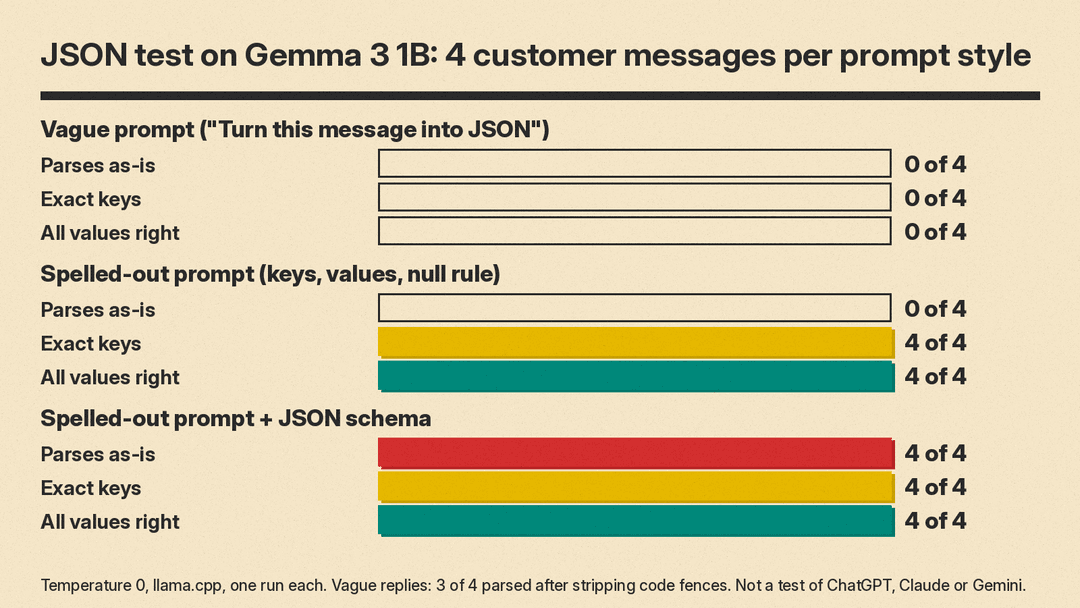
- Vague prompt ("Turn this message into JSON."): 0 of 4 parsed as-is. Every reply came in a code fence. After we stripped the fences, 3 of 4 parsed; the fourth had an explanation after the JSON. 0 of 4 used our keys. The model chose its own: "sender", "request", "contact", "recipient".
- Spelled-out prompt (keys, allowed values, null rule, "No code fences, no extra text"): still 0 of 4 parsed as-is, because the model kept the code fences. After stripping them, 4 of 4 parsed, with the right keys and all values right.
- Same prompt plus a JSON schema (llama.cpp's
response_formatwithjson_schema, which constrains the output like the hosted APIs): 4 of 4 parsed as-is, with the right keys and all values right.
We also sent an off-topic message ("What's a good name for a golden retriever puppy?") with the schema on. The model returned every key as null and topic "other". It did this with and without an extra fallback line, so one test does not show that the line is needed. On bigger hosted models your results will differ. The pattern is the useful part: the prompt fixes the keys, and the schema fixes the format.
The shape of a good JSON prompt
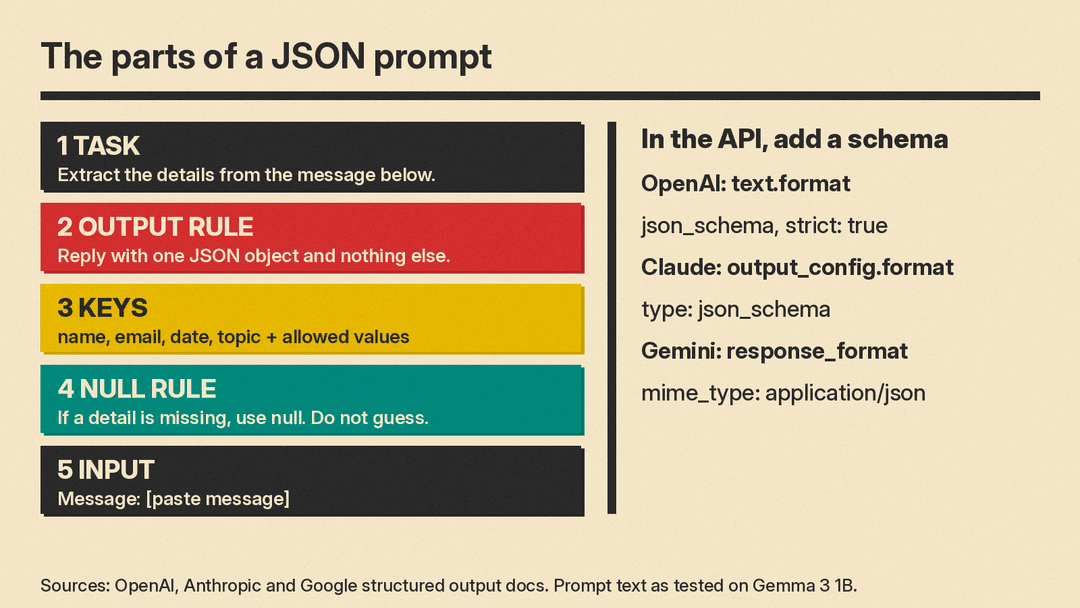
A good JSON prompt has five parts, in this order:
- The task in one line ("Extract the details from the message below.")
- The output rule ("Reply with one JSON object and nothing else.")
- The keys, each with a type or allowed values
- The null rule ("If a detail is missing, use null. Do not guess.")
- The input, clearly marked
6 copy-paste templates
Replace the parts in square brackets. They work in ChatGPT, Claude and Gemini chats.
1. Extract contact details
Extract the details from the message below. Reply with one JSON object and nothing else. No code fences, no extra text.
Use exactly these keys:
- name: the sender's name as written, or null
- email: the sender's email, or null
- date: the date they ask for, as written, or null
- topic: one of "demo", "pricing", "support", "other"
If a detail is missing, use null. Do not guess.

Message: [paste message]
This is the exact prompt we tested above.
2. Turn a list into rows
Turn the text below into a JSON array. Each item is an object with these keys:
- item: text
- quantity: number, or null if not given
- unit: text, or null
Reply with the JSON array only.

Text: [paste shopping list or notes]
3. Classify many short texts
Label each review below. Reply with a JSON array only. Each object has:
- id: the number in front of the review
- sentiment: one of "positive", "negative", "mixed"
- reason: one short sentence
Use only those three sentiment values.

Reviews:
1. [review]
2. [review]
4. Pull data from an invoice or receipt
Read the receipt below. Reply with one JSON object and nothing else:
- vendor: text
- date: in YYYY-MM-DD format, or null
- total: number with no currency sign
- currency: three-letter code such as "USD", or null
- line_items: array of objects with "description" and "amount"
If you cannot read a value, use null. Do not guess.

Receipt: [paste text or attach image]
5. Make test data for an app
Create 5 sample users as a JSON array. Each object has:
- id: integer starting at 1
- full_name: text
- signup_date: YYYY-MM-DD in 2026
- plan: one of "free", "pro", "team"
Reply with the JSON array only. Use made-up names.
6. Fix broken JSON
The text below should be one valid JSON object but has errors. Fix only the syntax. Do not add, remove or rename keys. Reply with the fixed JSON only.

[paste broken JSON]
Common problems and fixes
- Code fences around the JSON. Small models add them even when told not to (our test). Strip the leading
```jsonline and the closing fence in your code, or use the API schema setting. - New key names. List the keys and say "Use exactly these keys."
- Made-up values. Add a null rule and "Do not guess." OpenAI also suggests examples and splitting a hard task into smaller steps when outputs have mistakes.
- Long lists cut off. A reply that hits the token limit is incomplete JSON. Claude marks this with
stop_reason: "max_tokens". Raise the limit or ask for fewer items per call. - Right format, wrong facts. A schema checks shape, not truth. Google tells developers to validate values in their app and handle outputs that match the schema but are wrong.
Bottom line
In a chat app, name the keys, the types, the allowed values and the null rule, then check the result. In code, use the schema setting in the OpenAI, Claude or Gemini API, and still check for refusals, cut-off replies and wrong values. If you are building a small app this way, our guide to building an app with AI and no code shows where a JSON step fits.
Sources
- OpenAI: Structured model outputs
- Anthropic: Structured outputs
- Google: Structured outputs in the Gemini API
- JSON Schema: What is JSON Schema?
- llms.blog test: Gemma 3 1B on llama.cpp, temperature 0, 4 messages per prompt style, run October 29, 2026
