
Without memory, an AI chatbot starts each conversation from zero. You explain your project, your preferences and what you tried last time, and the next day you explain it all again. Agent memory is the set of features that lets an AI agent carry some of that context forward, so it can pick up closer to where it left off.
This explainer covers what agent memory is, the main kinds, how a few real coding tools handle it, and what to watch out for. It is written for people who use AI tools, not only for developers.
What agent memory means
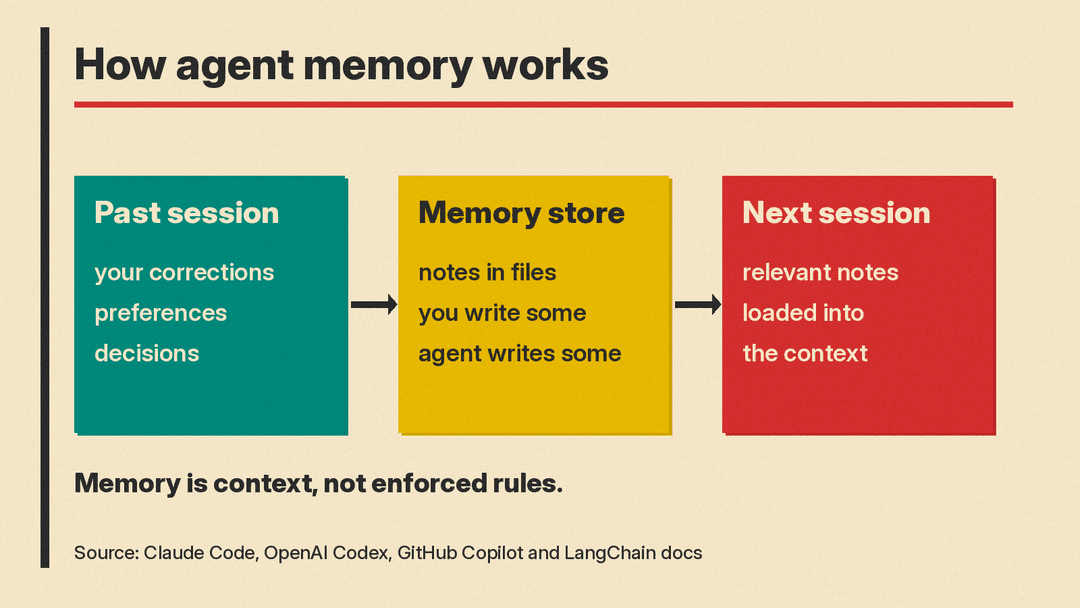
In the tools covered below, "memory" means stored notes: facts, preferences or past decisions saved in files or a memory store, then loaded back into the agent's context in a later session. The Claude Code docs, for example, say both of its memory systems are "loaded at the start of every conversation." The LangChain memory overview puts it simply: memory is "a system that remembers information about previous interactions." It says memory lets agents "remember previous interactions, learn from feedback, and adapt to user preferences."
This is different from the context window, which is the text the model can see right now. Memory is what decides some of what goes into that window. Our opinion piece on why a bigger context window is not better memory looks at that difference.
Short-term and long-term memory
The LangChain guide splits memory into two types by how long it lasts.
Short-term memory is the current conversation. LangChain calls it "thread-scoped memory," which "tracks the ongoing conversation by maintaining message history within a session." When you scroll up in a chat and the agent still knows what you said ten messages ago, that is short-term memory.
Short-term memory has a limit. The same guide says "A full history may not fit inside an LLM's context window," and that even when it does fit, "most LLMs still perform poorly over long contexts." The guide says models get "distracted" by stale or off-topic content, with slower responses and higher costs.
Long-term memory lasts across sessions. In LangChain's words, it "stores user-specific or application-level data across sessions and is shared across conversational threads." When an agent remembers next week that you prefer short answers, that is long-term memory.
Three kinds of things an agent can remember
LangChain borrows a framing from human memory. It says humans use memory to remember facts (semantic memory), experiences (episodic memory) and rules (procedural memory), and that "AI agents can use memory in the same ways."
In plain terms:
- Facts. "This project uses a certain testing tool." "The user is a teacher."
- Experiences. What happened last time: an approach that failed, a fix that worked.
- Rules. How to behave: "Ask before deleting files." "Explain changes before making them."
The guide also notes that memory can be written at two different moments. An agent can save something "on the hot path," as part of its work, typically before it responds to you, or it can save memories later as a background task. For a technical look at how developer frameworks store memory, see our comparison of agent memory frameworks.
Two ways memory gets written
In practice, AI tools mix two approaches.
You write it. You keep an instruction file that the agent reads every time. Coding agents use files such as AGENTS.md or CLAUDE.md for this. We cover these files in our explainer on what AGENTS.md is. This kind of memory is predictable: it says exactly what you put in it.
The agent writes it. The agent decides, on its own, what is worth saving from your work together. This saves you effort, but you have less control over what ends up stored.
How Claude Code handles memory
The Claude Code memory docs describe "two complementary memory systems":
- CLAUDE.md files, which you write. They hold instructions and rules, such as coding standards and workflows, and are loaded in every session.
- Auto memory, which Claude writes. It holds learnings and patterns, and the docs say it lets Claude "learn from your corrections without manual effort."
According to the docs, auto memory saves four kinds of notes: your role and working preferences, corrections you give and approaches you confirm, ongoing work and decisions "that Claude can't derive from the code or git history," and where to find outside information such as an issue tracker. It skips things it can work out from the code itself, and anything your CLAUDE.md files already say.
Some limits from the same page:
- Auto memory is loaded in every session, but only the first 200 lines or 25KB of its MEMORY.md index file, whichever comes first. Other memory files are read only when Claude needs them.
- It "is machine-local." The docs say files "are not shared across machines or cloud environments."
- The memory files are plain text you "can edit or delete at any time."
The docs also make a point that applies to every tool here: Claude "treats them as context, not enforced configuration." Memory is a strong hint, not a hard rule. To block an action no matter what, the docs point to a separate feature called a hook.
How Codex handles memory
OpenAI's memories page says memories "let ChatGPT and Codex carry useful context from earlier work into future work." It notes that ChatGPT on the web uses ChatGPT memory, while local Codex clients use "a separate local memory store and controls."
Details from that page:
- Local Codex memories are off by default. You turn them on in the ChatGPT desktop app's personalization settings.
- Codex turns useful context from earlier chats into local memory files. It "skips active or short-lived sessions" and updates memories in the background, not at the end of every chat.
- It "redacts secrets from generated memory fields," but the page still says: "Don't store secrets in memories."
- You can choose, per chat, whether the chat can use existing memories and whether it can add to future ones.
The page also gives advice worth copying. It says to keep required team guidance in AGENTS.md or checked-in documentation, and to "Treat memories as a helpful recall layer, not as the only source for rules that must always apply."
How GitHub Copilot handles memory
GitHub's Copilot Memory docs describe two types:
- Repository-level facts, such as "coding conventions, architectural decisions, build and test commands, and project-specific rules."
- User-level preferences, which "describe how you personally like to work and follow you between repositories."
GitHub gives an example of each. "This repository uses Vitest for unit tests" is a fact about the codebase, so it is stored for the repository. "Explain your changes before you apply them" is about you, so it is stored as your preference.
Two details stand out in GitHub's design. First, memories come with citations: facts point to the code that supports them, and preferences can quote what you said. Before using a fact, the docs say Copilot "checks the fact's citations against the current branch to judge whether the information is still accurate." Second, Copilot rates memories by usefulness. Memories downvoted past a threshold "are no longer used and will be deleted after a period of disuse."
The docs also say facts learned by one Copilot feature can be used by another. For example, something the cloud agent learns about a repository can later help Copilot code review.
Memory outside coding tools
Chat assistants have memory too, and it works on the same idea. Anthropic's memory announcement for the Claude app describes project-scoped memory, where "each project has its own separate memory," plus an Incognito chat mode for conversations "that don't appear in your conversation history or save to memory."
For step-by-step controls in consumer apps, see our guides to ChatGPT memory and Gemini's memory summary.
What to watch out for
The docs above point to the same set of risks.
- Stale facts. A note that was true last month may be wrong today. GitHub's citation check exists for this reason, and Claude Code can record when Claude wrote a memory file, in a timestamp field, so you and Claude can see how current a fact is.
- Memory is not a rulebook. The Claude Code docs say memory is "context, not enforced configuration," and OpenAI says memories should not be "the only source for rules that must always apply." Put firm rules in an instruction file or a hard control.
- Secrets. Codex redacts secrets from generated memories but still tells you not to store them. Treat memory files like any other file that could be shared.
- Privacy and visibility. On Copilot Business and Copilot Enterprise plans, GitHub says admins can view, export or delete members' stored preferences. Check who can see your memories before you rely on them.
- More is not always better. Loading lots of old notes uses up context. Our coverage of research on agent memory versus plain retrieval looks at one study of this tradeoff.
How to use agent memory well
A few habits follow from the vendor docs:
- Put rules that matter in a file you control, such as AGENTS.md or CLAUDE.md.
- Let the agent's own memory handle smaller things, like your preferred style.
- Review stored memories now and then, and delete anything wrong or out of date.
- Keep passwords, keys and private data out of memory.
- Use a no-memory or incognito mode for one-off or sensitive work, where your tool offers one.
Key takeaways
- In these tools, agent memory is stored notes that an agent loads back into its context.
- Short-term memory is the current conversation. Long-term memory lasts across sessions.
- Tools mix memory you write (instruction files) with memory the agent writes for itself.
- Claude Code and Codex docs both say not to treat memory as a set of guaranteed rules.
- Review what your agent remembers, and keep secrets out of it.
