
jq is the small command-line tool people reach for when they need to pull a few fields out of a JSON file: an API response, a log export, a config dump. Its syntax is hard to remember, so asking ChatGPT, Claude, Gemini or DeepSeek for the command is a common shortcut. The catch is that the AI only sees the sample you paste, and real JSON is messier than any sample.
We tested how much that matters. We asked one model for the same jq command 8 times, with two different prompts, and ran every answer on a test file with a few ordinary traps in it. The plain request failed every time. The prompt with five added rules worked every time.
The test
The task was a typical reporting job. A file called orders.json holds shop orders under .data.orders. We asked for a CSV with two columns, email and total: paid orders only, amounts added up per customer, highest total first, and orders with no email skipped.
Both prompts pasted the same two clean sample orders. The full test file had 9 orders, including these traps:
- One amount stored as a string,
"19.90", instead of a number. - One customer with
"email": nulland one with no email key at all. - One order with no
statusfield. - One order with no
itemslist, and one customer name with a comma in it.
We wrote our own reference command first. The right answer is four rows: cy@example.com 120, ana@example.com 62.4, dee@example.com 61.4 and ben@example.com 8.25.
The model was DeepSeek V4.1 Flash through OpenRouter, low reasoning effort, no system prompt. Each prompt ran 4 times, so 8 scored replies (one call timed out at the gateway and was sent again). We pulled the command out of each reply and ran it with jq 1.7 in bash. A reply passed only if it exited cleanly and printed exactly the right rows. The raw replies and the test harness are saved with the run.
What happened
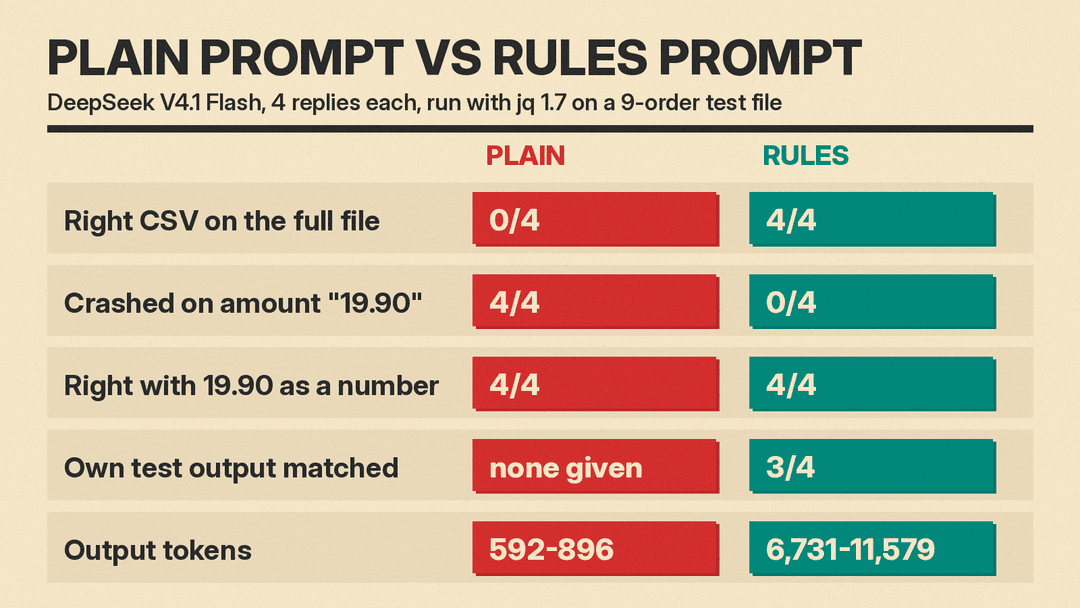
The plain prompt failed 4 out of 4 times. Every command stopped with the same error:
jq: error (at orders.json:128): number (42.5) and string ("19.90") cannot be addedjq does not convert text to numbers for you, so one quoted amount ends the whole run. Two of the four commands had already printed the header row, so a script that writes to a file and does not check the exit code would leave a CSV with a header and no data. The other two printed nothing.
The rest of the logic was fine. When we changed "19.90" to a plain number in the file, all 4 plain commands printed the right rows, and all 4 had already handled the null and missing emails. The model wrote a correct command for the data it was shown. It just never asked whether the rest of the file looked the same.
The rules prompt passed 4 out of 4 times. Every reply converted string amounts with tonumber, skipped orders with no email, treated a missing status as not paid, and counted unreadable amounts as zero so they could not crash the run or quietly drop a customer.
The rules replies also made choices we did not ask for. All four trimmed spaces and ignored case in the status, so " PAID " counts as paid. One also lowercased emails, which merges Ana@Example.com with ana@example.com; that is often what you want, but it changes your totals, so check that line. Two rounded to whole cents to avoid float noise; adding all 9 amounts in our test file in jq, with the string converted, printed 451.04999999999995.
The self-tests caught one small surprise. We asked each rules reply for a 3-record test file and the exact output it expected. We ran each test through its own command. Three matched exactly. The fourth predicted 10.5 but jq 1.7 printed 10.50, because tonumber kept the digits as written in the string. That is harmless in a spreadsheet, but it would break a test that compares text. One reply also gave 4 test records instead of 3.
The safety had a price. The plain replies used 592 to 896 output tokens. The rules replies used 6,731 to 11,579, about ten times as many, mostly hidden reasoning. In a chat app that shows up as a longer wait; through an API you also pay for it.
The prompt template
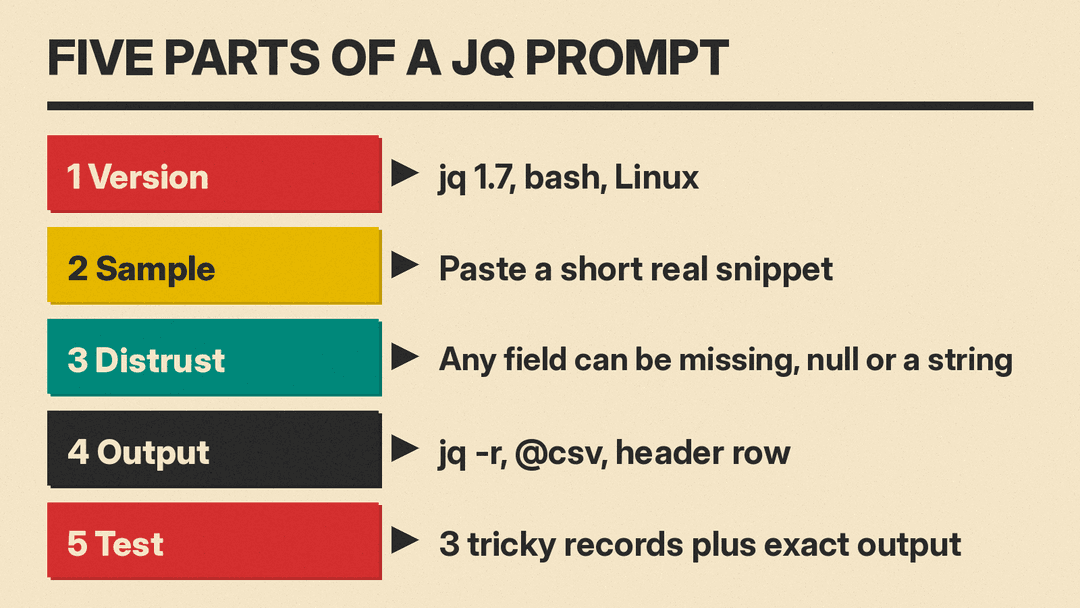
This is the rules prompt we tested. Swap in your own goal and sample.
You are helping me write a jq command. I use jq 1.7 in bash on Linux.

Goal: [describe the output: columns, filters, grouping, sort order].

Here is a short sample of [file name]. The real file has more records:

[paste 2 or 3 real records]

Rules:
1. Do not trust the sample. In the real file, any field can be missing, null, or the wrong type (for example a number stored as a string). Handle each case so the command does not crash or drop rows by accident.
2. Use jq -r and @csv, and print a header row.
3. Give one command I can paste into bash, in a code block.
4. Then list each edge case you handled in one short line each.
5. Give me a 3-record test JSON with the tricky cases and the exact output your command should print for it.
Why each part is there:
- Version and shell. jq builds differ, and quoting rules differ between bash and Windows PowerShell. Naming them up front prevents a command that only works somewhere else.
- A real sample. Paste actual records, not a description. The model needs the exact field names and nesting, such as
.data.ordersrather than a top-level list. - Distrust the sample. This one line made the difference in our test. Without it, the model wrote for the two clean records it could see.
- Output format. The jq manual says
@csvneeds an array as input and quotes strings for you, and-rprints the result as raw text instead of a JSON string. Asking for both avoids hand-built commas that break on names like "Dee, Jr.". - A test with expected output. This makes the model commit to an answer you can check in ten seconds. Run its test file through its command and compare.
If you already have a plain command
You do not have to start over. The smallest fix for our plain commands was one change in the sum. This version of the first plain reply ran correctly on the full test file:
jq -r '
  (
    ["email", "total"],
    (
      .data.orders
      | map(select(.status == "paid" and ((.customer.email? // "") | length > 0)))
      | group_by(.customer.email)
      | map({
          email: .[0].customer.email,
          total: (map(.amount | tonumber? // 0) | add)
        })
      | sort_by(-.total)
      | .[]
      | [.email, .total]
    )
  )
  | @csv
' orders.json
tonumber? // 0 turns a numeric string into a number and anything unreadable into 0. The ? suppresses the error, and the // operator supplies the fallback when the left side gives nothing, null or false, as the manual describes. Keep the space between ? and //: jq 1.7 reads tonumber?//0 as its separate ?// operator and stops with a syntax error. Decide whether 0 is the right fallback for your data; for money it often is, but for other fields you may want to drop the record instead.
A checklist before you trust any AI-written jq
- Run it on the whole file, not the sample you pasted.
- Check the exit code with
echo $?right after. Anything other than 0 means the output may be cut short. - Search the file for the fields you use with a quick
jq '.data.orders[].amount | type' orders.json | sort | uniq -cto see every type that appears. - Count rows in and out. If 9 orders went in and 4 customers came out, make sure the skipped ones were meant to be skipped.
- Add one total by hand and compare.
The same lesson showed up in our tests of SQL queries written by AI, bash scripts and cron jobs: the model is usually right about the data you describe and blind to the data you did not show it. A prompt that tells it what could go wrong, and asks for a test, closes most of that gap.
Sources
- jq 1.7 manual (tonumber, @csv, -r, the alternative operator, try and catch)
- OpenRouter: DeepSeek models
- Test prompts, all 8 raw replies, the test file and the harness: saved in our run folder (llms.blog testing, November 12, 2026)
