
A cloud coding agent is an AI coding agent that does its work on a remote computer instead of your own machine. Because the work happens somewhere else, the agent can keep going while you do other things. It usually hands back its work as a set of proposed changes for a person to review.
What is a cloud coding agent?
An agent is a program that receives a goal, decides on steps, and carries them out with tools. Our explainer on how AI agents work covers that loop. A coding agent is an agent whose tools are coding tools: it reads files, edits files, and runs commands in a terminal. Our explainer on coding agents compares several of them.
The word cloud describes where the agent runs. Cursor's docs say cloud agents "use the same agent fundamentals but run in isolated VMs in the cloud with full development environments instead of on your local machine." A VM is a virtual machine, a computer that exists as software running on other hardware. Isolated means it is kept separate from other machines.
Anthropic's docs say "A cloud session is a Claude Code session that runs on cloud infrastructure instead of on your machine." OpenAI's Codex Cloud page says you can "Give Codex coding tasks to work through in the cloud, from investigating bugs to building features." GitHub's docs say Copilot "can research a repository, plan changes, and implement them in the background." It "can edit files and run tests and linters in a cloud development environment, rather than your local IDE." An IDE is the program where you write and run code. A repository, or repo, holds a project's files and a recorded history of changes to them. A linter is a tool that scans code for likely errors and style problems.
In the products covered here, the agent's main output is a set of proposed changes. GitHub's docs, for example, say you can review proposed changes and ask for refinements before creating a pull request, or request a pull request in your prompt.
How is it different from a coding agent on your laptop?
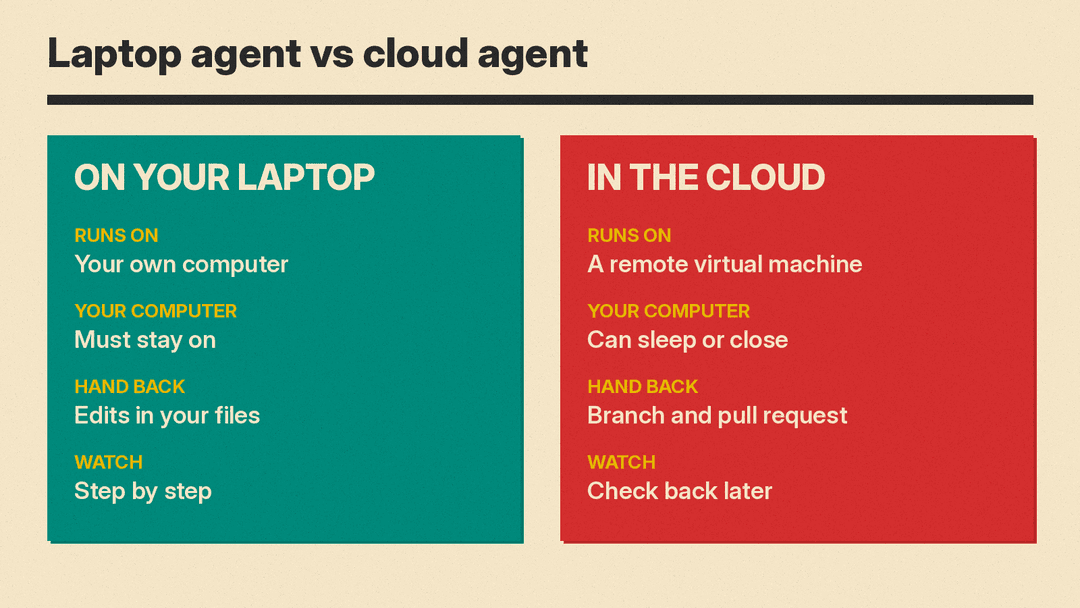
The differences are about where the work runs and what that allows.
Your machine stays free. OpenAI says "Each task has its own workspace and can keep working while your computer is asleep." Anthropic's docs say "The session keeps running after you close your laptop, and you can check on it or steer it from any device." Cursor's docs say "You can run as many agents as you want in parallel, and they do not require your local machine to be connected to the internet."
The agent gets its own machine. On a laptop, an agent shares your processor, memory, and files with everything else you are doing. In the cloud, it has a virtual machine of its own. Cursor says that because cloud agents have their own virtual machine, they can build, test, and interact with the changed software. They can also use computers to control the desktop and browser, and they support MCP servers. An MCP server is an external program an agent can connect to and use as a tool; our MCP guide explains the idea.
You can start work from more places. The products below list start points such as a phone app, a web page, a chat app, or a comment on a pull request or work item.
How does a cloud coding agent work, step by step?
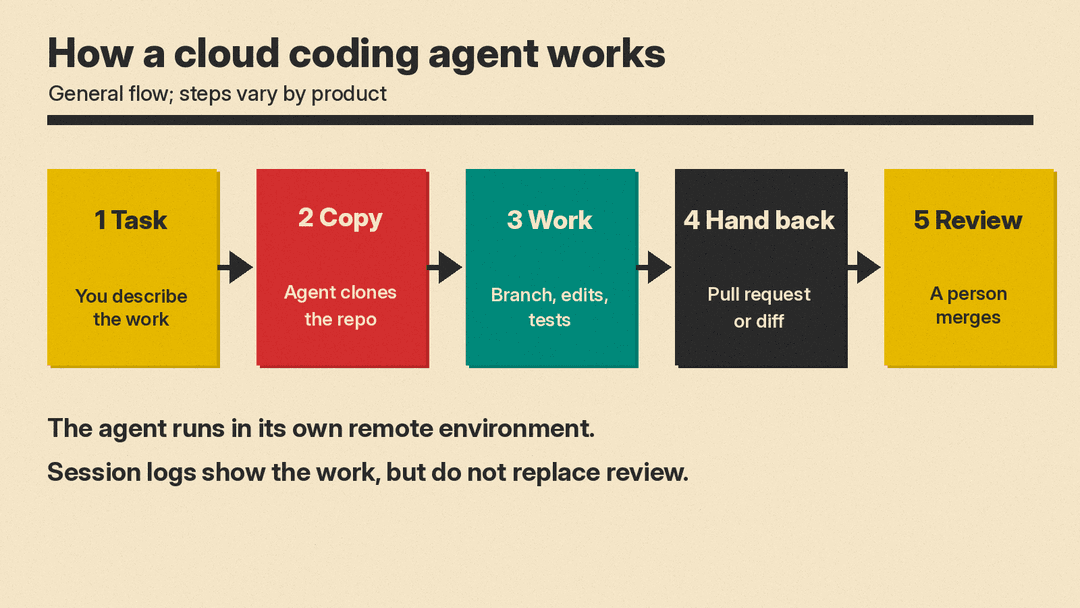
The steps vary by product. The general flow is similar.
- You describe a task in plain language. OpenAI's page describes tasks "from investigating bugs to building features."
- The agent gets a copy of the code in its own remote environment. Cursor's docs say cloud agents clone your repo and work on a separate branch. To clone means to copy a repository. A branch is a separate line of work inside a repository. Its changes do not alter the main version until someone merges them into another branch.
- The agent makes changes and runs checks. GitHub's docs say Copilot can edit files and run tests and linters in a cloud development environment. Tests are small programs that check whether other code behaves as expected. Cursor's docs say an agent "that can write code but can't run tests, query services, or reach APIs cannot close the loop on its work." An API is a defined way for one program to request something from another.
- The agent hands back a pull request or a diff. A diff lists the lines added, removed, or changed. A pull request is a proposal to merge one branch into another. It shows the diff, allows comments, and gives a person a place to accept or reject the work. Cursor's docs say cloud agents push changes to your repo for handoff. To push means to send changes to a hosted copy of the repository.
- A person reviews and merges. GitHub's risks doc says draft pull requests the Copilot cloud agent creates must be reviewed and merged by a human, and that it cannot approve or merge a pull request. A draft pull request is marked as not ready for final approval. GitHub's docs say session logs show the work and tools used, and that "Logs do not replace your own review and testing." Our explainer on AI code review covers tools that read code and leave comments.
What is a cloud environment, and why does setup matter?
An environment is the saved configuration around a project: which files are present, which programs are installed, which credentials the agent may use, and which network addresses it may contact. A credential is a password, key, or token that proves who you are to another system.
Anthropic's docs say every cloud session runs in a cloud environment, the saved configuration that controls network access, environment variables, and setup scripts. An environment variable is a named value programs can read at run time. A setup script prepares a machine, usually by installing what a project needs.
OpenAI says you create a cloud environment with the repositories, tools, and access a project needs. Codex inspects your repositories, installs dependencies and tools, tests the workflow, and asks for missing access or information. A dependency is software a project needs in order to run.
Cursor's docs describe the environment as similar to a laptop setup: cloned repos, installed dependencies, secrets, startup commands, and network access. A secret is a stored credential kept out of the visible code. Cursor's docs say "Not setting up a development environment for your cloud agents is like not giving your engineers a computer."
Setup differs by product. GitHub's docs list environment choices in Copilot in the cloud: Cloud, a cloud sandbox; GitHub Actions-based; and Remote, a connection to a custom environment. A sandbox is separated so that what happens inside does not affect other systems. GitHub Actions runs automated steps when something happens in a repository. Anthropic's docs say a cloud session runs by default on infrastructure Anthropic manages, or on an organization's self-hosted environment when routed there. Self-hosted means the organization runs the computers itself.
Where can you start one?
Each product lists its own starting points. The lists below are as read in each product's docs on November 9, 2026.
Cursor Cloud Agents
Cursor's docs list: the Cursor for iOS app, Cursor Web at cursor.com/agents, the Cursor Desktop app where you select Cloud, Slack by mentioning @cursor, GitHub or Bitbucket comments by mentioning @cursor, Linear, and an API. Bitbucket is a code hosting service. Linear tracks work items. Slack is a workplace chat app. An API start point lets another program begin an agent. Cursor's docs say Cloud Agents were formerly called Background Agents.
OpenAI Codex Cloud
OpenAI's page says you can start a task from ChatGPT on the web, on mobile, or in the desktop app. You can also start from the terminal using the CLI. A CLI is a command line interface, where you type commands as text.
GitHub Copilot cloud agent
GitHub's docs say Copilot can research a repository, plan changes, and implement them in the background, in a cloud development environment rather than your local IDE. It works in Copilot in the cloud, which offers the environment choices above: Cloud, GitHub Actions-based, and Remote. GitHub's docs list these entry points on GitHub.com: your Copilot home page at github.com/copilot, the Copilot panel in a file, issue, or pull request, your GitHub dashboard, and the Agents tab in a repository. A session in a cloud sandbox can also continue in other Copilot clients, such as GitHub Mobile, the GitHub Copilot app, an IDE, or the Copilot CLI. GitHub's docs say this newer Copilot in the cloud experience is available to users with a paid Copilot plan starting October 28, 2026, subject to organization and enterprise policies, while Copilot Free users keep the older Copilot Chat experience.
Anthropic cloud sessions in Claude Code
Anthropic's docs list: the browser at claude.ai/code, also called Claude Code on the web; the Code tab in the Claude mobile app; the Desktop app; the terminal with claude --cloud; and cloud scheduled tasks. A scheduled task starts at a set time.
What are the risks, and what safeguards exist?
GitHub's risks doc puts it plainly: "Copilot cloud agent is an autonomous agent that has access to your code and can push changes to your repository. This entails certain risks." Autonomous means the agent acts on its own once started.
The safeguards below are the ones the vendors describe in their docs, as read on November 9, 2026.
GitHub. Only users with write access to the repository can trigger the Copilot cloud agent. Write access means permission to push changes. It can push only to a single branch. Draft pull requests it creates must be reviewed and merged by a human, and it cannot approve or merge a pull request. By default, GitHub Actions workflows are not triggered until its code is reviewed and a user with write access approves them. GitHub restricts its internet access with a firewall, a filter that decides which network connections are allowed. Its commits are signed and include a link to session logs. A commit is a saved set of changes. Signed means it carries a cryptographic mark showing where it came from.
Prompt injection. GitHub's risks doc names this risk. Users can include hidden messages in issues or comments. An issue is a note in a repository used to report a problem or request work. GitHub's docs say it filters hidden characters, for example HTML comments are not passed to the agent. HTML is the markup language of web pages. An HTML comment is text a browser does not display.
Cursor. Cursor's docs say you can add secrets and restrict outbound domains. A domain is a website address. Restricting outbound domains limits where the agent may connect. Agents produce screenshots, videos, and logs so you can see what changed and how the agent verified its work. You can take control of the agent's remote desktop.
OpenAI. OpenAI's page says network access and credentials are configured in the environment settings. For workflows that need service credentials, it says: "Use network secrets for allowed HTTPS services and limit the environment's network destinations." HTTPS is the encrypted form of HTTP, the protocol browsers and servers use.
Anthropic. Anthropic's docs say that in Anthropic-hosted environments, GitHub credentials stay encrypted on Anthropic's servers and never enter a session's VM.
When does a cloud agent make sense, and when doesn't it?
These are considerations, not rules.
A cloud agent may fit when:
- The task is well defined and you can write down what done looks like.
- The result is testable, so a test or build can show whether the work succeeded.
- You want to hand off and check back later.
- You want several tasks running at once. Cursor says you can run agents in parallel.
- The work needs a browser or desktop app to check, and the product's agents can use one (Cursor's docs say its cloud agents can).
A laptop agent may fit better when:
- The task needs constant back-and-forth and you are still deciding what you want.
- No test or check shows whether the work is right.
- The environment is not set up, so the agent cannot run the project.
- You want to watch each step and adjust immediately.
Two questions before you start one: Can the agent run the project in its environment? Can a person check the result before it reaches the main branch?
Key terms
- Repository (repo): the files of a software project and the recorded history of changes.
- Branch: a separate line of work inside a repository. Changes on a branch do not affect the main version until merged.
- Pull request: a proposal to merge changes from one branch into another. It shows the diff and gives a person a place to accept or reject the work.
- Virtual machine (VM): a computer that exists as software running on other hardware. Isolated means kept separate from other machines.
- Environment: the saved configuration around a project: files, installed programs, credentials, environment variables, setup scripts, and network rules.
- Session log: a record of what an agent did and which tools it used. GitHub's docs say "Logs do not replace your own review and testing."
FAQ
Does a cloud coding agent need my computer to stay on?
OpenAI says each task can keep working while your computer is asleep. Anthropic says the session keeps running after you close your laptop. Cursor says cloud agents do not require your local machine to be connected to the internet.
Can a cloud agent merge its own pull request?
GitHub's docs say the Copilot cloud agent cannot approve or merge a pull request, and that draft pull requests it creates must be reviewed and merged by a human.
Where does the work run?
Cursor's docs say cloud agents run in isolated VMs in the cloud with full development environments. Anthropic's docs say a cloud session runs on cloud infrastructure, by default infrastructure Anthropic manages, or on an organization's self-hosted environment when routed there.
Can I see what the agent did?
GitHub's docs say session logs show the work and tools used. Cursor's docs say agents produce screenshots, videos, and logs so you can see what changed and how the agent verified its work.
Can I start one from my phone?
OpenAI says you can start a task from ChatGPT on the web, mobile, or desktop app. Anthropic lists the Code tab in the Claude mobile app. Cursor lists the Cursor for iOS app. GitHub's docs cover Copilot on GitHub Mobile.
