
AI tools such as Claude, ChatGPT, Codex, Cursor and GitHub Copilot can load packaged instructions called agent skills. A skill teaches the tool how to do one specific job, such as writing release notes in your team's format or running a deployment checklist. Instead of typing the same instructions every time, you save them once in a folder, and the agent reads them when a matching task comes up.
Skills follow a shared, open format, and products such as Claude Code add their own extra settings on top. This article explains what a skill is, how an agent loads one, where skills run, and how they differ from prompts, rules files and tool connections.
What is an agent skill?
agentskills.io, a site documenting the format, defines it this way: "Agent Skills are a lightweight, open format for extending AI agent capabilities with specialized knowledge and workflows."
Two terms need plain definitions. An agent is an AI tool that can carry out multi-step tasks, not just answer questions. An open format is a public specification any vendor can adopt, so files made for one product can be read by others. According to the site, "The Agent Skills format was originally developed by Anthropic, released as an open standard, and has been adopted by a growing number of agent products."
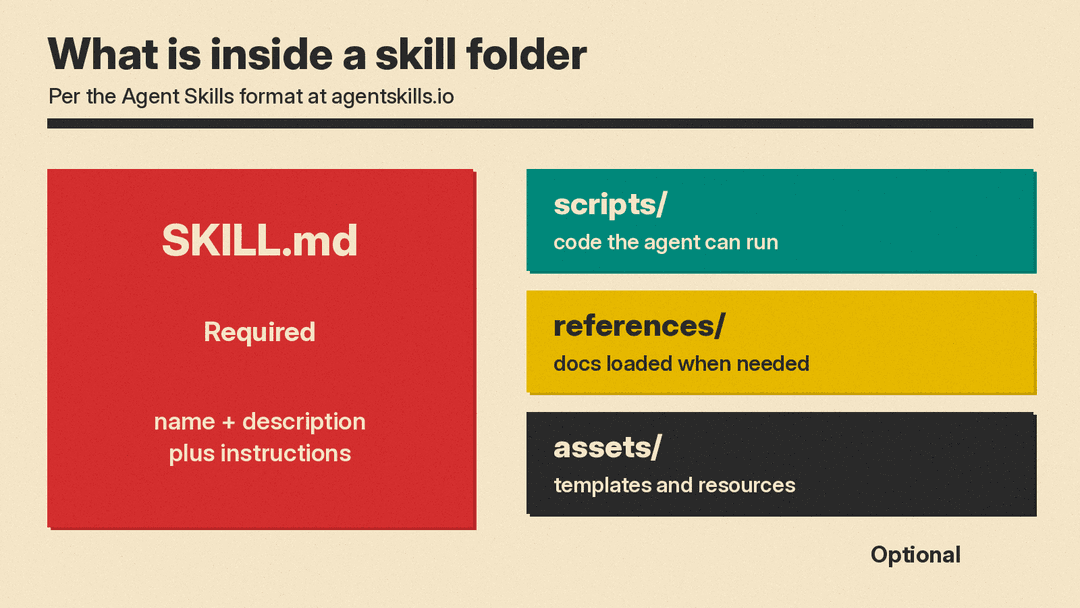
In concrete terms, a skill is a folder containing a file named SKILL.md. That file includes metadata, meaning a name and description at minimum, plus instructions that tell an agent how to perform a specific task. Skills can also bundle scripts, which are small programs, along with reference materials, templates and other resources. The optional folders are scripts/, references/ and assets/.
agentskills.io lists these benefits:
- Domain expertise: capture specialized knowledge as reusable instructions and resources.
- Repeatable workflows: turn multi-step tasks into consistent, auditable procedures.
- Cross-product reuse: "Build a skill once and use it across any skills-compatible agent".
How does a skill work?
Agents load skills through a method agentskills.io calls "progressive disclosure". An AI model works with a limited amount of text at one time, called its context, and this method keeps most skill text out of it until needed.
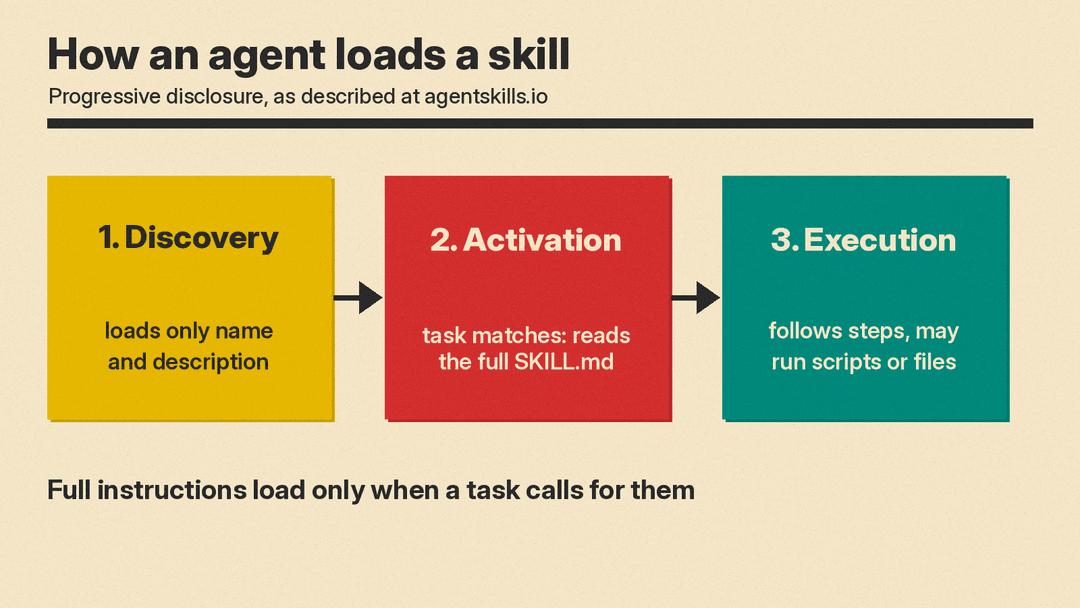
Loading happens in three stages:
- Discovery: at startup, agents load only the name and description of each skill.
- Activation: when a task matches a skill's description, the agent reads the full SKILL.md into context.
- Execution: the agent follows the instructions, optionally running bundled code or loading referenced files.
Full instructions load only when needed, so agents can keep many skills on hand with a small context footprint.
For a more technical look at the SKILL.md layout, bundled scripts, the split with MCP and the security risks of shared skills, see our deep dive on how agent skills work.
Claude Code's docs frame the use case this way: "Create a skill when you keep pasting the same instructions, checklist, or multi-step procedure into chat". The docs contrast skills with CLAUDE.md, a file whose content loads every session. A skill's body loads only when it is used.
What does a skill look like?
A skill is plain files you can open in a text editor. The required piece is SKILL.md, which has two parts:
- Frontmatter: a small metadata block at the top of the file with fields like name and description. Cursor's docs say name and description are required in Cursor.
- Body: the instructions themselves, written for the agent to follow.
Claude Code's docs describe two kinds of content a skill may carry:
- Reference content: conventions, style guides, domain knowledge.
- Task content: step-by-step instructions for an action like a deployment.
Around SKILL.md, a skill may include the optional folders: scripts/ for executable code, references/ for supporting documents, and assets/ for templates and other files.
GitHub's docs give an example: a skill for writing release notes can include your team's template, a script for gathering changes, and instructions for grouping them.
Where can you use agent skills?
As of November 2026, skills run in several products, including chat apps and many coding agent tools.
- Claude Code: skills follow the Agent Skills open standard, and Claude Code adds extra features. Claude uses skills when relevant, or you can invoke one directly with /skill-name.
- Cursor: Cursor calls Agent Skills "an open standard for extending AI agents with specialized capabilities." Cursor discovers skills at start, and the agent decides when they are relevant. Project skills live in .agents/skills/ or .cursor/skills/, and user-level skills live in ~/.agents/skills/ or ~/.cursor/skills/. For compatibility, Cursor also loads skills from Claude and Codex folders.
- ChatGPT and Codex: OpenAI's docs say, "A skill packages instructions, resources, and optional scripts so either product can follow a workflow reliably. Skills build on the open agent skills standard." OpenAI also offers plugins, which distribute skills and connectors, meaning links to other software. You can use skills to design the workflow, then package it as a plugin for others to install.
- GitHub Copilot: GitHub's docs say, "Agent skills are folders of instructions, scripts, and resources that Copilot can load when relevant to improve its performance in specialized tasks." Skills are usable in the GitHub Copilot app, Copilot CLI (a command-line tool), Copilot cloud agent and Copilot code review on GitHub.com, and agent mode in VS Code, Visual Studio and JetBrains IDEs. Shared skills exist online, for example the anthropics/skills repository and github/awesome-copilot. A repository is a shared folder of code and files.
Skills vs prompts, rules and MCP
These concepts overlap, so the labels can blur. A simple framing, with the caveat that details vary by product:
- A prompt is a one-time instruction you type in the moment. It applies to that conversation only.
- A rules or instructions file like AGENTS.md or CLAUDE.md is always on. Its content loads every session, whether or not it is relevant to the task.
- A skill loads only when relevant. The agent sees the name and description up front and reads the full instructions when a task matches.
- The Model Context Protocol (MCP) connects an agent to outside tools and data, while a skill teaches it how to do a task. One supplies access, the other supplies procedure.
The two can be combined. OpenAI's docs note that plugins can bundle skills with MCP server connections.
Who decides when a skill runs?
Both the agent and the user can trigger a skill, depending on the product and its settings.
On the agent side, matching is based on the description. OpenAI's docs describe implicit invocation: ChatGPT or Codex can choose a skill when the task matches the skill description. Cursor behaves similarly, with the agent deciding when discovered skills are relevant. Claude Code's docs say Claude uses skills when relevant.
On the user side, each product offers explicit invocation:
- ChatGPT: type @ and select a skill.
- Codex CLI or IDE extension: run /skills or type $.
- Cursor: type / in Agent chat to invoke a skill.
- Claude Code: invoke a skill directly with /skill-name.
A skill can also opt out of agent-side triggering. In Claude Code, the setting disable-model-invocation: true means Claude can't invoke the skill on its own. The docs recommend it for workflows with side effects, meaning actions that change things outside the conversation, like /deploy. The docs say: "You don't want Claude deciding to deploy because your code looks ready."
Because matching depends on the description, the description is part of the design. OpenAI's docs list a related practice: test prompts against the description to check that the skill triggers when intended.
Are agent skills safe?
A skill is instructions, but it can also carry scripts and permission settings, so it is worth reading before you use one.
Claude Code's docs flag one field in particular. The allowed-tools field grants permission for listed tools during the turn that invokes the skill, without prompting. The docs say a skill can grant itself broad tool access, so review the allowed-tools of skills checked into a repository before you run Claude Code there.
Reasonable habits:
- Read SKILL.md before using a skill written by someone else.
- Check the scripts/ folder for code the skill may run.
- Review allowed-tools in Claude Code skills, especially in shared repositories.
- Set disable-model-invocation: true for skills with side effects, so a person starts them.
Shared collections, like the ones GitHub's docs mention, make skills easy to find, but a shared skill is not automatically a reviewed one. Treat third-party skills the way you would treat any third-party extension.
How to start with skills
You do not need to write files by hand to begin. ChatGPT Work includes a built-in creator at @skill-creator, and Codex includes one at $skill-creator. OpenAI's docs say the creator asks what the skill does, when it should trigger, and whether to include scripts. Instruction-only is the default.
OpenAI's docs also list best practices:
- Keep each skill focused on one job.
- Prefer instructions over scripts unless you need deterministic behavior (the same result every time) or external tooling.
- Write imperative steps with explicit inputs and outputs.
- Test prompts against the description.
A good first project is a task you already repeat. Claude Code's docs point to the signal to watch for: you keep pasting the same instructions, checklist or multi-step procedure into chat. Write those steps down once, save them as a skill, and let the agent pick them up when the task appears.
When you are ready to write one by hand, our step-by-step guide to writing an agent skill covers naming rules, descriptions that trigger, folder locations and testing.
