
GitHub is turning its Copilot desktop app into a place to run longer, multi-step agent work. In its Universe changelog for the GitHub Copilot app, dated October 28, 2026, the company added two public previews: Copilot Projects, which gives agents an ongoing goal across repositories, and computer use, which lets Copilot click and type inside desktop apps on macOS and Windows.
Both features take Copilot past a single task in a single repository. They also raise new questions about review and control, which GitHub's own documentation answers in some detail.
What Copilot Projects does
The changelog says "Work doesn't always fit in a single repository or session." A feature can span several repositories, and a launch plan can pull in specs, designs and assets without touching a repository at all. Projects are meant to give that work one home.
According to the changelog, you start a project, describe the goal, and add context such as repositories, design mocks, Slack threads or meeting notes. You choose the models and tools. "Copilot runs as many agents as the work needs and brings back results (e.g., pull requests) for your review." For a focused task in one repository, you can still start a session directly from that repository.
The GitHub Docs page on working with projects fills in the mechanics:
- A project can span one or more repositories, or none. You can start a project without adding a repository.
- A Library tab holds supporting material. Files you add appear under "User", and artifacts Copilot creates appear under "Agent".
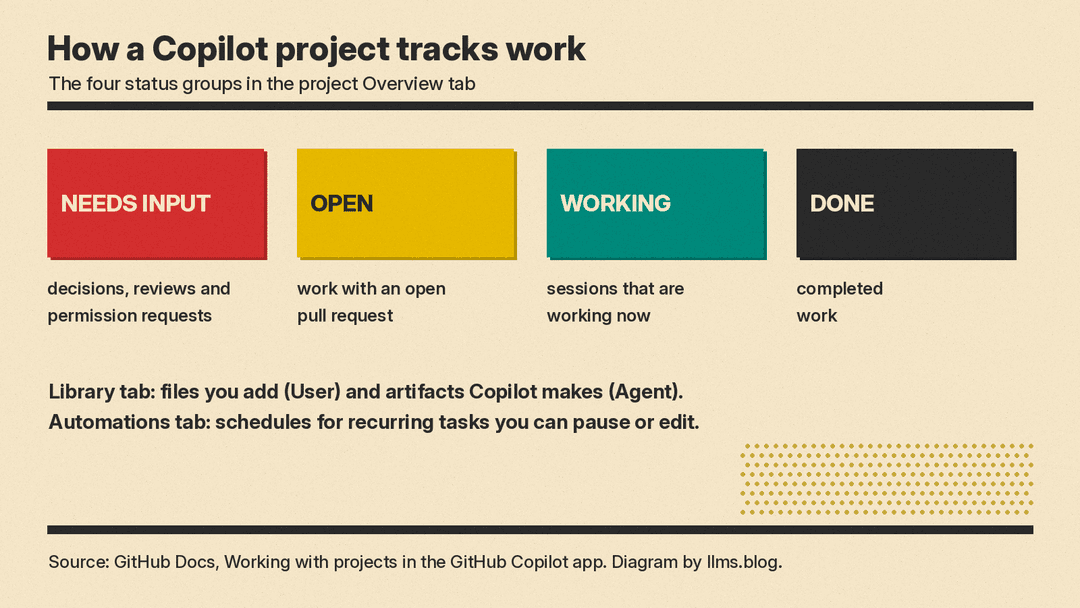
- An Overview tab groups work by status: Needs input (decisions, reviews and permission requests), Open (work with an open pull request), Working (sessions working now) and Done.
- You can open any session to review its conversation, changes, pull request and plan, and send a message in "Steer this session".
- Recurring work is set up by asking Copilot in the project conversation, for example a summary every Monday at 9 AM. An Automations tab shows the schedule and next run time, and lets you pause, edit or delete the task.
The docs note that projects "are in public preview and subject to change."
In the Universe 2026 keynote post, GitHub's Jay Parikh says projects "let you run agent work across multiple repos in fully managed, parallel sessions." iTWire's Universe report adds that, per the keynote, the work can run on your computer or in the cloud, so you can close your laptop and it keeps running.
What computer use does
The second preview reaches outside the code editor. The changelog says computer use "lets Copilot read app content, click controls, enter or edit text, and navigate across apps, including those without an API, command-line interface, or MCP integration." GitHub's example is an expense-report workflow.
The how-to page for computer use says it is available for local sessions on macOS and Windows, and that Copilot interacts with apps in the background so you can keep working. On Windows, it brings the target app into focus only when needed, then restores the previous window. The concept page on computer use says the same feature is also in GitHub Copilot CLI.
The controls, per those two docs pages:
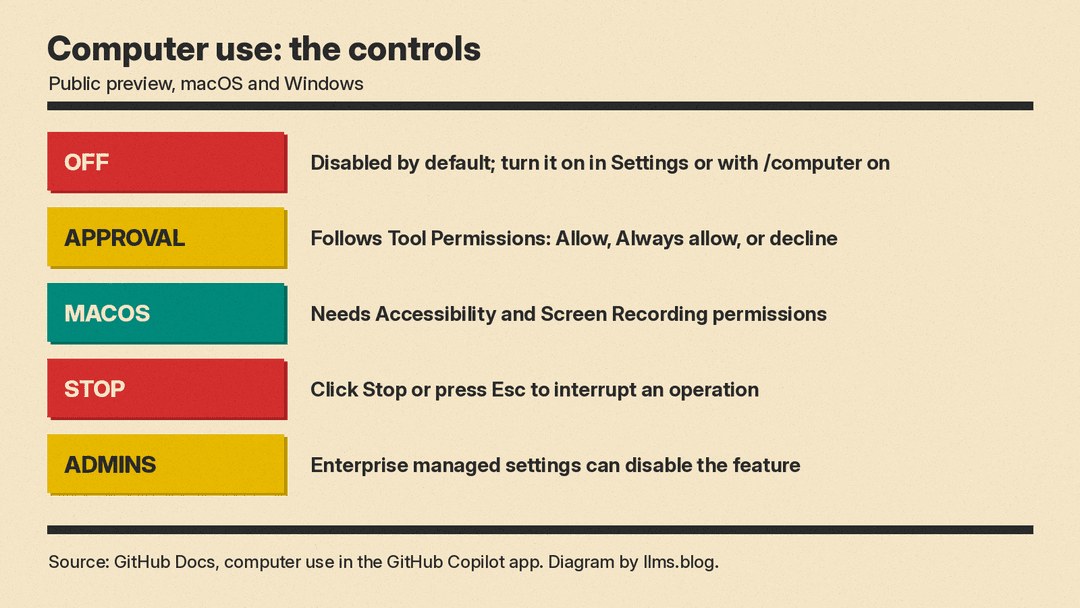
- Computer use is disabled by default. You turn it on under Settings, Computer Use, or with the
/computer oncommand in a session. - On macOS you must grant Accessibility and Screen Recording permissions.
- It follows the app's Tool Permissions setting. When approval is required, you can choose Allow for the current session, Always allow, or decline.
- An "Always allow" choice is stored locally and applies to both the app and the CLI on that computer. Removing it does not revoke access already granted in a running session.
- You can stop an operation with the Stop button or the Esc key.
- Enterprise administrators can disable it through managed settings, and a local setting does not override that policy.
GitHub is direct about the risks. The concept page warns that computer use "can select the wrong control, enter text in the wrong location," and that ambiguous instructions or unexpected on-screen content "may cause unintended actions that affect your device, data, or connected accounts." It advises against "Always allow" for apps that hold sensitive information or support high-impact actions. It also says that if an API, MCP server, terminal command or browser tool can do the job, that tool "typically provides more structured information and predictable results."
Who can use it and what it costs
The docs say the GitHub Copilot app "is available for all Copilot plans." GitHub did not list a separate price for Projects or computer use. Usage is billed through GitHub AI Credits. The GitHub Copilot features page says every plan includes a monthly credit allowance, that "1 AI credit = $0.01 USD," and that credit use depends on the model and the task. As of October 2026, that page lists Pro at $10 per user per month, Pro+ at $39 per user per month and Max at $100 per user per month, with a free tier at $0.
Enterprise buyers have a separate path. GitHub said at Universe that enterprises working with a GitHub or Microsoft account team can now get Copilot included with GitHub Enterprise, with AI use metered against the company's budget, which we covered in GitHub Enterprise Now Includes Copilot.
Why it matters
Projects give Copilot a long-running goal with a review queue, for work that spans more than one repository. Computer use lets the same agent reach legacy and GUI-only software that has no API or MCP server, which GitHub's docs name as the use case for the feature.
The features also fit the rest of GitHub's Universe releases. Copilot Fusion picks models for each task, and GitHub Agentic Workflows run coding agents inside Actions. Projects is the layer that ties several of those sessions to one goal.
Both features are previews. GitHub's own documentation says they are subject to change, and its warnings about computer use mean teams should test it on low-risk apps first and keep approvals on.
Sources
- GitHub Changelog: GitHub Copilot app, Universe releases
- GitHub Docs: Working with projects in the GitHub Copilot app
- GitHub Docs: Using the GitHub Copilot app to interact with desktop applications
- GitHub Docs: About computer use in GitHub Copilot
- GitHub Blog: GitHub Universe 2026: Evolving every layer of the stack
- GitHub Copilot features and plans
- iTWire: GitHub announces Copilot Fusion and Copilot Projects
