
You have a spreadsheet, a CSV export or a database, and a question about it. A year or two ago that meant formulas, pivot tables or a request to the data team. Now several AI tools will read the file, write the code, run it and hand back a chart. This guide lists the main options as of October 2026, sorted by who they suit: individuals with a file, analysts who write SQL and Python, and companies that already run a business intelligence (BI) platform. Every feature and price below comes from the vendor's own page.
If your data lives mostly in Excel or Google Sheets, start with our separate guide to AI tools for Excel and Google Sheets. This list covers tools built for analysis beyond the spreadsheet grid.
The short answer
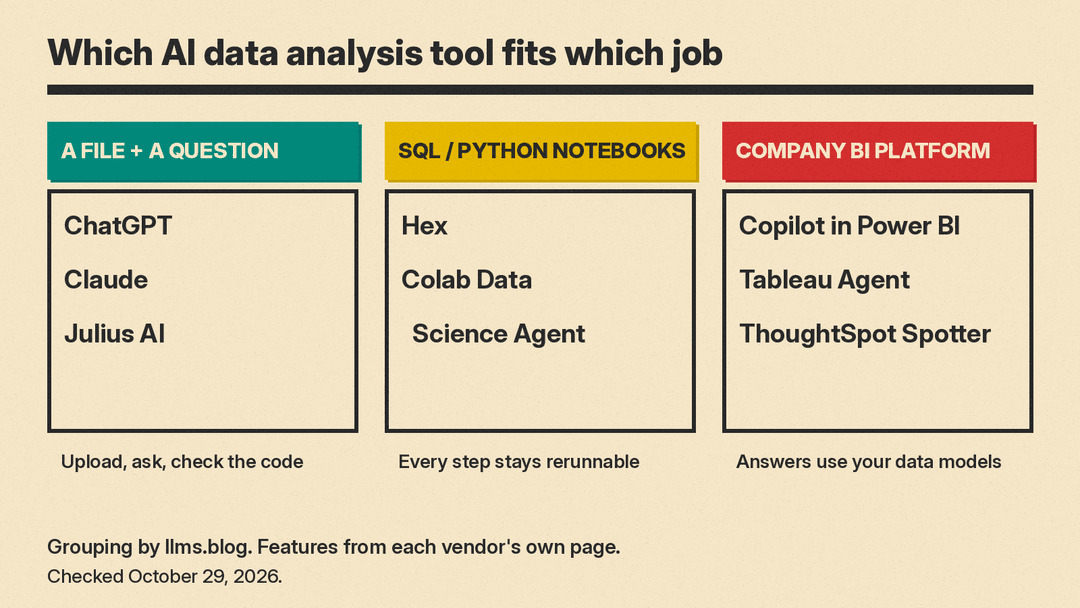
- You have a file and a question: ChatGPT, Claude or Julius AI. Upload the file, ask in plain English, and check the code each one runs.
- You write SQL or Python and want a faster notebook: Hex, or the Data Science Agent in Google Colab.
- Your company already uses a BI platform: Copilot in Power BI, Tableau Agent or ThoughtSpot Spotter, which answer questions against the data models your data team already maintains.
1. ChatGPT: upload a file and ask
ChatGPT's data analysis feature works inside the ChatGPT app. OpenAI's help page says ChatGPT "can analyze uploaded files, answer questions about the data, and create tables or charts". It supports spreadsheets (.xls, .xlsx, .csv), PDFs and text and data files such as .json, .xml and .yaml. Connected sources such as Google Drive, OneDrive and SharePoint work "when plugins are available for your account or workspace".
How it works: for some tasks ChatGPT "writes and runs Python code in a stateful Jupyter notebook environment". Interactive charts are supported for bar, line, pie and scatter charts; other chart types may come back as static images.
Limits worth knowing, all from the same page:
- The Python environment "cannot make external web requests or API calls", so upload the data you need first.
- ChatGPT "may not reliably extract exact values from image-based tables, scanned files, or files with complex visual layouts."
- A file can upload successfully but still be too large or complex for complete analysis. OpenAI suggests asking about specific sheets or splitting the file.
OpenAI's advice is to "review the generated code, outputs, and assumptions before relying on the result." That is good advice for every tool on this list.
2. Claude: analysis that ends in a finished file
Claude's code execution and file creation feature runs code in a sandboxed computing environment. Anthropic's help page says it is "available to all Claude users (Free, Pro, Max, Team, and Enterprise)" on the web, Claude Desktop and Claude Mobile.
For analysis, Claude can create Python scripts, generate charts as PNG images, process CSV, TSV and other data files, and build machine learning models. Where it differs from a pure chat answer is the output: it can turn the analysis into an Excel file "with working formulas", a Word report, a PDF or a PowerPoint deck. One example prompt on the help page is "Create a quarterly sales report using this CSV data, including trend analysis and recommendations."
Limits and settings:
- The maximum file size is 30MB per file for uploads and downloads.
- Creating files uses more of your plan's usage limit than normal chats, according to the page.
- On Team and Enterprise plans, owners control network access, and new Enterprise organizations start with it off. Anthropic explains that turning network access off means "nothing can be transmitted outside the sandbox," and warns that with access on, prompt injection could trick Claude into sending data out. It recommends watching Claude while it works.
3. Julius AI: a workspace built around analysis
Julius AI is a standalone AI workspace that leads with data. Its pricing page says you can "explore files, run analyses, visualize results, and get answers with citations," and also build reports, dashboards and presentations. The FAQ lists native connections to Snowflake, BigQuery, MySQL, PostgreSQL and SQL Server, plus Google Drive, OneDrive and SharePoint. For large warehouses, Julius says it "builds a semantic layer of your schema" so it does not have to read thousands of tables at once.
Plans as of October 29, 2026, copied from the pricing page:
- Free: a daily credit allowance; the page says every plan, including Free, can make presentations, websites and videos.
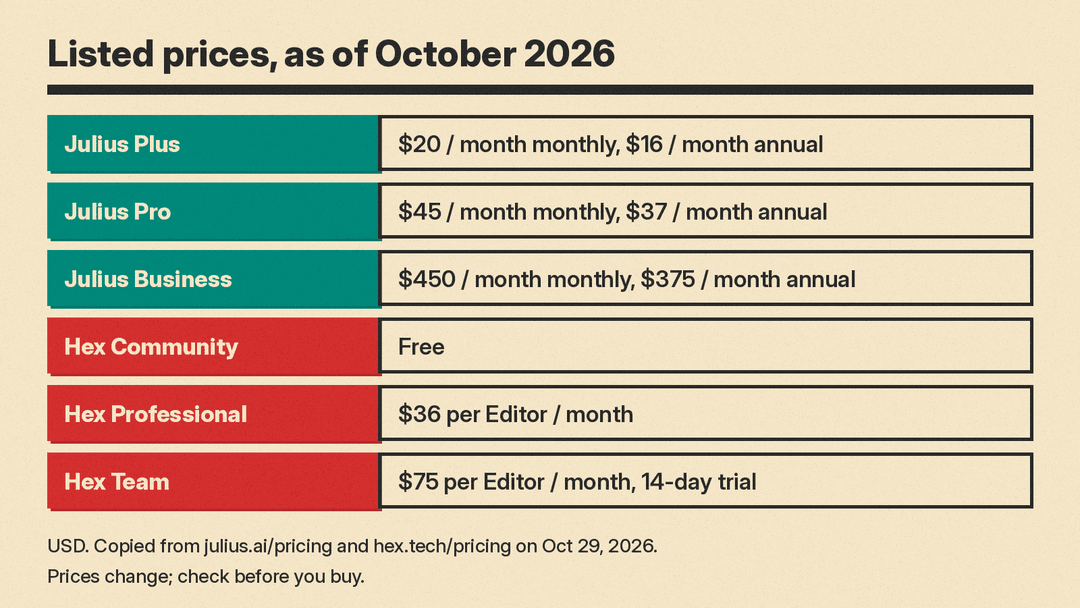
- Plus: "$20 USD / month" on monthly billing, or "$16 USD / month" on annual billing, with "2,000 credits monthly".
- Pro: "$45 USD / month" on monthly billing, or "$37 USD / month" on annual billing, with "5,000 credits monthly".
- Business: "$450 USD / month" on monthly billing, or "$375 USD / month" on annual billing, with data connectors and "Add up to 50 team members".
Privacy: the Julius privacy policy (last updated October 21, 2026) says Julius does not use your Personal Information "to train our artificial intelligence models". The same policy lists "AI technology providers" among the parties it may share data with, and says you can opt out of having your User Submitted Content shared with them by emailing privacy@julius.ai. Read both lines before you upload customer data.
4. Hex: AI notebooks for analysts
Hex is a data notebook and app platform for people who already work in SQL and Python. Its pricing page describes "agentic notebooks, conversational self-serve analytics, and interactive data apps." The Hex agent works inside the notebook, and AI features use credits "based on the effort required to complete the task." Hex also runs an MCP server, in beta on the Team and Enterprise plans, so tools like ChatGPT and Claude can search existing Hex analyses.
Plans as of October 29, 2026:
- Community: Free, with a "Hex agent trial" and small compute.
- Professional: "$36 per Editor / month", with the Hex agent, standard credits and up to 5 published apps.
- Team: "$75 per Editor / month", with extended credits, unlimited published apps, and scheduled runs and alerts. The Team plan has a 14-day free trial with no payment card required.
- Enterprise: Custom pricing, with audit logs, SSO and Bring Your Own Key for OpenAI and Anthropic.
Hex says students and educators at universities and bootcamps can get the Professional plan free by contacting support. Its FAQ says Hex is "audited annually for SOC 2 Type II and HIPAA compliance."
5. Data Science Agent in Google Colab
Google Colab is a free, browser-based notebook. Google's Data Science Agent announcement (March 2025) describes the steps: open a blank notebook, upload a data file, describe your goal in the Gemini side panel, and the agent generates the code, imports and analysis in a working notebook. Example goals from Google include "Visualize trends" and "Fill-in missing values". At launch, Google opened it to Colab users "age 18+ and in select countries and languages."
This is the right pick if you want a real notebook you can edit and share afterward, not only a chat answer.
6. Copilot in Power BI
If your company runs on Microsoft, Copilot in Power BI lets business users ask questions about reports and lets report authors build report pages, write DAX queries and add descriptions to measures. Microsoft says the Copilot pane on reports is generally available, while the standalone, full-screen Power BI agent is in preview.
Requirements matter here. Microsoft's page says you need "Paid Fabric capacity (F2 or higher) or Power BI Premium (P1 or higher)", and that "Trial capacities and free SKUs aren't supported." A Power BI Pro or Premium Per User license alone is not enough. Microsoft also says data preparation matters: "Without preparation, Copilot can misinterpret the data and return generic or inaccurate results."
7. Tableau Agent
Tableau Agent is the AI agent inside Tableau. The product page says users can ask questions "in plain language" in dashboards and Tableau Pulse, turn prompts into visualizations and calculations in Web Authoring and Desktop, clean data with natural language prompts in Tableau Prep, and generate descriptions for data sources in Tableau Catalog. In Tableau Next, the page says you can act on findings "in Salesforce and Slack." Tableau does not list a price for the agent on that page.
8. ThoughtSpot Spotter
ThoughtSpot Spotter is an AI analyst for business users on governed company data. ThoughtSpot says it compiles questions into "identical governed SQL on every run," supports drill-downs, forecasting, change analysis and regression, and runs live queries "across 30+ sources, including Snowflake, Databricks, BigQuery, and more." It also works in Slack, Microsoft Teams, Claude and ChatGPT, per the product page. On cost, ThoughtSpot says Spotter "is priced per seat, per customer, or per warehouse query, not per token," but the page gives no dollar figure.
How to choose
Ask three questions.
- Where is the data? A single file points to ChatGPT, Claude or Julius. A warehouse such as Snowflake or BigQuery points to Julius, Hex or a BI tool. Data already modeled in Power BI or Tableau points to that vendor's agent.
- Who checks the work? Chat tools show their code, but someone has to read it. Notebook tools (Hex, Colab) keep every step visible and rerunnable. BI agents (Power BI, ThoughtSpot) lean on definitions your data team sets once.
- What can leave the building? Check each vendor's data settings before you upload customer or employee data. OpenAI's help page points to its Data Controls FAQ; Claude business plans let owners switch network access off; Julius offers an email opt-out for sharing with AI providers.
A quick test before you commit
Use a file where you already know the answer, such as last quarter's sales by region. Ask each tool the same three questions: a total, a trend and a chart. Then compare the numbers with your own. Any tool that gets a known answer wrong will get an unknown one wrong too, and the free tiers of ChatGPT, Claude, Julius, Hex and Colab make this test cheap.
Everything above was checked on vendor pages on October 29, 2026. Features and prices change often, so recheck the page before you buy.
Sources
- OpenAI Help Center: Data analysis with ChatGPT
- Claude Help Center: Create and edit files with Claude
- Julius AI pricing
- Julius AI privacy policy
- Hex pricing
- Hex docs: Hex MCP Server
- Google Developers Blog: Data Science Agent in Colab
- Microsoft Learn: Copilot for Power BI overview
- Tableau Agent product page
- ThoughtSpot Spotter product page
