
A new hire's first week runs on documents. There is a welcome email, a first-day schedule, a 30-60-90 day plan, a list of who to ask about what, a tools and accounts checklist, and any internal guides the team keeps. Writing all of that from scratch for every hire is slow. SHRM notes that too often, onboarding consists of handing a new employee a pile of forms and walking them around for ad hoc introductions.
An AI assistant such as ChatGPT, Gemini in Google Docs or Copilot in Word can help with this kind of writing. It can turn your rough notes, existing policies and team knowledge into clear, consistent first drafts. It cannot know how your company actually works. This guide shows how to get the speed without the made-up details, and which documents to keep in human hands.
Why onboarding documents deserve the effort
Gallup reports that only 12% of employees strongly agree that their organization does a great job onboarding new employees. In its onboarding toolkit, the Society for Human Resource Management (SHRM) cites the same Gallup research and adds that those employees were nearly three times as likely to say they have the best possible job, while only 29% of new hires felt prepared and supported to excel in their new role.
SHRM also draws a useful line between orientation and onboarding. Orientation covers paperwork and other routine tasks. Onboarding is a broader process that involves managers and other employees and can last up to 12 months. Written documents can carry part of that longer process, so a manager does not have to repeat the same explanations every week.
That is where AI can help: turning what you already know into something a newcomer can read. Deciding what is true stays with you.
The rule that keeps onboarding documents accurate
Use AI to organize and phrase information you provide. Never let it fill in facts about your company.
If you ask a chatbot to "write an onboarding guide for a new sales rep," it will produce a plausible document full of meetings you do not hold, tools you do not use and policies you never wrote. A new hire may not be able to tell which parts are real, and may trust all of it because it came from their employer.
Microsoft says this plainly in its Copilot in Word help pages: suggestions come from AI, which can sometimes make mistakes, misinterpret facts or produce inaccurate results, and Microsoft recommends that users review suggestions before accepting them. The safe workflow follows from that. You supply the facts, the assistant supplies structure and wording, and a person who knows the job checks every line.
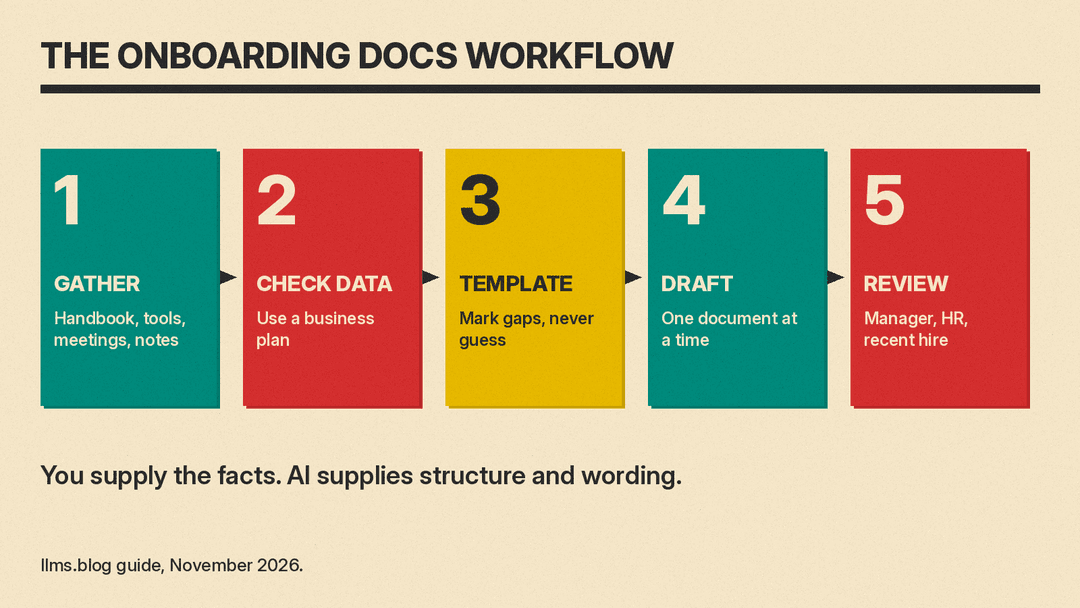
Step 1: Gather your raw material
Before you open a chatbot, collect what already exists. Start with what your team already has:
- The job description and the hiring manager's notes from interviews.
- The employee handbook and any team-level policies.
- A list of the tools the role uses, and who grants access to each.
- Recurring meetings, with what each one is for.
- Old onboarding emails or checklists, even if they are out of date.
- A few honest notes from your most recent hire about what confused them.
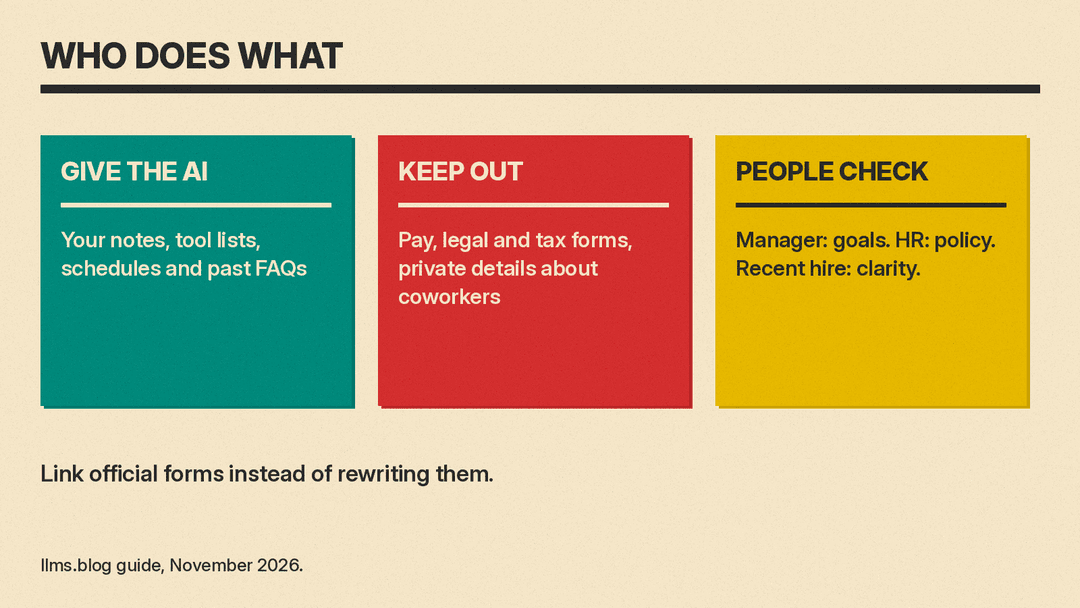
Paste these into one working document. Remove anything private before you go further: salaries, home addresses, health details, performance notes about other employees and anything a coworker shared in confidence. Replace names with roles where you can ("the sales manager" instead of a full name).
Step 2: Check where your data goes
The tool you use matters as much as the prompt. Consumer chat accounts and business accounts often handle data differently, so check the plan before you paste internal documents.
OpenAI, for example, states on its enterprise privacy page that it does not train its models on business data from ChatGPT Business, ChatGPT Enterprise or its API by default, and that ChatGPT Enterprise customers control how long their data is retained. Google says Gemini in Docs requires an eligible Google Workspace or Google AI plan. If your company has a business plan, use that one rather than a personal account. If you are not sure which plan you are on, ask whoever manages your IT tools before you paste a handbook into a chat window.
Step 3: Build a template once
Ask the assistant to turn your notes into a reusable structure, not a finished document for one person. A good prompt looks like this:
"Using only the notes below, create a reusable onboarding guide template for a [role] at a [size] company. Use these sections: welcome, first-day schedule, first-week goals, 30-60-90 day plan, tools and access, key people by role, and where to find answers. Where my notes do not cover a section, write [FILL IN] instead of guessing."
The last sentence is the important one. It tells the model to leave visible gaps rather than inventing content, and it gives you a clear list of what still needs a human answer.
SHRM's overview offers a reasonable backbone for those sections. It lists four components: preboarding (for example, sending informational material and assigning a buddy before the start date), orientation (structure, mission and values, the handbook and major policies, and paperwork), foundation building (culture and values, which take time to absorb) and mentoring or buddy systems. A template that touches all four follows SHRM's outline.
Step 4: Draft the individual documents
With a template in place, generate each document separately so you can review them one at a time. These are the ones AI handles well:
- Welcome email. Give it the start date, arrival time, location or video link, who will meet them and what to bring. Ask for a warm, short message under 200 words.
- First-week schedule. Paste your calendar of recurring meetings and the planned intro sessions. Ask for a day-by-day table with a one-line purpose for each item.
- 30-60-90 day plan. Give it the job description and the manager's real goals for the role. Ask it to split them into learning, contributing and owning phases, and to mark any goal it inferred so the manager can confirm or delete it.
- Tools and access checklist. List each tool with its owner. Ask for a checklist the new hire can tick off, sorted by what they need on day one.
- "Who to ask" guide. List roles and the topics each one handles. Ask for a short reference sheet organized by question ("Who do I ask about expenses?").
- FAQ. Paste the questions your last few hires actually asked, with the real answers. Ask the assistant to group and tidy them.
If your team works in Google Workspace, Gemini in Docs can pull from your own files. Google's help page says you can add files from Drive as sources and ask Gemini to write using them, for example to add a section based on a specific document. That is useful for onboarding because it keeps the draft grounded in your handbook instead of the model's general knowledge. For step-by-step tasks a new hire will repeat, such as filing expenses, the same notes-first method works for process documents; see our guide on how to use AI to write SOPs and process docs.
Step 5: Have the right people review it
Every onboarding document needs a review by someone who knows the job, not only someone who knows how to write. Split the review by type of content:
- The hiring manager checks goals, schedules and expectations. These are the parts a new hire will be measured against, so a made-up goal can cause real confusion.
- HR or operations checks anything about pay, benefits, leave, time off and policy. Policy language should be copied from the official source, not paraphrased by a model.
- A recent hire reads the whole set and marks what is still unclear. They can spot what a newcomer will not understand.
Ask the assistant to help with the review too. A prompt such as "List every factual claim in this document as a bullet so I can check each one" turns a long guide into a checklist. It does not verify anything itself, but it makes your check faster and harder to skip.
What to keep out of AI-written onboarding
Some parts of onboarding should not be drafted by a general chatbot at all:
- Legal, tax and payroll forms. These come from your payroll provider, HR system or the relevant government agency. Link to the official form; do not ask an AI to recreate or summarize it.
- Offer terms and compensation. These belong in the signed offer, word for word.
- Safety procedures. For roles with physical risk, use the procedures your safety lead has approved, not a rewritten version.
- Private information about coworkers. A "meet the team" page can list roles and work topics. It should not include personal details people did not choose to share.
When a section touches any of these, the AI draft should say "see [official document]" and link to it.
Keep the documents current
A good first draft goes out of date if nobody updates it. AI makes updates faster, so build them into the routine:
- After each hire's first month, ask them what was wrong, missing or confusing. Paste their notes into the assistant with the current guide and ask for a list of suggested edits, not a rewrite.
- When a tool, meeting or policy changes, update the template first and regenerate only the affected sections.
- Put a "last reviewed" date and an owner's role at the top of each document so readers know whether to trust it.
A simple starting point for small teams
If you run a small business and have never written onboarding documents, start small. Pick the next person you hire and write three things with AI help: the welcome email, the first-week schedule and the tools checklist. Give the assistant your real notes, tell it to mark gaps instead of guessing, and read every line before you send anything. After that hire's first month, ask what was missing and add a 30-60-90 day plan.
It gives the next new person a clear, written and accurate picture of their first weeks.
