
Most small businesses run on knowledge that lives in one person's head. The owner knows how a refund actually gets processed. The office manager knows which vendor form to use. The team lead knows the sequence for setting up a new laptop. That knowledge rarely reaches paper, for one predictable reason: the person who knows the work is the person with the least time to write about it.
AI writing tools lower the cost of the first draft. You no longer need the expert to sit down and compose prose. You need them to talk. A rough brain dump, a recorded walkthrough transcript, a chat explanation typed on a phone, or an outdated document can go into an assistant and come back as a structured draft with numbered steps, definitions, and a checklist. The expert then corrects a draft instead of creating one from a blank page, which is a much smaller request.
The limit matters just as much. AI does not know your process. The expert does. AI is useful for ordering, formatting, and rephrasing. It is unreliable on the specific thing that happens when a shipment is short or an approval is out of office. Every method below assumes a person who does the work reviews every line before it is published.
What is an SOP?
A standard operating procedure (SOP) is a written, step-by-step description of how a repeatable task gets done. A useful bar comes from the US Environmental Protection Agency's guidance for preparing SOPs, known as EPA QA/G-6: write with enough detail that someone with limited experience but a basic understanding can reproduce the procedure unsupervised.
SOPs are not only for laboratories. The EPA guidance states they may be written for any repetitive technical activity and for administrative procedures. Onboarding a new hire, closing the books, issuing a refund, shipping an order, and setting up a workstation all qualify.
An SOP is also not the same thing as a checklist. Per the same guidance, a checklist is not the SOP but a part of the SOP. The SOP explains the procedure. The checklist is a tool for tracking that the steps were completed.
What should an SOP contain?
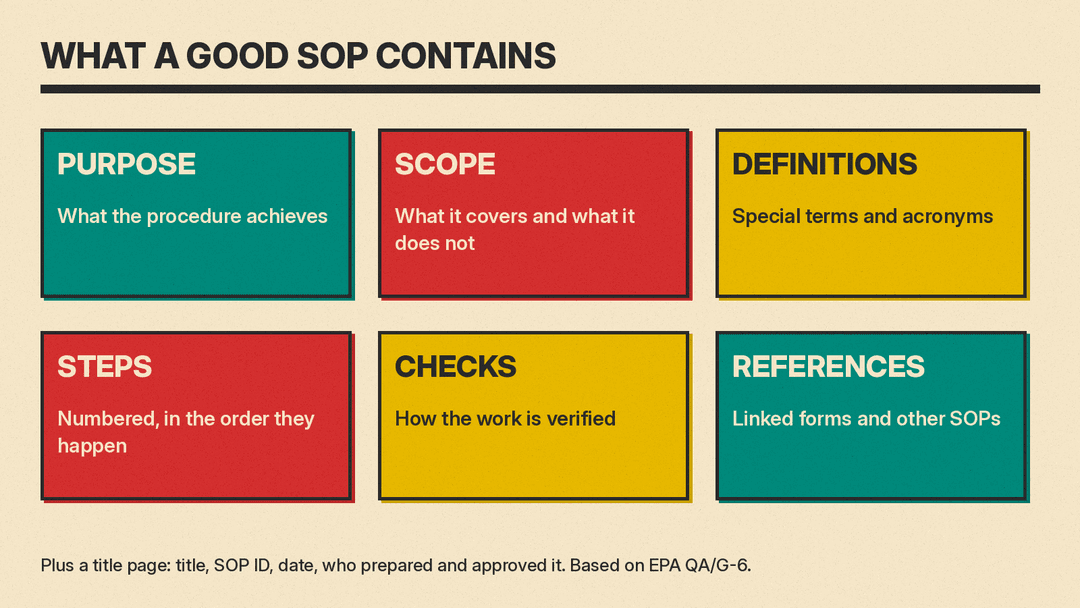
EPA QA/G-6 specifies a title page carrying a title that clearly identifies the procedure, an SOP ID number, the date of issue and/or revision, the unit the procedure applies to, and the signatures and dates of who prepared and approved it. Long SOPs may also need a table of contents.
The body should briefly describe the purpose and scope, define specialized terms, lay out sequential procedures divided into sections (the guidance gives examples such as equipment needed, personnel qualifications, and safety considerations), list quality checks, and cite references. Diagrams and flow charts help break up long text and can illustrate the process.
Translated to a small business, that structure looks like this:
- Title, SOP ID, effective date, revision number, owner
- Purpose: what the procedure achieves
- Scope: what it covers and what it does not
- Definitions: internal terms, acronyms, system names
- Before you start: access, tools, forms, approvals required
- Who performs this: role or qualifications
- Safety, legal, or compliance notes
- Steps, numbered in the order they are performed
- Exceptions and escalation paths
- Quality checks: how the work is verified
- References and links to related SOPs
- Revision history and next review date
An SOP may reference other SOPs rather than restating them. Keep one process per document and link between them.
On style, the EPA guidance is direct: write in a concise, step-by-step, easy-to-read format; be unambiguous and not overly complicated; use active voice and present verb tense; do not use "you" but imply it; avoid wordy, redundant, or overly lengthy text; and follow your organization's style guide. So write "Open the invoice in the accounting system" rather than "You should open the invoice."
On authorship, the guidance says SOPs should be written by people who know the activity, the subject matter experts who actually do the work. A team approach helps for processes that span several tasks and promotes buy-in. AI is a drafting assistant inside that arrangement, not the author.
How do you write an SOP with AI in five steps?
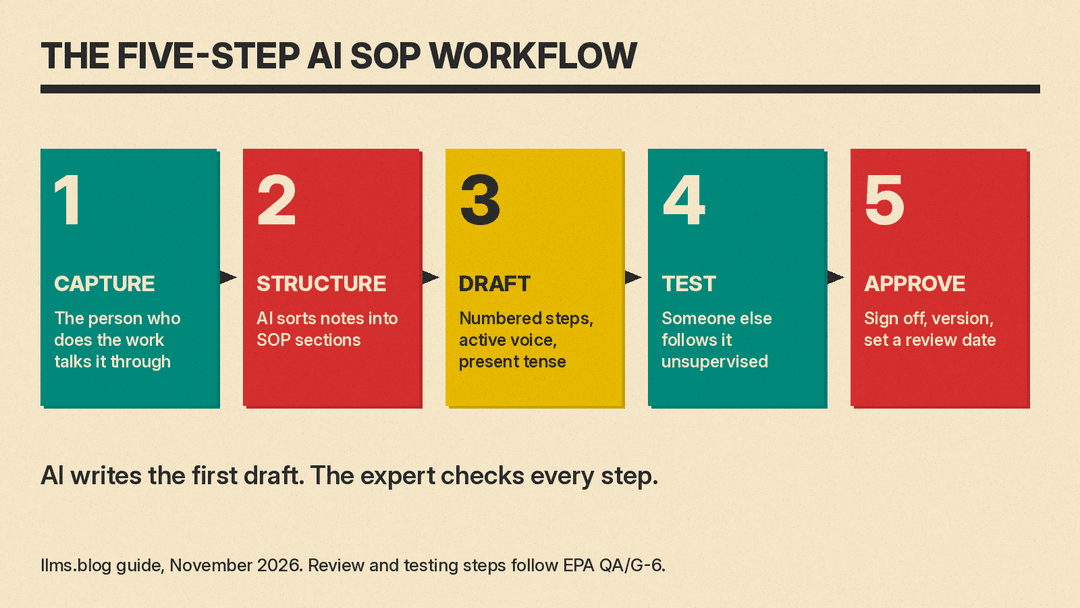
The workflow is capture, structure, draft, test, approve. Capture the expert's account of the work. Structure the raw notes into SOP sections. Draft numbered steps in the correct voice. Test the draft with someone who did not write it. Approve it, version it, and schedule the next review.
Step 1: Capture the process from the person who does it
Ask the person who performs the task to talk through it while you record, or to type every step into a chat or a notes app. Prompt for the parts people forget: what they check before starting, what they do when something is missing, who they ask, and what "done" looks like. Ask for exceptions and edge cases explicitly. Tell them to be messy. Ordering and cleaning is the next step.
Step 2: Structure the notes
Give the raw capture to an AI assistant and ask it to sort the material into purpose, scope, definitions, prerequisites, steps, quality checks, exceptions, and references. Ask it to list questions rather than guess answers. Anything the assistant flags as unclear goes back to the expert.
Step 3: Draft numbered steps
Ask for numbered steps in active voice and present tense, written as commands, with no "you." One action per step. State the expected result where a mistake is easy to spot. If the process has branches, ask for a flow chart outline you can redraw, since the EPA guidance recommends a flow chart to illustrate the process.
Step 4: Test with someone other than the writer
EPA QA/G-6 says drafts should be reviewed by people with experience in the process, and that it is especially helpful if drafts are tested by someone other than the original writer before finalizing. Hand the document to a person who has not done the task and let them work from it unsupervised. Have them mark every place they stopped, guessed, or asked a question. Revise the document, not the person.
Step 5: Approve, version, and schedule review
Approval generally rests with the immediate supervisor and a quality assurance officer, per the EPA guidance. Record who prepared it, who approved it, and on what dates. Assign an SOP ID and a revision number. Set a review date. The guidance says to update and re-approve an SOP whenever procedures change, to review periodically (for example every 1-2 years), and to withdraw and archive an SOP for a process no longer followed.
What prompts should you use to write an SOP?
Copy these and paste your own notes where indicated.
Turn rough notes into a draft:
Turn the notes below into a standard operating procedure with these
sections: Purpose, Scope, Definitions, Before you start, Steps (numbered),
Quality checks, Exceptions, References. Write steps in active voice, present
tense, imperative mood. Do not use the word "you". Do not add steps that are
not in the notes. List every unclear point as a question at the end.

Notes:
[paste notes or transcript]
Find missing steps and undefined terms:
Act as someone performing this task for the first time. List every step where
you would not know what to do next, every undefined term, every decision
point with no branches, and every assumption a new hire would not share. Do
not rewrite the document yet.

[draft]
Make a checklist version:
Create a one-page checklist from this SOP for the person performing the work.
One action per line, in step order, with a blank box at the start of each
line. Include the quality checks. Match the SOP wording. Label it as part of
the SOP, not a replacement for it.

[SOP]
Write a flow chart outline:
Convert this SOP into a flow chart outline as a numbered list. For each item
give the shape type (start, process, decision, end), the label text, and the
next item. For decisions, list each branch and where it leads. Keep to one
page.

[SOP]
Rewrite for a new hire:
Rewrite this SOP for a new hire with no prior experience. Keep every step and
requirement. Expand shorthand, spell out acronyms on first use, add a
definitions section, and state the expected result after each major section.
Short sentences. Do not invent steps.

[SOP]
Compare an old SOP to new notes:
Compare the old SOP with the new process notes. Group the differences as:
steps removed, steps added, steps reworded with no change in meaning, and
steps that conflict. Cite the section for each. Then write a revision history
entry with a date and a one-line summary.

Old SOP:
[paste]

New notes:
[paste]
Can you use Copilot in Word or Gemini in Docs?
Yes, if you already work in those tools. Copilot in Word can create a first draft from a request, a detailed prompt, an outline, your notes, or reference files. It can start from a template or an existing document and keep that document's formatting and structure, which is useful when your company already has an SOP template. It can also add a new section, paragraph, checklist, or table to a document you have open. It requires an eligible Microsoft 365 subscription and/or Microsoft 365 Copilot license, and available features may depend on your license and organization settings.
Gemini in Google Docs requires an eligible Google Workspace or Google AI plan. You can draft and refine using information from your files in Drive, Chat, Gmail, and the web, and you can add files as Sources (or type "@") for Gemini to reference. The support page gives the example "Update the project timeline based on the latest updates from our meeting notes doc." Gemini can change document structure, such as "Convert the bulleted list in the 'To do' section into a three-column table." One-click Refine options include Rephrase, Shorten, Elaborate, Bulletize, Summarize, More formal, and More casual. Suggestions appear in the document and you accept or reject them, which suits the review step of the workflow.
A general chat assistant such as ChatGPT or Claude also works, provided your company allows you to upload the notes. The advantage of the in-document tools is that the draft stays in the file where approvals and revisions happen.
What mistakes should you avoid?
Letting AI fill gaps. An assistant will produce plausible steps for anything your notes omit. Treat every step you cannot trace back to the expert as unverified, and ask the assistant to flag its assumptions.
Pasting sensitive data into prompts. Never include passwords, API keys, customer names, card details, addresses, or contract terms. Replace them with placeholders such as [ADMIN PASSWORD] or [CUSTOMER NAME] before drafting.
Skipping the second-person test. A document that reads well to its author proves nothing. EPA QA/G-6 is explicit that testing by someone other than the writer is especially helpful.
Publishing without an owner or a review date. An undated SOP with no owner quietly becomes wrong. Set a review cadence, re-approve after any change to the procedure, and archive versions that describe processes you no longer follow.
Building one giant SOP. A single document covering onboarding, payroll, refunds, and shipping is hard to update and hard to read. Split by process and link, since an SOP may reference other SOPs.
Ignoring your own style guide. The EPA guidance says to follow your organization's style guide. Give the assistant your template and a good existing example to imitate.
What should you check before publishing an SOP?
- The person who does the work reviewed every step
- Someone other than the writer completed the task using only the document and reported where they got stuck
- Purpose, scope, definitions, prerequisites, steps, quality checks, exceptions, and references are all present
- Steps use active voice, present tense, imperative mood, and avoid "you"
- No step remains that nobody can verify
- No passwords, customer data, or secrets appear in the text
- Title, SOP ID, issue or revision date, applicable unit, and preparer and approver signatures with dates are recorded
- A named owner and a review date are set
- Related SOPs are linked rather than duplicated
- A flow chart or diagram illustrates any branching
- A checklist is attached if the task needs tracking
- The file is stored where the team will find it, and the previous version is archived
