
A job description does two jobs at once. It tells candidates what the work is, and it shapes who decides to apply. A posting can fail at both when it copies last year's version, stacks up a wish list of requirements or uses phrases nobody on the team would say out loud.
AI assistants such as ChatGPT, Gemini in Google Docs, Copilot in Word and the drafting tool built into LinkedIn job posts can help. They are fast at turning a manager's rough notes into a clean, well-structured posting. They can also invent duties, perks and requirements that do not exist. This guide shows a workflow that keeps the speed and drops the made-up parts, plus a wording check you can run before you post.
What AI is good at here, and what it is not
A job description is mostly organizing work. Someone already knows what the role does, who it reports to and what a good first year looks like. The hard part is getting that knowledge out of a hiring manager's head and into clear, scannable text. Language models are good at that step.
What they cannot do is know your company. Ask a chatbot to "write a job description for a marketing manager" and it can produce a confident page of generic duties, tools you may not use and qualifications nobody asked for. Candidates cannot tell which lines are real.
The vendors say the same thing. LinkedIn's help page for its AI-assisted job descriptions says the feature "may produce surprises or mistakes," that the job poster is "still responsible for the final job description," and that applicable law may require extra details "such as a salary range, other pay or benefits information, an applicant privacy notice, or other information." Microsoft's Copilot in Word help tells users to "review and verify details, especially facts, numbers, citations, names, policy statements, and other sensitive information."
So the rule is simple. You supply the facts. The AI supplies structure and wording. A person checks every line.
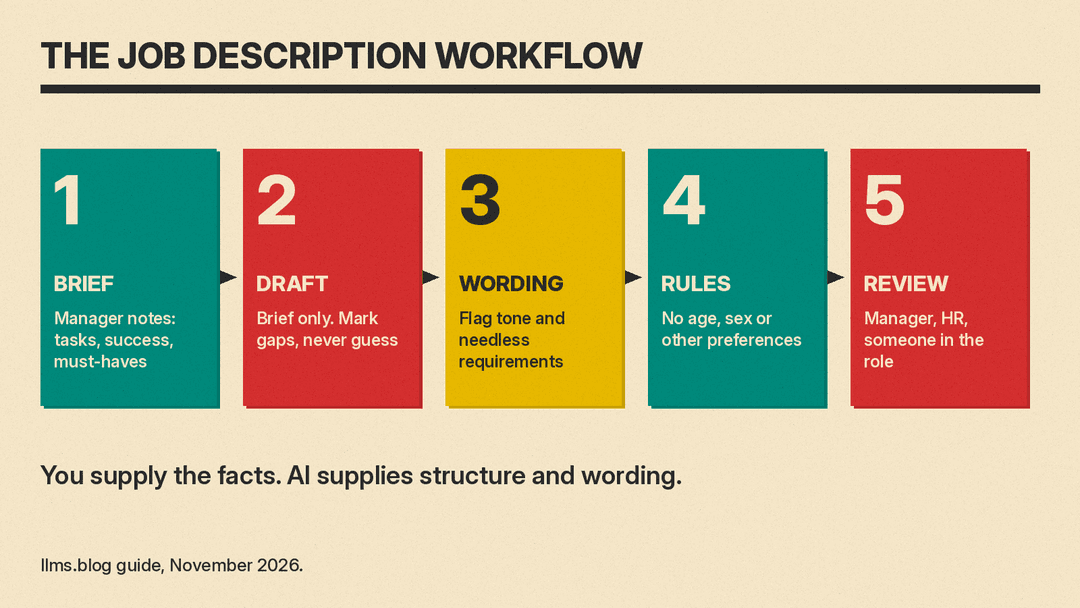
Step 1: Write a role brief before you open any AI tool
Spend 15 minutes with the hiring manager and write plain notes. Bullet points are fine. Cover:
- Why the role exists. What problem will this person solve, and what happens if the seat stays empty?
- What they will do. The five or six tasks that take most of the week, in the manager's own words.
- What success looks like. What should be done or better after six months and after a year?
- Must-haves. Skills the person needs on day one. Be strict: if someone could learn it in the first month, it is not a must-have.
- Nice-to-haves. Skills that help but are not required.
- Facts. Title, team, who they report to, location or remote policy, schedule, pay range and benefits as HR has approved them.
This brief is the most important input. Everything the AI writes should trace back to a line in it.
Step 2: Pick a tool and check what it can see
Any general assistant works for this. The main choices:
- Inside your job board. When you post a job on LinkedIn, the posting flow offers a "Draft with AI" option. LinkedIn says the draft uses inputs such as job title, job location, company, workplace type and job type. That makes it a fast starting point, but it does not know your role brief, so expect to rewrite it heavily.
- Inside your documents. Gemini in Google Docs can draft and edit from a prompt and can use files you add as sources, such as an older job description or a team handbook. Copilot in Word can start a draft from a prompt, notes or reference files and can reuse the format of an existing document. Both need an eligible plan from Google or Microsoft, and our comparison of Microsoft 365 Copilot and Gemini in Google Workspace covers the plans.
- A general chatbot. ChatGPT or a similar assistant works well if you paste in your role brief. If you use a personal account, check its data settings first. OpenAI's data controls page says model training is on by default for personal Free, Plus and Pro workspaces and can be turned off, and that by default it does not train on content from Business and Enterprise workspaces.
Whatever you choose, keep candidate names, current employees' pay and internal salary bands that are not meant for the posting out of the prompt. The role brief does not need them.
Step 3: Draft from the brief, not from the title
Give the assistant the whole brief and tight instructions. A prompt that works:
You are helping me write a job description. Use only the facts in the role brief below. Do not add duties, tools, benefits or requirements that are not in the brief. If something a job description usually has is missing, write [NEEDS INPUT: what is missing] instead of guessing.
Structure: a two-sentence summary of the role, "What you will do" (5 to 7 bullets), "What success looks like in your first year" (3 bullets), "What you need" (must-haves only), "Nice to have", and "Pay, benefits and logistics".
Style: plain English, second person ("you will"), short sentences, no jargon, no clichés such as "rockstar" or "fast-paced environment". Keep it under 600 words.
Role brief: [paste your notes]
The "NEEDS INPUT" line matters. It turns gaps into visible placeholders instead of invented text. When the draft comes back, search for every placeholder and fill it with a real answer.
Useful follow-up prompts:
- "Cut the must-have list to the five requirements that matter most for day one. Move the rest to nice-to-have and tell me what you moved."
- "Rewrite the summary so a candidate outside our industry understands what the job is."
- "List any sentence in this draft that is not supported by the role brief."
That last prompt is a cheap self-check. It will not catch everything, but it often flags a duty or perk the model added on its own.
Step 4: Check the wording, not just the facts
Word choice changes who applies. In a 2011 study, researchers Gaucher, Friesen and Kay found that job ads in male-dominated fields used more masculine-themed words, such as "leader," "competitive" and "dominant," than ads in female-dominated fields. In their experiments, women found otherwise identical jobs less appealing when the ad used more masculine wording, and the effect ran through a weaker sense that they would belong, not through doubts about their skills.
Harvard's Gender Action Portal summary gives the numbers. Women rated masculine-worded ads 4.16 for appeal against 4.50 for the feminine-worded version of the same ad, on a 6-point scale. Their anticipated belonging was 3.98 against 4.31 on a 7-point scale. Their rating of the personal skill the job required barely moved: 4.89 against 4.99.
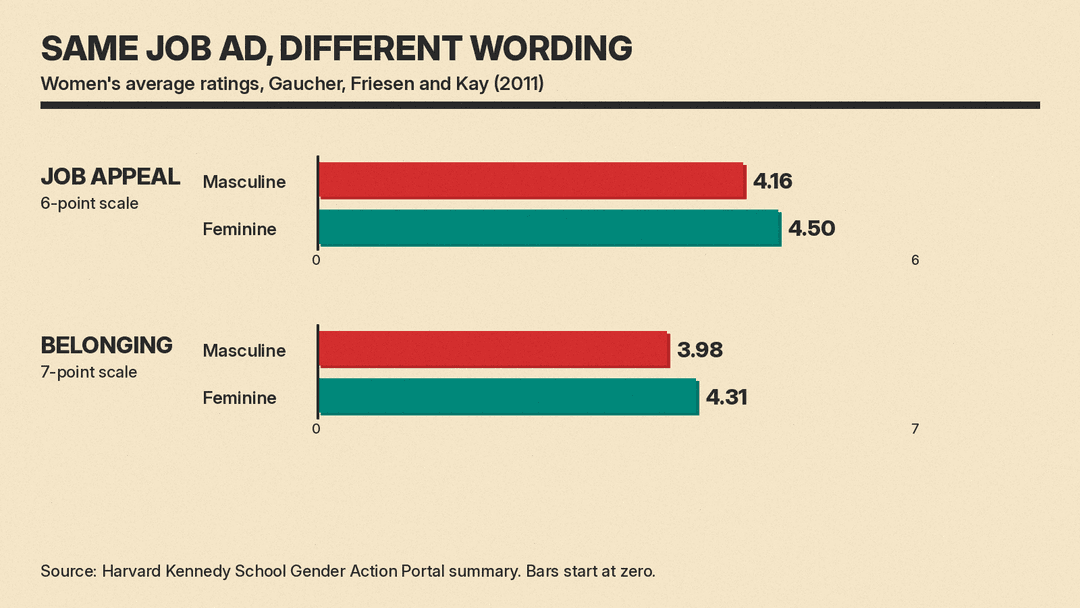
The differences are modest, and the study is about one kind of bias. It is still a good reason to read your draft for tone. AI is useful here because it can scan quickly:
Review this job description for wording that might discourage qualified people from applying. Flag words that lean heavily on competition or dominance, phrases that hint at age or life stage, requirements that are not needed for the job, and jargon. For each flag, quote the phrase and suggest a neutral rewrite. Do not change any facts.
Treat the output as suggestions. You decide what stays.
Step 5: Run the basic rules check
Some wording is not just a style issue. The U.S. Equal Employment Opportunity Commission's page on prohibited employment practices says it is illegal to publish a job ad that "shows a preference for or discourages someone from applying" because of race, color, religion, sex, national origin, age (40 or older), disability or genetic information. Its example: an ad that seeks "females" or "recent college graduates" may violate the law.
The EEOC's age rule, at 29 CFR 1625.4, lists terms such as "age 25 to 35, young, college student, recent college graduate, boy, girl" as examples that violate the Age Discrimination in Employment Act unless a statutory exception applies.
AI drafts can slip these phrases in, especially if you ask for an "energetic" or "early-career" tone. Search the final text for them. Pay transparency and other posting requirements vary by location, and LinkedIn's own help page notes that law may require pay or privacy details. If you are not sure what applies to you, ask HR or an employment lawyer. This guide is not legal advice.
Step 6: Have people review it
Before you post, get three quick reads:
- The hiring manager checks that the duties and success measures are accurate.
- HR or whoever owns hiring checks pay, benefits, title and required wording.
- Someone who does the job now checks that it sounds like the real work. If they would not recognize their own job, rewrite it.
Then save the approved version as a template. Next time you hire for a similar role, give the AI the old posting and a short list of what changed. That is faster than starting over, and it keeps your postings consistent.
Common mistakes to avoid
- Prompting with only a title. You get a generic posting that could belong to any company.
- Letting the requirement list grow. AI tends to add plausible qualifications. Every extra must-have narrows the pool.
- Pasting private data. Pay data for current staff, candidate details and internal disputes do not belong in a prompt.
- Skipping the read-through. LinkedIn says the job poster is responsible for the final text, and Microsoft tells users to review and verify what Copilot drafts.
- Over-polishing. A posting that sounds like marketing copy can read as vague. Concrete tasks beat adjectives.
The short version
Write a role brief first. Ask the AI to draft only from that brief and to mark gaps instead of guessing. Check the wording for tone and for phrases that signal age, sex or other protected traits. Have the manager, HR and a current team member read it. Then reuse the approved version as your template.
Used this way, AI cuts the slow part of writing a job description and leaves the judgment where it belongs, with the people who know the job.
Sources
- LinkedIn Help: Use AI-assisted job descriptions
- LinkedIn Help: Post a job on LinkedIn
- Microsoft Support: Draft and add content with Copilot in Word
- Google Docs Editors Help: Write and edit with Gemini in Docs
- OpenAI Help Center: Data controls in ChatGPT
- Gaucher, Friesen and Kay (2011), PubMed abstract
- Harvard Kennedy School Gender Action Portal: study summary
- U.S. EEOC: Prohibited Employment Policies/Practices
- eCFR: 29 CFR 1625.4, Help wanted notices or advertisements
