
Temperature is a setting that controls how much randomness an AI language model uses when it picks each next word. OpenAI's API reference describes it this way: "Higher values like 0.8 will make the output more random, while lower values like 0.2 will make it more focused and deterministic." Top-p and top-k are two related settings that limit which words the model may pick at all.
This guide explains what these settings do in plain words, how the major providers and one local tool handle them, why some providers now ignore or reject them, and what to adjust instead when you want steadier or more varied answers.
The short version
- A language model writes one token at a time. For each step it scores every possible next token.
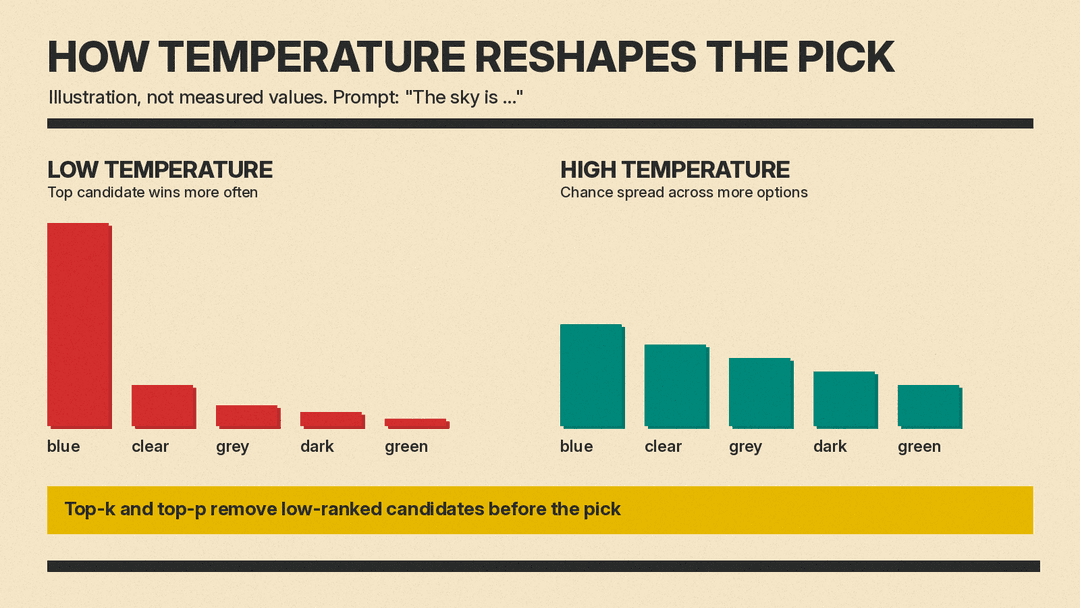
- Temperature changes how sharply the model favors the top-scoring tokens. Low temperature favors them more; high temperature spreads the chance across more options.
- Top-p and top-k cut the list of candidates before the model picks one.
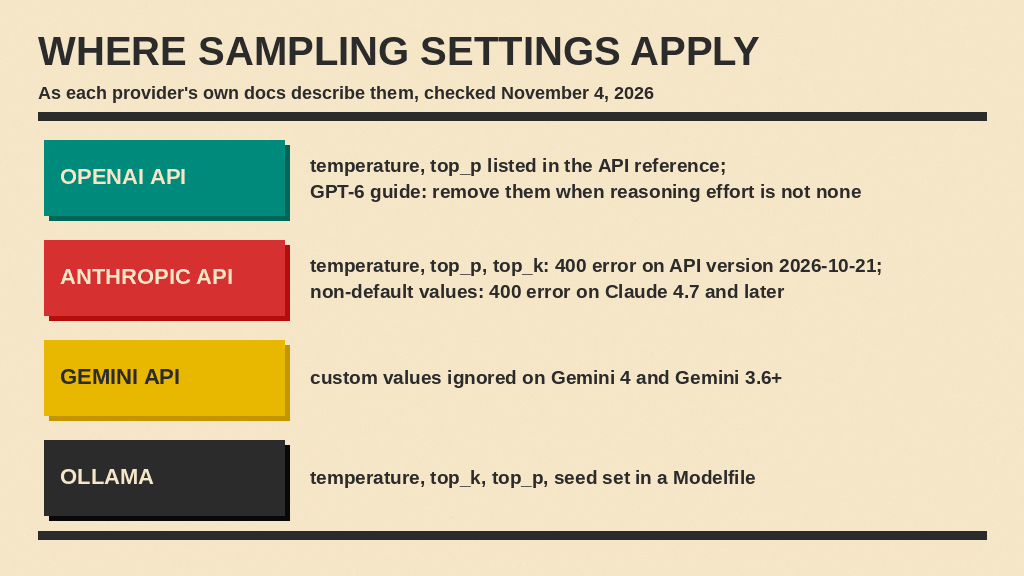
- OpenAI's API reference lists temperature from 0 to 2 and recommends changing temperature or top-p, "but not both." Its GPT-6 guide says to remove temperature and top_p when reasoning effort is not none.
- Anthropic's API returns a 400 error for any temperature, top-p or top-k value in API version 2026-10-21, and for non-default values on Claude 4.7 and later. Google says Gemini 4 and Gemini 3.6+ models ignore custom values.
- In local tools such as Ollama, you can still set all three.
How a model picks the next word
A language model does not write a full sentence at once. It reads your prompt as tokens, then predicts the next token, adds it, and repeats. For a closer look at tokens, see our guide to what tokens are and how AI models count text.
At each step the model produces a probability for each candidate token. Something then has to choose one. Hugging Face's guide How to generate text walks through the main choices:
- Greedy search. The guide says greedy search "selects the word with the highest probability as its next word" every time.
- Sampling. The guide says sampling "means randomly picking the next word" according to its probability.
Greedy search gives the same answer for the same prompt, but the Hugging Face guide notes that greedy and beam search tend toward "generating repetitive word sequences." Plain sampling adds variety, but the same guide warns that with sampling, "The models often generate incoherent gibberish." Temperature, top-k and top-p exist to find a middle ground.
What temperature does
Temperature reshapes the probabilities before the model samples. The Hugging Face guide describes lowering temperature as making the distribution "sharper (increasing the likelihood of high probability words and decreasing the likelihood of low probability words)."
In practice:
- Low temperature. The top candidate wins more often. Answers become more repetitive from run to run and stick closer to the most likely wording. The Hugging Face guide says that as temperature approaches zero, "temperature scaled sampling becomes equal to greedy decoding."
- High temperature. Less likely candidates get picked more often, so answers vary more between runs. This moves output back toward plain sampling, which the Hugging Face guide links to "incoherent gibberish."
- The default. OpenAI's API reference lists a default of 1 and a range of 0 to 2. Ollama's Modelfile reference lists a default of 0.8 and describes the setting this way: "Increasing the temperature will make the model answer more creatively."
Temperature changes how the model chooses among tokens it has already scored. For the math behind temperature scaling, top-k and nucleus sampling, see our technical post on stochastic decoding strategies.
What top-k does
Top-k keeps only the k highest-scoring candidates and drops the rest. The Hugging Face guide puts it as: "In Top-K sampling, the K most likely next words are filtered and the probability mass is redistributed among only those K next words."
If k is 40, the model can only pick from the 40 most likely tokens at each step, however the rest are scored. Ollama's Modelfile reference lists a top_k default of 40 and says "A higher value (e.g. 100) will give more diverse answers, while a lower value (e.g. 10) will be more conservative."
The Hugging Face guide names the drawback: top-k "does not dynamically adapt the number of words that are filtered." The cut is the same count whether the model is confident or unsure.
What top-p does
Top-p, also called nucleus sampling, cuts by probability instead of by count. The Hugging Face guide says top-p "chooses from the smallest possible set of words whose cumulative probability exceeds the probability p," so the size of that set "can dynamically increase and decrease according to the next word's probability distribution."
OpenAI's API reference gives an example: "0.1 means only the tokens comprising the top 10% probability mass are considered." Its default is 1, which keeps every candidate. Ollama's Modelfile reference lists a top_p default of 0.9 and says top-p "Works together with top-k."
Google's Gemini API reference says its models use "combined Top-k and Top-p (nucleus) sampling," where "Top-k sampling directly limits the maximum number of tokens to consider, while Nucleus sampling limits the number of tokens based on the cumulative probability."
Temperature or top-p: change one
OpenAI's reference repeats the same advice on both settings: "We generally recommend altering this or top_p but not both," and for top-p, "altering this or temperature but not both."
A simple approach that follows that advice:
- Leave every setting at its default first.
- If answers are too varied, lower temperature a little and test again.
- If answers are too flat or repetitive, raise temperature a little.
- Change top-p only if temperature alone does not get you there, and then put temperature back at its default.
Why some providers no longer let you set it
All three API providers checked here limit user-set sampling values on some models or API versions.
- Anthropic. Anthropic's API versions page says that in a newer API version, "The
temperature,top_p, andtop_krequest parameters are removed. A request that sends any of them returns a 400 error on every model." Its migration guide says that without these parameters a request samples with the defaults, "including atemperatureof 1.0," and that on models that accept other values, such as Claude Sonnet 4.6, a request that lowered temperature for more consistent output loses that effect: "No other setting replaces it." - Google. Google's text generation guide says Gemini 4 and Gemini 3.6+ models "ignore custom values for
temperature,top_p, andtop_k" and tells developers to "Remove these sampling parameters from your requests." The Gemini API reference says the temperature field is "silently ignored" on Gemini 3.6 Flash and newer models. - OpenAI. OpenAI's Responses API reference still lists temperature and top_p with a range and a default. Its Using GPT-6 guide tells developers to remove temperature, top_p and top_logprobs when reasoning effort is not none.
Anthropic's Messages guide says the three sampling parameters are not supported on Claude 4.7 and later models and Claude Mythos Preview, or on any model starting with API version 2026-10-21, and tells developers to "use prompting to guide the model’s behavior instead." Neither Anthropic nor Google gives a reason on the pages above, so we do not guess at one here.
Setting temperature in a local model
Local tools give you direct control. Ollama's Modelfile reference shows a PARAMETER line for each setting. A minimal example from that page sets temperature with:
PARAMETER temperature 1The same page lists other sampling settings you can set the same way:
top_k, default 40.top_p, default 0.9.min_p, which the page calls an "Alternative to the top p" that filters tokens below a share of the top token's probability. Default 0.0.seed, which the page says, when set "to a specific number will make the model generate the same text for the same prompt."
To use a Modelfile, the page says to save the file, run ollama create with a model name and the file path, then run ollama run with that name.
Getting consistent answers without temperature
If your provider ignores temperature, or you use a chat app without a temperature control, you can still steer output:
- Write tighter instructions. Say the format, length and tone you want. You can put these in a system prompt; see our system prompt templates.
- Show examples. A few worked examples in the prompt show the model the pattern to follow. Our guide to few-shot prompting covers how.
- Ask for a fixed structure. For example, request a list with named fields.
- Use a seed where offered. Google's Gemini API reference lists a
seedfield and says "If not set, the request uses a randomly generated seed." Ollama offersseedtoo. - Check facts at any setting. Temperature changes how the model picks among scored tokens, not the scores themselves.
When to raise or lower it
For tools that still accept temperature, the vendor descriptions point in two directions. OpenAI says lower values make output "more focused and deterministic." Ollama says higher values make the model "answer more creatively." Applied to everyday tasks:
- Lower it for tasks where you want the same answer each run: pulling fields from a document, classifying text, or reformatting data.
- Leave it at the default for general chat and most writing help.
- Raise it a little for brainstorming names, first drafts of fiction, or generating many different options to choose from.
Test with your own prompts, and note that the defaults differ: 1 in OpenAI's API reference and 0.8 in Ollama's Modelfile reference.
Sources
Sources checked on November 4, 2026.
- How to generate text: using different decoding methods for language generation with Transformers, Hugging Face
- Create a model response (Responses API reference), OpenAI
- Modelfile reference, Ollama
- Generating content (API reference), Google Gemini API
- Text generation, Google Gemini API
- Versions, Claude API docs
- Migration guide for the current API version, Claude API docs
- Using the Messages API, Claude API docs
- Using GPT-6, OpenAI
