
Wix has launched an AI agent product for small businesses called Symphony. Instead of one chatbot, you get a team of agents, one each for outreach, marketing, scheduling, research, finance and design, and you talk to them through a single assistant named Maestro. Wix announced Symphony on August 11, 2026, and published a fresh overview post on November 4 describing it as a new AI agent platform for businesses. This guide explains what it does, what it costs as of November 2026, and what a small business owner should check before handing it real work.
What Symphony by Wix is
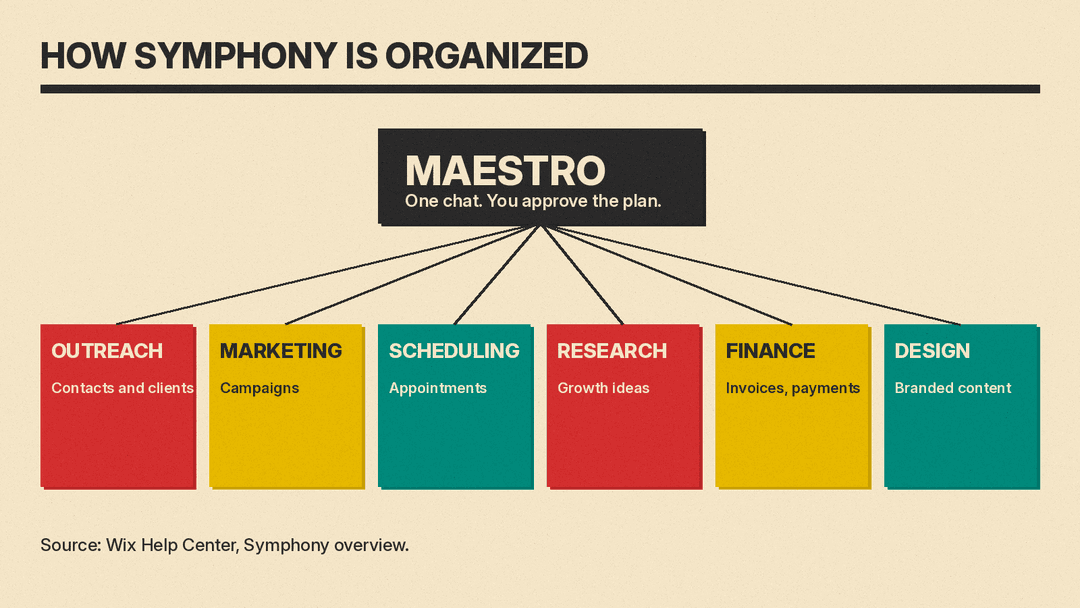
According to Wix's help center overview, Symphony builds a team of AI agents around your business, and each agent owns one area of work. The six areas Wix lists are:
- Outreach: reaching out to clients and contacts.
- Marketing: creating and running marketing campaigns.
- Scheduling: booking and managing appointments and meetings.
- Research: finding new growth opportunities.
- Finance: keeping on top of invoices and payments.
- Design: creating branded content.
You do not manage each agent. You chat with Maestro, the orchestrator, which Wix says hands each job to the right agent. In the app, Maestro turns a request into a plan and you approve a short summary before the agents start, per Wix's features post.
Symphony is a standalone app, available on iOS, Android and desktop. Wix's launch announcement says it is platform-agnostic, so it is meant for businesses that use Wix, another platform, or no website at all. The help center says you use Symphony with a Wix account, which is created for you when you start, and that you do not need a Wix website. If you sign in with an existing Wix account, Symphony can see your sites and help run your Wix business.
The "morning meeting" and the quality check
Two details set Symphony apart from a plain chat assistant. Both come from Wix's own descriptions, so treat them as what the company says the product does, not as independently tested results.
First, Wix says the agents hold a daily "morning meeting." They summarize completed work, surface what needs attention and highlight new opportunities based on business activity, customer behavior or current trends. In the November 4 post, Wix adds that some tasks can run on their own within the owner's guidelines, while others come to the owner for review and approval.
Second, Wix says Symphony has a built-in quality-review layer, where another agent checks the work before it is presented to you. That is a claim about process. Wix does not publish an accuracy figure for it in the sources reviewed for this guide, so you still need to read what the agents produce.
Where your data comes from: the Genome
Wix calls the intelligence behind the product the Symphony Genome. The company describes it as built from what it has learned across hundreds of millions of businesses, covering areas such as commerce, bookings, services, hospitality, fitness, transportation, restaurants and events. It turns that knowledge into what Wix calls hundreds of distinct skills the agents can use, so a booking-heavy wellness studio and a taxi fleet get different behavior.
Wix gives one example. A taxi company using Symphony ended up with an agent called a Driver Coordinator, which Wix says was shaped to the way that business talks with its drivers. A bowling business owner, Tom Russo of RevRates VIP Bowling, is quoted by Wix saying Symphony helps run a lot of the business without adding staff. Both are testimonials published by the vendor, so read them as marketing, not as measured savings.
What it connects to
Wix says you connect tools by asking in the chat, with no complex setup. The features post and the pricing page name email, calendar, Slack, Notion, Monday, Salesforce, other CRMs, payments and your Wix website as examples, and Wix says Symphony supports thousands of integrations. It also says some agents come from outside providers such as Shopify and Zendesk.
One limit to note: higher plans unlock more connected tools and deeper agent activity, according to the same pages. The free plan works across a smaller set of integrations. Wix does not list which ones, so check the app before you plan around a specific tool.
What Symphony costs
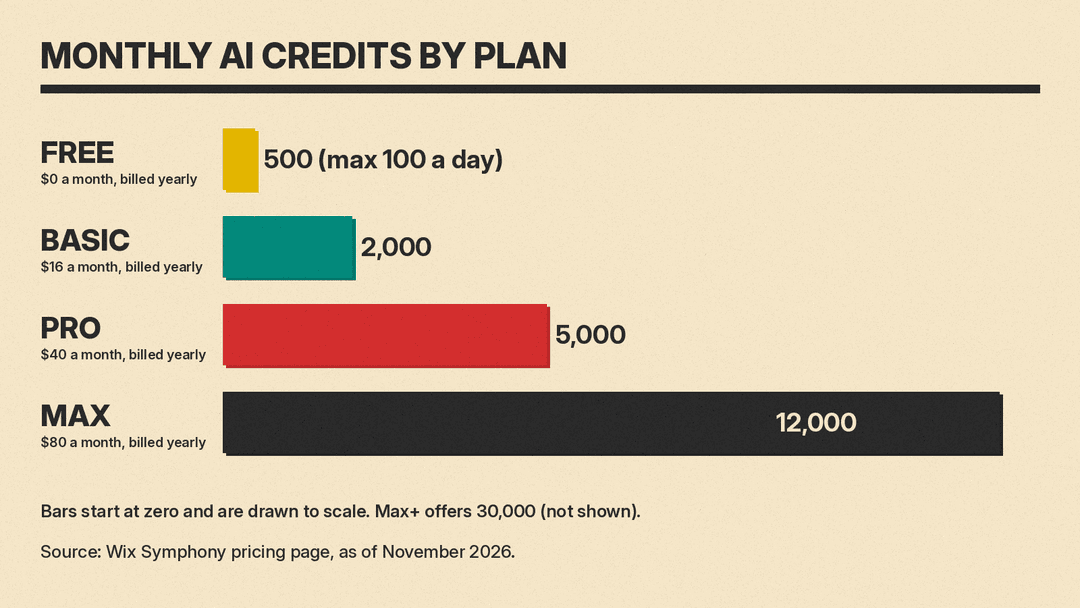
Wix prices Symphony by AI credits, not seats. Credits are spent when an agent takes an action such as drafting an email, running a task or pulling data. The amount each action uses depends on its complexity and the tool used. Here are the plans from Wix's pricing page and AI credits article, as of November 2026:
- Free: $0, 500 credits a month with a cap of 100 a day, no credit card needed.
- Basic: $16 a month billed yearly or $20 billed monthly, 2,000 credits.
- Pro: $40 a month billed yearly or $50 billed monthly, 5,000 credits. Wix marks this plan as recommended.
- Max: $80 a month billed yearly or $100 billed monthly, 12,000 credits, or 30,000 with Max+. It includes priority support.
A few rules about credits matter more than the headline price:
- Credits reset every month and do not roll over.
- On the free plan, credits refresh daily up to the monthly maximum, so you cannot spend all 500 in one day.
- Chatting with Maestro uses credits on the free plan only. On paid plans, chatting does not consume credits.
- If credits run out, the agents pause their background work until credits renew or you upgrade.
- Symphony credits work only inside Symphony. They cannot be used with other Wix AI products.
Wix also says every plan includes a Wix Light Premium plan free for one year if you build a website. Wix reserves the right to change the credit cost of actions, so the number of actions a plan buys can shift.
What to check before you rely on it
A team of agents that works around the clock is only useful if it works the way you expect. Here is a short test plan that fits the free tier.
- Start on the free plan and give it one narrow job, such as drafting follow-ups to recent customers. Read every draft.
- Look at the approval step. Wix says important actions wait for your sign-off. Confirm that sending a message or campaign really does stop for you before you connect your real inbox or customer list.
- Watch how fast credits drain. Run a normal week of work and see whether 100 credits a day, or 500 a month, is enough. That tells you whether Basic or Pro fits.
- Check each connected tool's permissions. Give agents the narrowest access that lets them do the job.
- Keep a person on money tasks. Finance is one of the six agent areas, so review any invoice or payment action yourself until you trust it.
Symphony is also not the only way to automate small business work. Our guide to automating small business tasks with AI covers Google Workspace Studio, Power Automate with Copilot and Zapier Agents, which suit people who want to build specific flows. Symphony's pitch is the opposite: a pre-built team that works from what it learns about your business. If you also need research, our market research guide shows a lower-cost way to start with a general chat assistant.
Bottom line
Symphony is a small business agent product from a company that says it has supported hundreds of millions of businesses, with a free tier that makes a trial cheap. The pitch rests on vendor descriptions, and the sources reviewed here include no independent test of how well the agents perform. Try one narrow task on the free plan, watch the credits and the approval step, and decide from your own results.
Sources
- Symphony by Wix is our new AI agent platform for businesses (Wix, November 4, 2026)
- Wix Launches Symphony by Wix (Wix press room, August 11)
- Symphony: An Overview (Wix Help Center)
- Symphony: About AI Credits (Wix Help Center)
- Symphony pricing (Wix)
- What is Symphony by Wix and The best Symphony by Wix features (Wix blog)
