
Pruna AI has released P-H3-Image, an open-weights model that makes and edits pictures. It is built from MiniMax-H3, a video model, and Pruna says it is 7 times smaller and 5 times faster than the original. For anyone who wants to run an image model on their own hardware, the numbers are worth a close read, and so is the license.
This post covers what Pruna says it did, what the model is good and bad at, what it takes to run, and the license terms that decide who can use it.
What Pruna released
In its launch post dated November 3, 2026, Pruna describes P-H3-Image as an open-weights model for text-to-image generation and image editing. It renders images from 2 to 16 megapixels. For comparison, a 4 megapixel image is roughly 2,000 by 2,000 pixels. The company says the model does best at photorealism and cinematic scenes.
The weights are on Hugging Face as PrunaAI/P-H3-Image, with a separate ComfyUI version in smaller formats. Pruna also runs a hosted playground on Hugging Face Spaces.
Why start from a video model
Pruna's argument is simple. To keep frames consistent, a video model has to learn how objects look from different angles and how light falls on different materials. That knowledge should carry over to still images. Pruna says it tested this idea before with an earlier model called Wan Image, built on Wan 2.1.
MiniMax-H3 was released with open weights this summer, according to Pruna. Out of the box, Pruna says H3 can make single images, but they come out soft and blurry, and the model is too large and slow for most people to run. P-H3-Image is its fix for both problems.
What Pruna changed
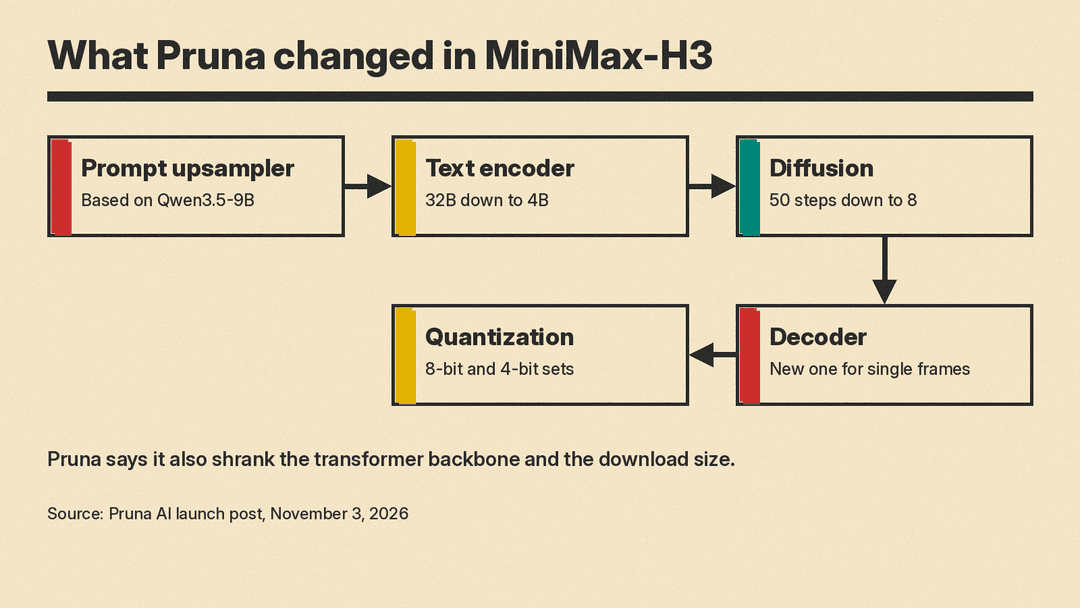
Pruna says it reworked every part of the pipeline. In the order the model uses them:
- Prompt upsampler. A small helper model, based on Qwen3.5-9B, turns a short request into a longer prompt that H3 handles well. Pruna says it keeps prompts short and images natural rather than glossy.
- Text encoder. H3 reads prompts with a 32B encoder. Pruna distilled it down to 4B, which it says cuts the file from 67 GB to 9 GB with the same image quality.
- Diffusion steps. Pruna cut the number of steps from 50 to 8 using a distillation method it calls advanced DMD. It says the 8-step model matches the 50-step original on most prompts.
- Decoder. H3's decoder was trained on video, so on a single frame it returned blurry images. Pruna trained a new one that turns one frame into one sharp image.
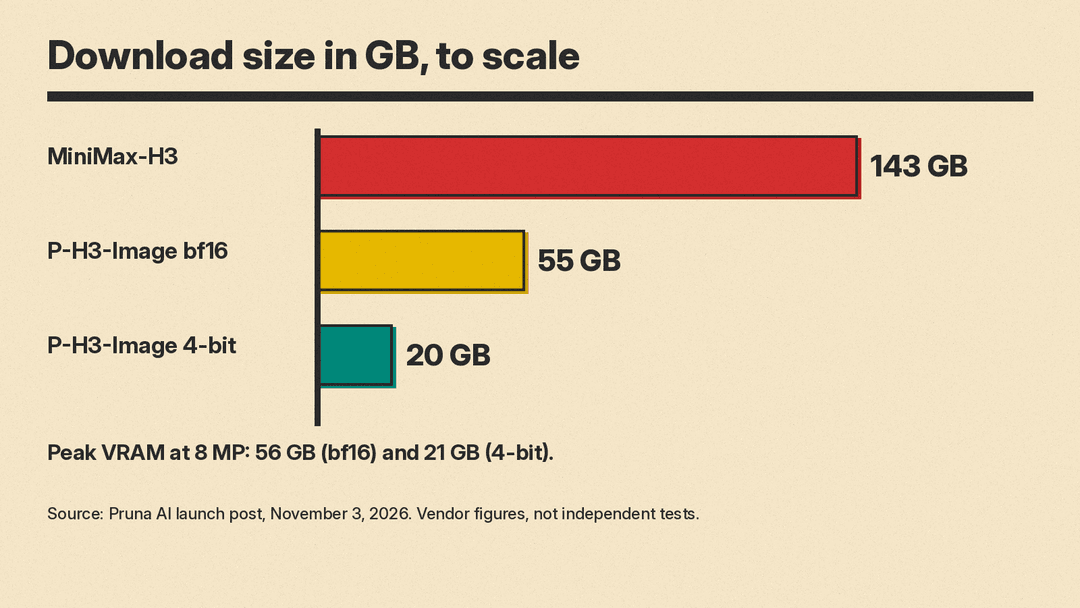
- Quantization. The parts were compressed to 8-bit and 4-bit versions. The smallest set is a 20 GB download, compared with 143 GB for H3.
What it is good at, and where it breaks
Pruna lists documentary and editorial photography, portraits with real skin texture, film stills, anime frames, drawings, prints, and graphic design with short text as the model's strongest areas. It can also edit images and combine several reference pictures into one scene. The launch post says up to 9 input images in one place and up to 8 references in another, and the Hugging Face model card says 1 to 8 input images, so treat 8 as the safe number.
The limits are stated plainly by Pruna:
- Very short, overly long or hype-heavy prompts can weaken results.
- Hands, small background figures and fine details may look distorted, especially below 8 megapixels.
- Small or dense text, such as body copy or code, is unreliable. Short quoted text works well.
- The 4-bit version keeps the quality but can change small details and sometimes the composition.
Speed and memory
These are Pruna's own measurements, not independent tests. On one NVIDIA B200 data center GPU, the launch post reports 2.6 seconds for a 4 megapixel image, compared with 12.4 seconds for the original H3. At 8 megapixels it reports 5.8 seconds against 30.6 seconds. The Hugging Face model card gives a different figure for 8 megapixels with the prompt written by hand: about 9 seconds, plus 6 to 11 seconds more if the prompt upsampler runs. The two pages do not explain the gap, so expect real times to depend on your setup.
On a smaller card, an NVIDIA L40S with 48 GB, Pruna reports 6.3 seconds for a 4 megapixel image using the 4-bit ComfyUI files. The full-quality version needs far more memory: the launch post gives a peak of 56 GB at 8 megapixels, and the model card says about 101 GB with the prompt upsampler in the standard setup. The 4-bit ComfyUI version peaks at about 21 GB, according to the launch post.
Prompting tips from Pruna
If you write prompts yourself instead of using the upsampler, Pruna gives four tips that apply to most image models:
- Open by saying what the image is, such as "a photograph by a street photographer" or "a frame from an anime TV series."
- Describe one scene, with a viewpoint, one main subject and a light source.
- Put any text you want in quotation marks and keep it short.
- Skip hype words such as "stunning", "8k" or "masterpiece". Pruna says they make images glossy and oversaturated.
For edits, Pruna suggests describing the finished result and saying what must stay unchanged, for example: "Edit Picture 1. The pickup truck is red. Keep everything else exactly as it is." Without that list, the model tends to redraw the whole scene, according to the model card.
The license is the catch
P-H3-Image is released under the MiniMax H3 Community License, and it is not a free-for-all. Pruna says the license excludes the European Union, the United Kingdom, the Republic of Korea and the United States unless you have a separate license from MiniMax. Products built on it must show "Powered by MiniMax H3." The text encoder parts and the prompt upsampler are under the Apache License 2.0, and the ComfyUI nodes are MIT-licensed.
Pruna tells readers to read the license before use. This post is not legal advice, and if you plan to use the model in a business, read the full terms yourself.
Update, November 11, 2026: MiniMax has released its own open-weight image model built on H3, under a separate license. See our report on MiniMax H3-Image and its license.
What it means for creators
If you generate images locally, this is one more route to an open image model, alongside options such as FLUX 3 Image Klein: start from a video model, then compress it until it runs in about 21 GB of VRAM in the 4-bit version. For VRAM sizing in general, see our guide on how much memory to run an AI model locally. The speed and size claims come from Pruna, and this post found no independent test yet. The license limits who can use it at all. For many readers, the practical step is to try the hosted playground first and read the license before downloading anything.
