
Black Forest Labs now has two ways to use its newest image model. FLUX 3 Image arrived on the BFL API on October 1, 2026. Two weeks later, on October 15, the company released FLUX 3 Image Klein, a 5.6B-parameter version with open weights that you can download and run on a consumer GPU.
The headline feature is not raw image quality. It is layout control. With FLUX 3 you can write bounding boxes into the prompt and tell the model where each element goes: a headline here, a face there, each panel of a grid in its own box. That turns composition from something you hope the model guesses into something you state as data. This explainer covers what the two models do, how the bounding-box prompts work, what they cost, what hardware Klein needs, and where the vendor's claims stop.
The short version
- FLUX 3 Image is the full API model. It does text-to-image, local edits and up to 10 reference images through one endpoint, with output up to 4K. Pricing runs from $0.041 to $0.607 per image, by resolution.
- FLUX 3 Image Klein is a 5.6B-parameter open-weights version with the same features: text-to-image, image editing, multi-reference and bounding boxes. Through the API it costs $0.008 to $0.036 per image.
- Bounding boxes go at the end of the prompt as a JSON list. Each box is written
[y_min, x_min, y_max, x_max]on a 0 to 1000 grid, y first. - Hardware: Black Forest Labs says Klein's INT8 build runs on NVIDIA GeForce RTX GPUs with as little as 8 GB of VRAM.
- License: the Klein weights use the FLUX Kommunity License, which allows free commercial use for individuals and companies with annual revenue under $5M.
- Caveat: the quality rankings Black Forest Labs publishes come from its own internal evaluations.
What FLUX 3 Image is
Black Forest Labs describes FLUX 3 as its multimodal model for video, audio, images and actions. FLUX 3 Image is the part that generates and edits images. The family also includes FLUX 3 Video and FLUX 3 Action, an open-weights 7B model for robot control.
The full FLUX 3 Image model is an API product. According to BFL's release notes, it gives you one endpoint for generating and editing, and "the prompt decides whether to generate or edit." There is no separate mode setting. Companies that want to run the full model themselves can ask about a commercial weights license, which the model page offers for teams "running image generation at scale."
What Klein adds
Klein is the version you can download. BFL's Klein announcement says it shares the full model's core capabilities: native 4K generation, pixel-perfect editing, multi-reference generation with up to 10 images, and bounding boxes that control where elements are placed or confine edits to one area.
It ships in two variants:
- Klein (distilled) runs 16 steps at CFG 1 for fast inference. On Hugging Face it is
black-forest-labs/flux-3-image-klein. - Klein Base runs 50 steps at CFG 3.5. BFL calls it the model for fine-tuning and LoRA training. On Hugging Face it is
black-forest-labs/flux-3-image-klein-base.
The release also includes FP8, INT8 and NVFP4 builds, which BFL says were developed with NVIDIA support. For API users, the release notes say the request format is unchanged: prompt, images, aspect_ratio, resolution and the bounding-box format are the same, so a FLUX 3 Image request runs on Klein by switching the endpoint.
How bounding-box prompts work
This is the part worth learning, because it is a different way to prompt an image model.
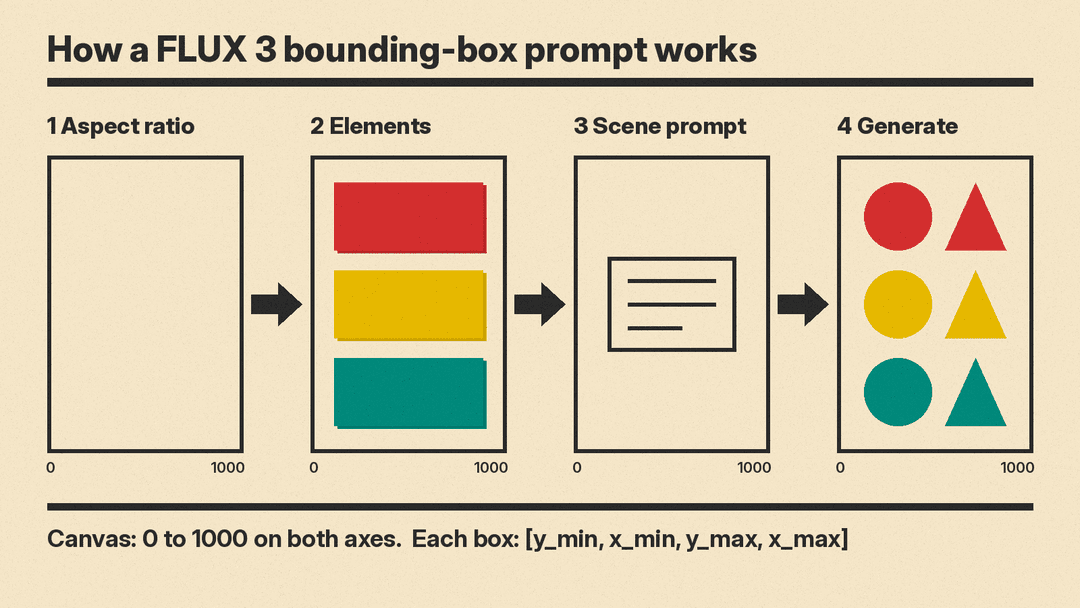
On the FLUX 3 Image page, BFL breaks it into four steps:
- Aspect ratio. Pick one. Whatever its shape, the canvas is a 0 to 1000 grid on both axes.
- Elements. Draw a box for every element that matters, then describe what goes in it.
- Scene prompt. Give the scene one line that ties the elements together.
- Generate. FLUX 3 renders the scene with every element inside its box.
In the prompt itself, a layout has two parts. A caption describes the whole image. Then comes an element table, a JSON array with one row per element. Each row has an id, a bbox and a desc, and the caption mentions each element by its id where it first appears. Hugging Face's Diffusers guide gives this shape (shortened here):
Minimalist graphic illustration featuring a black silhouette of a person <silhouette_1>
centered against a solid, vibrant chartreuse background <background_1>. ...
[{"id": "background_1", "bbox": [0, 0, 1000, 1000], "desc": "A flat field of neon yellow-green ..."},
 {"id": "silhouette_1", "bbox": [150, 150, 850, 850], "desc": "A black silhouette of a person in motion ..."}]
Three details trip people up:
- The order is y first. Boxes are
[y_min, x_min, y_max, x_max], not x first. A box of[0, 0, 200, 1000]is a band across the top of the image. - The grid is normalized. Because the scale is 0 to 1000, Hugging Face notes that the same box works at any image size.
- There is no separate parameter. On the API, you add the JSON list to the end of
prompt.
You do not have to draw every box yourself. BFL says an LLM can plan the layout: give it one line and an aspect ratio, and it writes the caption and the element table. You can then move any box you do not like. BFL also says its prompt upsampler, which expands a short request into the dense caption FLUX 3 was trained on, may suggest more elements, but every box you drew reaches the model with the same id and coordinates.
BFL says boxes suit "compositions with many parts in strict relationships": type set around a photograph, collages and panel grids, editorial spreads, or a crowded scene where every face has its place. That is a good description of a lot of design work. Posters, ad layouts, social cards and storyboards all depend on where things sit, not only what they look like. MOSS-Image, an Apache 2.0 open-weight model, also takes JSON layouts with bounding boxes; our MOSS-Image explainer covers its format.
Editing: change one thing, keep the rest
FLUX 3 also edits existing images. According to the release notes, you mark the element to change and the rest of the image stays as it was. You can recolor, replace, move, resize or remove several elements in one request.
The model page shows edits written the same way as layouts. In one example, the prompt changes a surfer's black wetsuit and white surfboard to bright red, and says to keep the wave and the sky "exactly unchanged." In another, a wolf in a frosty bamboo scene becomes a dog and everything else stays locked.
To move something, the Hugging Face guide uses two boxes per element: src_bbox for where it is in the reference image and tgt_bbox for where it should go. An element with the same two boxes stays where it is. In the Hugging Face example, a knitted knight moves up and to the left while the backdrop, cliff, needle, dragon and fire stay pinned in place.
Through the API, BFL says Klein comes with prompt upsampling and "pixel restoration, which preserves unedited regions of an image exactly."
Up to 10 reference images
Both models accept up to 10 reference images per request. Each reference gets a token in the order you add it, starting at ref_image_0, and the prompt cites them by that token. One example on the model page reads: "A fashion streetwear portrait in Times Square with ref_image_0, ref_image_1, ref_image_2, ref_image_3, ref_image_4 and ref_image_5", where the references are a vest, a tee, jeans, a duffel, a beanie and sneakers. BFL says FLUX 3 decides where each reference sits and how big it is.
For product, fashion and brand work, this is the practical draw: you can give the model the exact items you need in the picture instead of describing them.
Native 4K
The resolution setting goes from 768sq for fast previews to 4k, which the release notes describe as about 16 megapixels, at 15 aspect ratios. BFL's showcase includes a soba shop image at 5456 × 3072 pixels, which it says came entirely from the model, and zooms in on the hand-lettered characters of the lightbox sign.
Pricing
BFL prices both models per image, by resolution. For Klein, text-to-image and image editing cost the same.
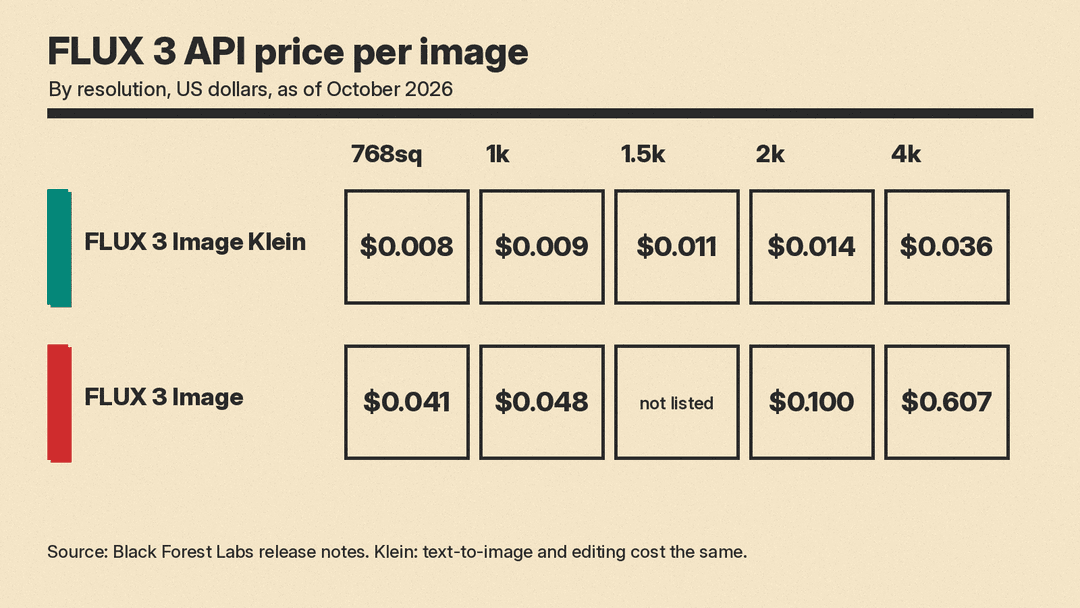
From the release notes, as of October 2026:
FLUX 3 Image Klein (API)
- 768sq: $0.008
- 1k: $0.009
- 1.5k: $0.011
- 2k: $0.014
- 4k: $0.036
FLUX 3 Image (API)
- 768sq: $0.041
- 1k: $0.048
- 2k: $0.100
- 4k: $0.607
The gap is widest at 4K. If you need many 4K images and Klein's quality is good enough for the job, the cost difference is large. If you run Klein on your own GPU, you pay for hardware and power instead.
Hardware and speed
BFL's Klein post gives these figures:
- The generator weights need 11.2 GB in BF16 and 5.6 GB in FP8.
- With the INT8 build, Klein runs on NVIDIA GeForce RTX GPUs with as little as 8 GB of VRAM, through ComfyUI or Diffusers.
- With the distilled model and the INT8 build, it makes a 1MP image in about 4 seconds on an RTX 5090 and in under 9 seconds on an RTX 4070, through ComfyUI. NVIDIA did the measuring.
- On NVIDIA GB300, the distilled model makes a 1MP image in under 0.6 seconds in NVFP4.
- Serving a LoRA adds around 5% to generation time.
Hugging Face ran its own timings on a single H100 80GB with the distilled checkpoint at 16 steps:
- Text-to-image, 1024 × 1024: 1.93 seconds
- Image-to-image with one 1024 × 1024 reference: 3.87 seconds
- Layout editing with one 1360 × 768 reference: 4.10 seconds
Peak memory in those runs was 23.8 GiB. Hugging Face notes that a reference image roughly doubles the time, because a 1024 × 1024 reference adds 4,096 tokens to every transformer call. If your workflow stacks several references, expect it to slow down.
What BFL claims about quality
BFL says that in internal evaluations Klein ranks first in text-to-image, multi-reference generation and image editing, ahead of larger open-weights models, and rates above the two closed models in its comparison, Ideogram V4.5 and FLUX.2 [pro]. It says Klein gains 91 Elo in text-to-image and 70 in image editing over FLUX.2 [klein] 9B, with 38% fewer parameters.
These are the company's own tests. BFL also notes that parameter counts cover only the image generator, as each publisher reports them, and that text encoders are not counted. Klein's text encoder is Qwen3-VL, per Hugging Face. Treat the rankings as a reason to test Klein, not as a verdict. For how Klein fits next to Midjourney, GPT Image 2.5, Nano Banana 2.1 and others, see our guide to the best AI image generators as of October 2026.
How to try it
- No setup: the FLUX 3 Image page links to BFL's Playground, where you can draw the boxes by hand, and there is a public Hugging Face Space for Klein.
- API: the distilled Klein model is available as
flux-3-image-klein. The full model is FLUX 3 Image on the same API. - Local: download the weights from Hugging Face, or load them in ComfyUI. BFL lists day-one support in ComfyUI, Hugging Face Diffusers, TensorRT-LLM, SGLang Diffusion and vLLM-Omni.
- Fine-tuning: train LoRAs on Klein Base with Ostris's AI Toolkit (
arch: flux3) or Diffusers. The release notes say a LoRA trained on Base also loads into the distilled model.
In Diffusers, the Hugging Face guide gets you to a first image in a few lines:
import torch
from diffusers import ModularPipeline

pipe = ModularPipeline.from_pretrained("black-forest-labs/flux-3-image-klein")
pipe.load_components(dtype=torch.bfloat16)
pipe.to("cuda")
pipe(prompt="a red fox", output="images")[0].save("fox.png")
Prompting tips from the docs
- Write a full scene. Hugging Face says FLUX 3 responds best to a full description with the subject, the setting, the light, the composition and the style. Our beginner's guide to better AI prompts covers the same habit for chat models.
- For edits, describe the result. For image-to-image, Hugging Face says to write the prompt as a caption of the image you want, with the change included.
- Name what stays. BFL's own edit examples list the elements to keep and say to keep them "exactly unchanged."
- Use boxes when position matters. If you only care about mood and style, skip them. BFL's page says you can just write a prompt.
Who should use which
- Designers and marketers who want layout control without setup: FLUX 3 Image through the Playground or API.
- Teams that need volume: Klein through the API, starting at $0.008 per image.
- Developers who need images to stay on their own hardware: Klein's open weights. BFL says teams with data sovereignty or local deployment needs can evaluate and adapt it on their own infrastructure.
- Anyone training a custom style: Klein Base with LoRA.
Before you build on the open weights at a company, check the license. Free commercial use covers individuals and companies under $5M in annual revenue. Larger organizations need BFL's self-hosted licensing or the API. If you ran earlier open models, our comparison of FLUX.1, Stable Diffusion 3.5, PixArt-Sigma and Sana shows where the field stood one generation back.
Why it matters
Most image models still take one block of prose and decide the composition for you. FLUX 3 makes placement an explicit input, and Klein puts that control in a model small enough to run on a consumer GPU. For design work, where a headline in the wrong place ruins the image, that is a more useful change than another bump in an aesthetics score. The open question is how well the boxes hold up in your own layouts, and that is something you can now test for less than a cent per image.
