
Midjourney and OpenAI's GPT Image models are two common choices when people want an AI picture. They are built for different jobs. Midjourney is a subscription app tuned for styled images that you steer with parameters and a learned taste profile. GPT Image is OpenAI's image model family, offered in ChatGPT and as two API models built to follow instructions, edit precisely and slot into other software. Which one makes better pictures depends on what "better" means for your project.
This guide compares them as of October 2026, using only what each company documents: the current models, editing tools, output sizes, pricing and known limits. For GPT Image against Google's model, see our GPT Image 2.5 vs Nano Banana 2.1 comparison. For a wider field, see our roundup of 10 AI image generators.
The short answer
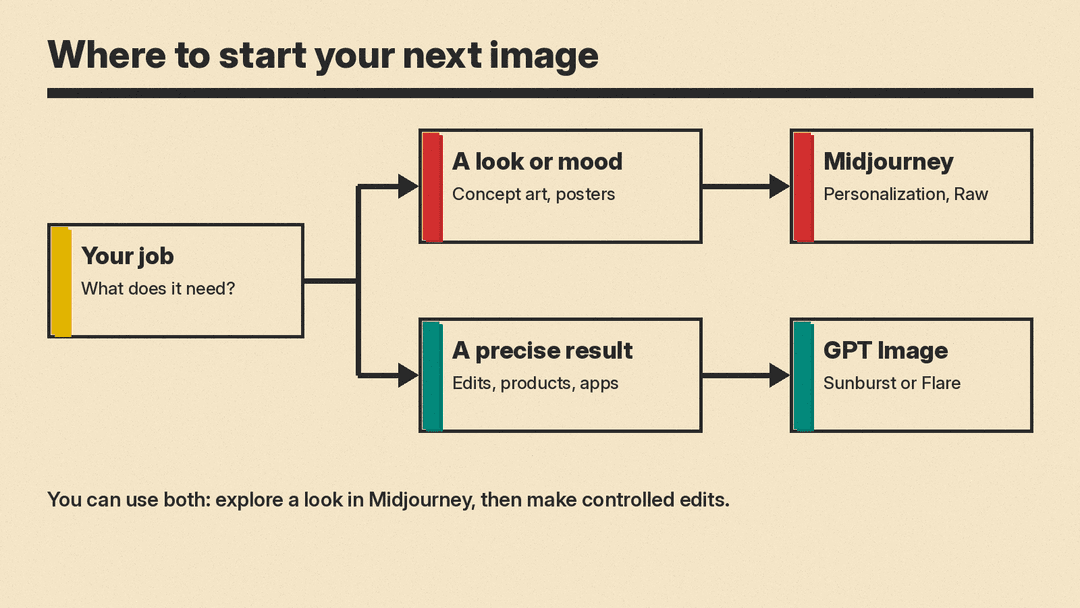
- Pick Midjourney if you want a strong default look, fast exploration of styles, and a personal aesthetic that the tool learns over time. It suits mood boards, concept art, posters and social visuals where taste matters more than exact layout.
- Pick GPT Image if you need the model to follow a detailed brief, edit an existing photo, combine several reference images, or produce assets inside an app or workflow. It suits product shots, ad variations, transparent-background assets and anything built by developers.
- You can also use both: Midjourney to find a direction, then an instruction-following model to make controlled edits.
What each one is today
Midjourney V8.2
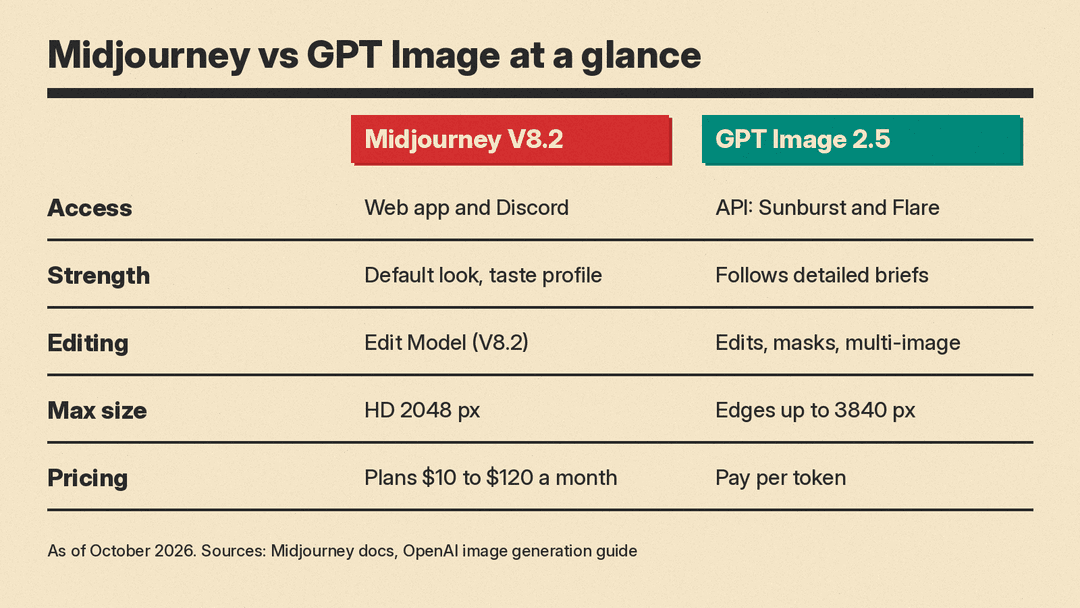
According to Midjourney's version documentation, the current default model is V8.2, released as the default on July 24, 2026. Midjourney describes V8.2 as an update focused on aesthetics, image quality and Personalization, and says its images are "more creative, bold, sophisticated, and edgy."
V8.2 also brings a new Edit Model, which replaces three older tools: Omni Reference, Character Reference and Retexture. The previous version, V8.1, added HD images at 2K resolution without upscaling and, per Midjourney, renders standard jobs about four to five times faster than earlier versions.
You use Midjourney in its web app or in Discord, and you control results by adding parameters to the end of a prompt, such as --v for version, plus options like Raw mode, Stylize, Chaos and Style Reference listed in the same documentation.
GPT Image 2.5 (Sunburst and Flare)
OpenAI's image generation guide lists two current models: gpt-image-2.5-sunburst and gpt-image-2.5-flare. OpenAI says to choose Sunburst "for workflows where editing precision matters most" and Flare "for fast, high-quality everyday image generation."
Both are reached through OpenAI's API, either as a one-shot Image API call or as a tool inside a conversation through the Responses API. Other products build on them too: GitHub, for example, added image generation and editing to Copilot using the Flare model, as covered in our post on Copilot image generation.
You do not need the API to use it. OpenAI's consumer version, ChatGPT Images 2.5, launched on September 8, 2026, and is available on all ChatGPT tiers on web, iOS and Android, according to OpenAI's help center. OpenAI says the Flare API model brings the same improvements in quality, editing and speed. Images with thinking is limited to the Plus, Pro and Business plans.
Look and style
Midjourney is designed around taste. Its Personalization feature builds a profile from the images you pick, and Midjourney says V8.2 "understands" that taste much better, especially on profiles with many ratings. Style Reference applies the colors, medium, textures or lighting of an existing image to new images, for a consistent look. If you want something that looks finished with a short prompt, this is Midjourney's core strength. If the default styling gets in the way, Raw mode removes it.
GPT Image takes the opposite approach. It aims to do what the prompt says. In the Responses API, the main model automatically revises your prompt before generating, and OpenAI exposes that rewritten version as a revised_prompt field so you can see what was actually sent. That suits briefs where details matter: a specific product, a label with set wording, or a scene with named elements.
A practical rule: describe a mood and Midjourney will often surprise you in a good way; describe a spec and GPT Image is more likely to hit it.
Editing and references
This is where the two differ most.
GPT Image is built for editing. OpenAI's guide covers:
- Edits from a prompt: change part or all of an existing image with plain instructions.
- Multiple references: combine several input images into one new image. OpenAI's own example builds a gift basket from four separate product photos.
- Masks: mark the area to change. OpenAI notes that masking is "entirely prompt-based," so the model treats the mask as guidance and may not follow its exact shape.
- Multi-turn editing: keep refining the same image across a conversation ("now make it look realistic").
Midjourney's editing runs through its Edit Model in V8.2, which now powers Pan, Zoom Out and the Editor, according to its compatibility chart. One documented catch from V8.1: using inpainting or outpainting tools on HD images downscales the result to standard size, though you can upscale it again.
If your work starts from a real photo you need to keep recognizable, GPT Image's editing tools are the more direct fit.
Size, format and output control
Midjourney V8.1 and V8.2 produce HD images at 2048 pixels. Aspect ratios go up to 14:1, or 4:1 for HD, according to its compatibility chart.
GPT Image 2.5 offers more output control, as documented by OpenAI:
- Custom sizes in multiples of 16 pixels, with aspect ratios from 1:3 to 3:1 and edges up to 3840 pixels. OpenAI labels anything above 2560x1440 as experimental.
- Quality settings from
lowtomax. - PNG, JPEG or WebP output, with adjustable compression.
- Transparent backgrounds, which matter for logos, stickers and product cutouts.
Pricing
Midjourney sells subscriptions, plus extra GPU time at $4 an hour on every plan. Per its plan comparison page, as of October 2026:
- Basic: $10 a month, with 3.3 hours of Fast GPU time.
- Standard: $30 a month, with 15 hours of Fast time and unlimited Relax mode images.
- Pro: $60 a month, with 30 hours of Fast time, unlimited Relax images and SD videos, and Stealth Mode to keep images private.
- Mega: $120 a month, with 60 hours of Fast time and the same Relax and Stealth access as Pro.
Annual plans are 20% cheaper, paid upfront: $96 to $1,152 a year. Midjourney's terms require a Pro or Mega plan for companies with more than $1 million in yearly gross revenue. HD images cost more GPU time than standard ones: 1.3 minutes against 0.8 minutes.
In the API, GPT Image is billed per use. OpenAI lists the same token rates for both 2.5 models: $8 per million image input tokens, $30 per million image output tokens and $5 per million text input tokens. Batch processing halves the image output rate to $15 per million. OpenAI notes that equal rates do not mean equal cost per image, because token use varies by model and quality setting.
For a person making pictures by hand, the choice is between a Midjourney plan and ChatGPT Images, which comes with every ChatGPT tier. Both are easier to predict than per-token billing. For a team generating images inside software, pay-per-use pricing scales with actual volume.
Known weak spots
OpenAI is direct about GPT Image's limits in its own guide: complex prompts can take up to two minutes, text placement can still be imprecise, recurring characters or brand elements may drift across generations, and precise layout can be hard.
Midjourney's documentation notes that each version handles prompts differently, so a prompt that worked in one version may give a different result in the next. Stealth Mode, which keeps your images private, is only available on the Pro and Mega plans.
Which one should you use?
- Concept art, mood boards, posters: start with Midjourney.
- Editing a real product photo: GPT Image, ideally Sunburst for precision.
- Fast everyday images inside an app: GPT Image Flare.
- A personal visual style across many images: Midjourney with Personalization and Style Reference.
- Transparent assets for design work: GPT Image.
- Building a product or automation: GPT Image, since it is an API model.
Neither tool wins on every job. The useful question is not which makes better pictures in general but which one fits the next image you need to make.
