
AI chatbots can help with the drafting part of trip planning: turning "somewhere warm in spring, not too expensive, we like food" into a shortlist, a day-by-day plan and a packing list. The part they can get wrong is the part that can ruin a trip: opening days, ticket rules, prices and addresses. This guide shows how to use ChatGPT, Gemini and Claude for the first part and how to check the second.
You get a six-step workflow, copy-paste prompts for each step, and the results of a test we ran on a small local model. In that test, when we asked what to check on each stop's official website, the model made up the websites: none of the seven web addresses we looked up exist.
What each assistant can do for travel planning
All three can brainstorm and draft an itinerary from what you tell them. The differences are in how they reach live information. These details come from each company's help pages, as of October 2026.
ChatGPT can search the web. OpenAI's help page on searching the web with ChatGPT says it "may search the web automatically when your question would benefit from current information," and you can start a search yourself by selecting View all tools, then Search, or by typing / and choosing Search. Answers can include citations. The same page warns that "search results and citations can be incomplete, outdated, or incorrect" and advises you to open a cited source to check that it supports the answer. On eligible consumer plans and models, ChatGPT can also show restaurant reservation times from OpenTable, Resy or Yelp, depending on the restaurant and country.
Gemini can pull in public information from Google services. Google's help page on searching for flights and hotels in Gemini Apps says Gemini uses public information from Google Flights and Google Hotels to "pull in real-time flight info" and search hotels based on details you give. A separate page on finding places and directions says Gemini can get "addresses, descriptions, websites, ratings, and opening hours" from Google Maps. You need to be signed in with Keep Activity on. Google also lists what Gemini cannot do here, including "Book a flight or hotel for you" and "Cancel or update existing reservations."
Claude can search the web when web search is on. Anthropic's web search help page says to click + in the lower left of the chat and select Web search, and that in the new Claude experience there is no toggle because Claude "searches the web when it helps." It says every response that uses web search includes citations "so you can easily verify sources yourself." On Team and Enterprise plans, an owner has to enable web search for the workspace first.
The short version: use any of them to plan, turn on search (or let Gemini use Flights, Hotels and Maps) when you need current facts, and book on the airline's, hotel's or venue's own site.
The 6-step workflow
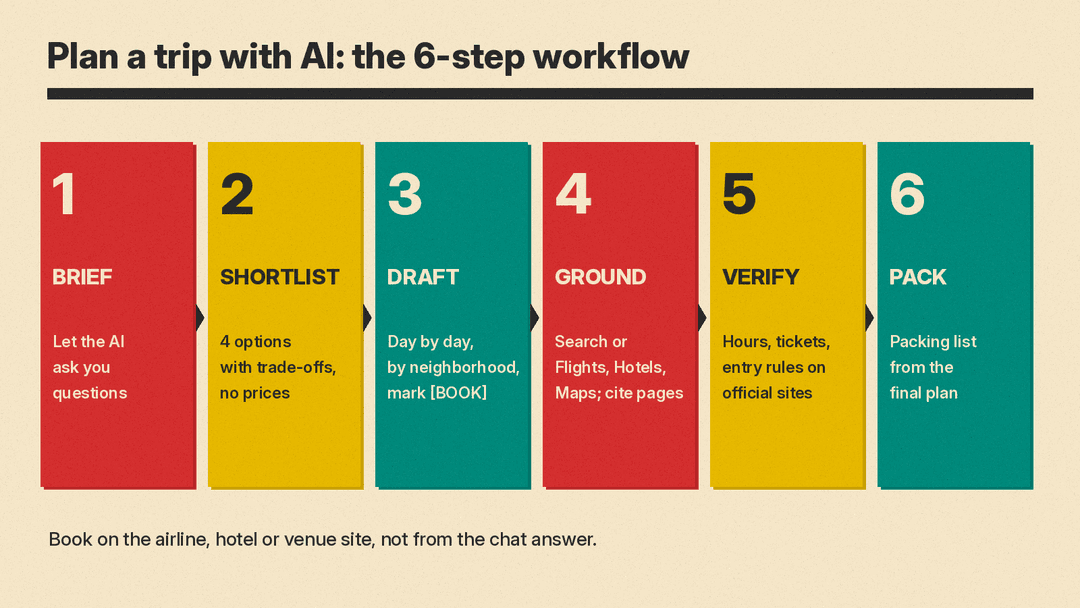
Step 1: Brief the AI (let it ask the questions)
Start by letting the AI interview you. A trip plan depends on details that are easy to leave out: who is coming, how much walking is realistic, what you have already seen, what you hate.
I want help planning a trip. Before you suggest anything, ask me up to 8 short questions about what you need to know: dates, budget, who is coming, pace, interests, mobility, and anything I want to avoid. Ask them all at once, numbered, then wait for my answers.Answer in one message. Then keep the answers handy: you can paste them into a new chat or another app later.
Step 2: Get a shortlist, not a single answer
If you have not picked a destination, ask for options with trade-offs, so you are choosing rather than accepting the first idea.
Based on my answers, suggest 4 destinations that fit. For each, give: why it fits my interests, what the travel time from [home city] roughly involves, what the weather is usually like in [month], and one reason it might not suit us. Do not include prices. Keep each to 5 lines."Do not include prices" is deliberate: prices change, and you will get current ones later from Google Flights, a hotel site or the airline.
Step 3: Draft the day-by-day plan
Give the plan a shape and real constraints. The more specific your limits, the more useful the plan.
Plan [number] days in [destination] for [who is coming] who like [interests]. Our pace is [relaxed / moderate / packed]. We are staying in [neighborhood or "not booked yet"]. For each day, give a morning, afternoon and evening, and keep each day within one or two neighborhoods to limit travel. Name the neighborhood for every stop. Mark anything that usually needs booking ahead with [BOOK]. Do not give prices, opening hours or web addresses; I will check those separately.The last line matters more than it looks. In our test (below), a small model added price estimates nobody asked for, and later made up web addresses.
Step 4: Ground it in live information
Now switch on the tools that read current information, and use them for one job at a time.
- In ChatGPT, start a search (View all tools, then Search) and ask about a specific stop.
- In Gemini, ask directly about flights, hotels or a place; Google's help pages give examples such as "Find hotels for a 4-day trip to San Francisco for New Years Eve."
- In Claude, turn on Web search and ask the same question.
Search the web. For each stop on day [number] of the plan, find the official website and tell me its opening days and hours for [dates], whether tickets must be booked ahead, and the date the page was last updated if shown. Link the page you used for each fact. If you cannot find an official page, say so.Asking for "the page you used for each fact" turns the answer into a list you can click through, which is what Step 5 needs.
Step 5: Verify on official sites before you book
OpenAI's help article Does ChatGPT tell the truth? says the model "may express high confidence even in incorrect answers" and advises users to "always verify quotes, data, technical information or references to external documents."
For a trip, check these on the official site of the airline, hotel, museum, park or transport operator:
- Opening days and hours for your exact dates, including holidays.
- Ticket rules: whether you must book a time slot, and what ID or documents you need.
- Addresses and how you get between stops.
- Anything about entry requirements, visas or health rules: use the official government source for your destination and your own country, never a chatbot alone.
Our 5-minute routine for fact-checking AI answers works well here: open every link, and treat a link that does not load as a failed check.
Step 6: Pack and prepare
Once the plan is fixed, AI is useful for the boring lists.
Using our final itinerary above, make a packing list for [number] people for [dates] in [destination]. Group it by: documents, clothes, toiletries, electronics, and things for specific activities on the plan (name the day). Ask me first if anything about the weather or activities is unclear.More copy-paste prompts for trip planning
A rainy-day backup
For each day of our plan, suggest one indoor alternative near the same neighborhood in case of bad weather. Keep the same interests in mind. Mark any that usually need booking ahead.Travelling with kids or older relatives
Rework the plan for [two kids aged 6 and 9 / a parent who cannot walk more than 30 minutes at a time]. Add rest breaks, keep walking short, and flag any stop with many stairs or steep streets so I can check access on the official site.A food-focused day
Plan one day in [neighborhood] built around food: a breakfast spot, a market or food hall, a lunch, a snack, and dinner. For each, tell me the dish or food it is known for and what kind of place it is (counter, sit-down, market stall). Do not give prices or hours.Turn the plan into a calendar-style list
Turn our final itinerary into a simple schedule I can copy into my calendar: one line per stop with day, approximate time block, place name, and neighborhood. No extra commentary.Stress-test the plan
Look at our plan critically. Where is it too packed, where do we backtrack across the city, and which stops are likely to need booking far ahead? Suggest fixes, but do not add new stops unless you remove one.Compare two versions
Here are two draft itineraries for the same trip: [paste plan A] and [paste plan B]. Compare them on pace, travel time between stops, and fit with our interests. Recommend one and explain why in 5 bullets.If you want to write your own versions, our beginner's guide to writing better AI prompts covers the basics: give context, set constraints and ask for a format.
What happened when we tested these prompts
We ran three prompts on a small open model, Gemma 3 1B, running locally through llama.cpp at temperature 0 on October 26, 2026. A small local model is not ChatGPT, Gemini or Claude. The models behind those apps are much larger, and they can search the web, which this one could not. Treat this as a demonstration of the errors to watch for, not a rating of any app. We used Lisbon as the example city.
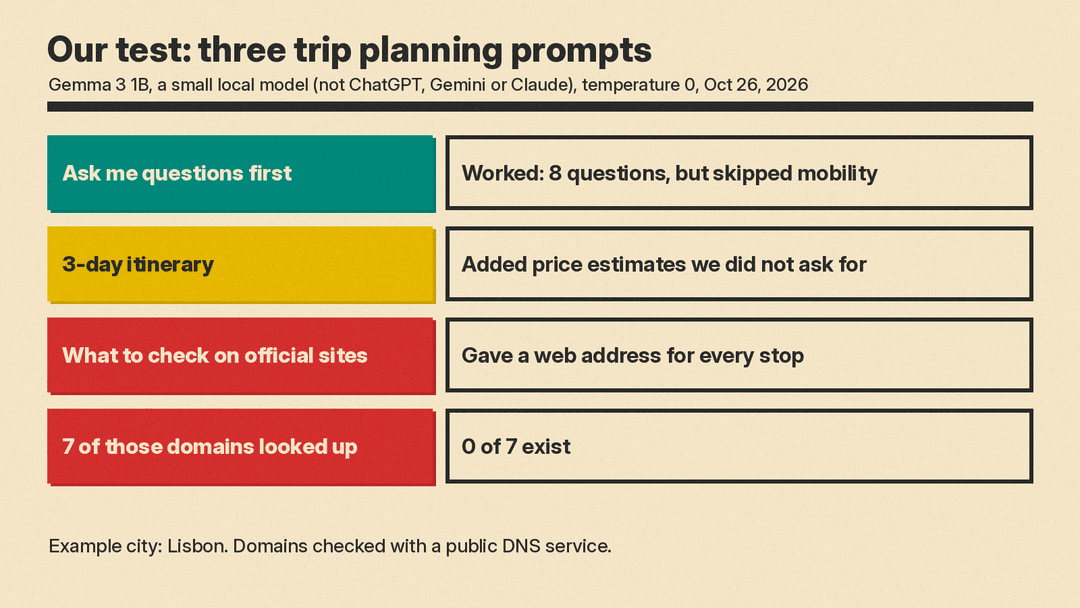
- The "ask me questions first" prompt (Step 1). It worked as intended. The model asked 8 numbered questions covering dates, budget, who is travelling, purpose, pace, interests, must-see places and things to avoid. It did not ask about mobility, even though the prompt named it.
- A simpler version of the Step 3 itinerary prompt. We asked for a 3-day plan for two adults who like food, history and walking, with a morning, afternoon and evening each day and the neighborhood for each place. It produced a readable plan, but it also added euro price estimates for meals, tickets and a daily budget, which we had not asked for and had no way to check. That is why the Step 3 prompt says "Do not give prices, opening hours or web addresses."
- "Do not guess" follow-up. We then asked it to list what to check on each place's official website and told it: "Do not guess any of these. If you do not know, write 'check official site'." It never wrote "check official site." Instead it gave a web address for every stop and stated closing days as facts. One address had a space in the middle of the domain name, so it cannot work. We looked up seven of the other domains it gave (for the cathedral, the tram lines, the castle, the monastery, Belém Tower and the food hall) with a public DNS service on October 26, 2026: none of the seven exist. The list also included a museum that was not in the plan it had written.
A plan you can edit is useful even when the details are wrong. Addresses, hours and links from a model that cannot search are not. For those, use answers from a search-enabled assistant with citations, then open the official page.
Common mistakes
- Booking from the chat answer. Gemini's help page says it cannot book flights or hotels. ChatGPT's help page says a restaurant reservation is confirmed only when you get a confirmation from OpenTable, Resy or Yelp. Confirm with the provider before you pay or turn up.
- Trusting a link because it looks official. A plausible domain name is not proof the site exists. Click it.
- Leaving out the hard constraints. Mobility, kids, diet and budget change the plan. Say them in the first message.
- Asking for everything at once. Splitting flights, hotels, the day plan and the packing list into separate steps makes each answer shorter and easier to check.
- Letting old answers go stale. If you planned weeks ago, run the Step 4 search prompt again close to your dates.
Sources
- OpenAI Help Center: Searching the web with ChatGPT
- OpenAI Help Center: Does ChatGPT tell the truth?
- Gemini Apps Help: Search for flights and hotels in Gemini Apps
- Gemini Apps Help: Find places and get directions in Gemini Apps
- Gemini Apps Help: Use and manage Connected Apps in Gemini
- Claude Help Center: Enable and use web search
