
Raycast, the launcher app best known on the Mac, now wants to be the keyboard you type with on your iPhone. On October 29, 2026, the company announced on X "the all-new primary keyboard for iOS," listing dictation, swipe typing and autocorrect, AI Commands and Quick Fix, snippet expansion and Quicklinks, smart emoji search and five themes. Digital Trends covered the launch the same day.
The key change is the word "primary." Raycast has offered an iOS keyboard since version 1.1.0 in October 2025, but Digital Trends describes that version as a companion you switched to only when you needed its features. The new version is a full typing keyboard, so the AI tools sit one tap above the letters you already use.
What the keyboard does
According to the Raycast Keyboard manual, it works on iPhone and iPad and handles normal typing: word suggestions, autocorrect, auto-capitalization, a double-tap space for a period, slide-to-type, and your iOS Text Replacements and contact names. It learns the words you use, and you can wipe that with Reset Keyboard Learning.
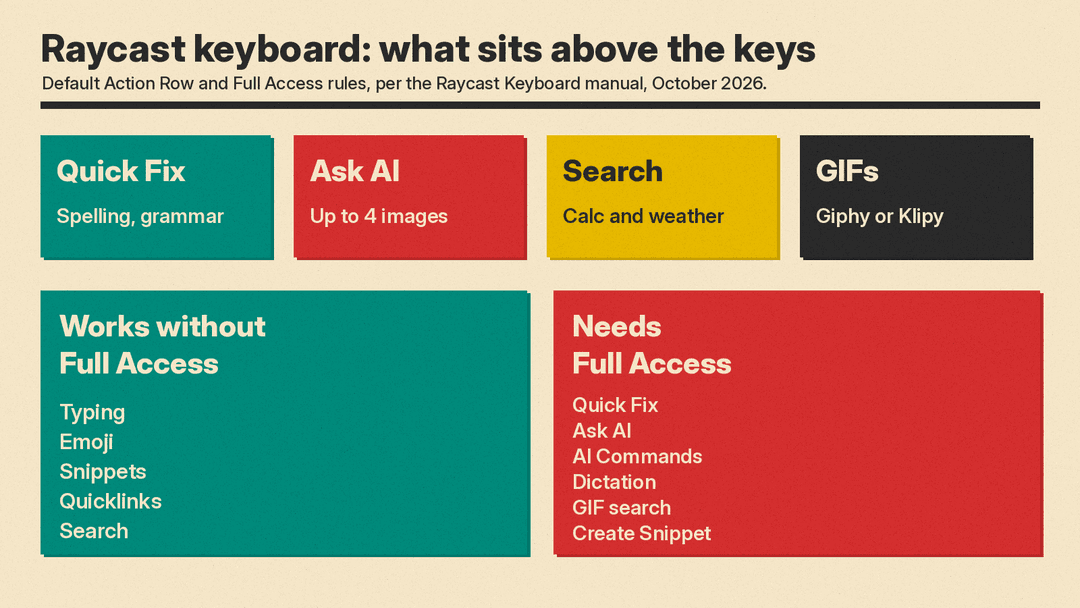
Above the keys is an Action Row. By default it holds four buttons:
- Quick Fix corrects the spelling and grammar of the selected text, or the whole field if nothing is selected, and replaces it in place.
- Ask AI takes an instruction and uses your text as context. You can attach up to four images. You then insert, replace, copy or regenerate the answer.
- Search finds your snippets, Quicklinks and AI Commands, and also answers calculations such as "20% of 80" and weather questions.
- GIFs searches Giphy or Klipy.
You can swap these for other actions, including Dictation, Emoji, Snippets, Create Snippet, Quicklinks and AI Commands. An AI Command runs a saved prompt on the selected text, or on all the text in the field. Built-in commands use your default AI Commands model; your own commands use the model you chose for each one.
The manual lists five themes (Default, Clear, Physical, Mechanical and iOS 5) and seven layouts, including QWERTY, AZERTY, Dvorak and Colemak.
How dictation works, and its catch
Dictation inserts spoken text into most text fields, with optional "styles" that format the transcript. Digital Trends reports that the styles come over from Raycast on the Mac.
There is a catch that comes from iOS, not Raycast. Third-party keyboards cannot use the microphone directly, so the first dictation opens the Raycast app to record and then tries to return you to your app. The dictation manual says that since iOS 26.4, Apple no longer lets keyboards see which app they are typing in, so you may need to swipe back yourself. To cut down on the jumps, Raycast keeps a dictation session alive in the background for 5 minutes, so you can dictate again without a trip to the app. A Disable Session setting can end the session right away or after 5 minutes up to 1 hour.
If you would rather talk to an assistant than dictate text, our comparison of Siri, Gemini and ChatGPT voice covers the main phone assistants.
Limits to know before you switch
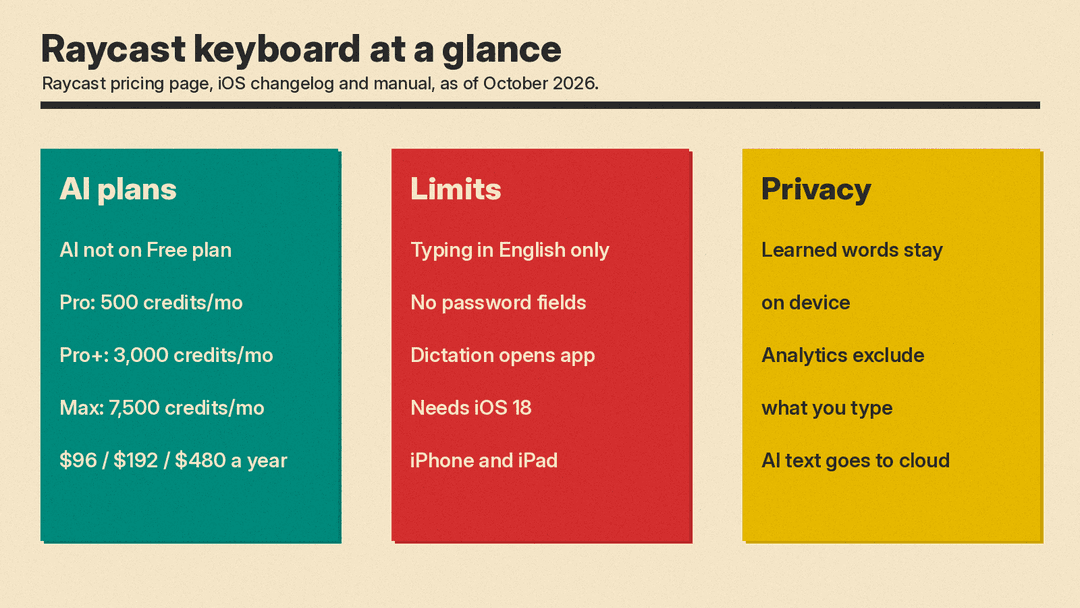
- English only for typing. The manual says more languages are "coming soon." To type in another language, use Secondary mode, which keeps your usual keyboard and turns Raycast into a panel of tools.
- Not everywhere. iOS does not allow third-party keyboards in password fields, and some apps turn them off. In those places you get Apple's keyboard.
- Full Access is required for the AI parts. Typing, emoji, snippets, Quicklinks and search work without it. Quick Fix, Ask AI, AI Commands, Dictation, GIF search and creating a snippet need iOS's Allow Full Access setting, because only keyboards with Full Access can go online.
- The AI is paid. Raycast's pricing page says AI "isn't available on the Free plan." Paid plans include monthly AI credits; per Raycast's iOS changelog, Pro includes 500 credits a month, Pro+ 3,000 and Max 7,500. The pricing page lists $96, $192 and $480 a year for individuals. Eligible new accounts can try Pro for free, and verified students get 50% off Pro.
- iOS 18 or later. Raycast's iOS page says the app requires iOS 18.
What about privacy?
A keyboard sees almost everything you type, so the Full Access prompt deserves a second look. Raycast's manual says the words the keyboard learns stay on your device. It says usage analytics record which features you use and your settings, but "never include what you type," your snippets, dictation or searches, or the app you are typing in, and that nothing is collected from password, one-time code or card number fields.
The AI features are different by design. When you run Quick Fix or Ask AI, the keyboard sends your text over the internet to an AI model, which is why these features need Full Access. Raycast's AI privacy page says Raycast does not log or retain user prompts and does not use your data to train AI models. If you write sensitive messages, keep the AI buttons for text you are comfortable sending out.
Why it matters
Most people meet AI writing help inside one app: a chatbot, an email client, or a phone maker's built-in tools. A keyboard reaches every app at once, from texts to work chat to notes. That is why the change from add-on to primary keyboard is the real news here. Before, you had to remember to switch. Now the AI tools are always there.
Some writing assistants already work across apps: Grammarly offers corrections and tone help in many apps at once, as our Grammarly vs QuillBot comparison explains.
It also sets Raycast against Apple's own keyboard. Digital Trends says it could replace Apple's keyboard for people who write all day on their iPhone. Whether people switch will depend on how well the basics work. Autocorrect and swipe typing are the parts you use many times a day, and a keyboard that fails at those will not keep users, however good its AI is. The English-only limit and the dictation app jump are the two things to test first.
How to try it
Per the manual: open Raycast, tap your avatar, then Keyboard, then Set Up Keyboard. In iOS Settings, turn on Raycast and Allow Full Access. To make it your main keyboard, go to General, Keyboard, Keyboards, tap Edit, drag Raycast to the top, and remove English. If you used the old Raycast keyboard, it switches to the full typing keyboard on its own.
