
OpenAI has not announced GPT Image 2.6. But its own API specification now names it. A change to OpenAI's public openai-openapi repository on October 28, 2026 adds a new option to the image edit endpoint called markup. The description of that option says it "Supports GPT Image 2.5 and 2.6."
That one sentence is the first time an OpenAI file has named a 2.6 version of its image model. Here is what the spec says, what it does not say, and why the new markup option matters for anyone who edits images with AI.
What changed
The commit is titled "Add 'markup' property to image editing endpoints." It was pushed at 20:56 UTC on October 28 (1:56 PM PT). It adds 27 lines across openapi.json and openapi.yaml, the machine-readable files that describe the OpenAI API.
The new field description, in full:
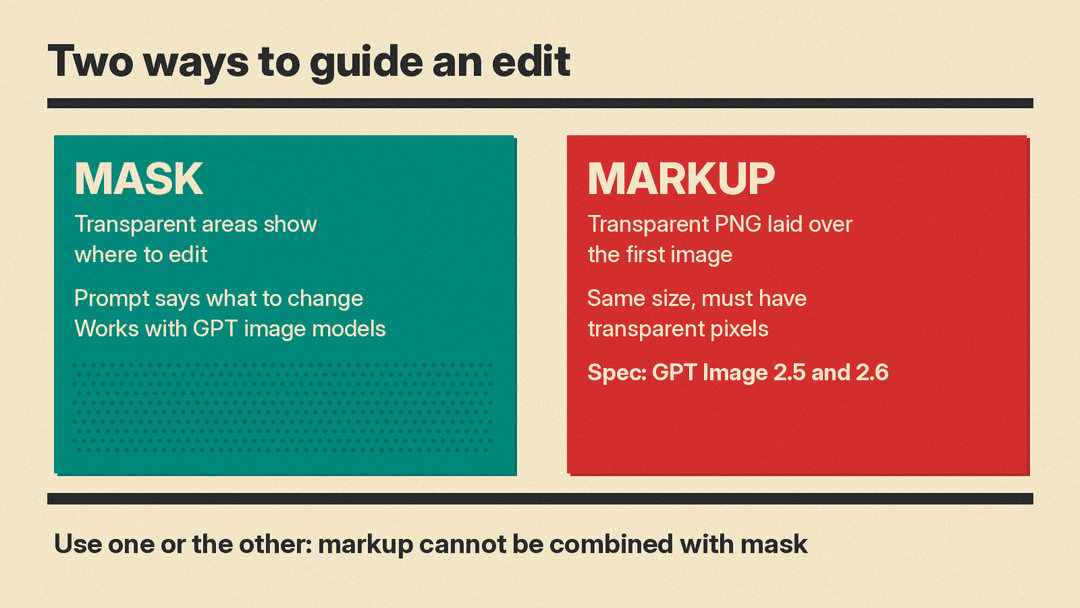
"A transparent PNG overlaid on the first image, referenced by file ID, HTTPS URL, or base64 data URL. Must match that image's dimensions after orientation and contain transparent pixels. Supports GPT Image 2.5 and 2.6. Cannot be combined with mask."
The same text now shows on OpenAI's image edit API reference page.
What is not there yet
GPT Image 2.6 is a name in a description, not a model you can call. We checked the current openapi.yaml on October 29. It has no gpt-image-2.6 model ID anywhere. The image models the spec lists are:
gpt-image-1,gpt-image-1-miniandgpt-image-1.5gpt-image-2and its snapshotgpt-image-2-2026-04-21gpt-image-2.5-sunburstandgpt-image-2.5-flare, with snapshots dated2026-09-08chatgpt-image-latest
OpenAI's image generation guide does not mention 2.6 either. Its examples use the GPT Image 2.5 models. There is no price, no release date, no changelog entry and no benchmark for 2.6. Treat it as unreleased.
Coverage of the commit, such as ArtificialWatch and OrcaRouter, reached the same reading: the model list stops at 2.5. Community trackers have linked anonymous Arena image models to OpenAI. Nobody has confirmed that any of them is GPT Image 2.6, and OpenAI has said nothing.
Markup vs mask: why the new option matters
Today the edit endpoint takes a mask. In the spec, a mask is an extra image whose fully transparent areas show where the main image should be edited. OpenAI's guide adds an important caveat: "Masking with GPT Image is entirely prompt-based. The model uses the mask as guidance, but may not follow its exact shape with complete precision."
So a mask says where. The text prompt has to say what.
Markup is also a transparent PNG laid over the first input image. But the spec describes it as an overlay "to guide the edit," and it is a separate path: a request can use markup or a mask, not both. The field is optional, so existing mask-and-prompt calls do not change.
OpenAI has not explained how the model reads a markup layer. The spec says nothing about arrows, circles, handwritten notes or colors. A reasonable guess is that markup lets you draw on top of an image to show the change you want, the way a designer marks up a proof. That is our inference, not documentation. Wait for OpenAI's examples before you build a workflow around it.
The rules the spec does set
For developers who want to plan ahead, the spec gives four hard rules for markup:
- Format: a transparent PNG.
- Input methods: a file ID, an HTTPS URL, or a base64 data URL (in the JSON form of the request). The multipart form takes it as a file upload.
- Size: it must match the first image's dimensions after orientation, and it must contain transparent pixels.
- Exclusive: it cannot be combined with
mask.
The rest of the edit endpoint is unchanged. It still accepts up to 16 input images for GPT image models, each a PNG, WebP or JPG under 50MB, and a prompt of up to 32,000 characters. When there are several input images, markup applies to the first one, as the mask does.
Why it matters
For most people, AI image editing still means typing a sentence and hoping the model changes the right thing. Masks help, but OpenAI's own docs say the model may not follow the mask's exact shape. A drawn overlay could carry more intent in one file: a box around a logo, an arrow, a note in the margin. If GPT Image 2.6 reads those marks well, editing could feel closer to giving notes to a human designer.
It also shows where the next version is headed. OpenAI named 2.6 in a field about editing, not generation. That suggests (but does not prove) that editing control is a focus of the next release.
For now, nothing changes for ChatGPT users or for API users on GPT Image 2.5. If you build on the OpenAI image API, watch the openai-openapi commits and the models page for a gpt-image-2.6 ID and a price.
For background on the current models, see our GPT Image 2.5 vs Nano Banana 2.1 comparison and Midjourney vs GPT Image.
Sources
- OpenAI openai-openapi commit aa88004: "Add 'markup' property to image editing endpoints"
- OpenAI API reference: image edit
- OpenAI image generation guide
- ArtificialWatch: OpenAI's own API spec names GPT Image 2.6 before any launch
- OrcaRouter: GPT Image 2.6 Leak: Named in the Spec, Not in the API
- ArtRealmAI: GPT Image 2.6 Shows Up in OpenAI's API Spec
