
Google and Kuaishou now sell two very different ideas of what an AI video model should be. Google's Gemini Omni Flash is built around conversation: make a short clip, then tell the model what to change. Kling 4.0 is built around the long take: up to 30 seconds in one pass, with a deep stack of references and keyframes to steer it.
If you searched for "Veo vs Kling", this is the comparison you want now. Google says on its own Gemini page that "Gemini Omni will replace Veo in the Gemini app", and the Gemini API docs say the Veo 3.1 Preview models in the API were shut down on October 22, 2026, with Gemini Omni Flash as the named replacement. We covered that switch in our post on the Veo 3.1 Preview shutdown and how to move to Gemini Omni Flash.
Every spec and price below comes from Google's and Kling's own pages, as of October 2026. We did not run a blind quality test, so this guide compares what each model is built to do, not which one looks better on a given prompt.
The short answer
- Pick Gemini Omni Flash if you want to edit by talking to it, you already pay for a Google AI plan, or you want to remix clips in YouTube Shorts at no cost.
- Pick Kling 4.0 if you need longer single shots, wider aspect ratios like 21:9, many reference assets in one job, or dialogue in several languages.
- Use both if you are making a longer piece: Kling for the long establishing shots, Omni Flash for quick fixes and edits on short clips.
What each model is
Gemini Omni Flash is Google's video generation and editing model. Google introduced it in May 2026 as a model that can "create anything from any input", starting with video, and the DeepMind model card describes it as a transformer-based model with native support for text, vision, video and audio inputs. The current API version is gemini-omni-1.1-flash. Google's own pitch is that it works "like Nano Banana, but for video", in the words of the Google Flow announcement.
Kling 4.0 is the newest video model from Kling AI, owned by Kuaishou. Kuaishou says it launched on October 15, 2026, and frames the upgrade around "realism, control and professional quality". The Kling API changelog shows the developer API became fully available on October 28. For how Kling 4.0 stacks up against ByteDance's long-clip model, see our Kling 4.0 vs Seedance 2.5 comparison.
Clip length
This is the biggest gap.
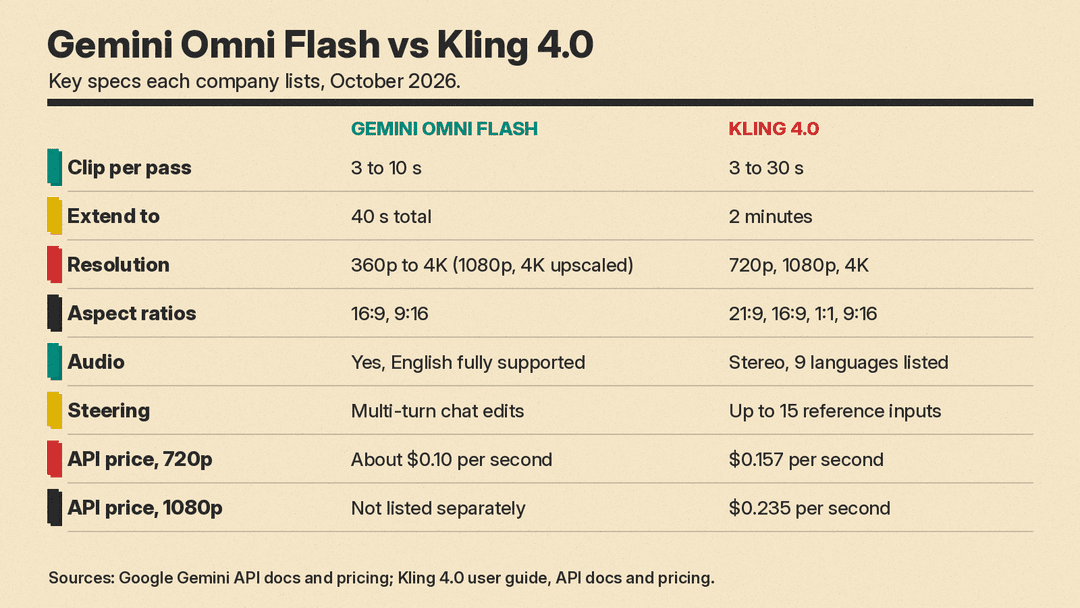
- Gemini Omni Flash makes clips of 3 to 10 seconds per generation, per the model page. You can then extend a clip. Google's Omni guide says "You can extend videos by 10s, up to a total length of 40s", and that the model uses the last 10 seconds of your video as context so motion, characters and audio stay coherent.
- Kling 4.0 makes 3 to 30 seconds in one pass, adjustable in 1-second steps, with a default of 10 seconds, per the Kling 4.0 user guide. The same guide says you can extend a video "multiple times, up to 2 minutes".
A single 30-second take and a 10-second clip extended three times are not the same thing. One pass keeps the whole action in one generation. Extensions stitch new footage on the end, and Google notes that "some of the final frames in your input video will be edited to make the transition seamless."
Resolution, frame rate and aspect ratio
- Gemini Omni Flash outputs 360p, 720p, 1080p or 4K at 24 FPS. The default is 720p, and Google's guide marks 1080p and 4K as "upscaled". Aspect ratios are 16:9 (the default) or 9:16.
- Kling 4.0 lists 720p, 1080p and 4K, with 10-bit HDR at 1080p and 4K, and aspect ratios of 21:9, 16:9, 1:1, 9:16 or Auto. One caveat: on the API, the changelog lists 720p and 1080p with "10-bit 4K coming soon", and the text-to-video endpoint accepts only
720por1080ptoday.
If you need a square clip for a feed or a 21:9 widescreen shot, Kling is the only one of the two that lists them. If you only make vertical shorts and landscape video, both cover you.
Audio and languages
Both models make sound with the picture.
- Gemini Omni Flash "generates a video with audio based on your text description", per Google's guide, and by default "the model will try to generate an appropriate audio track". Google suggests describing music in the prompt if you want it. Google also says English is fully supported, while other languages "have not been evaluated" and may vary.
- Kling 4.0 outputs two-channel stereo audio and lists speech in Chinese, English, Japanese, Korean, Spanish, Portuguese, German, French and Hindi, plus accents such as Cantonese, Sichuan dialect, and British and Indian English. It can also take a voice reference.
For multilingual dialogue, Kling's documentation simply promises more.
References and control
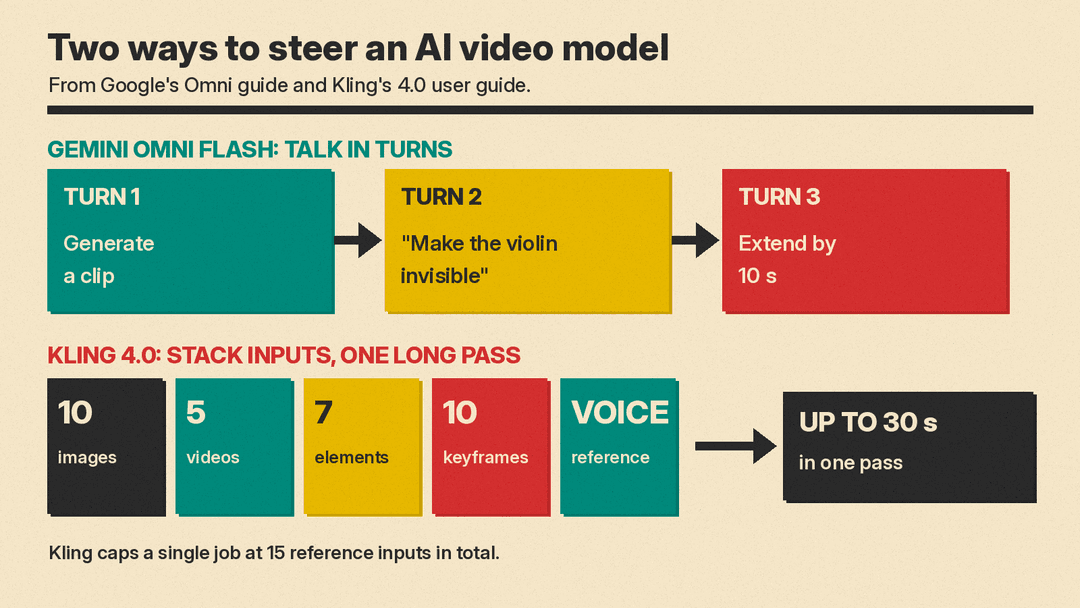
The two models take different routes to control.
- Gemini Omni Flash leans on multi-turn editing through Google's Interactions API. You generate a clip, then send a follow-up such as Google's own example, "Make the violin invisible", and the model edits the previous result. It also takes images as first frames, first and last frames, or subject references. In the Gemini app, Google's Gemini Omni page says you can create videos from up to 5 photo references.
- Kling 4.0 leans on stacking inputs. Its user guide lists up to 10 reference images, up to 5 reference videos (30 seconds total), up to 7 elements, voice references, and up to 10 keyframes, with "a maximum of 15 reference inputs in total". The user guide lists prompts of up to 8,000 tokens, and the API changelog says up to 26,000 English characters.
In practice, Omni Flash suits people who like to iterate in small steps. Kling suits people who plan a shot up front and feed in every asset at once. Either way, good prompts still matter; our beginner's guide to writing AI video prompts covers the basics that apply to both.
Price for developers
Both bill by the second on their APIs, as of October 2026.
- Gemini Omni Flash: Google's pricing page lists $17.50 per million output video tokens, at 5,792 tokens per second of 720p video, which "equates to an effective price of approximately $0.10 per second". That makes a 10-second 720p clip roughly $1. Google does not list a separate per-second figure for the upscaled 1080p or 4K output on that page. It is paid tier only; there is no free API tier for this model.
- Kling 4.0: Kling's video pricing table lists 1.0 unit ($0.157) per second at 720p and 1.5 units ($0.235) per second at 1080p when no input video is used. A 10-second 1080p clip is about $2.35, and a full 30-second 1080p take is about $7.05. If you feed in a reference video, the per-second rate drops but the billed seconds go up, because input video time counts too.
At 720p, Omni Flash is the cheaper of the two per second on list price. Kling's extra cost buys longer single takes and its wider input stack.
Price and access for everyday users
- Gemini Omni Flash rolled out to Google AI Plus, Pro and Ultra subscribers in the Gemini app and Google Flow, according to Google's launch post, and "at no cost to users on YouTube Shorts and YouTube Create App". The YouTube team says the Shorts "Create Video" feature makes up to 10-second videos from up to 3 reference images, in select markets.
- Kling 4.0 is offered through Kling AI and its developer API. We did not find a free entry point like YouTube Shorts for it, and this guide does not cover Kling's consumer plan prices.
Safety, watermarks and limits
- Google says all Omni Flash videos "include SynthID watermarking, which is invisible to viewers but can be detected programmatically." Its guide also lists limits: uploading and editing images of "certain recognizable people is not supported", and editing or extending uploaded videos is not available in the EEA, Switzerland and the UK.
- Kling's text-to-video API has an option to also return a watermarked copy (
watermark_info), off by default, and notes that custom watermarks are not supported.
Which one should you use?
- Short social clips and quick edits: Gemini Omni Flash. The conversational edit loop and the free YouTube Shorts route make it the easier start.
- Long single shots and action: Kling 4.0. Native 30-second generation is the headline feature, and Kuaishou pitches it for "intense motion and complex camera movements".
- Multilingual dialogue: Kling 4.0, on its documented language list.
- Cheapest 720p per second on the API: Gemini Omni Flash, at about $0.10 a second versus $0.157.
- Widescreen or square formats: Kling 4.0.
Neither company has published a head-to-head test against the other, so treat any "winner" claim you see online with care. The fairest test is your own: run the same short prompt through both, then decide whether you value the long take or the edit loop more.
Sources
- Google: Introducing Gemini Omni
- Google: Gemini Omni Flash model page (Gemini API)
- Google: Generate and edit videos with Gemini Omni Flash
- Google: Video generation in the Gemini API (Veo 3.1 Preview shutdown)
- Google: Gemini Developer API pricing
- Google: Gemini Omni in the Gemini app
- Google: Gemini Omni for Google Flow
- Google DeepMind: Gemini Omni Flash model card
- YouTube: Upgrading Shorts Remix with Gemini Omni Flash
- Kuaishou: Kling AI officially launches Kling 4.0
- Kling AI: Kling 4.0 user guide
- Kling AI: API updates
- Kling AI: Kling 4.0 text-to-video API
- Kling AI: Video pricing
