
Google's Gemini API release notes list the Computer Use tool as generally available (GA) as of October 30, 2026. The entry reads: "Released the Computer Use tool to general availability (GA) across the Interactions and GenerateContent APIs." It is a status change for a tool that had public preview support. The release note itself is short, so most of the detail on this page comes from Google's Computer Use guide and pricing page.
What changed on October 30
The changelog entry for October 30 is a single line. It does not list new benchmarks, new models or a price change. The changelog gives these earlier dates for the tool:
- January 29, 2026: Google launched support for the Computer Use tool in
gemini-3-pro-previewandgemini-3-flash-preview. - June 24, 2026: Google launched public preview support in Gemini 3.5 Flash. That release included simplified actions with intents, built-in support for browser, mobile and desktop environments, configurable safety policies and prompt injection detection.
- October 30, 2026: GA across the Interactions and GenerateContent APIs.
Forkast wrote that the GA notice changes the tool's status but not the split between a model's suggestion and an executed action. That matches Google's own guide, covered below. See Forkast's write-up.
What the tool does
Google's guide says the Computer Use tool lets developers build browser, mobile and desktop control agents. The model looks at a screenshot and returns a UI action, such as a mouse click or a keyboard input. The guide names three uses: automating repetitive data entry or form filling on websites, automated testing of web applications and user flows, and research across websites, such as gathering product information, prices and reviews from ecommerce sites to inform a purchase.
The guide is clear about one point: like function calling, it needs a client-side execution environment that you implement to receive and run the actions. The model does not click anything by itself.
The four-step loop
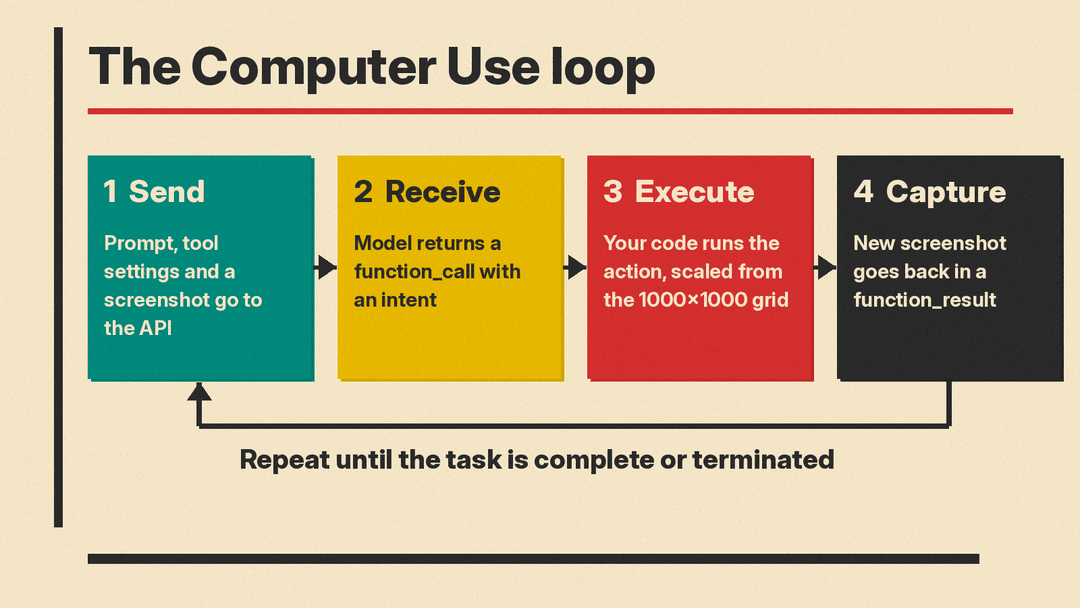
Google describes a loop between your application and the API:
- Your application sends a request with the Computer Use tool, the target environment, the user's prompt and a screenshot of the current screen.
- The model returns a suggested
function_call, such as a click, a scroll or a keystroke. For Gemini 4 and Gemini 3.x models, the response also carries anintentthat explains why the model chose the action. - Your code runs the action if it is allowed or the user confirms it. The model returns coordinates on a normalized 1000 by 1000 grid, so your code scales them to your own viewport. The guide's examples use Playwright for this.
- Your code captures a new screenshot and sends it back in a
function_result. The loop repeats until the task is complete or stopped.
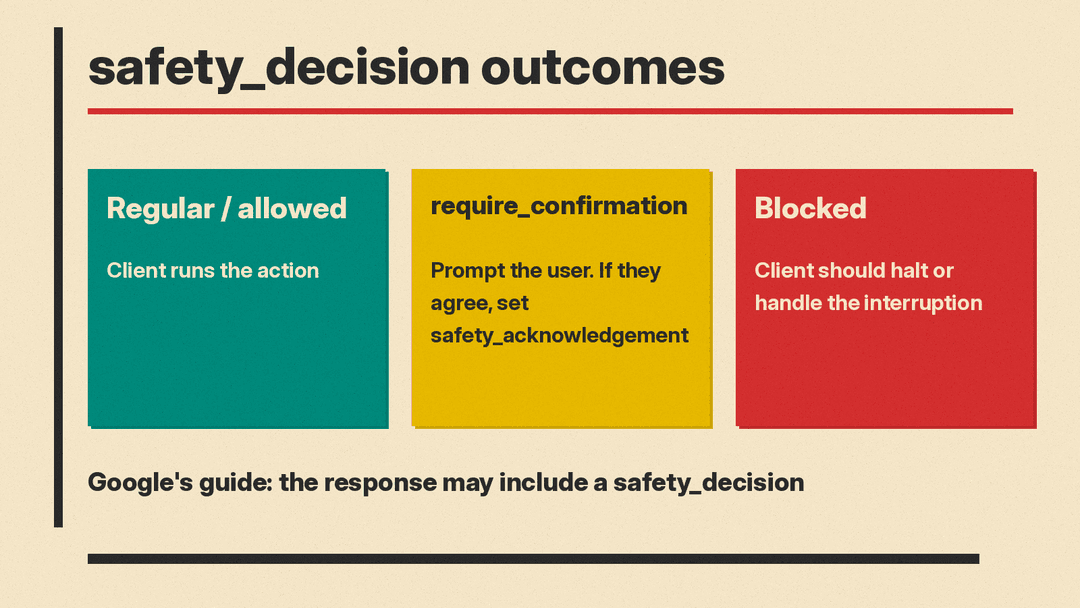
The response may also include a safety_decision from an internal safety system. It classifies an action as regular or allowed, as require_confirmation (the user must approve it), or as blocked. If an action needs confirmation and the user agrees, your code sets safety_acknowledgement in the next function_result.
Safety controls in the guide
The guide lists seven built-in safety policy categories for Gemini 4 and Gemini 3.x models:
FINANCIAL_TRANSACTIONS: payments, retail checkout or regulated goods.SENSITIVE_DATA_MODIFICATION: health, financial or government records.COMMUNICATION_TOOL: sending emails, chat messages or drafts.ACCOUNT_CREATION: registering new accounts on websites.DATA_MODIFICATION: file system changes, data sharing and storage deletion.USER_CONSENT_MANAGEMENT: cookie consent banners and privacy prompts.LEGAL_TERMS_AND_AGREEMENTS: accepting Terms of Service or binding contracts.
Developers can pass overrides for some policies. Google adds a caveat: overrides indicate your preference, but the model may still return require_confirmation in some cases, so your app should always handle safety decisions.
Prompt injection detection is separate. When it is on, the tool checks whether a screenshot contains hidden adversarial instructions, for example "Ignore previous commands", and blocks execution if it finds them. It is opt-in. The default is false. For background on that attack class, see our post on attention gates against prompt injection.
Google's note in the guide reads: "Computer Use may contain errors and security vulnerabilities. We recommend supervising closely for important tasks, and that you avoid using the Computer Use capability for tasks involving critical decisions, sensitive data, or actions where serious errors cannot be corrected."
The guide also lists best practices. They include asking the user to confirm when the safety response says require_confirmation, using a secure sandbox such as a virtual machine or container, sanitizing user text in prompts, adding content guardrails, using allowlists or blocklists for navigation, keeping detailed logs of prompts, screenshots, suggested actions and executed actions, and keeping the GUI environment consistent. Google points to a reference implementation on GitHub with a Docker-based sandbox.
Models and price
The guide lists four models that support Computer Use:
- Gemini 4 Argon (
gemini-4-argon), which Google calls its most capable model. - Gemini 3.8 Flash (
gemini-3.8-flash), which Google calls the recommended model for computer use. - Gemini 3.5 Flash-Lite (
gemini-3.5-flash-lite), described as a low-latency, cost-effective option. - Gemini 3 Flash Preview (
gemini-3-flash-preview), listed as a preview model.
The GA changelog entry does not mention price. Google's pricing page has a tools table. For Computer Use it shows the free tier as "Not available" and the paid tier as charged as regular tokens at the model's price, for example standard Gemini 3.8 Flash pricing. Because each step sends a screenshot back to the model, check the token cost of your own loop before you run long tasks. That point is our reading, not a Google statement.
Where the announcement and the docs differ
Two details do not line up exactly. First, the changelog says GA covers both the Interactions API and the GenerateContent API. The Computer Use guide is titled for the Interactions API, and its code samples use that API. We did not find GenerateContent examples on the page.
Second, the guide's intro says Gemini 4 and Gemini 3.x models support the advanced capabilities, including prompt injection detection. The prompt injection section says detection is supported for Gemini 3.5 Flash-Lite or later. The model list also still includes Gemini 3 Flash Preview. Check the model you plan to use against the section that matters to you.
Why it matters
GA does not change what the tool is. It is a loop that your own code must run, inside an environment you secure. What changes is the label on it. Google moved a tool with public preview support, which the changelog dates to June 24, to general availability. The documentation lists safety controls and supported models.
We have covered similar features elsewhere: computer use in the GitHub Copilot app, Tencent's Hy4 model with computer use and LangSmith's managed Deep Agents getting a browser. Teams that compare these tools should test each one on a small task in a sandbox, with a human approving anything that pays, sends or deletes. The Gemini guide's own safety design points the same way.
