
Open a model page on Hugging Face and click "Files". You will often see a long list of names that end in .safetensors, .gguf, .bin or .pt. Some repositories have dozens of .gguf files with codes like Q4_K or Q6_K in the name. Which one do you need, and does the choice matter?
It does. The file format decides which apps can load the model, how fast it loads, how much space it takes and, in one case, whether opening the file could run code on your computer. This guide explains the three formats you will meet most often, in plain English, and ends with a short checklist.
What is inside a model file
An AI model is, at its core, a very large set of numbers called weights. Training adjusts those numbers. When you run the model, your computer does math with them to produce each word of the answer.
Weights are stored in groups called tensors, which are tables of numbers with a name and a shape. A model file is a way to save those tensors to disk so another program can load them later. Formats differ in three ways:
- How safely they can be opened
- How fast they load, and whether a program can load only part of the file
- What else they store next to the numbers, such as the model's settings or tokenizer
The three formats below take different positions on each of these.
Pickle files (.bin and .pt): the old default
Pickle is a general way to save Python objects to a file. Hugging Face's security documentation notes that it is "the default format for PyTorch model weights". That is why many older repositories have a file called pytorch_model.bin.
The problem is that pickle is not only data. The same page explains that loading a pickle file can run code, because the format can tell the loader to import a function and call it. Hugging Face shows a short example in which a harmless-looking file prints a message when opened. A real attacker could put anything there. In its own words: "There are dangerous arbitrary code execution attacks that can be perpetrated when you load a pickle file."
Hugging Face does try to reduce the risk. According to the same documentation, every file pushed to the Hub is run through two scans:
- A ClamAV antivirus scan
- A pickle import scan, which lists the functions a pickle file would import and highlights suspicious ones on the file page
Hugging Face is clear that this is "not 100% foolproof" and that it is the user's responsibility to check if a file is safe. Its advice is to load files from users and organizations you trust, to rely on signed commits where possible, and to prefer safer formats.
For an everyday user the takeaway is simple. A .bin or .pt file from an unknown uploader carries the risk Hugging Face describes. If the same model is offered in another format, use that instead.
Safetensors: the safe format for full models
Safetensors was built to fix the pickle problem. The safetensors documentation describes it as "a new simple format for storing tensors safely (as opposed to pickle) and that is still fast (zero-copy)". Hugging Face's GGUF page calls safetensors a "tensor-only" format: the file holds the model's numbers, not code to run.
In a 2023 blog post, Hugging Face explained why it made the format and how it was checked:
- PyTorch uses pickle "under the hood", which the post calls "inherently unsafe". The post warns that a malicious file posing as a model could give an attacker full control of a user's computer.
- Hugging Face, EleutherAI and Stability AI ordered an external security audit by Trail of Bits. It found "no critical security flaw leading to arbitrary code execution". It did find some gaps in the spec and a missing check, which were fixed.
- The library is written in Rust, which the post says adds an extra layer of security.
Safety is not the only benefit. The same post says safetensors allows lazy loading, which means a program can read only the part of a file it needs. The post says this enables sharding with efficient inference libraries, and the safetensors docs show loading only part of the tensors, which they call interesting when running on multiple GPUs. Hugging Face also reports "generally faster loads (around 100x faster on CPU)" than the older approach. Treat that as Hugging Face's own figure.
For how production servers load large safetensors checkpoints, see our technical explainer on fast model weight loading.
Safetensors is also widely supported. The documentation lists projects that use it, including Hugging Face Transformers and Diffusers, MLX, llama.cpp, ComfyUI, AUTOMATIC1111's Stable Diffusion Web UI, InvokeAI and Civitai.
Hugging Face's GGUF page calls safetensors a recommended model format for the Hub. Large models can be split into many numbered files, such as model-00001-of-00054.safetensors. That is the format to use if you work in Python, fine-tune a model, or serve it on GPUs with tools built on Transformers.
GGUF: the format for running models on your own computer
GGUF is the format that local tools such as llama.cpp and Ollama load. Hugging Face's GGUF page describes it as "a binary format that is optimized for quick loading and saving of models, making it highly efficient for inference purposes". Inference simply means running a model, as opposed to training it.
Three points from that page explain where GGUF fits:
- It was developed by @ggerganov, who is also the developer of llama.cpp, which the page calls "a popular C/C++ LLM inference framework".
- It is designed for use with GGML and other runtimes. Models first built in frameworks such as PyTorch can be converted to GGUF.
- Unlike tensor-only formats such as safetensors, a GGUF file stores the tensors and a standard set of metadata in one file.
That last point is why GGUF is convenient. Ollama's import guide, for example, builds a model from a single .gguf file.
Hugging Face's GGUF page lists four tools under usage with open-source tools: llama.cpp, LM Studio, GPT4All and Ollama. If you followed our guide on running an AI model on your own laptop, you have already used GGUF, perhaps without knowing it.
The Hub also has GGUF helpers. You can filter models to those with GGUF files, view a GGUF file's metadata and tensor list on the model page, and use the gguf-my-repo tool to convert and quantize a model's weights into GGUF.
What Q4_K, Q6_K and the other codes mean
GGUF supports many quantized types. Quantization stores each weight with fewer bits, so the file is smaller and needs less memory, at some cost in accuracy. Our explainer What Do Q4 and Q8 Mean? covers the trade-off in detail.
The code in a GGUF file name tells you which method was used. Hugging Face's GGUF page has a table of the types. A few common ones, with the average bits per weight the table gives:
- Q2_K: 2-bit quantization, about 2.625 bits per weight
- Q3_K: 3-bit, about 3.4375 bits per weight
- Q4_K: 4-bit, about 4.5 bits per weight
- Q5_K: 5-bit, about 5.5 bits per weight
- Q6_K: 6-bit, about 6.5625 bits per weight
- F16 and BF16: 16-bit numbers, no quantization of this kind
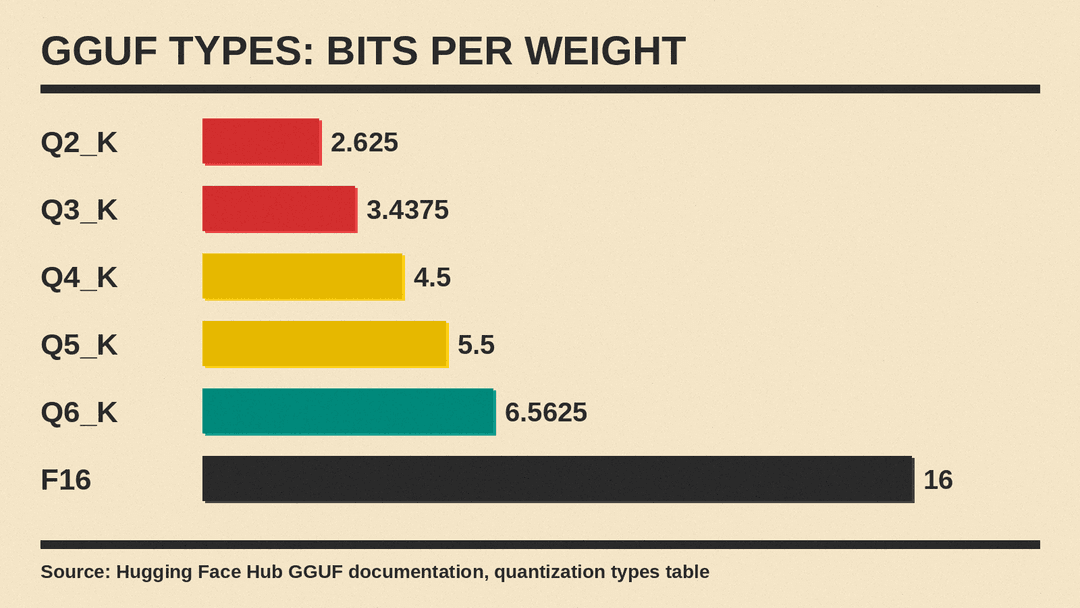
Why is Q4_K 4.5 bits and not 4? The table explains that the K types store weights in blocks, and each block also stores its own scale and, for some types, a minimum value. Those extra numbers add a little to the average.
You will also see types that start with IQ, such as IQ4_XS or IQ2_XXS. The table says these use an "importance matrix" to decide how to store weights. And it marks older types such as Q4_0 and Q8_0 as "legacy" methods that are "not used widely as of today".
A simple rule of thumb follows from the numbers. A Q4_K file stores its weights in a little over a quarter of the space of a 16-bit version, because 4.5 bits is about 28% of 16. Lower codes are smaller still, with the accuracy trade-off our quantization explainer describes.
The three formats side by side
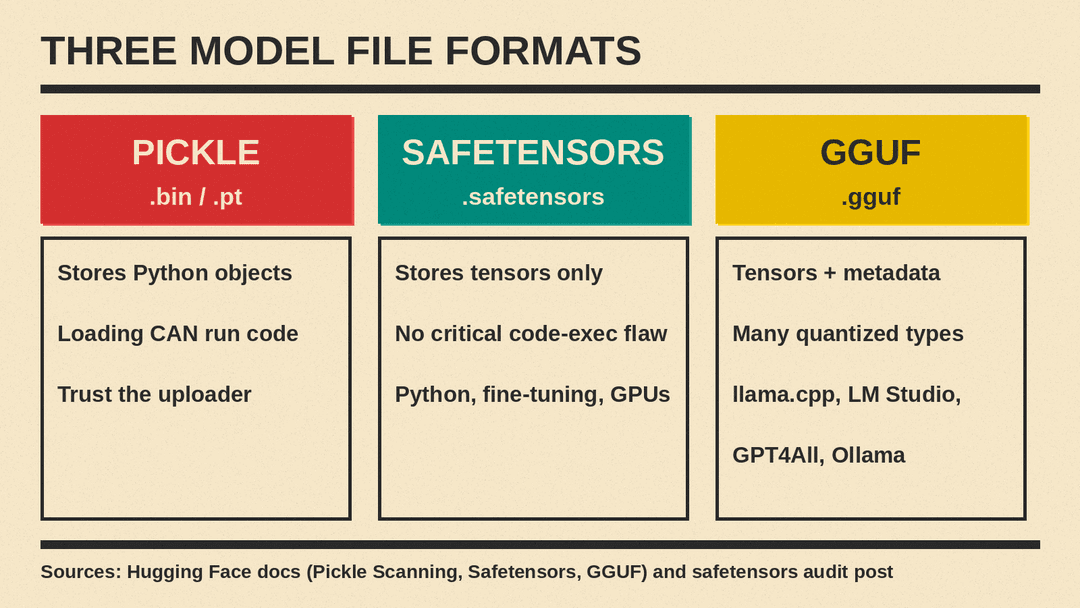
- Pickle (.bin, .pt). Stores Python objects, including tensors. Loading can run code. Use only from sources you trust.
- Safetensors (.safetensors). Stores tensors only. Its audit found no critical flaw leading to arbitrary code execution. Best for Python tools, fine-tuning and GPU servers.
- GGUF (.gguf). Stores tensors plus standard metadata in one file, with many quantized types to choose from. Best for local apps such as llama.cpp, LM Studio, GPT4All and Ollama.
Moving between formats
You do not always have to pick one format and stay with it. Ollama's import guide shows both paths. You can point a short Modelfile at a folder of safetensors weights, or at a .gguf file, then run ollama create to build a model you can chat with.
There is one catch. The same guide says Ollama "does not quantize GGUF models during import". If you want a smaller GGUF file, you have to quantize it first with a tool such as llama.cpp's llama-quantize. For models split across several GGUF files, the guide says to keep the original file names and use a wildcard that matches every part.
You can often skip conversion. Many models already have GGUF copies on the Hub. Hugging Face's GGUF page points to a community upload, TheBloke's Mixtral-8x7B-Instruct GGUF repository, as an example. Before you download one, check the model card for who made the conversion and which original model it came from. Our guide on how to read an AI model card explains what to look for.
Which file should you download
Use this short checklist.
- Do you want to chat with a model in a desktop app? Look for a
.gguffile. Lower-bit files such as Q4_K need less memory. Higher-bit files such as Q6_K keep more accuracy but are larger. - Are you writing Python code, fine-tuning, or running on a GPU server? Use the
.safetensorsfiles. Hugging Face calls safetensors a recommended format for the Hub, and its audit found no critical flaw leading to arbitrary code execution. - Is the only option a
.binor.ptfile? Check who uploaded it. Hugging Face's advice is to load such files only from users and organizations you trust. Look at the pickle import scan on the file page, and prefer a safetensors version if one exists. - Is the GGUF from a third party? Check the model card for the base model and the uploader. A converted file is only as trustworthy as the person who made it.
- Does the license allow your use? Check the original model's license on its model card before you use any copy of it, converted or not.
The short version
Safetensors is the safe, standard way labs share full models. GGUF is the compact, single-file way to run those models on your own machine, with many quantization types to choose from. Pickle files are the older format, and Hugging Face itself says loading one can run code. If you remember only one thing, choose safetensors or GGUF over pickle when you have the option.
