
Google's managed agents on the Gemini API can now run their tools on computers you control. On November 11, the Google AI Studio account posted on X: "now you can bring your own sandbox with self-hosted environments." The Environments page in the Gemini API docs now explains how it works.
By default, a managed agent runs its code and file work in a Linux sandbox hosted by Google. The GitHub guide describes the agents as "Gemini API server-side agents." The new option changes where their shell commands and file edits run.
What managed agents are
Managed agents are Google's hosted agent harness on the Gemini API. The docs say "a single API call provisions a Linux sandbox where the agent reasons, executes code, manages files, and browses the web autonomously." The default agent is the Antigravity agent, which the overview page says is "built with Gemini 3.8 Flash." Developers can also build custom agents on top of it.
The Environments page calls environments "Linux sandboxes that give agents an isolated place to execute code and persist files." It adds: "By default, Google hosts the sandbox, or you can connect a self-hosted environment to run tools in your own infrastructure."
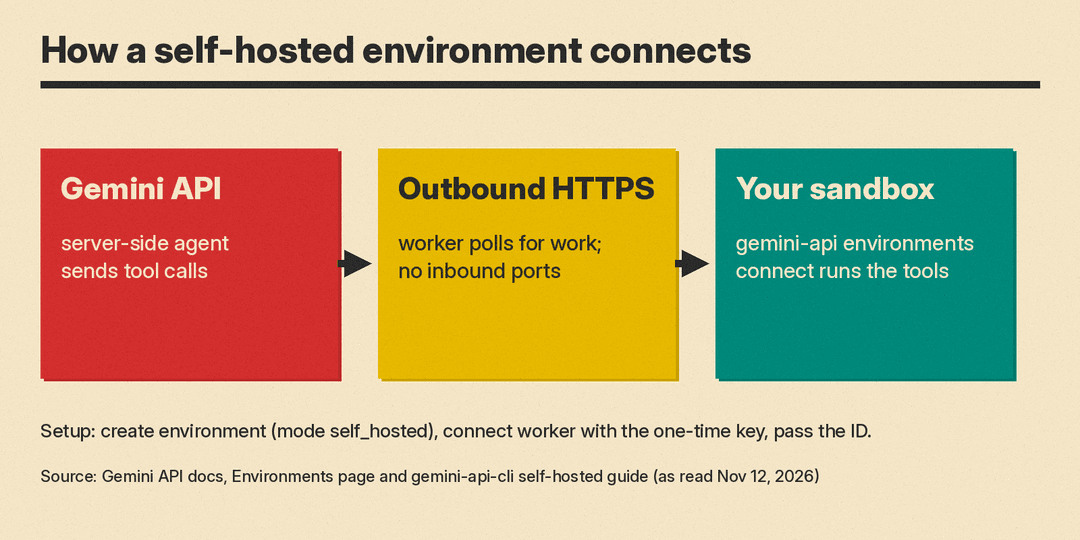
How a self-hosted environment connects
The docs list three steps:
- Call
POST /v1beta/environmentswith{"mode": "self_hosted"}. This returns an environment ID and a one-time environment key. - Run
gemini-api environments connectinside your sandbox with that key. The command comes from Google's open-source Gemini API CLI. - Pass the environment ID when you call
interactions.create.
The sandbox connects "over outbound HTTPS" and "requires no inbound firewall ports," the docs say. The self-hosted environments guide on GitHub adds that the API returns the environment key "only once at creation time," so you must save it right away. It also recommends that you give the worker only this scoped key, so your project-wide Gemini API key does not need to be inside the sandbox.
The guide describes two setups:
- Single worker. One
gemini-api environments connectprocess runs in your container, VM or cloud microVM. It polls the Gemini API for work and runs tool calls in its root directory. - Split poller and workers. A trusted control plane runs
gemini-api environments polland holds the API key or the scoped environment key. Untrusted sandbox containers rungemini-api environments serveand hold "zero API keys," the guide says. They get only a short-lived, interaction-scoped lease token.
Where you can run it
The docs link setup examples for eight sandbox options: Google Cloud Run, Agent Substrate, Cloudflare Sandbox, Daytona, E2B, Fly.io (Sprites and Machines), Modal and Vercel Sandbox. You can also run the runtime in Docker or rootless Podman, or locally for testing.
The guide says these configurations and samples are "provided as reference implementations rather than an officially supported Google product." Issues go to the repo's GitHub tracker.
What the agent can do in your sandbox
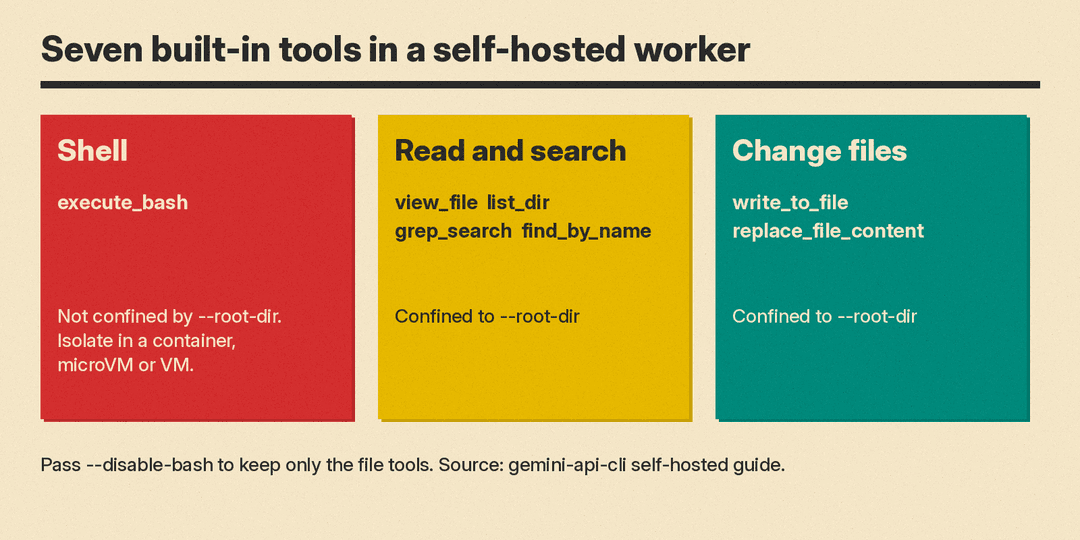
The guide says every self-hosted worker gives the agent seven built-in tools (plus common aliases):
execute_bashruns shell commands.view_file,list_dir,grep_searchandfind_by_nameread and search files.write_to_fileandreplace_file_contentchange files.
The file tools are "strictly confined" to the worker's --root-dir. The shell tool is not. The guide warns that execute_bash "executes arbitrary model-generated shell commands" and says to "always isolate execute_bash inside a container, microVM, or VM."
The limits a builder hits first
- Preview. "Environments and managed agents are in preview. Features and schemas may change," the Environments page says. The agents overview labels managed agents Public Preview.
- Hosted-only options. The
sources,network,envand/filessnapshot options work only with Google-hosted environments. Self-hosted environments reject them with400 INVALID_ARGUMENT. - Local mode is risky. The local setup page calls running on your own workstation "inherently unsafe." Unless you pass
--disable-bash, the shell tool runs model-written commands on your host under your user account.--root-dir"does not" stop it from reading or changing$HOME, SSH keys or cloud credentials. - Expiry. Inactive offline environments are kept for 7 days, then expire. An expired ID returns
404 Not Found. - Files. The agent "is currently constrained to reading text and image files," the Environments page says. Binary file support "is not yet available."
- Billing. The docs say Google does not bill for hosted environment compute during the preview. That note covers Google-hosted sandboxes. A self-hosted sandbox runs on infrastructure you control. Agent token costs are on the pricing page.
Why it matters
The agent stays a server-side agent on the Gemini API. Its commands and file changes can now run on machines where you set the network rules and the isolation. The guide's security list is practical: run as a non-root user, drop Linux capabilities, restrict outbound traffic, and block cloud metadata endpoints such as 169.254.169.254/32.
Google shipped other agent-builder updates the same week. It put /swarm multi-agent teams in Antigravity in preview, and shipped the Gemini Decisions API for fast yes/no and choice calls such as tool selection. For agent screens, see our post on A2UI 1.0.
The Gemini API release notes had no entry for self-hosted environments when we read them on November 12, 2026.
