
This page covers 8 free AI courses for teachers. The providers' pages differ on who each course is for, how long it takes and what you get at the end, so we say what each page states.
We read each provider's page in November 2026. Five of the eight pages name a certificate or certification: Google, Panorama, Canva, the NC State Friday Institute and Anthropic. For the other three, OpenAI Academy, Microsoft Learn and CodeAI (formerly Code.org), we say what the pages name instead, or that the page names nothing. Where a page did not say a thing, we left it out.
If you are brand new to the topic, our explainer What Is Generative AI? How It Works, Explained Simply gives the background these courses build on. For tools and ready-made prompts, see Best AI Tools for Teachers and ChatGPT Prompts for Teachers.
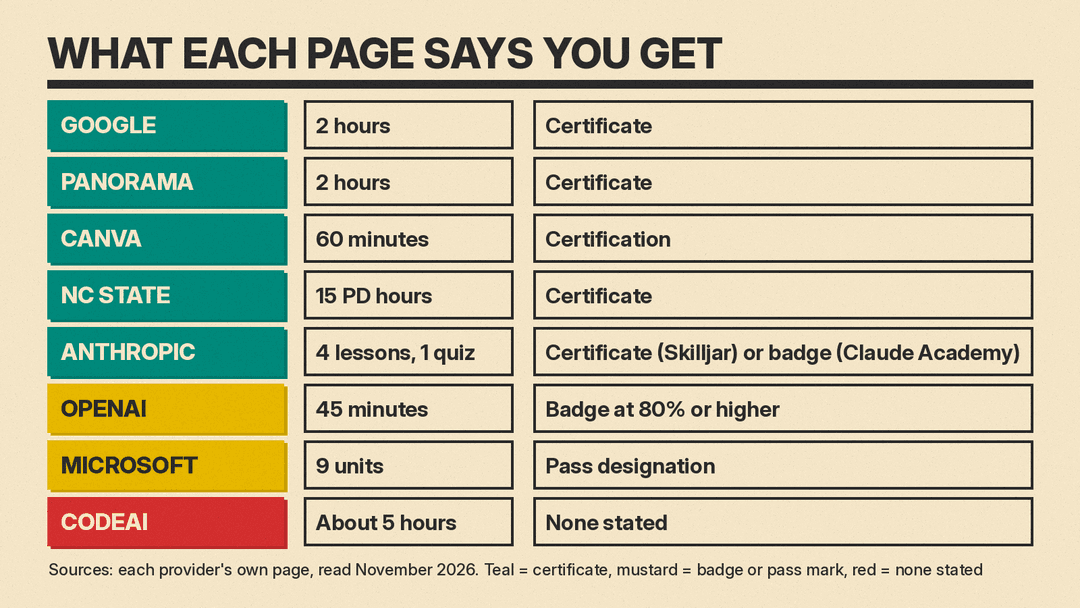
The 8 courses at a glance
- Google, Generative AI for Educators with Gemini: a two-hour course for middle and high school teachers, with a certificate.
- Panorama, AI Literacy Essentials for K-12: a two-hour course for anyone working in K-12 education, with a certificate.
- Canva, AI in the Classroom: a 60-minute course built around Canva's AI tools, with a certification.
- NC State Friday Institute, The AI-Empowered Teacher: a nine-module course with a certificate for 15 professional development hours.
- Anthropic, AI Fluency for Educators: a course for faculty, instructional designers and education leaders, with a completion certificate or badge.
- OpenAI Academy, AI for Educators: a 45-minute course with a badge if you pass the assessment.
- Microsoft Learn, Empower educators to explore the potential of artificial intelligence: a nine-unit module with a pass designation on your profile.
- CodeAI, AI 101 for Educators: a free, self-paced course of five modules, with no certificate mentioned on its page.
Courses whose page names a certificate
Google: Generative AI for Educators with Gemini
Google's course page on Grow with Google calls it "a two-hour, self-paced course" and says it is "designed for high school and middle school educators of any subject, with no technical experience required." On cost, the page says: "The Generative AI for Educators with Gemini course is provided at no cost."
- What it covers: using generative AI tools such as Gemini and Gemini Notebook to save time on everyday tasks, personalize instruction and enhance lessons. The page lists writing class correspondence, creating assessments and giving feedback among the practical uses.
- Certificate: "After completing the course, teachers earn a certificate that they can present to their district for professional development (PD) credit, depending on district and state requirements."
- Language: the page says the course is currently available in English.
Panorama: AI Literacy Essentials for K-12
Panorama's course page describes "a free, self-paced certification course." It says the course "is for anyone working in K-12 education," including teachers, instructional coaches, principals, counselors, support staff and district leaders, and that you do not need to be a Panorama user.
- Time: "about two hours to complete."
- Cost: the page says the course is "completely free for individual educators, coaches, school leaders." Districts that want to roll it out to staff can buy a separate package, which the page calls premium.
- What it covers: what AI is and is not, safe and ethical use in schools, writing and evaluating prompts, and protecting student data.
- Certificate: "a certificate you can add to your LinkedIn profile or submit for professional development credit (depending on your district requirements)."
Canva: AI in the Classroom
Canva's announcement calls AI in the Classroom "a free, self-paced certification" that takes "just 60 minutes." It says teachers "earn a professional certification" and that no advanced technical skills are required.
- What it covers: lesson plans, worksheets and presentations built with Canva's AI tools such as Magic Write and Magic Design, translating materials, drafting emails and newsletters, and student projects with Magic Media and Magic Animate.
- Our reading: the course is tied to Canva's own tools, so it fits best if your school already uses Canva. The announcement does not describe the course for any other tool.
- Cost: the page says the certification is free and that Canva for Education is "100% free for teachers and students."
NC State Friday Institute: The AI-Empowered Teacher
The Friday Institute's course page lists the cost as free and the primary audience as K-12 classroom educators, with a certificate of completion and 15 professional development hours. Registration closes July 1, 2027, and certificate requirements are due 365 days after you register.
- What it covers: nine modules on how generative AI works and where it falls short, bias and transparency in AI tools, ethical decision-making, and designing learning experiences with AI. It is described as "a self-paced asynchronous course."
- How you earn the certificate: you complete the activities in each unit, submit the self-assessments, quizzes and questionnaires, and write the required discussion posts and replies.
- Credit: the page says the certificate "can be submitted to your local agency with a request for CEUs," and that granting of CEUs is "subject to the policies and procedures of your state and local agency."
- Before you start: you need an NC State Brickyard account to register, and the page explains how to create one.
Anthropic: AI Fluency for Educators
Anthropic's course page on Skilljar shows "Register | FREE" and says the course "empowers faculty, instructional designers, and educational leaders to apply AI Fluency into their own teaching practice and institutional strategy." It says: "After finishing the course, you will have the opportunity to take a final assessment and receive a certificate of completion."
The same course on Claude Academy says you can "earn a completion badge" after the final assessment, and its quiz page says the quiz has 6 questions and that a score of 80% or higher passes. Because the two pages use different words, check which one you get before you promise a certificate to a school.
- What it covers: the 4D AI Fluency Framework (Delegation, Description, Discernment and Diligence) applied to course design, learning materials and assessments. The page lists 4 lessons and 1 quiz.
- Prerequisites: the page recommends completing AI Fluency: Framework and Foundations first, and recommends that learners have active teaching or curriculum development responsibilities and access to an AI chat tool. It says "any chatbot will work."
- Our reading: the page names faculty, instructional designers and education leaders as its audience, so a K-12 classroom teacher may find the Google, Panorama or NC State courses closer to the job.
Courses with a badge, a pass mark or no credential on the page
OpenAI Academy: AI for Educators
OpenAI's Academy courses help page lists AI for Educators at 45 minutes: "Create lesson plans, activities, assessments, and communications, and review outputs against learning goals and requirements." It says Academy courses are free and that you need a ChatGPT account to start a course and save progress.
- Credential: a badge, for completing the course and passing the assessment "with a score of 80% or higher." The page says AI for Educators is a standalone course that does not form a pathway, and pathway certificates of completion apply only to the pathways it lists. It also says badges and certificates "are not certifications."
- Tool: the page lists ChatGPT as the product focus.
Microsoft Learn: Empower educators to explore the potential of artificial intelligence
The Microsoft Learn module page lists 9 units at beginner level for K-12 and higher education educators. The objectives include explaining what a large language model is, using generative capabilities and explaining how AI can improve learning outcomes and accessibility.
- Credential: the module page says to "Sign in and answer all questions correctly to earn a pass designation on your profile." It does not mention a certificate. Microsoft's Learn FAQ says that finishing a module earns a badge, shown on your Learn profile.
- Cost: the FAQ says: "Microsoft Learn training is free and available to anyone who has an interest to learn about Microsoft products."
- Next step: Microsoft's Enhance teaching and learning with Copilot Chat module is a separate 9-unit beginner module for educators.
CodeAI: AI 101 for Educators
CodeAI (formerly Code.org) describes its AI 101 for Educators course as "free, self-paced" and says: "No cost; no district approval needed to get started." The page lists five modules of about an hour each, "roughly five hours to work through in total."
- What it covers: what AI is and what it is already changing about the teacher's role, how large language models work, writing and refining prompts, and bringing AI to the classroom with an AI Literacy Framework.
- Credential: the page we read does not mention a certificate. If you need a document for PD records, ask your district before you start.
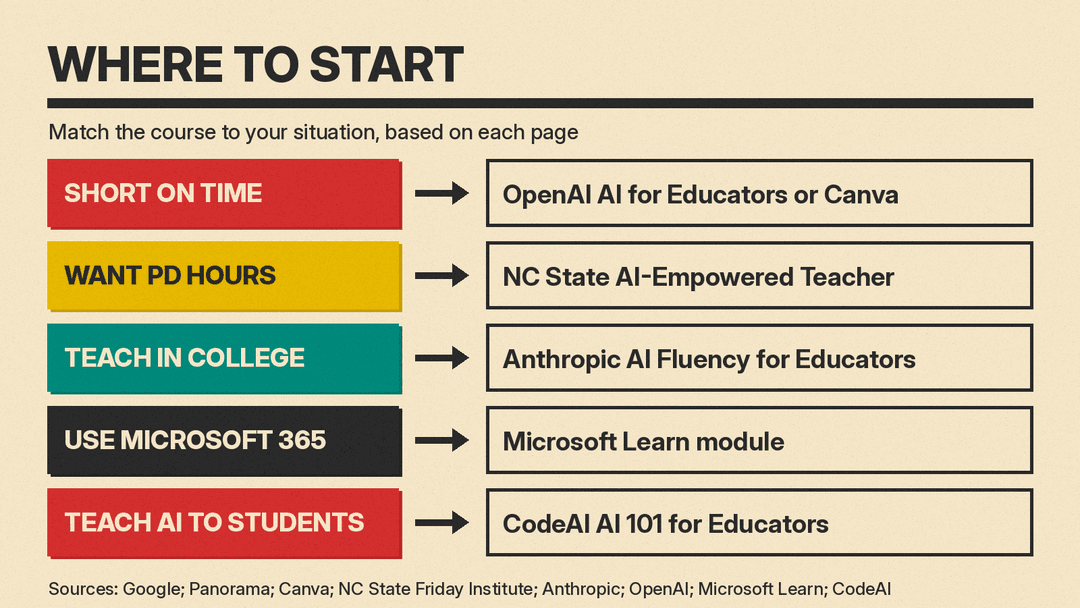
How to choose
- You have about an hour: OpenAI's AI for Educators is listed at 45 minutes and Canva's course at 60 minutes. Canva's is built around Canva's tools and OpenAI's around ChatGPT.
- You want a certificate that mentions PD credit: Google and Panorama each say the certificate can be submitted for PD credit, depending on district requirements. NC State states 15 professional development hours.
- You teach at college level: Anthropic's course is written for faculty, instructional designers and education leaders.
- Your school runs on Microsoft 365: the Microsoft Learn module page tags Microsoft Edge, PowerPoint, Microsoft Copilot, Microsoft Teams and Microsoft 365 Education.
- You want to teach AI to students, not only use it: CodeAI's page says the course is built so that "your students can too" understand AI.
If you want a longer path across all of AI, see our 12-week plan to learn AI from scratch. For cost, format and who each certification fits, see Best AI Certifications Worth Getting in 2026.
What a certificate does and does not do
Three of the pages tie the certificate to PD credit, and each adds a condition. Google says PD credit depends on "district and state requirements." Panorama says "depending on your district requirements." NC State says CEUs are "subject to the policies and procedures of your state and local agency." Our reading: a certificate from one of these courses is a document you can offer, not a guarantee that your district will count it, so ask your PD office first.
OpenAI's page spells out the limit of a badge. It says badges and certificates "are not certifications and do not guarantee eligibility for a future certification." A course certificate from any provider here shows that you finished a course. The pages we read do not describe any of these as a teaching license or a state credential.
Before you enroll
- Accounts: Panorama asks you to sign up, NC State needs a Brickyard account, OpenAI needs a ChatGPT account, and Microsoft Learn needs you to sign in to earn the pass designation.
- Dates: the NC State page lists a registration deadline of July 1, 2027. Panorama's page refers to the 2025-26 school year, so check that it is still current when you sign up.
- Tool match: Google's course uses Gemini, OpenAI's uses ChatGPT, Canva's uses Canva, and Microsoft's covers Microsoft tools. Pick the one that matches what your school allows.
- Student data: Panorama's page lists safeguarding student data and following school and district policies among its learning objectives. Whatever course you take, check your own district's rules before you put student information into an AI tool.
Sources
- Generative AI for Educators with Gemini, Grow with Google
- AI Literacy Essentials for K-12, Panorama Education
- AI in the Classroom: A new Canva certification for teachers, Canva
- The AI-Empowered Teacher, NC State Friday Institute
- AI Fluency for educators, Anthropic Academy on Skilljar
- AI Fluency for educators, Claude Academy
- Course quiz, AI Fluency for educators, Claude Academy
- OpenAI Academy courses, OpenAI Help Center
- Empower educators to explore the potential of artificial intelligence, Microsoft Learn
- Microsoft Learn frequently asked questions
- Enhance teaching and learning with Copilot Chat, Microsoft Learn
- AI 101 for Educators, CodeAI
- Code.org is now CodeAI, CodeAI
