
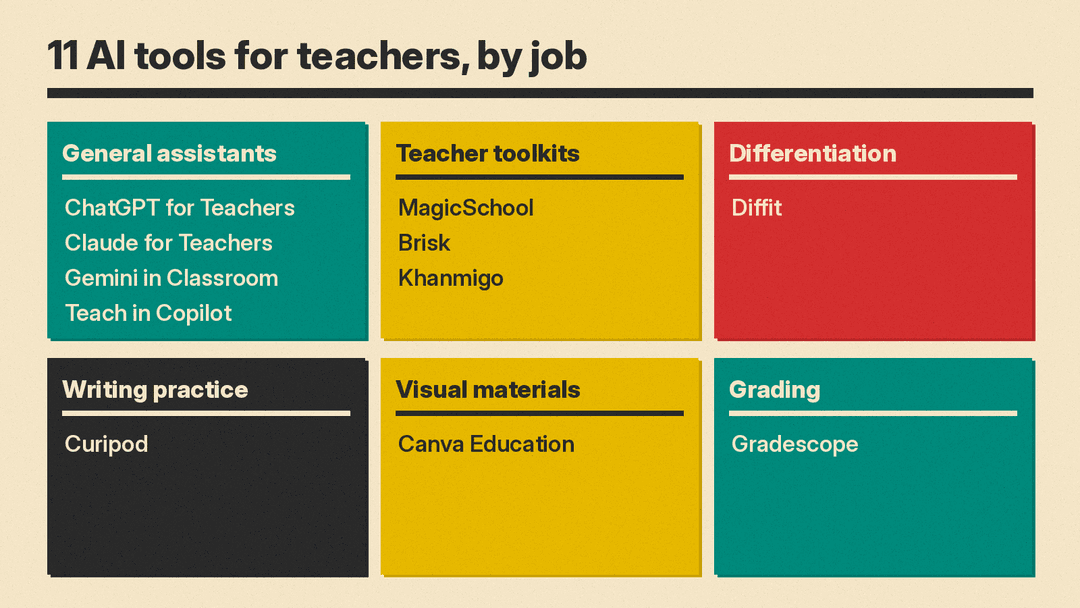
Teachers now have free, education-specific versions of the big AI assistants, plus a layer of classroom tools built for lesson prep, differentiation and feedback. Many of them are free for individual teachers, with paid plans aimed at schools and districts. This guide lists 11 real tools, grouped by job, with what each does, who it suits, its main limit, and a price only where we read it on the vendor's own page.
All features, plans and prices below are as of October 2026. Eligibility rules change, so check the linked page before you sign up.
How we picked
- Real, available products only. We loaded each tool's own site, plan page or help docs in October 2026.
- Built for a teaching job. Each tool helps with lesson planning, differentiation, assessment, feedback or classroom materials.
- Verified details only. Prices and free terms come from vendor pages. Where a vendor lists "custom pricing" or no price, we say so.
- A clear limit for each. Every entry names a caveat, often eligibility or a feature that sits on a paid school plan.
General assistants with teacher plans
The large AI labs and the two big school software suites all offer a teacher version. If your school already runs Google Workspace or Microsoft 365, start there. If you want to compare the consumer plans these are based on, see our ChatGPT Plus vs Claude Pro vs Google AI Pro guide.
ChatGPT for Teachers
ChatGPT for Teachers is a secure ChatGPT workspace for U.S. K-12 educators. OpenAI says it includes "unlimited access to our flagship model, file uploads, connectors and apps, voice mode, image generation, data analysis, web search, memory, and deep research", plus shared projects, custom GPTs and admin controls. You can pull lesson plans or files from Google Drive or Microsoft 365 and build presentations with Canva. OpenAI says anything you share is not used to train its models by default.
- Who it suits: U.S. K-12 teachers who want a full general assistant and the option to plan with colleagues in a shared workspace.
- Limit: it is for verified U.S. K-12 staff only, through SheerID, and "This plan is not for students." A workspace is limited to verified staff in your own district.
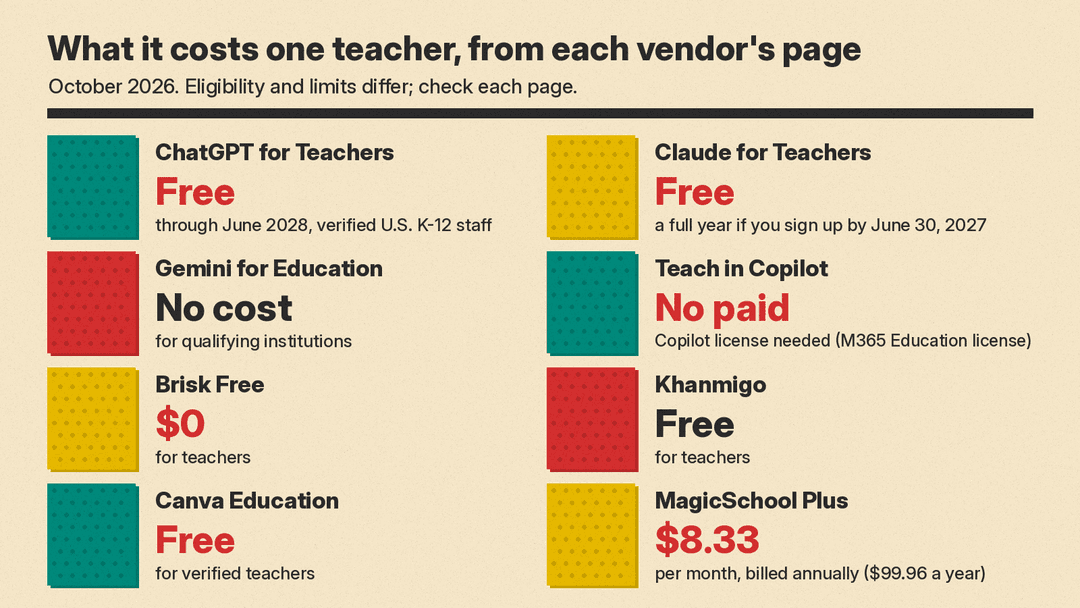
- Pricing note: free for verified U.S. K-12 educators through June 2028, per OpenAI's plan page. OpenAI says it may adjust pricing after that and will give advance notice.
Claude for Teachers
Claude for Teachers gives verified U.S. K-12 staff a professional Claude account. Anthropic's help center says it includes Pro-level features with Claude Code and Claude Cowork, teaching skills for lesson planning and differentiation, and the Learning Commons connector, which gives Claude academic standards in all 50 states. It also lists education connectors from MagicSchool, TeachFX and Canva for Education. Anthropic launched the individual offer on July 14, 2026 and a free Enterprise version for schools and districts on August 28, 2026. We covered the school and district launch at the time.
- Who it suits: teachers who want lesson plans grounded in state standards and curricula, and districts that want one managed account with SSO.
- Limit: it is for staff at U.S. K-12 schools and districts, and it is not for students. Anthropic says the offer follows Claude's 18-and-over policy, and that using identifiable student information requires authorization from the school or district.
- Pricing note: free. Anthropic says teachers and organizations that sign up by June 30, 2027 get a full year of free access.
Gemini in Google Classroom and Gemini for Education
Gemini in Google Classroom is available with all Google Workspace for Education editions. On the web, teachers can outline a lesson plan, generate a quiz, re-level text, create a vocabulary list or a rubric, tackle common misconceptions, translate text into over 100 languages, build a choice board, and create a podcast-style audio lesson (English only). The separate Gemini for Education app adds Gems, Deep Research, Gemini Canvas and Gemini Live. Google says your data "is not human-reviewed or used to train AI models."
Google's edition comparison also lists Gemini Notebook, which lets you chat with AI "based only on your sources" and turn sources into podcast-style audio discussions and video explainers. On Education Fundamentals, Google lists up to 3 Audio Overviews and 3 Video Overviews per day.
- Who it suits: schools on Google Workspace for Education, and teachers who already live in Classroom.
- Limit: some features sit on paid tiers. Gemini's draft feedback on written assignments needs Education Plus or the Teaching & Learning Add-on, and Google's comparison page lists Deep Research at 5 reports per month on Education Fundamentals and Education Plus unless you add Google AI Pro for Education.
- Pricing note: Google says Gemini for Education is available at no cost for qualifying institutions, including by signing up for Google for Education Fundamentals.
Teach in the Microsoft Copilot app
Teach is Microsoft's home for AI teaching tools in the Copilot app. It creates lesson plans and rubrics that save as Word documents, quizzes in Microsoft Forms, and flashcards. Its modify tools align text to standards, differentiate instructions, change reading level and add supporting examples. In its August 2026 update, Microsoft added remembered subjects and grades and automatic language detection, and said Unit Plans were coming in September.
- Who it suits: schools on Microsoft 365 for Education, especially those that run classes in Teams.
- Limit: Microsoft says Teach "is only available to Faculty/Staff with a Microsoft 365 for Education license." If you do not see it, Microsoft says to check with your IT administrator.
- Pricing note: Microsoft says the feature "does not require a paid Microsoft Copilot license."
Teacher toolkits
These products wrap AI in ready-made teacher tools, so you fill in a form instead of writing a prompt.
MagicSchool
MagicSchool offers 80+ teacher tools for lesson planning, worksheets, quizzes, IEP creation and presentations, plus a chatbot called Raina and 50+ student tools. Student Rooms let you choose and configure AI tools for students and set learning goals. MagicSchool says it integrates with Google Docs, Classroom and Canvas, is SOC 2 certified and FERPA/COPPA compliant, and does not use student or teacher data to train AI.
- Who it suits: teachers who want many single-purpose generators in one place, and schools that want student-facing AI with teacher controls.
- Limit: unlimited generations, unlimited output history and the 50+ student tools are listed under Plus, not Free.
- Pricing note: per MagicSchool's pricing page, Free is $0, Plus is $8.33 per month billed annually ($99.96 a year) or $12.99 per month billed monthly, and Enterprise is custom.
Brisk Teaching
Brisk is a Chrome and Edge extension that works inside Docs, Slides, YouTube and your LMS. Its 30+ tools include a lesson plan generator, quiz generator, rubric generator and a presentation maker that builds Google Slides from any idea, article, website or video. Its feedback tools leave comments on student writing, including Glow and Grow feedback and batch feedback. Inspect Writing shows how students revised their work, and Change Level adjusts reading level or translates content into 50+ languages. Brisk Boost turns an online resource into a learning activity for students.
- Who it suits: teachers who want AI inside the documents and sites they already use, without a separate app.
- Limit: curriculum alignment, district standards and the admin dashboard sit on the Premium and Intelligence plans.
- Pricing note: per Brisk's plans page, Free is $0 for teachers. Premium and Intelligence have custom pricing.
- Pricing note: per Brisk privacy policy, Free is $0 for teachers. Premium and Intelligence have custom pricing.
Khanmigo
Khanmigo is Khan Academy's AI assistant. For teachers, Khan Academy lists standards-aligned, differentiated lesson planning tied to its content library, an on-demand summary of student work, learning objectives, rubrics and exit tickets, and help to refresh content knowledge.
- Who it suits: teachers who already assign Khan Academy content and want plans that connect to it.
- Limit: Khanmigo access for your students, district and school data, and SSO through Clever or ClassLink come with Khanmigo District Tools, priced on request.
- Pricing note: free for teachers. Khan Academy lists $4 per month or $44 per year for learners and families, and District Tools on request.
Differentiation and writing practice
Diffit
Diffit makes print-ready, leveled resources. You start from a topic or your own materials, then set MTSS tier, challenge level, language, scaffolds and standards. Diffit returns differentiated activities, station rotations, sub plans, intervention materials and slides. Diffit says it has "No student logins, no student AI."
- Who it suits: teachers in ELL, special education, intervention and MTSS settings who need several versions of one reading.
- Limit: the free Basic plan gives access to content made in the last 90 days. Exports to Google, Canva and Microsoft formats, standards alignment and full history are listed under Diffit for Schools.
- Pricing note: Basic is free. Diffit says Diffit for Schools is a flat-rate annual subscription tiered by student enrollment.
Curipod
Curipod runs teacher-led, whole-class lessons where students read, write and discuss. Students get AI feedback when they submit, then revise in the same class period. Curipod turns responses into reports that flag learning gaps, and says it aligns with 55+ curricula, including HMH Into Reading and Amplify CKLA.
- Who it suits: ELA, social studies and science teachers who want more writing practice with fast feedback.
- Limit: the free plan gives weekly writing sessions that renew every week. Unlimited sessions and full test prep libraries are on the School and District plan.
- Pricing note: per Curipod's pricing page, Free is $0 per month. School and District plans have custom pricing.
Classroom materials and grading
Canva Education
Canva Education gives verified teachers Canva's design tools for lesson plans, presentations, sheets and posters. Its AI features include Magic Write for lesson plans and activities, translation, video captions and an accessibility checker. Teachers can invite students with a school email, assign tasks and track progress.
- Who it suits: teachers who make a lot of slides, handouts and visual materials.
- Limit: you must verify. Canva says it usually replies within 24 hours, but busy periods can take up to 7 days.
- Pricing note: Canva says Canva Education is "100% free for verified teachers and students."
Gradescope
Gradescope lets instructors grade paper-based, digital and code assignments, including problem sets, worksheets, quizzes, bubble sheets and exams. Its plan page lists AI-Powered Grading and AI-Powered Roster Matching on the Institutional plan.
- Who it suits: high school and college instructors who grade many similar written or code answers.
- Limit: the AI grading features are not on the free Basic plan. Gradescope's home page mainly lists universities as users.
- Pricing note: per Gradescope's pricing page, an Institutional Trial runs for one term, after which you can keep the Basic plan for free. Institutional pricing is by contact.
Privacy and student data
Most teacher plans promise not to train models on your content, but the details differ.
- ChatGPT for Teachers content is not used for training by default, and OpenAI says data export options help schools meet FERPA requirements.
- Claude for Teachers has training turned off for verified teacher accounts. Anthropic changed its examples to use de-identified classroom data, and says identifiable student records need school or district authorization.
- Google says Gemini for Education data is not human reviewed or used to train AI models, and students under 18 get a distinct experience with extra guardrails.
- MagicSchool and Brisk both state FERPA and COPPA compliance, Brisk in its privacy policy. Diffit collects no student data.
Before you paste student names, grades or IEP details into any tool, check what your district has approved. A district agreement often changes which terms apply.
How to choose
Start with the suite your school already runs, then add one specialist tool for your biggest time cost.
- If your school uses Google Workspace: start with Gemini in Classroom, which sits inside Classroom itself.
- If your school uses Microsoft 365: start with Teach in the Copilot app.
- If you want the strongest general assistant for free: ChatGPT for Teachers or Claude for Teachers, if you are verified U.S. K-12 staff. Claude for Teachers adds state standards through Learning Commons.
- If you want ready-made generators: MagicSchool for breadth, Brisk if you want it inside your browser.
- If you teach mixed reading levels: Diffit for leveled versions of one text.
- If grading writing takes your evenings: Brisk's feedback tools, or Curipod for in-class writing with instant feedback.
- If you grade many problem sets or exams: Gradescope, if your institution has the Institutional plan.
- If you make many slides and handouts: Canva Education.
Pick one assistant and one specialist tool, not five. Check every output before it reaches students: these tools draft, you decide. For tools your students might use themselves, see our best AI tools for students guide.
Sources
- ChatGPT for K-12 teachers (plan page)
- OpenAI Help Center: ChatGPT for Teachers
- Claude for K-12 teachers
- Claude Help Center: Claude for Teachers, your data and our terms
- Anthropic: Introducing Claude for Teachers
- Claude for Teachers, now available for U.S. K-12 schools and districts
- Classroom Help: Learn about Gemini in Google Classroom
- Google for Education: Gemini for Education
- Google for Education: Compare editions
- Microsoft Support: Teach in the Microsoft Copilot App
- Microsoft EDU: What's new, Back to School August 2026
- MagicSchool
- MagicSchool pricing
- Brisk Teaching
- Brisk plans
- Khanmigo pricing
- Diffit
- Diffit pricing
- Curipod
- Curipod pricing
- Canva for teachers
- Gradescope
- Gradescope pricing
