

Cursor's cloud agents can now build a web app, give it a database and a sign-in, and put it online at a link you choose. Cursor announced the feature, called Build Live Apps, in its changelog on November 5, 2026. The same changelog added voice chat with agents one day later.
What Cursor announced
Cursor opens the announcement with this problem: "Agents have lowered the cost of writing code, but most apps and tools that users build never make it off of localhost." Localhost means the app runs only on the builder's own computer.
The new feature covers the steps after the code. In Cursor's words: "Describe what you want to create and Cursor will handle the rest: build the app, set up a database, configure auth, and deploy it."
Cursor says people at Cursor in sales, operations, legal, finance and engineering already build internal apps this way. Its examples include ops tools for event registration and desk seating, onboarding experiences for new hires, live sales dashboards, and portals to manage engineering services.
Our explainer What Is a Coding Agent? covers how Cursor, Claude Code, Codex and Copilot differ, if you are new to these tools.
How it works
You start a cloud agent and tell it plainly that you want to build an app. The Cursor Apps docs give sample prompts, such as "Build an internal app where my team can submit bug reports and track their status." The docs also say a cloud agent is required: "this feature is not supported locally."
According to the changelog, Cursor then:
- Scaffolds the web app
- Starts a Postgres database if the app needs one
- Sets up sign-in behind Cursor SSO (single sign-on)
- Provisions hosting
- Asks for any secrets the app needs to reach your own systems, such as a data warehouse
The docs say "The agent never sees the values" of those secrets. In most cases a team admin creates team secrets in the Apps dashboard.
You can start from nothing, which creates a new repository on Cursor Origin, Cursor's code hosting service, which its docs say is in early beta. You can also ask Cursor to deploy an existing GitHub repository. The changelog says "Support for other git providers like GitLab is coming soon."
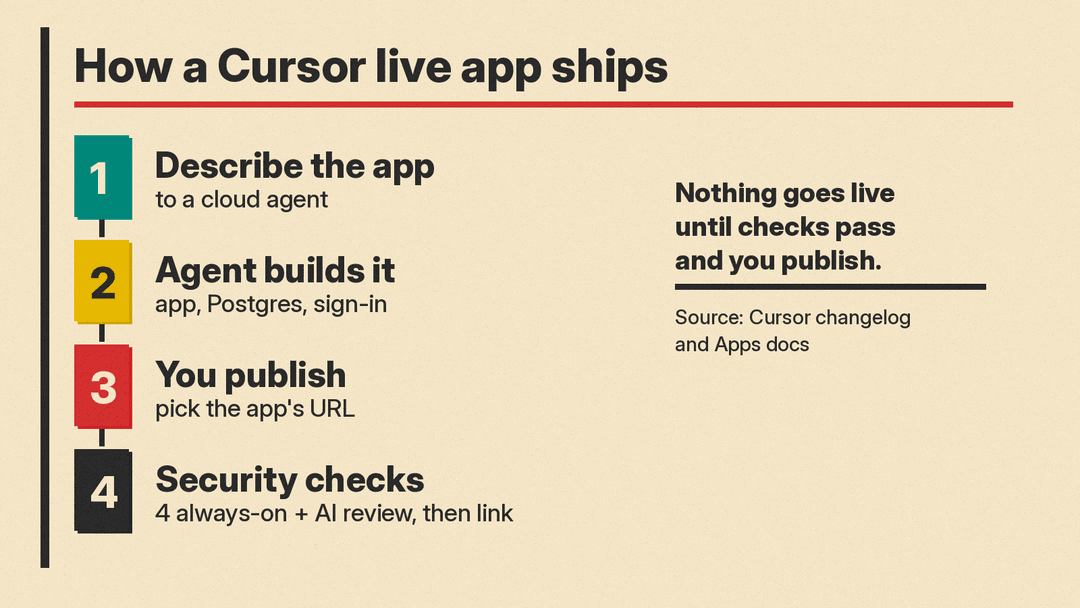
When the app is ready, Cursor shows a tray to preview and publish it. You pick the app's URL, which you can change later, and Cursor returns a live link.
The docs say each app is deployed in a dedicated hosting account for your team (or for you, on an individual plan), isolated from every other team's and user's.
Security checks before publishing
Cursor runs what it calls deterministic and agentic security checks when you publish. The changelog says: "Nothing goes live until the checks pass and you explicitly publish the app."
The docs list four checks that are always on, even when the AI review is off:
- Block secrets written in app files, such as an API key or access token
- Block credential files, such as private keys and service-account keys
- Never publish
.envfiles - Never publish source maps, so visitors cannot read the original source code
On top of these, an AI security review reads the app's files and blocks serious issues. Admins can add their own instructions to that review. The docs say custom instructions "can add rules, but they can't remove Cursor's built-in checks."
Admins can approve a publish that the review blocked, except for malicious code, hardcoded secrets or exposed credentials. They can also see every app and secret on the team and unpublish any app.
Who can open an app
Private and team apps sit behind Cursor sign-in. You can share an app with specific people, with groups, or with your whole Cursor team. On individual plans you can also share an app publicly, so anyone with the link can open it. The docs say public sharing is off by default for Teams and Enterprise, and an admin can turn it on.
Scripts and bots can open an app with a Cursor API key, sent in an x-cursor-app-token header. The docs say those requests are marked as automated.
Who can use it and what it costs
The changelog says the feature is "available on all paid plans with cloud agents enabled." The Cursor pricing page, as of November 9, 2026, lists cloud agents on these plans:
- Premium: $30 per month
- Super: $100 per month
- Ultra: $200 per month
- Teams: from $30 per user per month
- Enterprise: custom pricing through sales
The pricing page does not list cloud agents on Free ($0) or Plus ($8 per month). It also lists no separate charge for app hosting or app databases.
The docs add terms for hosting. They say hosting is separate from Cursor's services and is provided "as is" and "as available." An app may be removed if it breaks Cursor's terms or its Acceptable Use Policy.
For a separate service that hosts apps built with AI tools, see our post on Automattic's Spacefast.
What is still unclear
- Neither the changelog nor the docs give a price or a usage limit for hosting or databases.
- GitLab support is "coming soon," with no date.
- The docs describe choosing the app's URL but do not describe using your own domain name.
