
When an AI coding agent wants to change a file, run a command or reach the internet, someone has to decide whether it may. That decision is what the tools call permissions or approvals. If you use Claude Code, OpenAI's Codex or GitHub Copilot CLI, or if a developer on your team does, the permission setting decides how often the agent stops to ask, and what it can do without asking.
This guide explains the idea in plain terms, using what each vendor's own documentation says. If you are new to these tools, start with our explainer What Is a Coding Agent?.
The basic idea: ask first, or act and tell
A coding agent works in a loop. It reads files, decides what to do next and then uses a tool, such as editing a file or running a shell command. Each tool call is an action with effects on a real computer.
A permission system sits between the agent's decision and the action. Anthropic's permission modes page for Claude Code puts it this way: "A permission mode sets which actions Claude can take in a session without asking you first." In its Manual mode, the page says, "Claude Code stops and asks you before most actions that edit files, run shell commands, or reach the network."
GitHub describes the same moment for Copilot CLI. Its Copilot CLI documentation says that in manual approval mode, "Copilot asks for your approval when a tool request isn't already allowed."
So the core choice is simple. Either a person approves each risky step, or the person sets rules in advance and lets the agent work.
Two layers: permission and sandbox
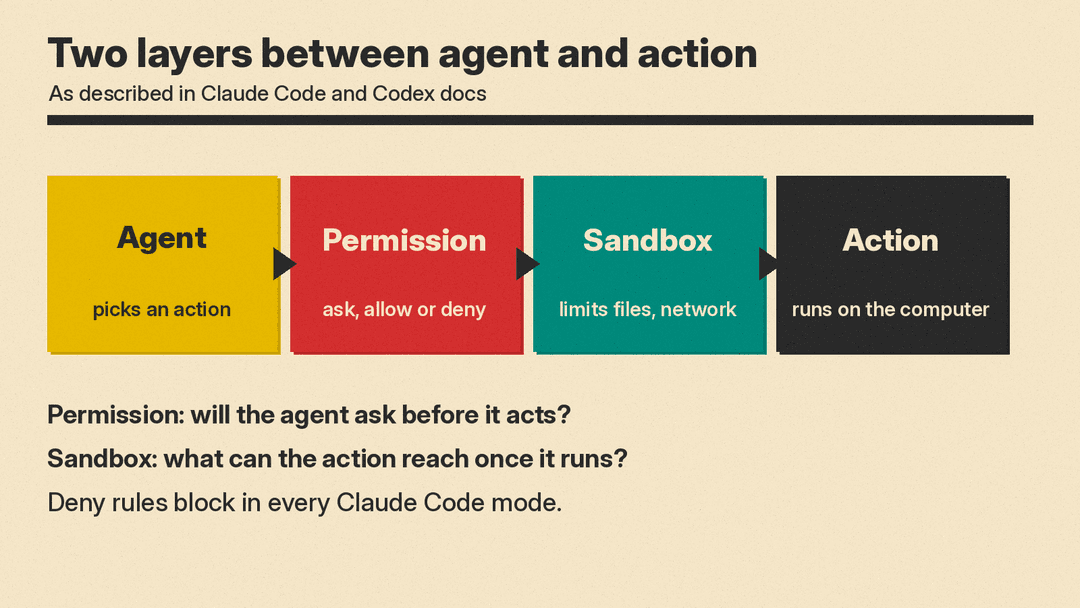
Vendors separate two questions:
- Will the agent ask before it acts? This is the permission or approval setting.
- What can the action reach once it runs? This is the sandbox, a technical boundary on files and network access.
OpenAI's Codex agent approvals and security page names both layers. The sandbox mode covers "What Codex can do technically (for example, where it can write and whether it can reach the network)." The approval policy covers "When Codex must ask you before it executes an action."
Anthropic draws the same line: "Permission modes decide whether Claude asks before an action, and the Bash sandbox and outer isolation boundaries decide what an action can reach once it runs."
The difference matters. A permission prompt depends on a person reading it and making a good call. A sandbox is enforced by the computer whether or not anyone is watching.
How Claude Code handles it
Claude Code offers several named permission modes. Anthropic's page lists what each one lets Claude do without a prompt:
- Manual (config value
default): reads only. Anthropic suggests it for "Reviewing every action yourself, sensitive work." - acceptEdits: reads, file edits and common filesystem commands such as
mkdirandmv. - plan: reads, plus commands an automated reviewer approves when auto mode is available. It is meant for "Exploring a codebase before changing it."
- auto: "Everything, with background safety checks."
- dontAsk: file reads in your working directories and tools you approved in advance. Anything that would prompt is denied, though Anthropic notes that a mod you installed can still approve some of those calls. Anthropic suggests it for "Locked-down CI and scripts."
- bypassPermissions: "Everything." Anthropic's guidance for it is "Isolated containers and VMs only."
Auto mode works differently from the others. In auto mode, the page says, "a second model, the classifier, reviews actions instead of you." Anthropic says the classifier blocks "anything that escalates beyond your request," among other checks. Manual's config name, default, does not mean every session starts there: Anthropic's page says sessions started in a terminal or the VS Code extension start in auto mode with Claude Code v2.1.283 or later, while claude -p and Agent SDK runs with no mode set start in Manual (v2.1.302 or later), and an organization can turn auto mode off.
Some actions are never approved automatically in any mode, though Anthropic says you can turn off the prompt for dangerous rm commands in bypassPermissions mode. Anthropic's list includes tools that you marked with an explicit ask rule and recognized deletions of critical paths. It also says "Deny rules block in every mode, including bypassPermissions."
How Codex handles it
Codex starts from a restrictive baseline. OpenAI's page says: "By default, the agent runs with network access turned off. Locally, Codex uses an OS-enforced sandbox that limits what it can touch (typically to the current workspace), plus an approval policy that controls when it must stop and ask you before acting."
In Codex's Auto preset, the page says, "Codex can read files, make edits, and run commands in the working directory automatically." It "asks for approval to edit files outside the workspace or to run commands that require network access." If you only want to chat or plan, OpenAI says to switch to read-only mode with the /permissions command.
Approvals also cover connected apps, not only the shell. OpenAI says Codex "can also elicit approval for app (connector) tool calls that advertise side effects," and that "Destructive app/MCP tool calls always require approval when the tool advertises a destructive annotation," unless the tool also advertises a read annotation, which OpenAI says takes priority. MCP, the Model Context Protocol, is a way for agents to connect to outside tools.
In its cloud mode, OpenAI says Codex runs "in isolated OpenAI-managed containers, preventing access to your host system or unrelated data."
How GitHub Copilot CLI handles it
Copilot CLI starts with trust in a folder. GitHub's documentation says that when you start a session, "you'll be asked to confirm that you trust the files in, and below, the directory from which you launched the CLI." GitHub adds that "Typically, you should not launch Copilot CLI from your home directory," and that "Scoping of permissions is heuristic and GitHub does not guarantee that all files outside trusted directories will be protected."
When Copilot asks to use a tool, GitHub lists three typical answers:
- Yes, for this one use.
- Yes, and approve TOOL for the rest of the running session.
- No, and tell Copilot what to do differently.
The second option is broader than it looks. GitHub's example: if you approve rm ./this-file.txt for the session, "Copilot can run any rm command (for example, rm -rf ./*) during the current run of this session, without asking for your approval."
Copilot CLI also has an assisted mode, in which "A large language model assesses eligible permission requests and automatically approves those it judges to be safe." We covered how that mode works in GitHub Copilot Assisted Permissions Explained.
Rules: allow, ask and deny
Beyond modes, the tools let you write rules for specific actions. Anthropic's permissions page describes three kinds for Claude Code: allow rules, ask rules and deny rules. It says "Rules are evaluated in order: deny, then ask, then allow. The first match in that order determines the outcome, and rule specificity doesn't change the order."
In practice, a deny rule wins. Anthropic's example: a broad deny rule such as Bash(aws *) "blocks every matching call, including calls that also match a narrower allow rule like Bash(aws s3 ls)." The page adds that "An allow rule can't carve an exception out of a deny rule."
Anthropic also says administrators can "deploy managed settings that user and project settings can't override," apart from a few listed keys. That is how a company can set limits that an individual developer cannot loosen.
Copilot CLI has similar controls on the command line. GitHub's documentation shows --allow-tool and --deny-tool options, and gives this example of allowing everything except two commands: copilot --allow-all-tools --deny-tool='shell(rm)' --deny-tool='shell(git push)'. GitHub says the deny option "takes precedence over the --allow-all-tools and --allow-tool options."
The tradeoff: fewer prompts, more trust
All three tools offer ways to ask less. Each vendor also says what that costs.
GitHub warns that with an option such as --allow-all-tools, "Copilot has the same access as you do to files on your computer, and can run any shell commands that you can run, without getting your prior approval." Its documentation says these options increase "the risk of unintended actions being taken that might result in data loss or corruption, or other security issues."
Anthropic ties its fully open mode to isolation. In its common setups table, running "fully unattended inside a container" lists the isolation as "Required: a container, VM, or the sandbox runtime."
GitHub gives similar advice. It says you can reduce the risk of automatic approval "by running Copilot CLI in a sandboxed environment," or in "a virtual machine, container, or dedicated system with tightly controlled permissions and network access."
What this means if you are not a developer
You may never type one of these commands. But if your company uses coding agents, these settings decide how much the agent can do on a work laptop or a build server without a person in the loop. Some useful questions to ask a technical lead:
- Which permission mode or approval policy do the agents run in by default?
- Do agents run inside a sandbox, container or virtual machine when they work unattended?
- Are there deny rules for actions that must never happen, such as pushing code or deleting folders?
- Who can change those settings?
Permissions also connect to a separate risk: text that tries to trick an agent into doing something its user did not ask for. We explained that problem in How to Keep AI Agents Safe From Prompt Injection. For the broader picture of what agents are, see What Is an AI Agent?.
