
ChatGPT can now make animated GIFs. OpenAI released the feature on November 4, 2026, alongside a new image model called Images 2.6. You describe a loop in words or upload a photo, and ChatGPT returns a short animation you can slow down, speed up, and fix one frame at a time.
This is a plain-English look at what OpenAI has confirmed, what its API documentation says about GIF limits, and what it means if you make images or reaction GIFs for work or fun.
What OpenAI launched
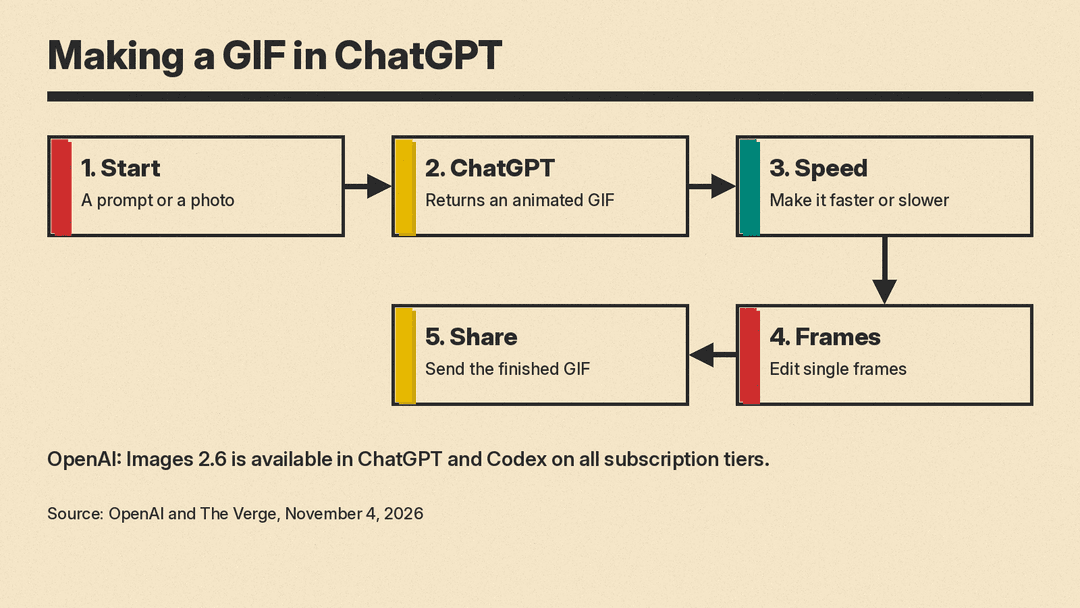
According to The Verge, ChatGPT can now create a GIF from a written prompt or from a photo you upload. After the GIF is made, you can change how fast it plays, edit individual frames, and share it. OpenAI's own example prompt was "can you make a gif of a cat dancing?", and ChatGPT answered with the animation plus controls for playback speed and a frame-by-frame view.
The Verge says that before this change, ChatGPT could not natively generate a GIF in a single step.
The GIF tool arrives with the new Images 2.6 model. In its announcement, OpenAI says Images 2.6 generates images 50% faster than before and is available globally in ChatGPT and Codex across all subscription tiers, on desktop, mobile and web. OpenAI suggests GIFs for animating a brand mascot, making reactions and memes, and drawing animated storyboards before video production.
Why frame editing is the useful part
Editing single frames means you do not have to start over when one frame goes wrong. If a paw, a logo or a line of text comes out wrong in one frame, the idea is that you fix that frame instead of regenerating the whole loop.
The Decoder describes OpenAI's cat example as several slight variations of one character strung together flipbook style. It adds that the model's image consistency appears strong enough to keep the character recognizable across frames, and that earlier models would likely have changed the look too much. That is the outlet's read of the demo, not a measured result, so treat it as a first impression until you try your own prompts.
Two new API models
For developers, OpenAI also launched two API models, according to OpenAI's announcement: GPT-Image-2.6 Flare for faster generation and GPT-Image-2.6 Sunburst for higher-quality generation. OpenAI says Flare can make an image in as little as six seconds at low quality, and that Sunburst gives more consistency across edits at medium or high quality. They follow the same two-way split OpenAI introduced with Images 2.5 in September.
The API documentation already lists them. OpenAI's image generation guide now has a GPT Image 2.6 section for the models gpt-image-2.6-sunburst and gpt-image-2.6-flare. The guide says both models support complexity control, markup-guided edits, SVG output, and animated GIF output through the Image API. Its older code examples still use GPT Image 2.5. OpenAI's API changelog lists the release on November 4.
What the API documentation says about GIF limits
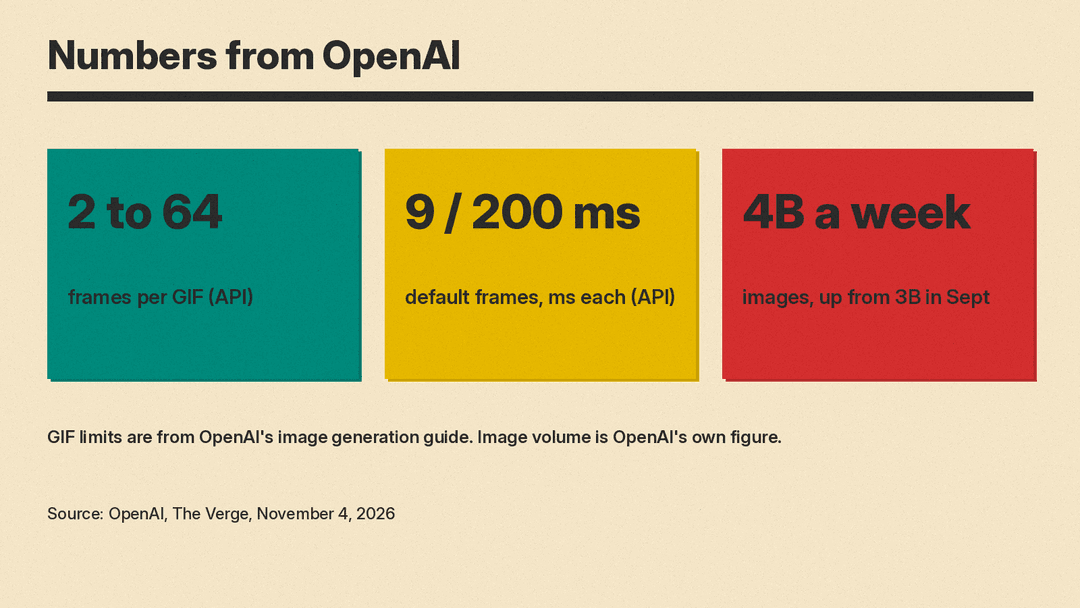
OpenAI's guide says GIF output is set with output_format on the image generations endpoint, and that the image edit endpoint does not support GIF output. You can set frame_count from 2 to 64 frames, with a default of 9. You can set frame_duration_ms from 20 to 2,000 milliseconds per frame, rounded to 10 ms, with a default of 200. The guide adds that GIF output does not support streaming, partial images or custom output compression.
These are API limits. OpenAI has not published frame limits for the ChatGPT feature in the pages we reviewed, so ChatGPT's own settings may differ. At the API defaults, a GIF is a loop of nine frames that each show for 200 milliseconds, which adds up to 1.8 seconds. OpenAI's own lantern example in the guide uses those settings. That suits a quick gesture or a simple motion. It does not replace video generation. For the full API feature list, see our guide to the GPT Image 2.6 API.
The bigger picture
OpenAI says people now create 4 billion images per week across ChatGPT, Codex and the API. According to The Verge, that is up from 3 billion per week in September. These are OpenAI's own figures, and they cover all image use, not only GIFs.
For context, The Next Web notes that the GIF feature comes months after OpenAI shut down its Sora video app in March, and that Images 2.0, launched in April, was its first image model that reasons before drawing. Short looping animation sits between still images and full video, and it is now part of the same chat window as everything else.
If you track how OpenAI's image models have been changing, our earlier post on GPT Image 2.6 appearing in OpenAI's API spec covers the first sign of this model. For a wider look at how ChatGPT's image quality compares with a rival, see Midjourney vs GPT Image.
Reactions from Hacker News and X are collected in our roundup of what people are saying about ChatGPT Images 2.6.
What to try first
These are practical ways to test the feature, using only what OpenAI and the reports describe:
- Start with a simple subject and a simple motion, like OpenAI's dancing cat, so you can judge whether the character stays the same from frame to frame.
- Upload a photo and ask for a small movement, then use the speed control to see how the loop feels at different rates.
- Step through the frames and edit the one that looks wrong instead of regenerating everything.
- Keep expectations short. OpenAI points to reactions, memes and quick animated storyboards as uses.
OpenAI says Images 2.6 is available globally on all subscription tiers. The Verge describes it as a rollout, so if you do not see GIFs in ChatGPT yet, check again later.
