
ChatGPT Voice now works inside Finances, the U.S. feature that lets ChatGPT read your linked bank and credit data. The official ChatGPT account announced it in a post on X on November 3, 2026, according to AI Briefing Daily. In practice it means you can ask about spending, savings and subscriptions out loud, and interrupt an answer to ask a follow-up, instead of typing.
This is a small feature on top of a bigger product, so the useful part is what Finances actually does, what it cannot do, and what to check before you connect a bank account.
What the voice update adds
According to Gadgets360 and Dataconomy, users who have connected their financial accounts can ask spoken questions about their financial health, transactions and savings. They can cut in during an answer with a follow-up. The announcement's own example, as transcribed by CHOOSETO.AI, is talking through which subscriptions you pay for, which ones you would keep, and what you could save by cancelling the rest.
The timing is a little unclear. OpenAI's personal finance page already lists "voice support" among the things added since launch, in an update dated October 2, 2026. TokenPost reports that voice reached Free and Go users on October 2 and that the November 3 post was an announcement. AI Briefing Daily says it could not confirm that from an OpenAI source. So treat November 3 as the date of the announcement, not necessarily the first day voice worked.
What Finances is
Finances launched on May 15, 2026 as a preview for ChatGPT Pro users in the United States. According to OpenAI's Help Center article, it is now available in the U.S. to Free, Go, Plus and Pro users on web, iOS and Android.
You connect accounts in two separate ways, and you can use either or both:
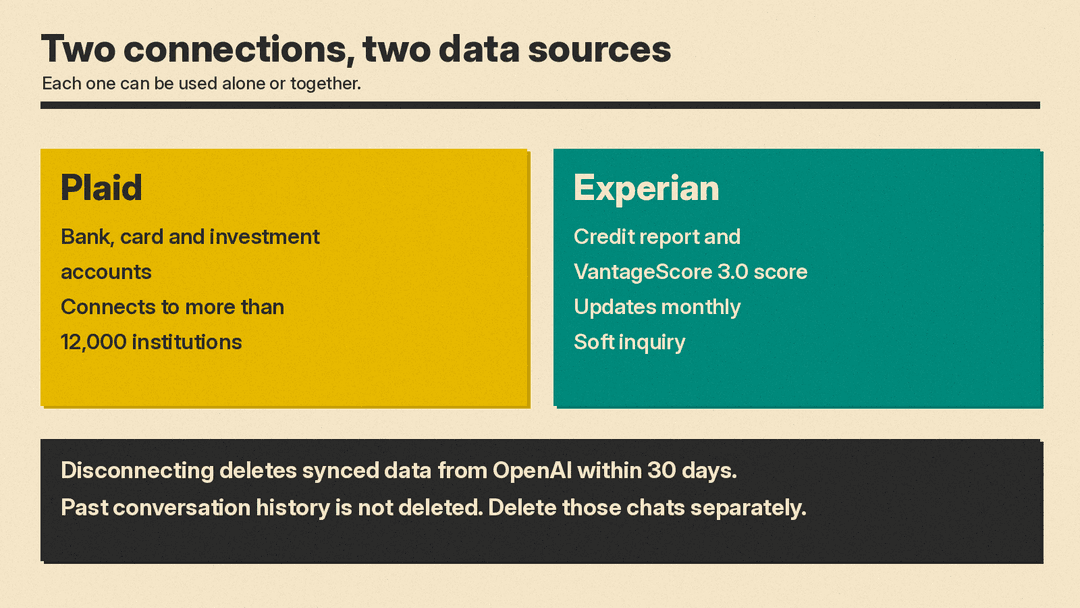
- Bank, card and investment accounts connect through Plaid. OpenAI says Plaid supports more than 12,000 financial institutions.
- Credit report data connects through Experian. It shows a VantageScore 3.0 score and report that update monthly, and OpenAI says checking it is a soft inquiry that does not affect your score.
Once connected, the Finances page shows widgets for spending by category, upcoming payments, subscriptions, bills, net worth, portfolio allocation and your credit score. In any chat you can type /finances or @finances so ChatGPT uses that context. You can also tell it things it cannot see, such as a savings goal or a loan from a relative. ChatGPT can save these as "financial memories," which you can view or delete on the Finances page.
What it cannot do
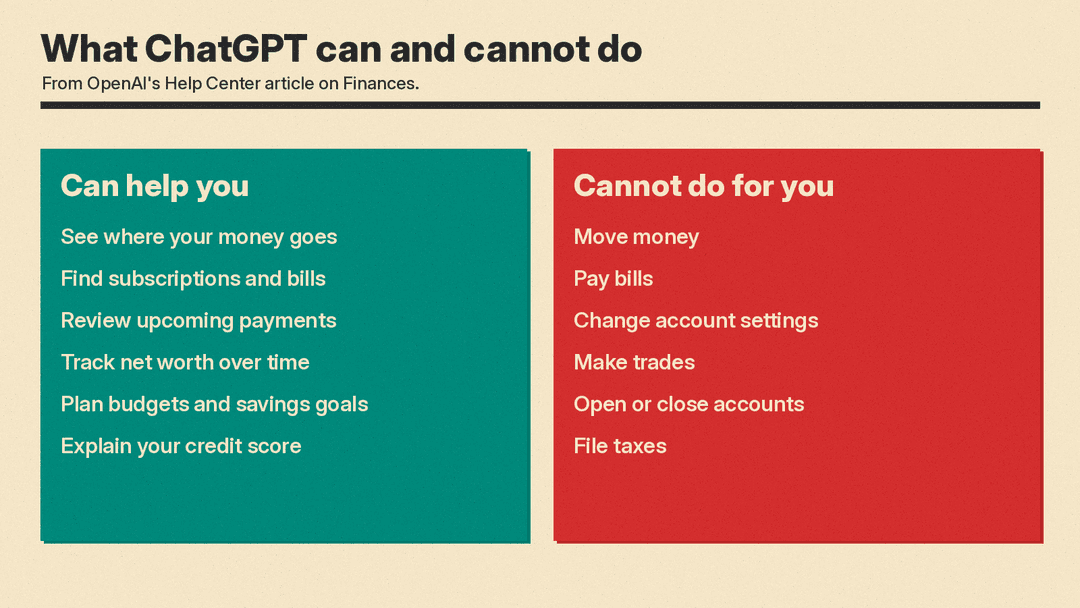
OpenAI is direct about the limits. The Help Center says ChatGPT cannot move money, pay bills, change account settings, make trades, change retirement contributions, open or close accounts, or file taxes. It also says ChatGPT is not a fiduciary, registered investment adviser, broker-dealer, tax preparer or law firm, and that responses are for information and planning only. OpenAI tells users to consult a qualified professional before decisions with legal, tax or investment consequences.
So voice changes how you ask, not what ChatGPT is allowed to do. It can explain, summarize and help you plan. It cannot act on your accounts.
What happens to your data
This is the part to read before you connect anything. OpenAI says:
- Conversations in Finances follow the same model training settings you choose across ChatGPT. You can change that in Settings under Data controls.
- Disconnecting Finances, or removing one account, deletes synced account data from OpenAI's systems within 30 days. Data tied to the ChatGPT connection is deleted from Plaid within 30 days under Plaid's policies.
- Disconnecting does not delete what is already in your conversation history. You delete those chats separately.
- Temporary chats do not access your connected accounts and do not create or update memories.
The Help Center article does not mention voice. AI Briefing Daily points out that it does not say whether a spoken question about your balance is stored like a typed one, whether the training setting applies the same way, or whether temporary chats behave differently in Voice. The same outlet says it does not have those answers, and neither do we. If that matters to you, check your Data controls before you use voice with a connected account.
Why numbers can look wrong
OpenAI lists a few causes in its Help Center. Syncing usually takes a few minutes but can take several hours. A bank may share balances without full transaction history, holdings, APRs or due dates. Transfers, card payments, refunds and duplicate pending transactions can be counted as spending. The article adds that "AI can make mistakes." You can ask ChatGPT which data it used for an answer and ask it to reclassify transactions that look wrong.
Credit data has its own lag. The score comes from your last Experian report, not live account activity, so a recent payment may not show until your lender reports it.
Who it is for
The feature suits people who already use ChatGPT Voice and want a quick spoken check, for example while cooking or commuting. The main tradeoff is practical rather than technical: a spoken question about your balance can be overheard, and it is a different habit from typing a prompt in private. OpenAI's Help Center describes Finances as a U.S. feature, so check availability before you plan around it if you are elsewhere. For other ChatGPT features that pull in outside information, see our guide to the best AI search engines.
Sources
- Finances in ChatGPT, OpenAI Help Center
- A new personal finance experience in ChatGPT, OpenAI
- OpenAI Brings ChatGPT Voice Support to Finances, Gadgets360
- ChatGPT Voice is now in Finances, CHOOSETO.AI
- OpenAI adds voice support to ChatGPT Finances, Dataconomy
- ChatGPT's U.S. Finances Tool Supports Voice Conversations, TokenPost
- ChatGPT Voice Now Works in Finances: What to Know, AI Briefing Daily
