
Planning a week of dinners is mostly list work: pick meals, check what is already in the kitchen, turn recipes into one shopping list, then order or shop. AI assistants can now help with that list work. ChatGPT, Claude, Gemini, Meta's Muse and Alexa+ can now draft a menu and, in some cases, fill a real grocery cart. Apps such as Samsung Food add AI on top of a normal meal planner.
This guide explains the options in plain terms, what each one can and cannot do according to the companies' own help pages, and where you still need to check the AI's work.
What AI is good at here, and where to be careful
An AI assistant can turn a loose request ("five dinners, one is vegetarian, nothing takes more than 30 minutes") into a menu, a recipe for each meal and a combined ingredient list in one conversation. It can also rewrite the plan when you change your mind.
One weak spot can be memory inside a long chat. In an August 2024 hands-on test for Android Central, Nicholas Sutrich asked Gemini Live for a week of keto meals with no oats, soy or protein shakes, and later added yogurt to his list of foods to avoid. He reported that it gave him only three days of recipe ideas, a two-day grocery plan instead of a full week, and a full-fat yogurt smoothie two steps after he had said no yogurt. That is one test of one assistant, but it shows why you should read every list before you buy. If anyone in your home has a food allergy, treat the AI's plan as a draft and check each recipe and each product label yourself.
Step 1: Give the assistant a clear brief
The more specific the request, the less you have to fix later. Google's own Keep help page makes the same point: it suggests a prompt like "Groceries for a week for a vegetarian family of 3" over a vague one. A good brief usually covers:
- How many meals and for how many days (for example, five dinners and three packed lunches).
- How many people, and any kids.
- Foods to avoid, including allergies, stated plainly as allergies.
- Time and equipment limits (30 minutes, one pan, a slow cooker).
- What you already have that should get used up.
- How you want the result: a menu, then recipes, then one shopping list grouped by store section.
A sample prompt you can adapt: "Plan five weeknight dinners for two adults and one child. No peanuts (allergy). Each dinner under 30 minutes. Use the chicken thighs and spinach I already have. Give me the menu first, then one combined shopping list grouped by produce, meat, dairy and pantry, with amounts."
Ask for the menu first and approve it before you ask for the list. Smaller steps are easier to check. For more on writing clear requests, see our beginner's guide to better AI prompts.
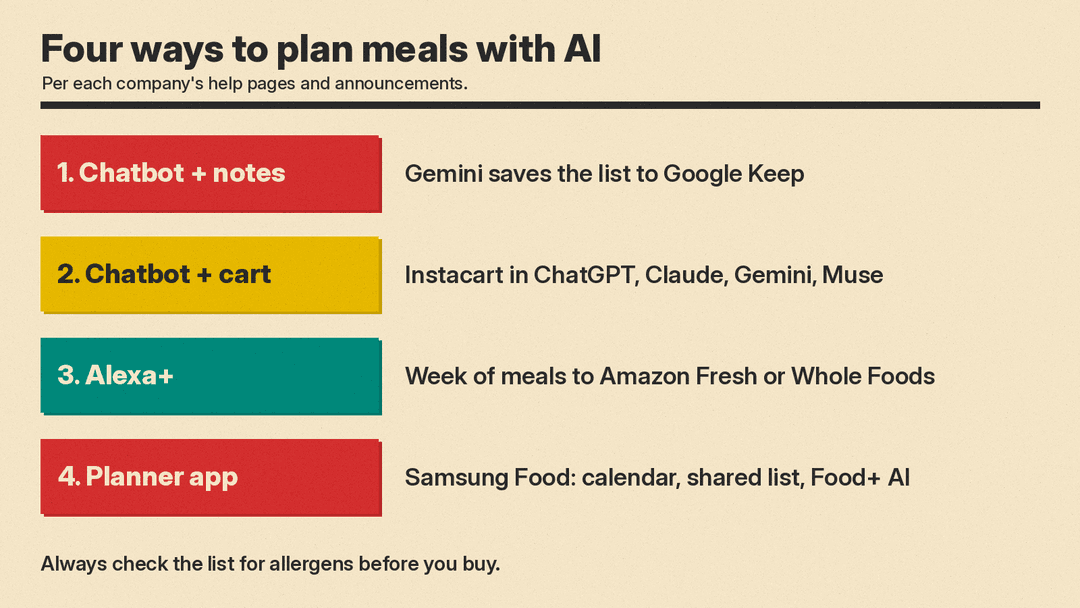
Option 1: Plan in a chatbot, save the list to your notes app
If you do not want any store connected, the simplest path is to plan in a chatbot and keep the list in a notes app.
Gemini can do this with Google Keep. According to Google's Gemini Apps help page, you can ask Gemini to "Find a recipe for [dish] and create a list of the ingredients in Keep." Google Workspace must be connected to Gemini Apps for this to work, and adding "@Google Keep" to your prompt tells Gemini to use Keep specifically. If Workspace is not connected yet, Gemini offers the option to connect it.
Keep also has its own AI button. On Google's Keep help page, the steps are: open Keep, tap Create, tap "Help me create a list," enter a prompt, then tap Create and Insert. Google says this needs a Google AI plan, and that on Pixel devices it is available subject to Gemini usage limits.
With any other chatbot, you can copy the finished list into whatever notes or list app your household already shares.
Option 2: Let the chatbot build a real grocery cart
Instacart now works inside several AI assistants. Its help page, Shop with third-party AI apps, names ChatGPT, Claude, Gemini and Muse. The flow is similar in each: you connect your Instacart account, pick a store, the assistant builds a cart from your request, and you ask it to add, remove or change items. The big difference is where you pay.
ChatGPT. You connect Instacart under Settings, then Apps. According to OpenAI, ChatGPT will also suggest the Instacart app when you mention food, recipes or meal ideas. You can call it by name, for example "@Instacart, can you help me shop for apple pie ingredients?", as Instacart's launch announcement describes. Payment happens inside ChatGPT through OpenAI's Instant Checkout. Instacart's help page lists two details worth knowing before you start:
- You can only pick from addresses already on your ChatGPT account. To use a new address, add it in Instacart and order through Instacart's own app or website.
- A new payment method you add during checkout is saved to your ChatGPT account, not your Instacart account.
Claude. Mention Instacart in your message and Claude asks permission to connect. Claude builds the cart, but when you select Checkout you are sent to Instacart to confirm the address, add an optional tip and pay.
Gemini. Say the word "Instacart" in your request, or connect it under Gemini's connected apps. Instacart says this is only for delivery, not pickup, and only for users in the US. You pick a store, ask for a recipe's worth of items or a long list, and finish paying in the Instacart app.
Muse (Meta's assistant). Muse connects to Instacart automatically when you ask for groceries, so you do not need to name it. It is US only, and you pay in the Instacart app. Instacart lists several things Muse orders do not support, including loyalty and promo pricing, coupons, pickup and replacement preferences. If you rely on store coupons, use another route.
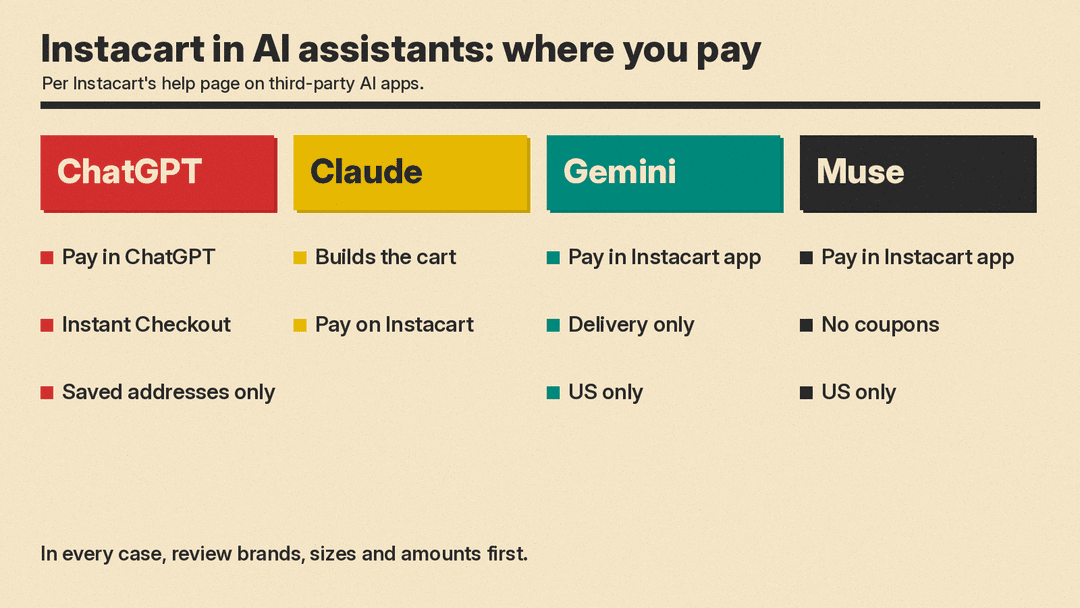
In every case the cart is a suggestion. Check sizes, brands and quantities before you check out, because the assistant chooses specific products for you.
Option 3: Ask Alexa+ for a full week
Amazon pitches Alexa+ for end-to-end meal planning. In its announcement of Alexa.com, Amazon says you can ask for a full week's menu of breakfast, lunch and dinner with preferences such as focusing on protein, avoiding sugar or processed foods, and making lunches packable for school. You can then ask Alexa to add every item to your Amazon Fresh or Whole Foods cart. That announcement was for Alexa+ Early Access customers. Amazon now says Alexa+ is available to everyone in the U.S. and free for Prime members, and that people without Prime can try a free chat experience at Alexa.com.
Alexa+ also keeps a personal recipe library. According to Amazon, you can photograph a handwritten recipe card or share a recipe link, and Alexa+ turns it into a clean recipe card that you can edit. Amazon says you can drop a recipe link into Alexa.com, ask Alexa to adjust it for your family's dietary restrictions, and turn the ingredients into shopping list items with one request. On an Echo Show, Alexa can then walk you through the steps and set timers.
This route makes most sense if you already shop at Amazon Fresh or Whole Foods.
Option 4: Use a meal planning app with AI built in
A dedicated app keeps your plan on a calendar and your list in one place.
Samsung Food is one example. Samsung says its basic meal planner is free for all users and lets you build weekly and daily plans, add recipes from its community or from any website, share plans and shopping lists with family and friends, and turn a meal plan into a shopping list. Samsung's Meal Planner guide adds that you can choose to have a local retailer deliver the items on your list.
The AI features sit mostly in the paid Samsung Food+ tier. Samsung's help page and Food+ page list:
- Tailored 7-day meal plans based on your tastes, dietary needs and health goals, with meals you can swap.
- AI recipe personalization, such as making a dish healthier or swapping in seasonal ingredients.
- Vision AI, which lets you scan ingredients with your phone, add them to your Food List and get recipe ideas.
- A recipe search that uses the ingredients you have and puts soon-to-expire items first.
Samsung says most of these are mobile-app only. Its Meal Planner guide adds that basic users can get personalized meal recommendations, but only for two weeks.
Which route fits you
- You want a list and nothing connected: plan in any chatbot, or use Gemini with Google Keep.
- You order from Instacart: use the Instacart app in ChatGPT, Claude, Gemini or Muse, keeping in mind where each one sends you to pay.
- You shop at Amazon Fresh or Whole Foods: Alexa+ is built around those carts.
- You plan every week and want history, a calendar and a shared household list: a dedicated app like Samsung Food.
A quick checklist before you buy
- Read the menu and the list side by side. Make sure every recipe's ingredients made it onto the list.
- Search the list for every allergen you named. Do not assume the assistant remembered.
- Check quantities against the number of people.
- In a store cart, check brand, size and price for each item the assistant picked.
- Know what you connected. Each assistant asks you to approve the link to your Instacart account before it builds a cart. For Gemini and Keep, Google says you can disconnect Google Workspace in your Connected Apps settings.
Sources
- Instacart Help Center: Shop with third-party AI apps
- Instacart: Instacart app launches in OpenAI ChatGPT
- OpenAI: Instacart and OpenAI partner on AI shopping experiences
- Google: Capture your ideas and notes with Gemini Apps
- Google: Create a list with Gemini in Google Keep
- Amazon: Talk to Alexa in your browser on Alexa.com
- Amazon: What the new Alexa+ can do for you
- Samsung Food: Free meal planner
- Samsung Food: Food+
- Samsung Food Help: What's included in Samsung Food+
- Samsung Food Help: Getting started with Meal Planner
- Android Central via Yahoo Tech: I had Gemini Live make my grocery list for a week
