
Canva has released Brush, a model built to edit designs rather than make them from scratch. The company calls it a vision-language model for design, built by its in-house research team, Canva Research. According to Canva's announcement, Brush "sees your design, understands how it's put together, and makes the changes you ask for, from a single line of copy to every slide in a deck."
Since October 29, 2026, Brush powers supported design edits in Canva AI for Canva Pro subscribers. Canva says wider availability is coming soon but has not given a date.
What Brush is for
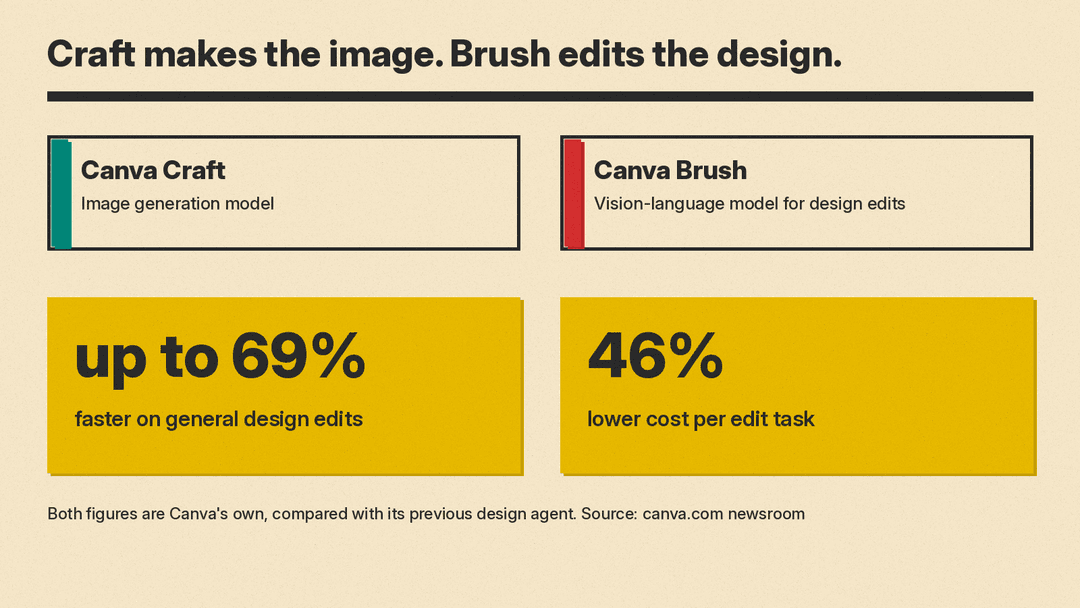
Canva says Brush arrives a week after its first image generation model, Canva Craft, which Canva announced on October 22. Both come from Canva Research, which Canva calls its 160-person AI lab. Canva describes the split simply: "Craft generates the image, and Brush refines the design around it."
That split matters because generating a design and editing one are different problems. Canva's post makes the point directly: an editing model has to understand what you want to change, how the design is built, and what must stay exactly the same. If it gets the last part wrong, a small request turns into a pile of changes nobody asked for. Other image labs are also shipping models built for edits, such as Microsoft's MAI Image 2.7 (October 27) and Ideogram 4.5 (September 30).
Canva gives a sample prompt to show how many decisions hide inside one request: "make me a 3-page pitch deck for my bakery with art nouveau visuals and backgrounds." To do that well, a model has to plan a story across pages, write and place text, choose images, and keep fonts, colour and spacing consistent from the first page to the last. Small mistakes add up to a design that feels off, even when you cannot say why.
How it works
Canva says Brush does not treat a design as a list of separate decisions. Instead it can keep checking and improving its own work. Behind the scenes, Brush runs an agentic loop: it writes and runs code to adjust design elements, then inspects what is on the page to decide its next step.
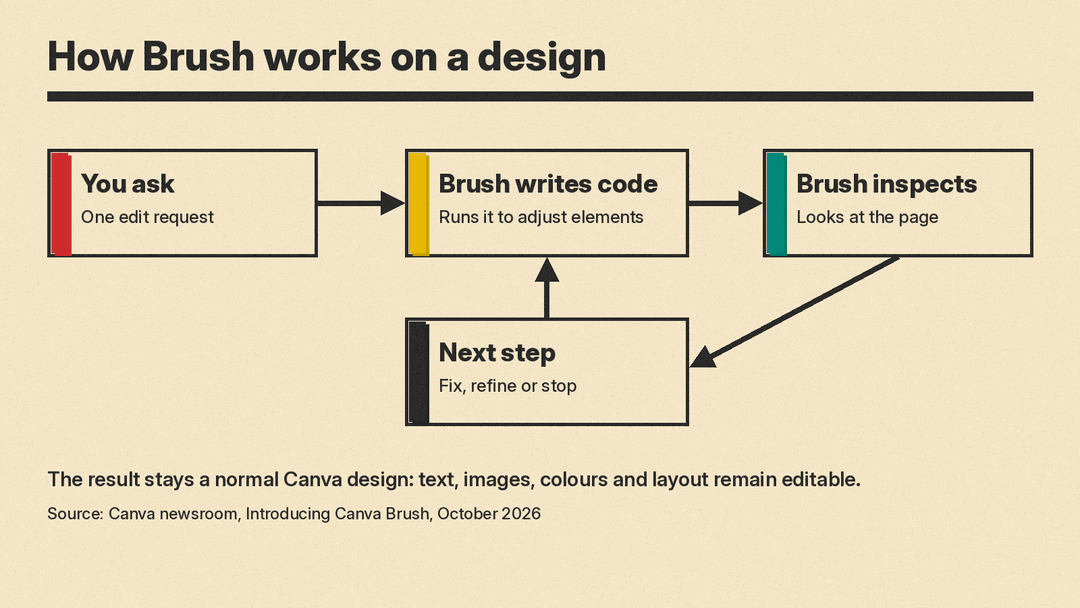
The output is a normal Canva design. Canva says every element, including text, images, colours and layout, stays fully editable, so you can take over by hand at any point.
Training
Canva says Brush started from "a leading open-weights model." The post does not name which one. Canva then post-trained it on real design and editing tasks, using a mix of in-house design expertise and anonymised insights from people who opted in to help improve Canva AI.
On top of that, Canva used large-scale reinforcement learning. The model worked through complete design and editing tasks and learned from what worked. Canva built a reward system that scores the model's work on several criteria, including:
- visual quality
- how well the layout follows design principles
- whether the model actually completed the task as requested
Canva says this scoring draws on its design expertise, its own library of designs, insight into how designs are edited, and hundreds of thousands of simulated interactions. It adds that the definition of good design is set by professional designers on its team.
Speed and cost claims
Canva says Brush is up to 69% faster on general design editing tasks and 46% lower in cost per edit task, compared with its previous design agent. These are Canva's own figures from its launch post. Canva did not publish a test method or an outside benchmark for them.
Canva also says that in internal testing, Brush matched or beat the quality of its previous setup on most editing tasks. It reports the strongest results in restyling designs and adapting them to new formats.
The company frames the efficiency gain as the real point. General-purpose models can reason through design edits, Canva says, but they cost more to run. With hundreds of millions of people making billions of designs on Canva, a few extra cents per task adds up. A cheaper, specialised model lets Canva offer more AI editing to more people.
How to try it
If you are on a Canva Pro plan, Canva gives these steps:
- Open an existing design in the editor, or attach or link a design in Canva AI.
- Select "Brush" from the dropdown list in Canva AI so Brush handles the full editing experience.
- Keep giving directions in Canva AI, or switch to the editor and edit by hand whenever you want.
Canva suggests three kinds of edits to start with:
- Restyle an image. Try a new visual direction for a design or image, such as a different colour scheme, different weather, or a different mood.
- Change a multi-page design in one prompt. Instead of updating headers page by page, ask for one sweeping change.
- Remix for other channels. Turn a design into a new format, such as resizing a presentation slide into an Instagram graphic.
What is missing
Canva calls this the first version of Brush. It says it is already working on Brand Kit support, the ability to reference attachments, and better handling of image-heavy layouts. If your work depends on strict brand colours and fonts, Brand Kit support is the gap to watch.
Why it matters
Canva's launch post has a section titled "Great design happens in the edit." Fixing one headline, restyling a deck, or resizing a post for another channel are small jobs that people repeat. Canva's bet is that a model trained on that work, and cheap enough to run at its scale, can make those changes without touching what should stay the same on the page.
It also shows Canva building its own model stack instead of relying only on partners. Canva says its vision for Canva AI combines "the best of leading partner models with our own specialised models." With Craft for images and Brush for edits, Canva now has two in-house pieces of that stack.
