
Krea has released Ad Studio, a tool that reads a brand's website and turns it into a batch of static ads. You paste a URL, Ad Studio builds a brand kit and a product list, and then its image model, Krea 3, makes the ads in the sizes you pick. Krea calls it the first "Krea 3 Expert," which it describes as a version of Krea 3 that is very good at one job, and it says more Experts are on the way.
The pitch is aimed at a real chore. As Krea puts it, every product launch, restock and promotion needs new ads, and each one needs the right logo, colors, claims and size. Ad Studio tries to remove the briefing step by treating the website itself as the brief.
How it works
The flow has a few clear steps, all described in Krea's launch post.
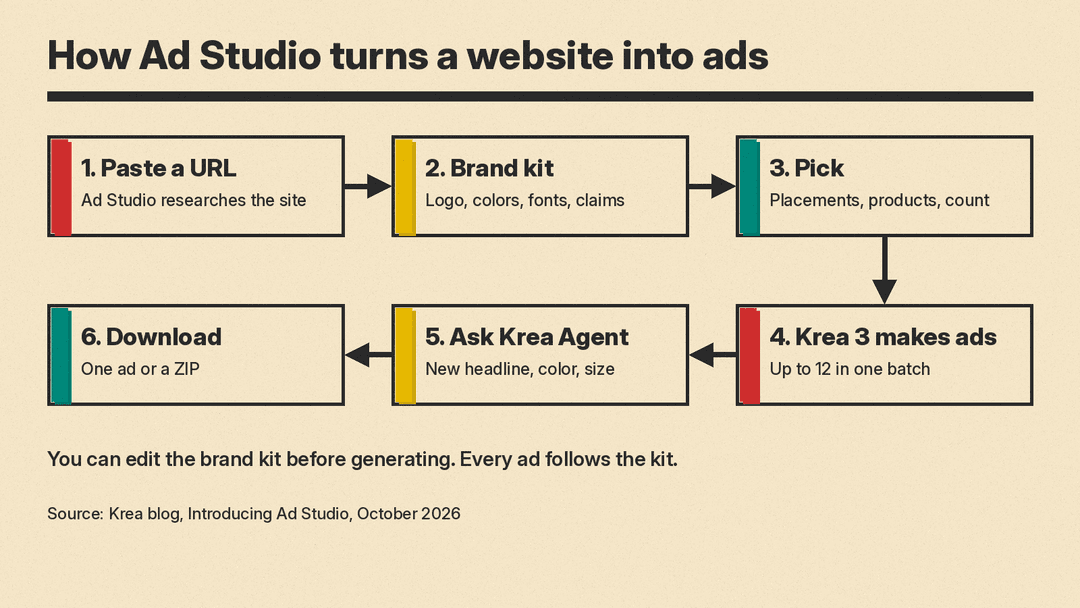
1. Paste a website. You type your domain and press Enter. Ad Studio researches the site and builds a brand kit: logo, colors, fonts, a description, tone of voice, audience and selling points. It also finds your products, with photos and prices. For Shopify stores, Krea says it reads the product catalog.
2. Check the brand kit. The kit is editable. You can fix a color, delete an expired promotion or rewrite a selling point. Krea says every ad follows the kit, "so the claims on your ads are the claims you approved." If you have no website, you can set up a brand by hand and add products by link, by upload or by hand. A kit holds up to 20 products.
3. Pick placements and products. Each placement sets the sizes Ad Studio makes:
- Instagram feed: 4:5 and 1:1
- Stories and Reels: 9:16
- Landscape feed: 16:9
You then choose which products to advertise and how many ads to make for each, up to 12 in one batch. Each ad features one product and gets its own layout and copy. You can also set a creative direction: let Krea choose, or ask for a product spotlight, the product in the real world, an editorial look, or an ad that explains why the product works.
4. Edit by asking. Finished ads open in a gallery next to Krea Agent, which keeps the brand kit and the campaign in context. You can ask it for a new headline, a darker background, another product or another size, and it makes the change with Krea 3. You can preview an ad in a Facebook, Instagram or Reels mockup, then download one ad or the whole campaign as a ZIP.
Where the ad copy comes from
This is the part that matters most for anyone selling a real product. Ad Studio builds its headlines from what it finds on your site. According to Krea's FAQ, the copy comes from the brand kit: the tagline, tone of voice and selling points it finds on your site. If you want different claims on your ads, you edit the selling points before you generate.
Krea's example uses the DAVID protein bar. Ad Studio read the brand's site and found a serif wordmark, a black-and-white palette, the tagline "Protein has a new bar." and selling points such as 28g of protein, 150 calories and 0g sugar. Krea says those claims became the headlines. It notes that DAVID is used only as an example and that the ads were made from the brand's public website, not with its endorsement.
The practical upshot: the brand kit review is the real quality gate. If your website carries an old offer or a claim your legal team has since changed, Ad Studio will pick it up unless you remove it first.
How fast Krea says it is
Krea timed one full run on a real store and published the numbers.
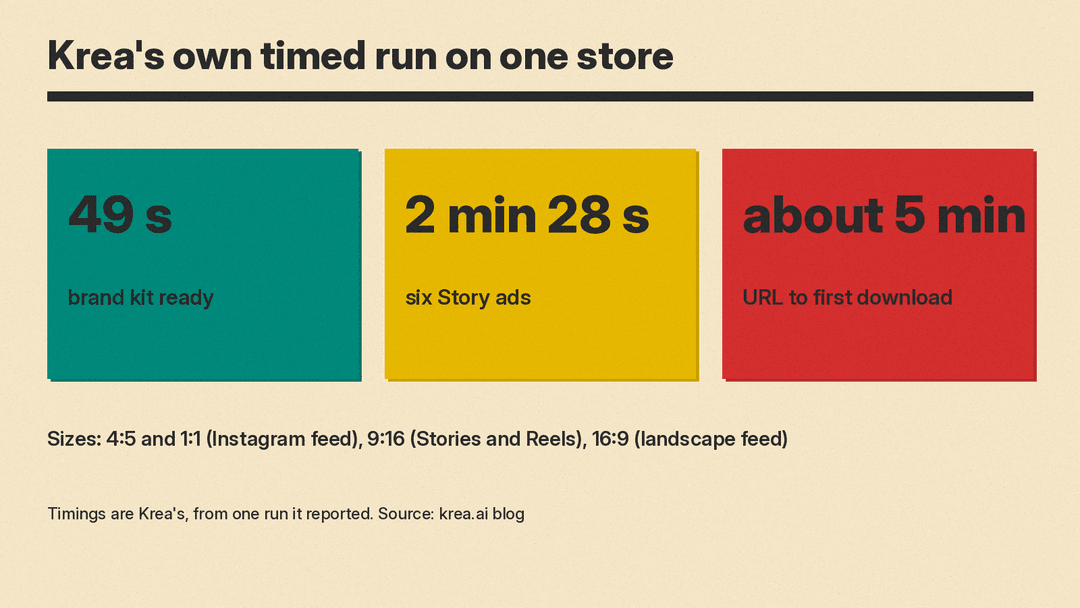
- The brand kit was ready in 49 seconds.
- Six Story ads took 2 minutes 28 seconds.
- From pasting the URL to downloading the first ads took about five minutes.
These are Krea's own figures from a single run, so treat them as a guide, not a benchmark. Your time will depend on your site, how many products you pick and how much you edit the kit.
It also works inside Claude
Krea says Ad Studio works through the Krea MCP server too. MCP (Model Context Protocol) is a standard way for AI assistants to call outside tools. In practice, you can ask Claude to research a brand, pick products and generate ads, and it uses the same brand kits you see in Krea's own app. For teams that already plan campaigns in a chat assistant, that removes a switch between apps.
Price and availability
Ad Studio is live now at krea.ai/ad-studio on every paid Krea plan, from Basic up. Brand research and product import are free. Generating ads uses your compute units, the same as other Krea 3 generations. Krea's pricing page lists the plans.
Why it matters
Most AI image tools still start from a blank prompt box. That works for one striking picture, but ads need consistency: the same logo, the same colors and the same product, again and again, in several sizes. Ad Studio's answer is to front-load the brand work into a reusable kit and pass it to the model on every ad.
It also fits a wider pattern on this beat. Design platforms are moving from "generate an image" to "produce a finished, on-brand asset." Canva followed its first image model, Canva Craft, with a design-editing model, Canva Brush, and Krea is now packaging its own model, Krea 3, into a job-specific tool for ads.
For small shops and solo marketers, the appeal is speed and fewer briefs. For larger brands, the open question is control: how well the output holds up under brand review, and how much editing still happens before an ad runs. The speed and quality claims so far come from Krea itself, so the best check is a small batch on your own site, with the brand kit reviewed line by line first.
