
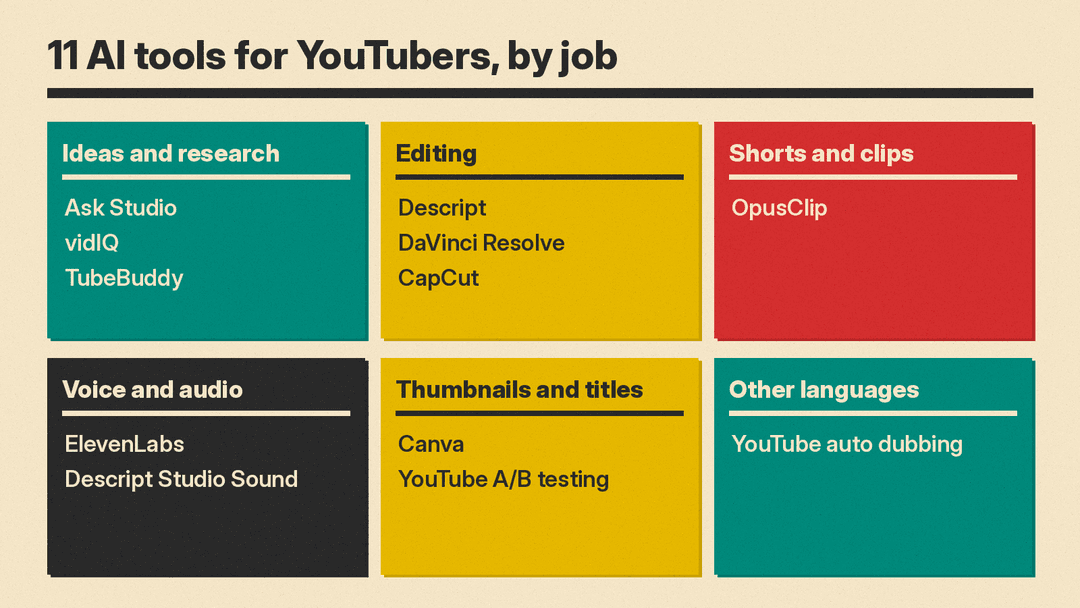
A YouTube channel runs on a loop of jobs: find an idea, script it, record, edit, clean the audio, make a thumbnail and title, cut Shorts, and reach viewers in other languages. AI tools now help with each step, and three of them are already inside YouTube Studio. This guide lists 11 real tools, grouped by job, with what each does, who it suits, its main limit, and a price only where we read it on the vendor's own page.
All features, plans and prices below are as of October 2026. Plans change often, so check the linked page before you pay.
How we picked
- Real, available products only. We loaded each tool's own site, pricing page or help docs in October 2026.
- Built for a YouTube job. Each tool helps with ideas, editing, audio, packaging, Shorts or translation.
- Verified details only. Prices come from vendor pages. Where a vendor did not show a price we could read, we leave it out.
- A clear limit for each. Every entry names a caveat, often a feature that sits on a paid plan.
Start with what YouTube already gives you
Three AI features ship inside YouTube Studio itself. Try them before you pay for anything else.
Ask Studio
Ask Studio is an AI assistant built into YouTube Studio. YouTube says it helps you brainstorm video ideas, get channel insights and analyze performance. You can ask it to summarize comments on a video, paste a script for feedback based on creative best practices, or select a draft, private or unlisted video and get suggestions based on creative best practices and historical retention data. You can attach up to 10 images to a prompt, for example to get visual feedback or generate reference thumbnails. Ideas you like save as Idea cards. YouTube says the answers come from large language models that draw on your channel, YouTube and the web.
YouTube says it started to gradually deprecate the older Inspiration tab in August 2026, and it points creators to Ask Studio for brainstorming.
- Who it suits: any creator who wants ideas and feedback grounded in their own channel data.
- Limit: desktop web only. Official Artist Channels, Made for Kids channels and creators under 18 do not get it. YouTube says human reviewers may read conversations, so do not paste anything confidential.
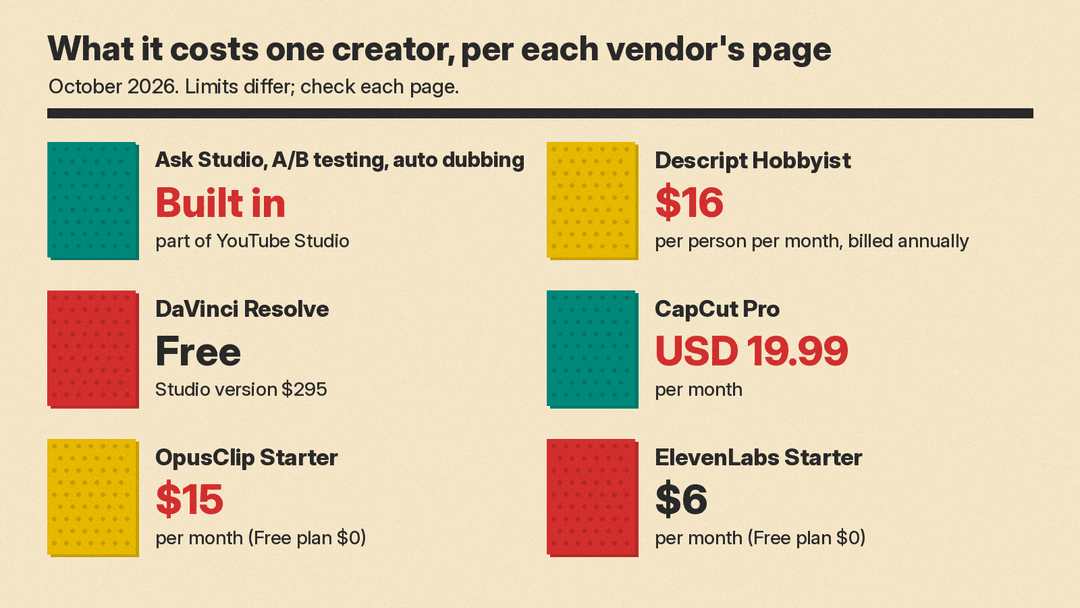
- Pricing note: it is part of YouTube Studio. YouTube's help page lists no separate plan.
A/B testing for titles and thumbnails
YouTube's A/B testing tool lets you test up to 3 titles, 3 thumbnails, or title and thumbnail pairs on one video. At the end, the option with the highest watch time is shown to all viewers. YouTube says a test should finish within two weeks. If there is no clear winner, the first option you uploaded stays.
- Who it suits: creators who make two or three thumbnail options anyway and want the data to decide.
- Limit: desktop only, and you must enable advanced features. You cannot test Shorts, scheduled lives or Premieres before they end, or videos that are private, made for kids or for mature audiences. Changing the title or thumbnail during a test stops it.
- Pricing note: part of YouTube Studio.
Automatic dubbing
YouTube's automatic dubbing makes translated audio tracks for your videos. In a February 2026 post, YouTube said auto dubbing is now available to everyone, in 27 languages, and that Expressive Speech, which tries to keep the original pitch and intonation, works in 8 of them: English, French, German, Hindi, Indonesian, Italian, Portuguese and Spanish. The help page says the feature is on by default for eligible creators, and you can choose to review dubs before they publish.
- Who it suits: talking-head, tutorial and explainer channels with an audience outside their own language.
- Limit: videos over 120 minutes, videos with little speech, very fast speech, or copyrighted content may not qualify. You cannot edit an automatic dub. If the source language is set wrong, dubs may be mistranslated.
- Pricing note: part of YouTube Studio.
Ideas, keywords and channel research
vidIQ
vidIQ offers AI ideas, optimization and coaching for YouTube creators. Its features page lists AI tools that optimize tags, titles and descriptions, create Shorts from long videos, and review every video on your channel with suggestions. vidIQ also offers an MCP connector that brings its YouTube data into Claude, ChatGPT and other assistants that support MCP. vidIQ says the connector is available on every plan, including Free, and that tool calls use the AI credits in your plan.
- Who it suits: creators who want keyword research and idea lists inside the browser, or inside the AI assistant they already use.
- Limit: the 30+ advanced tools, including personalized keyword ideas, competitive intel and the AI Coach, are in the paid Boost plan.
- Pricing note: per vidIQ's pricing page, Free is $0. Check the page for current Boost and Max prices.
TubeBuddy
TubeBuddy is a YouTube SEO and channel management toolkit. Its site lists Keyword Explorer, an SEO Studio that scores a video in real time, a tag generator, its own thumbnail and title A/B testing tool, and Channelytics analytics. The pricing page also lists a Thumbnail Generator, a Title Generator, Next Video Ideas and bulk editing tools.
- Who it suits: creators who care about search traffic and want SEO checks and bulk edits across many videos.
- Limit: TubeBuddy says its Pro and Legend packages are for individual creators and not for businesses. It may treat you as a business if you have multiple channels on TubeBuddy, 50,000 or more subscribers, 3 or more channel managers, or 50 or more employees.
- Pricing note: TubeBuddy says it is free to start. Enterprise is custom. Check the pricing page for current Pro and Legend prices.
Editing
Descript
Descript edits video by editing a transcript, like a document. Its AI tools include Studio Sound, Remove Filler Words, Eye Contact, Green Screen, Remove Retakes and Create Clips, plus an AI co-editor called Underlord that can brainstorm, write a script outline, and draft video descriptions and social posts. Paid plans add custom voice clones for fixing a line without a re-record.
- Who it suits: talking-head, tutorial and podcast creators who want to cut by reading rather than scrubbing a timeline.
- Limit: usage is metered in media hours and AI credits. Free gives 1 hour of media per month and exports at 720p. Dubbing into 30+ languages is listed on the Business plan.
- Pricing note: per Descript's pricing page, Free is $0. Hobbyist is $16 per person per month billed annually or $24 monthly, Creator is $24 billed annually or $35 monthly, and Business is $50 billed annually or $65 monthly.
DaVinci Resolve
DaVinci Resolve from Blackmagic Design combines editing, color, effects and audio in one app. The free version works with most 8-bit formats up to Ultra HD at 60 frames per second. The paid Studio version adds the DaVinci AI Neural Engine, which Blackmagic says powers smart reframing, facial recognition, auto color and other tools, plus text based editing and magic mask. Resolve 21 adds AI tools such as IntelliSearch for content search and CineFocus for focal point adjustment.
- Who it suits: creators who want a full professional editor and plan to grow into color grading and audio mixing.
- Limit: the AI Neural Engine, text based editing and magic mask are in Studio, not the free version. The app also takes time to learn.
- Pricing note: the free version costs nothing. Blackmagic lists DaVinci Resolve Studio at $295.
CapCut
CapCut is a video editor for desktop, mobile and the web. Its tool list includes auto captions, text to speech, voice enhancement, noise reduction and background removal, and the Pro plans add AI video generation credits. CapCut says its auto caption generator can turn speech to text and translate captions into other languages.
- Who it suits: creators who make Shorts and fast-turnaround edits, often on a phone.
- Limit: the pricing page lists free templates and basic editing tools on Free. Access to AI features, premium templates and 1 TB of storage are listed on Pro.
- Pricing note: per CapCut's pricing page, Free is USD 0 and Pro is USD 19.99 per month or USD 179.99 per year. CapCut says displayed prices are for reference only and that you see final pricing after you sign in.
Shorts and clips
OpusClip
OpusClip cuts a long video into short clips. Its ClipAnything model picks moments from vlogs, gaming, sports, interviews and explainers, and ReframeAnything resizes the clip and tracks moving subjects. It adds captions and can import videos from a verified YouTube account on paid plans.
- Who it suits: long-form creators and podcasters who want a steady stream of Shorts from each upload.
- Limit: on Free, animated captions carry a watermark, exports expire after 3 days, and clips render at up to 1080p. Watermark-free export starts on Starter.
- Pricing note: per OpusClip's pricing page, Free is $0, Starter is $15 per month (monthly billing only) and Pro is $29 per month on monthly billing or $174 billed annually. OpusClip says its free plan includes 60 minutes of processing time per month.
Voice and audio
ElevenLabs
ElevenLabs makes AI voice and audio: text to speech for voiceovers, voice cloning, sound effects, music, a voice isolator and dubbing. For YouTubers, the main uses are narration for faceless channels, a cloned voice to patch a line, and dubbing into other languages with more control than YouTube's automatic dubs. We have covered its Instant Soundtracks feature separately.
- Who it suits: faceless and narration-heavy channels, and creators who want to dub with their own cloned voice.
- Limit: all products draw on one monthly credit pool, and dubbing uses credits fast: ElevenLabs lists 2,000 to 10,000 credits per minute, depending on the mode and watermark. The commercial license starts on Starter, not Free.
- Pricing note: per ElevenLabs' pricing page, Free is $0 with 10,000 credits per month, Starter is $6 per month with 30,000 credits, Instant Voice Cloning and Dubbing Studio, and Creator is $22 per month ($11 for the first month) with Professional Voice Cloning.
If you already pay for Descript, try its Studio Sound tool on your voice track first. Descript lists it among the AI tools on its Hobbyist plan.
Thumbnails
Canva
Canva has a YouTube thumbnail maker with templates and its Magic Studio AI tools. On that page, Canva labels Magic Media (text to image and video) and Dream Lab as free, and Magic Eraser, Magic Edit, Magic Grab and Magic Expand as Pro. Canva notes that YouTube thumbnails are 1280 x 720 pixels.
- Who it suits: creators who want quick, consistent thumbnails without a full image editor.
- Limit: the tools that remove, move or extend parts of a photo are Pro features.
- Pricing note: Canva has a free plan and offers a Canva Pro free trial. Check the Canva Pro page for the current price.
Once you have two or three thumbnails, run them through YouTube's A/B testing tool above, so watch time picks the winner.
How to choose
Start with YouTube Studio's own tools, then add one tool for the step that costs you the most time.
- If ideas are the bottleneck: Ask Studio first, then vidIQ or TubeBuddy if you want keyword data.
- If editing takes your evenings: Descript for talking-head and tutorial videos, CapCut for Shorts and phone edits, DaVinci Resolve if you want a full editor for free.
- If you post long videos but few Shorts: OpusClip.
- If your channel is faceless or narration-heavy: ElevenLabs for voiceover.
- If thumbnails are the weak point: Canva for design, then YouTube's A/B testing to decide.
- If you want viewers in other languages: turn on YouTube's automatic dubbing and review the dubs. Use ElevenLabs or Descript's dubbing if you need more control.
Pick one or two paid tools, not six. Many of these features overlap: Descript, CapCut and OpusClip all make clips and captions. For the AI video generators that make footage from text, see our best AI video generators guide and the AI video generator pricing comparison.
FAQ
What is the best free AI tool for YouTubers? Start with what YouTube Studio already includes: Ask Studio for ideas and script feedback, A/B testing for titles and thumbnails, and automatic dubbing. For editing, DaVinci Resolve has a free version, and Descript, CapCut, OpusClip and ElevenLabs all have free plans with limits.
Can YouTube's own AI review my script? Yes. YouTube's help page says you can paste a script into Ask Studio for feedback based on creative best practices, and get suggestions on draft, private or unlisted videos.
Do auto dubs replace my original audio? No. YouTube adds dubbed audio tracks, marks the video as auto-dubbed, and viewers can switch back to the original track.
Sources
- YouTube Help: Learn about Ask Studio in YouTube Studio
- YouTube Help: Explore Inspiration tab on YouTube
- YouTube Help: A/B test titles and thumbnails
- YouTube Help: Use automatic dubbing
- YouTube Blog: Unlocking a global audience with auto dubbing
- vidIQ
- vidIQ features
- vidIQ pricing
- TubeBuddy
- TubeBuddy pricing
- Descript
- Descript pricing
- DaVinci Resolve
- DaVinci Resolve Studio
- CapCut
- CapCut auto caption generator
- CapCut pricing
- OpusClip
- OpusClip pricing
- ElevenLabs
- ElevenLabs pricing
- Canva YouTube thumbnail maker
- Canva Pro
